> ## Documentation Index
> Fetch the complete documentation index at: https://devzone.nayax.com/llms.txt
> Use this file to discover all available pages before exploring further.
# DynamicQR
Find quick answers and step-by-step guides for the most common questions about Nayax API integration, device configuration, transaction tracking, and deployment processes. Navigate the categories below to find solutions and best practices.
### How to upload the logo to the devices?
The complete logo package is made up of **five separate files**, with each file serving a different purpose on the device (e.g., DQR payment method, brand selection screens).
### 1. File Delivery and Transfer
1. **Receive FTP Links:** After the logo files are finalized, you will receive **one unique FTP link per file**.
2. **Transfer Files Individually:** You must send **each file separately** to your device using its respective FTP link.
3. **Wait and Process:** You must **wait for the burning process to complete** on the device after sending one file before you send the next one.
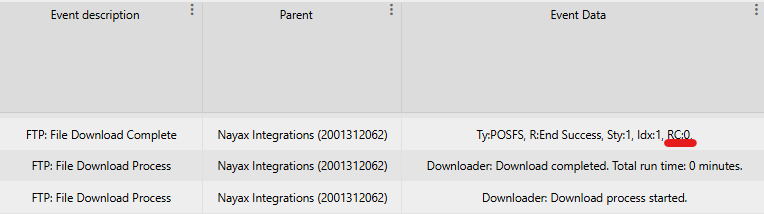 ### 2. Monitoring the Burning Process
You can check the result of the file transfer and burning process in the **Last Alerts** section of your device management system.
The result is indicated by the **Return Code (RC)** displayed in the top line of the alert.
| Return Code | Status | Description |
| :------------------ | :------------- | :----------------------------------------------- |
| **RC0** | **Successful** | The file was burned and installed successfully. |
| **RC17** | Unsuccessful | The file already exists on the device. |
| **RC41** | Unsuccessful | Bad or no response was received from our server. |
| **Any other value** | Unsuccessful | Indicates a failure in the burning process. |
The FTP links would be of the following format:
```
4010000;devicecoreftp.nayax.net;21;embeddedro;Ioh1Eqgv;/PaymentIcons/CustomerName/PI/CustomerNameButton.png;;8b41;PI\CustomerNameButton.png;
4010000;devicecoreftp.nayax.net;21;embeddedro;Ioh1Eqgv;/PaymentIcons/CustomerName/PI/CustomerNameLargerot.png;;5168;PI\CustomerNameLargerot.png;
4010000;devicecoreftp.nayax.net;21;embeddedro;Ioh1Eqgv;/PaymentIcons/CustomerName/PI/CustomerNameMediumrot.png;;624f;PI\CustomerNameMediumrot.png;
4010000;devicecoreftp.nayax.net;21;embeddedro;Ioh1Eqgv;/PaymentIcons/CustomerName/PI/CustomerNameSmallrot.png;;f8c4;PI\CustomerNameSmallrot.png;
4010000;devicecoreftp.nayax.net;21;embeddedro;Ioh1Eqgv;/PaymentIcons/CustomerName/QrLogo/CustomerNameSquare_105.png;;b290;QrLogo\CustomerNameSquare_105.png;
```
Should you have multiple channels, you would have places where there's "CustomerName" for each channel.\
For example, if I have 2 channels called "ChannelA" and "ChannelB" - you would get 10 files (5 images per channel) and the format would look something like this:
```
4010000;devicecoreftp.nayax.net;21;embeddedro;Ioh1Eqgv;/PaymentIcons/ChannelA/PI/CustomerNameButton.png;;8b41;PI\ChannelAButton.png;
4010000;devicecoreftp.nayax.net;21;embeddedro;Ioh1Eqgv;/PaymentIcons/ChannelA/PI/CustomerNameLargerot.png;;5168;PI\ChannelALargerot.png;
4010000;devicecoreftp.nayax.net;21;embeddedro;Ioh1Eqgv;/PaymentIcons/ChannelA/PI/CustomerNameMediumrot.png;;624f;PI\ChannelAMediumrot.png;
4010000;devicecoreftp.nayax.net;21;embeddedro;Ioh1Eqgv;/PaymentIcons/ChannelA/PI/CustomerNameSmallrot.png;;f8c4;PI\ChannelASmallrot.png;
4010000;devicecoreftp.nayax.net;21;embeddedro;Ioh1Eqgv;/PaymentIcons/ChannelA/QrLogo/CustomerNameSquare_105.png;;b290;QrLogo\ChannelASquare_105.png;
4010000;devicecoreftp.nayax.net;21;embeddedro;Ioh1Eqgv;/PaymentIcons/ChannelB/PI/CustomerNameButton.png;;8b41;PI\ChannelBButton.png;
4010000;devicecoreftp.nayax.net;21;embeddedro;Ioh1Eqgv;/PaymentIcons/ChannelB/PI/CustomerNameLargerot.png;;5168;PI\ChannelBLargerot.png;
4010000;devicecoreftp.nayax.net;21;embeddedro;Ioh1Eqgv;/PaymentIcons/ChannelB/PI/CustomerNameMediumrot.png;;624f;PI\ChannelBMediumrot.png;
4010000;devicecoreftp.nayax.net;21;embeddedro;Ioh1Eqgv;/PaymentIcons/ChannelB/PI/CustomerNameSmallrot.png;;f8c4;PI\ChannelBSmallrot.png;
4010000;devicecoreftp.nayax.net;21;embeddedro;Ioh1Eqgv;/PaymentIcons/ChannelB/QrLogo/CustomerNameSquare_105.png;;b290;QrLogo\ChannelBSquare_105.png;
```
### When should I send the logos?
You only need to send the logo files **once per device**.
Once you send the logos and confirm a **successful burn** (indicated by an **RC0** in **Last Alerts**), the files are permanently stored on that device.
* The logos will **remain on the device** even if you perform a simple reset or a full reset-default of the machine.
* You **do not need to send them again** unless the logo design itself changes, requiring a new file deployment.
### Which image type should you send us for the logo?
To ensure the best possible display across all devices, we strongly prefer the image file type you should submit.
### 1. **Preferred Format: SVG (Scalable Vector Graphics)**
* **Format:** **SVG**
* **Key Advantage:** SVG is a **vector format**, meaning its resolution is independent of size. You can scale it infinitely without any loss of quality or pixelation, and its file size remains minimal.
### 2. **Alternative Format: PNG**
* **Format:** **PNG**
* **Requirement:** If SVG is not available, provide a **PNG** image of the **maximum size** and highest resolution possible.
### 3. **Image Reference**
* **Format:** **Image Reference (URL/Source)**
* **Use Case:** Sending a link or reference to the source image is also acceptable if a direct file submission is difficult.
Once we receive your image(s) or references, we will process them internally to ensure they are optimized and displayed correctly on our devices.
### 2. Monitoring the Burning Process
You can check the result of the file transfer and burning process in the **Last Alerts** section of your device management system.
The result is indicated by the **Return Code (RC)** displayed in the top line of the alert.
| Return Code | Status | Description |
| :------------------ | :------------- | :----------------------------------------------- |
| **RC0** | **Successful** | The file was burned and installed successfully. |
| **RC17** | Unsuccessful | The file already exists on the device. |
| **RC41** | Unsuccessful | Bad or no response was received from our server. |
| **Any other value** | Unsuccessful | Indicates a failure in the burning process. |
The FTP links would be of the following format:
```
4010000;devicecoreftp.nayax.net;21;embeddedro;Ioh1Eqgv;/PaymentIcons/CustomerName/PI/CustomerNameButton.png;;8b41;PI\CustomerNameButton.png;
4010000;devicecoreftp.nayax.net;21;embeddedro;Ioh1Eqgv;/PaymentIcons/CustomerName/PI/CustomerNameLargerot.png;;5168;PI\CustomerNameLargerot.png;
4010000;devicecoreftp.nayax.net;21;embeddedro;Ioh1Eqgv;/PaymentIcons/CustomerName/PI/CustomerNameMediumrot.png;;624f;PI\CustomerNameMediumrot.png;
4010000;devicecoreftp.nayax.net;21;embeddedro;Ioh1Eqgv;/PaymentIcons/CustomerName/PI/CustomerNameSmallrot.png;;f8c4;PI\CustomerNameSmallrot.png;
4010000;devicecoreftp.nayax.net;21;embeddedro;Ioh1Eqgv;/PaymentIcons/CustomerName/QrLogo/CustomerNameSquare_105.png;;b290;QrLogo\CustomerNameSquare_105.png;
```
Should you have multiple channels, you would have places where there's "CustomerName" for each channel.\
For example, if I have 2 channels called "ChannelA" and "ChannelB" - you would get 10 files (5 images per channel) and the format would look something like this:
```
4010000;devicecoreftp.nayax.net;21;embeddedro;Ioh1Eqgv;/PaymentIcons/ChannelA/PI/CustomerNameButton.png;;8b41;PI\ChannelAButton.png;
4010000;devicecoreftp.nayax.net;21;embeddedro;Ioh1Eqgv;/PaymentIcons/ChannelA/PI/CustomerNameLargerot.png;;5168;PI\ChannelALargerot.png;
4010000;devicecoreftp.nayax.net;21;embeddedro;Ioh1Eqgv;/PaymentIcons/ChannelA/PI/CustomerNameMediumrot.png;;624f;PI\ChannelAMediumrot.png;
4010000;devicecoreftp.nayax.net;21;embeddedro;Ioh1Eqgv;/PaymentIcons/ChannelA/PI/CustomerNameSmallrot.png;;f8c4;PI\ChannelASmallrot.png;
4010000;devicecoreftp.nayax.net;21;embeddedro;Ioh1Eqgv;/PaymentIcons/ChannelA/QrLogo/CustomerNameSquare_105.png;;b290;QrLogo\ChannelASquare_105.png;
4010000;devicecoreftp.nayax.net;21;embeddedro;Ioh1Eqgv;/PaymentIcons/ChannelB/PI/CustomerNameButton.png;;8b41;PI\ChannelBButton.png;
4010000;devicecoreftp.nayax.net;21;embeddedro;Ioh1Eqgv;/PaymentIcons/ChannelB/PI/CustomerNameLargerot.png;;5168;PI\ChannelBLargerot.png;
4010000;devicecoreftp.nayax.net;21;embeddedro;Ioh1Eqgv;/PaymentIcons/ChannelB/PI/CustomerNameMediumrot.png;;624f;PI\ChannelBMediumrot.png;
4010000;devicecoreftp.nayax.net;21;embeddedro;Ioh1Eqgv;/PaymentIcons/ChannelB/PI/CustomerNameSmallrot.png;;f8c4;PI\ChannelBSmallrot.png;
4010000;devicecoreftp.nayax.net;21;embeddedro;Ioh1Eqgv;/PaymentIcons/ChannelB/QrLogo/CustomerNameSquare_105.png;;b290;QrLogo\ChannelBSquare_105.png;
```
### When should I send the logos?
You only need to send the logo files **once per device**.
Once you send the logos and confirm a **successful burn** (indicated by an **RC0** in **Last Alerts**), the files are permanently stored on that device.
* The logos will **remain on the device** even if you perform a simple reset or a full reset-default of the machine.
* You **do not need to send them again** unless the logo design itself changes, requiring a new file deployment.
### Which image type should you send us for the logo?
To ensure the best possible display across all devices, we strongly prefer the image file type you should submit.
### 1. **Preferred Format: SVG (Scalable Vector Graphics)**
* **Format:** **SVG**
* **Key Advantage:** SVG is a **vector format**, meaning its resolution is independent of size. You can scale it infinitely without any loss of quality or pixelation, and its file size remains minimal.
### 2. **Alternative Format: PNG**
* **Format:** **PNG**
* **Requirement:** If SVG is not available, provide a **PNG** image of the **maximum size** and highest resolution possible.
### 3. **Image Reference**
* **Format:** **Image Reference (URL/Source)**
* **Use Case:** Sending a link or reference to the source image is also acceptable if a direct file submission is difficult.
Once we receive your image(s) or references, we will process them internally to ensure they are optimized and displayed correctly on our devices.