

- Pre-selection
- Pre-authorization
Pre-selection
The Pre-selection flow simplifies the payment process by merging the steps of product/service selection and authorization into a single transaction. This flow is typically used for low-value or quick transactions, where the consumer’s selection and payment authorization are handled in a single step. See the diagram below: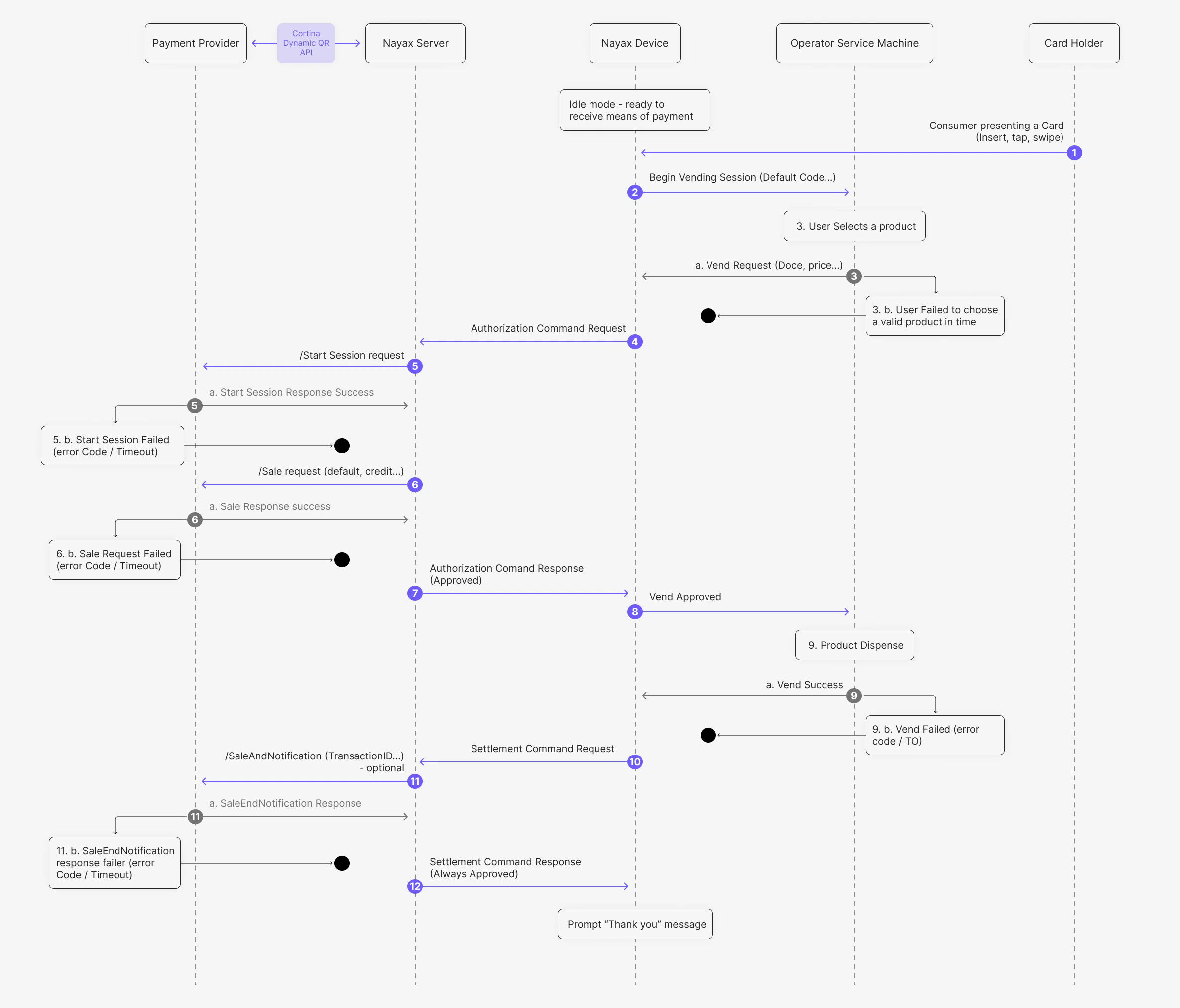
- The consumer presents a card (Insert, tap, or swipe) to the Nayax Device.
- The Nayax Device sends a Begin Vending Session command to the Operator Service Machine.
- The consumer selects a product, and the Operator Service Machine sends a Vend Request to the Nayax Device.
- The Nayax Device sends an Authorization Command Request to the Nayax Server.
- The Nayax Server sends a /Start Session request to the Payment Provider via the Start Session endpoint.
- The Nayax Server sends a /Sale request to the Payment Provider via the Credit Card Sale endpoint.
- The Nayax Server returns an Authorization Command Response (Approved) to the Nayax Device.
- The Nayax Device sends a Vend Approved command to the Operator Service Machine.
- The product is dispensed, and the Operator Service Machine sends a Vend Success notification to the Nayax Device.
- The Nayax Device sends a Settlement Command Request to the Nayax Server.
- (Optional) The Nayax Server sends a /SaleEndNotification to the Payment Provider via the Sale End Notification endpoint.
- The Nayax Server returns a Settlement Command Response (Always Approved) to the Nayax Device, which then displays a “Thank you” message.
Exception Handling
In the event of a failure at any critical junction (marked with a black circle in the diagram), the transaction is terminated. Since the Sale occurs before the product is dispensed in this flow, specific Void logic is required to ensure the cardholder is not charged for failed transactions.For a comprehensive list of financial response codes and authorization failures, refer to the Credit Card Decline Reasons page.
Pre-Authorization
The Pre-authorization flow is used for transactions that require a two-step process. First, a session is initiated, followed by an authorization check. This flow ensures the transaction is valid and the consumer has sufficient funds before settlement. See the diagram below: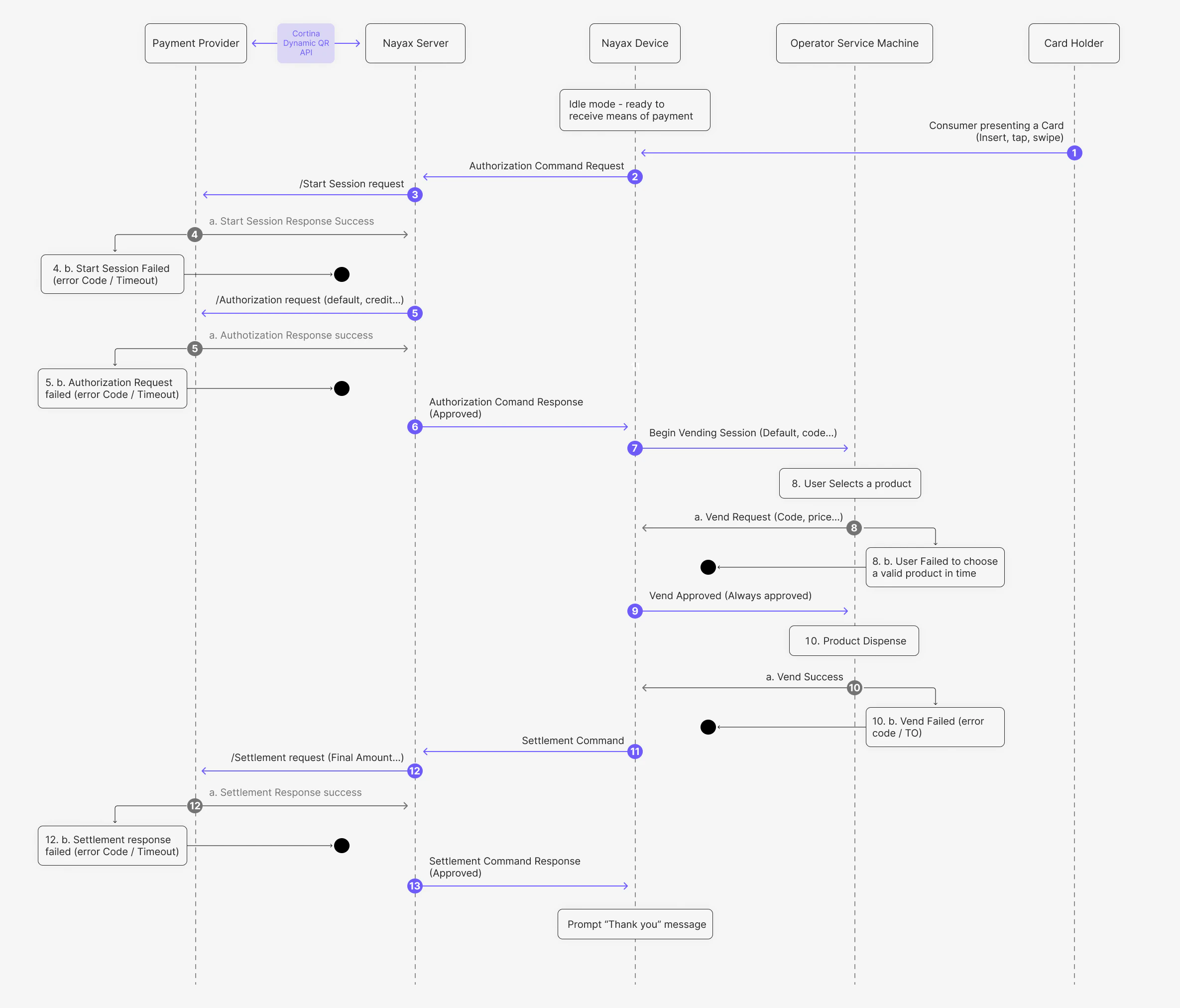
- The consumer presents a card (Insert, tap, or swipe) to the Nayax Device.
- The Nayax Device sends an Authorization Command Request to the Nayax Server.
- The Nayax Server sends a /Start Session request to the Payment Provider via the Start Session endpoint.
- The Payment Provider returns a Start Session Response Success to the Nayax Server.
- The Nayax Server sends an /Authorization request (default amount) to the Payment Provider via the Credit Card Authorization endpoint.
- The Nayax Server returns an Authorization Command Response (Approved) to the Nayax Device.
- The Nayax Device sends a Begin Vending Session command to the Operator Service Machine.
- The consumer selects a product, and the Operator Service Machine sends a Vend Request (Code, price) to the Nayax Device.
- The Nayax Device sends a Vend Approved (Always approved) response to the Operator Service Machine.
- The product is dispensed, and the Operator Service Machine sends a Vend Success notification to the Nayax Device.
- The Nayax Device sends a Settlement Command to the Nayax Server.
- The Nayax Server sends a /Settlement request (Final Amount) to the Payment Provider via the Credit Card Settlement endpoint.
- The Nayax Server returns a Settlement Command Response (Approved) to the Nayax Device, which then displays a “Thank you” message.
Exception Handling
In the event of a failure at any critical junction (marked with a black circle in the diagram), the transaction is terminated. Because a hold is placed on the cardholder’s funds during the authorization step, specific cleanup actions (Cancellations) are required if the vend is not completed.For a comprehensive list of financial response codes and authorization failures, refer to the Credit Card Decline Reasons page.