> ## Documentation Index
> Fetch the complete documentation index at: https://devzone.nayax.com/llms.txt
> Use this file to discover all available pages before exploring further.
# Credit Card
Cortina supports credit card payment processing. The process involves standard card verification steps, including pre-authorization, sale, cancellation (reversal), and void for card-present (swipe and chip) and card-not-present transactions.
Cortina supports two types of Credit Card transaction flows:
* Pre-selection
* Pre-authorization
Both flows involve interactions between components, including the Nayax Device, Nayax Engine, and Integrator. See the sections below for more details on each flow.
## Pre-selection
The Pre-selection flow simplifies the payment process by merging the steps of product/service selection and authorization into a single transaction. This flow is typically used for low-value or quick transactions, where the customer’s selection and payment authorization are handled in a single step.
See the diagram below:
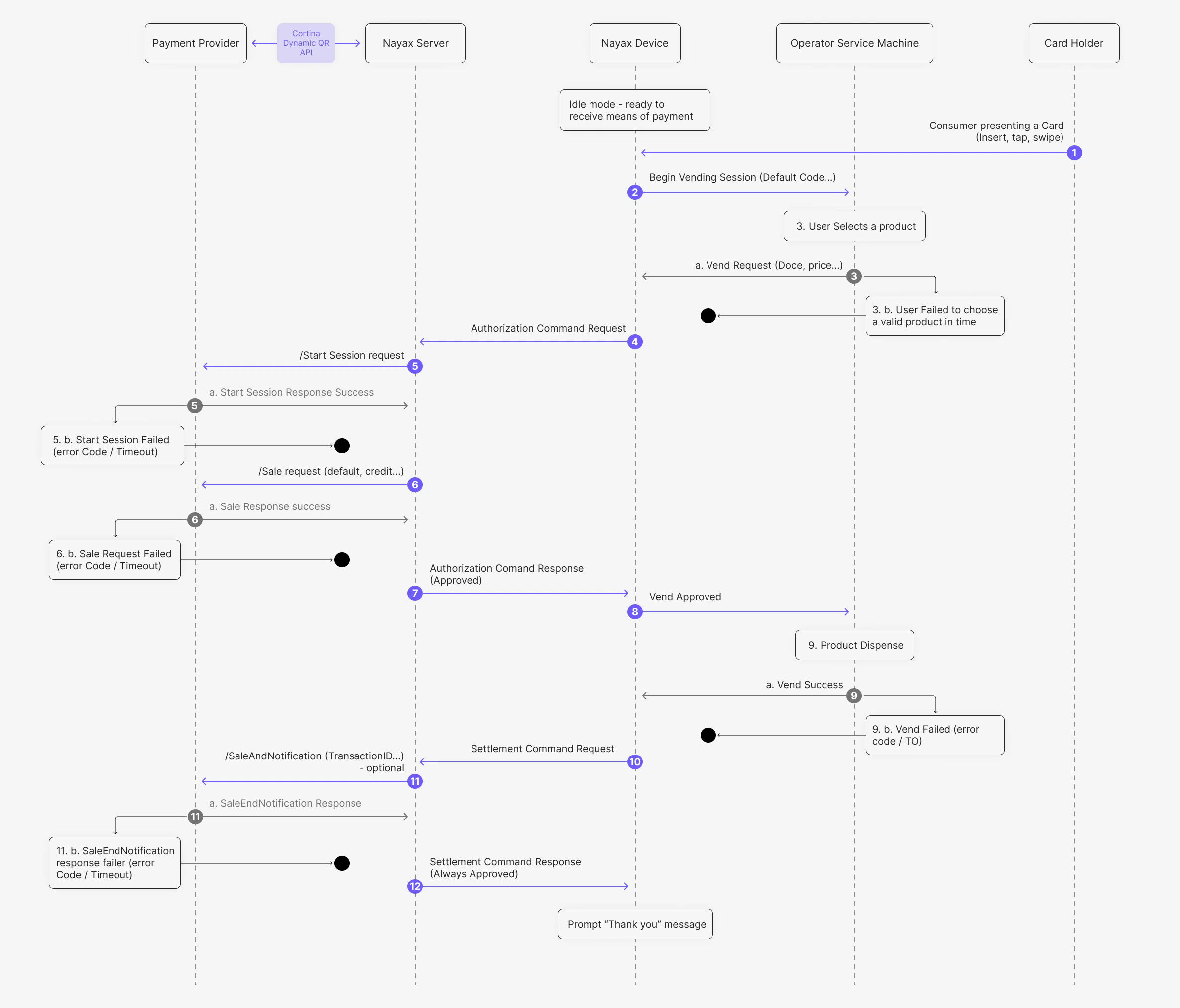 The steps in this process are as follows:
1. The consumer presents a card (Insert, tap, or swipe) to the Nayax Device.
2. The Nayax Device sends a Begin Vending Session command to the Operator Service Machine.
3. The user selects a product, and the Operator Service Machine sends a Vend Request to the Nayax Device.
4. The Nayax Device sends an Authorization Command Request to the Nayax Server.
5. The Nayax Server sends a /Start Session request to the Payment Provider via the [Start Session](/reference/cortina/cortina/post-start-session) endpoint.
6. The Nayax Server sends a /Sale request to the Payment Provider via the [Credit Card Sale](/reference/cortina/cortina-credit-card/cortina-credit-card-sale) endpoint.
7. The Nayax Server returns an Authorization Command Response (Approved) to the Nayax Device.
8. The Nayax Device sends a Vend Approved command to the Operator Service Machine.
9. The product is dispensed, and the Operator Service Machine sends a Vend Success notification to the Nayax Device.
10. The Nayax Device sends a Settlement Command Request to the Nayax Server.
11. (Optional) The Nayax Server sends a /SaleEndNotification to the Payment Provider via the [Sale End Notification](/reference/cortina/cortina/post-sale-end-notification) endpoint.
12. The Nayax Server returns a Settlement Command Response (Always Approved) to the Nayax Device, which then displays a "Thank you" message.
This response is typically always approved in this flow, as the authorization has already been granted.
### Exception Handling
In the event of a failure at any critical junction (marked with a black circle in the diagram), the transaction is terminated. Since the **Sale** occurs before the product is dispensed in this flow, specific Void logic is required to ensure the cardholder is not charged for failed transactions.
| Scenario | Diagram Step Reference | Technical Resolution |
| :----------------------- | :--------------------- | :-------------------------------------------------------------------------------------------------------------------------------------------------------------------------------------------------------------------------------------------------------------------------------------------------- |
| **Selection Timeout** | 3.b | Occurs if the user fails to choose a valid product within the machine's allowed timeframe. The session ends before any payment request is made. |
| **Start Session Failed** | 5.b | Occurs if the `/Start Session` request times out or returns an error. The process is aborted before the Sale request. |
| **Sale Request Failed** | 6.b | If the `/Sale` request fails, returns an error, or receives a **`992`** response code, the session is aborted. In cases of a gateway timeout, the [Credit Card Void](/reference/cortina/cortina-credit-card/cortina-credit-card-void) endpoint is triggered with the flag `isGatewayTimeout: True`. |
| **Vend Failed** | 9.b | If the machine fails to dispense the product (e.g., mechanical jam) after a successful sale, the Nayax Engine triggers the [Credit Card Void](/reference/cortina/cortina-credit-card/cortina-credit-card-void) endpoint to reverse the transaction. |
| **Notification Failure** | 11.b | Occurs if the optional `/SaleEndNotification` fails. This is a non-critical reporting step; the user has already received the product, so the error is simply logged for reconciliation. |
For a comprehensive list of financial response codes and authorization failures, refer to the [Credit Card Decline Reasons](/docs/cortina/credit-card/credit-card-decline-reasons) page.
## Pre-Authorization
The Pre-authorization flow is used for transactions that require a two-step process. First, a session is initiated, followed by an authorization check. This flow ensures the transaction is valid and the customer has sufficient funds before settlement.
See the diagram below:
The steps in this process are as follows:
1. The consumer presents a card (Insert, tap, or swipe) to the Nayax Device.
2. The Nayax Device sends a Begin Vending Session command to the Operator Service Machine.
3. The user selects a product, and the Operator Service Machine sends a Vend Request to the Nayax Device.
4. The Nayax Device sends an Authorization Command Request to the Nayax Server.
5. The Nayax Server sends a /Start Session request to the Payment Provider via the [Start Session](/reference/cortina/cortina/post-start-session) endpoint.
6. The Nayax Server sends a /Sale request to the Payment Provider via the [Credit Card Sale](/reference/cortina/cortina-credit-card/cortina-credit-card-sale) endpoint.
7. The Nayax Server returns an Authorization Command Response (Approved) to the Nayax Device.
8. The Nayax Device sends a Vend Approved command to the Operator Service Machine.
9. The product is dispensed, and the Operator Service Machine sends a Vend Success notification to the Nayax Device.
10. The Nayax Device sends a Settlement Command Request to the Nayax Server.
11. (Optional) The Nayax Server sends a /SaleEndNotification to the Payment Provider via the [Sale End Notification](/reference/cortina/cortina/post-sale-end-notification) endpoint.
12. The Nayax Server returns a Settlement Command Response (Always Approved) to the Nayax Device, which then displays a "Thank you" message.
This response is typically always approved in this flow, as the authorization has already been granted.
### Exception Handling
In the event of a failure at any critical junction (marked with a black circle in the diagram), the transaction is terminated. Since the **Sale** occurs before the product is dispensed in this flow, specific Void logic is required to ensure the cardholder is not charged for failed transactions.
| Scenario | Diagram Step Reference | Technical Resolution |
| :----------------------- | :--------------------- | :-------------------------------------------------------------------------------------------------------------------------------------------------------------------------------------------------------------------------------------------------------------------------------------------------- |
| **Selection Timeout** | 3.b | Occurs if the user fails to choose a valid product within the machine's allowed timeframe. The session ends before any payment request is made. |
| **Start Session Failed** | 5.b | Occurs if the `/Start Session` request times out or returns an error. The process is aborted before the Sale request. |
| **Sale Request Failed** | 6.b | If the `/Sale` request fails, returns an error, or receives a **`992`** response code, the session is aborted. In cases of a gateway timeout, the [Credit Card Void](/reference/cortina/cortina-credit-card/cortina-credit-card-void) endpoint is triggered with the flag `isGatewayTimeout: True`. |
| **Vend Failed** | 9.b | If the machine fails to dispense the product (e.g., mechanical jam) after a successful sale, the Nayax Engine triggers the [Credit Card Void](/reference/cortina/cortina-credit-card/cortina-credit-card-void) endpoint to reverse the transaction. |
| **Notification Failure** | 11.b | Occurs if the optional `/SaleEndNotification` fails. This is a non-critical reporting step; the user has already received the product, so the error is simply logged for reconciliation. |
For a comprehensive list of financial response codes and authorization failures, refer to the [Credit Card Decline Reasons](/docs/cortina/credit-card/credit-card-decline-reasons) page.
## Pre-Authorization
The Pre-authorization flow is used for transactions that require a two-step process. First, a session is initiated, followed by an authorization check. This flow ensures the transaction is valid and the customer has sufficient funds before settlement.
See the diagram below:
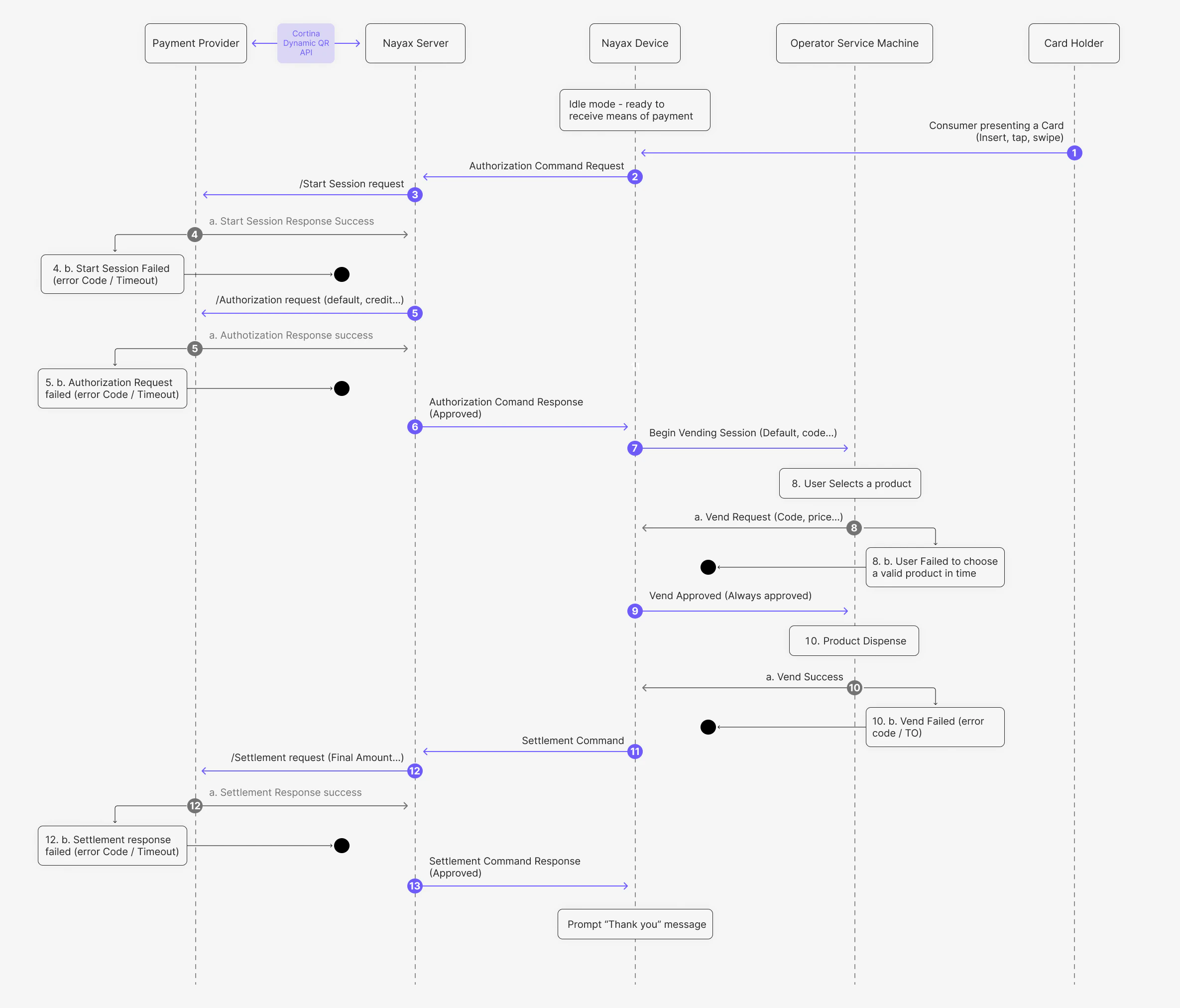 Where:
1. The consumer presents a card (Insert, tap, or swipe) to the Nayax Device.
2. The Nayax Device sends an Authorization Command Request to the Nayax Server.
3. The Nayax Server sends a /Start Session request to the Payment Provider via the [Start Session](/reference/cortina/cortina/post-start-session) endpoint.
4. The Payment Provider returns a Start Session Response Success to the Nayax Server.
5. The Nayax Server sends an /Authorization request (default amount) to the Payment Provider via the [Credit Card Authorization](/reference/cortina/cortina-credit-card/cortina-credit-card-authorization) endpoint.
6. The Nayax Server returns an Authorization Command Response (Approved) to the Nayax Device.
7. The Nayax Device sends a Begin Vending Session command to the Operator Service Machine.
8. The user selects a product, and the Operator Service Machine sends a Vend Request (Code, price) to the Nayax Device.
9. The Nayax Device sends a Vend Approved (Always approved) response to the Operator Service Machine.
10. The product is dispensed, and the Operator Service Machine sends a Vend Success notification to the Nayax Device.
11. The Nayax Device sends a Settlement Command to the Nayax Server.
12. The Nayax Server sends a /Settlement request (Final Amount) to the Payment Provider via the [Credit Card Settlement](/reference/cortina/cortina-credit-card/cortina-credit-card-settlement) endpoint.
13. The Nayax Server returns a Settlement Command Response (Approved) to the Nayax Device, which then displays a "Thank you" message.
### Exception Handling
In the event of a failure at any critical junction (marked with a black circle in the diagram), the transaction is terminated. Because a hold is placed on the cardholder's funds during the authorization step, specific cleanup actions (Cancellations) are required if the vend is not completed.
| Scenario | Diagram Step Reference | Technical Resolution |
| :----------------------- | :--------------------- | :--------------------------------------------------------------------------------------------------------------------------------------------------------------------------------------------------------------------------------------------- |
| **Start Session Failed** | 4.b | Occurs if the `/Start Session` request times out or returns an error. The session is aborted before any funds are authorized. |
| **Authorization Failed** | 5.b | Occurs if the provider denies the default credit amount. The transaction is terminated and the user is typically notified on the device. |
| **Selection Timeout** | 8.b | Occurs if the user fails to choose a valid product within the machine's allowed timeframe. The session is closed. |
| **Vend Failed** | 10.b | If the machine fails to dispense the product (e.g., mechanical jam), the system triggers the [Credit Card Cancel](/reference/cortina/cortina-credit-card/cortina-credit-card-cancel) endpoint to release the pre-authorized hold. |
| **Settlement Failed** | 12.b | Occurs if the final settlement request fails or times out. This requires internal logging for manual reconciliation with the provider. |
| **Timeout / 992 Code** | N/A | If no sale response is received within the timeout period, or a `992` code is returned, the [Credit Card Cancel](/reference/cortina/cortina-credit-card/cortina-credit-card-cancel) endpoint is called with the flag `isGatewayTimeout: True`. |
For a comprehensive list of financial response codes and authorization failures, refer to the [Credit Card Decline Reasons](/docs/cortina/credit-card/credit-card-decline-reasons) page.
Where:
1. The consumer presents a card (Insert, tap, or swipe) to the Nayax Device.
2. The Nayax Device sends an Authorization Command Request to the Nayax Server.
3. The Nayax Server sends a /Start Session request to the Payment Provider via the [Start Session](/reference/cortina/cortina/post-start-session) endpoint.
4. The Payment Provider returns a Start Session Response Success to the Nayax Server.
5. The Nayax Server sends an /Authorization request (default amount) to the Payment Provider via the [Credit Card Authorization](/reference/cortina/cortina-credit-card/cortina-credit-card-authorization) endpoint.
6. The Nayax Server returns an Authorization Command Response (Approved) to the Nayax Device.
7. The Nayax Device sends a Begin Vending Session command to the Operator Service Machine.
8. The user selects a product, and the Operator Service Machine sends a Vend Request (Code, price) to the Nayax Device.
9. The Nayax Device sends a Vend Approved (Always approved) response to the Operator Service Machine.
10. The product is dispensed, and the Operator Service Machine sends a Vend Success notification to the Nayax Device.
11. The Nayax Device sends a Settlement Command to the Nayax Server.
12. The Nayax Server sends a /Settlement request (Final Amount) to the Payment Provider via the [Credit Card Settlement](/reference/cortina/cortina-credit-card/cortina-credit-card-settlement) endpoint.
13. The Nayax Server returns a Settlement Command Response (Approved) to the Nayax Device, which then displays a "Thank you" message.
### Exception Handling
In the event of a failure at any critical junction (marked with a black circle in the diagram), the transaction is terminated. Because a hold is placed on the cardholder's funds during the authorization step, specific cleanup actions (Cancellations) are required if the vend is not completed.
| Scenario | Diagram Step Reference | Technical Resolution |
| :----------------------- | :--------------------- | :--------------------------------------------------------------------------------------------------------------------------------------------------------------------------------------------------------------------------------------------- |
| **Start Session Failed** | 4.b | Occurs if the `/Start Session` request times out or returns an error. The session is aborted before any funds are authorized. |
| **Authorization Failed** | 5.b | Occurs if the provider denies the default credit amount. The transaction is terminated and the user is typically notified on the device. |
| **Selection Timeout** | 8.b | Occurs if the user fails to choose a valid product within the machine's allowed timeframe. The session is closed. |
| **Vend Failed** | 10.b | If the machine fails to dispense the product (e.g., mechanical jam), the system triggers the [Credit Card Cancel](/reference/cortina/cortina-credit-card/cortina-credit-card-cancel) endpoint to release the pre-authorized hold. |
| **Settlement Failed** | 12.b | Occurs if the final settlement request fails or times out. This requires internal logging for manual reconciliation with the provider. |
| **Timeout / 992 Code** | N/A | If no sale response is received within the timeout period, or a `992` code is returned, the [Credit Card Cancel](/reference/cortina/cortina-credit-card/cortina-credit-card-cancel) endpoint is called with the flag `isGatewayTimeout: True`. |
For a comprehensive list of financial response codes and authorization failures, refer to the [Credit Card Decline Reasons](/docs/cortina/credit-card/credit-card-decline-reasons) page.