> ## Documentation Index
> Fetch the complete documentation index at: https://devzone.nayax.com/llms.txt
> Use this file to discover all available pages before exploring further.
# StaticQR
Static QR codes provide a straightforward, secure way to process payments via wallet applications, enabling customers to scan a code displayed on a vending machine or terminal.
## How it works
Before selecting a product, the user scans the QR code displayed on the machine, as in the image below.
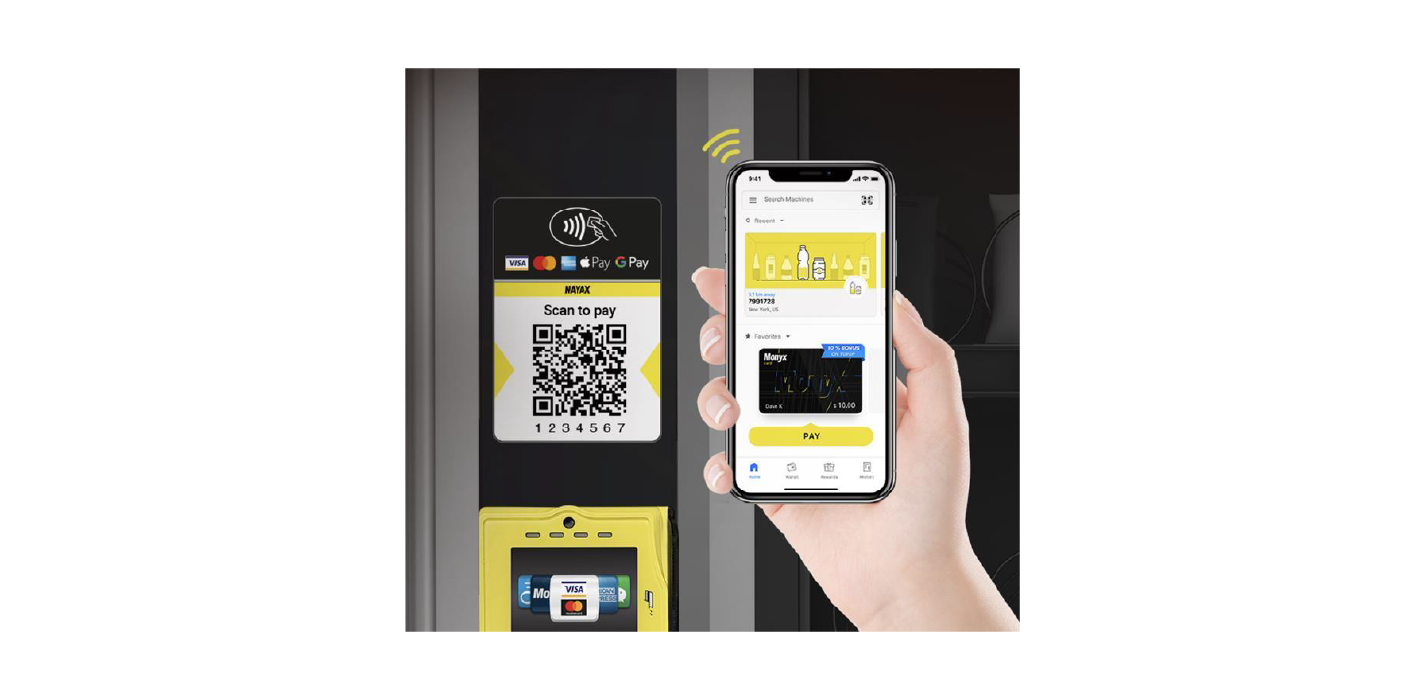 Once scanned, the customer’s mobile device interacts with the payment system to process the transaction, providing a seamless payment experience without requiring additional hardware.
## Transaction Flows
Cortina supports two types of StaticQR transaction flows:
* Pre-selection
* Pre-authorization
Learn more in the sections below.
### Pre-selection
The Pre-selection flow simplifies the payment process by merging the steps of product/service selection and authorization into a single transaction. This flow is typically used for low-value or quick transactions, where the customer’s selection and payment authorization are handled in a single step.
See the diagram below:
Once scanned, the customer’s mobile device interacts with the payment system to process the transaction, providing a seamless payment experience without requiring additional hardware.
## Transaction Flows
Cortina supports two types of StaticQR transaction flows:
* Pre-selection
* Pre-authorization
Learn more in the sections below.
### Pre-selection
The Pre-selection flow simplifies the payment process by merging the steps of product/service selection and authorization into a single transaction. This flow is typically used for low-value or quick transactions, where the customer’s selection and payment authorization are handled in a single step.
See the diagram below:
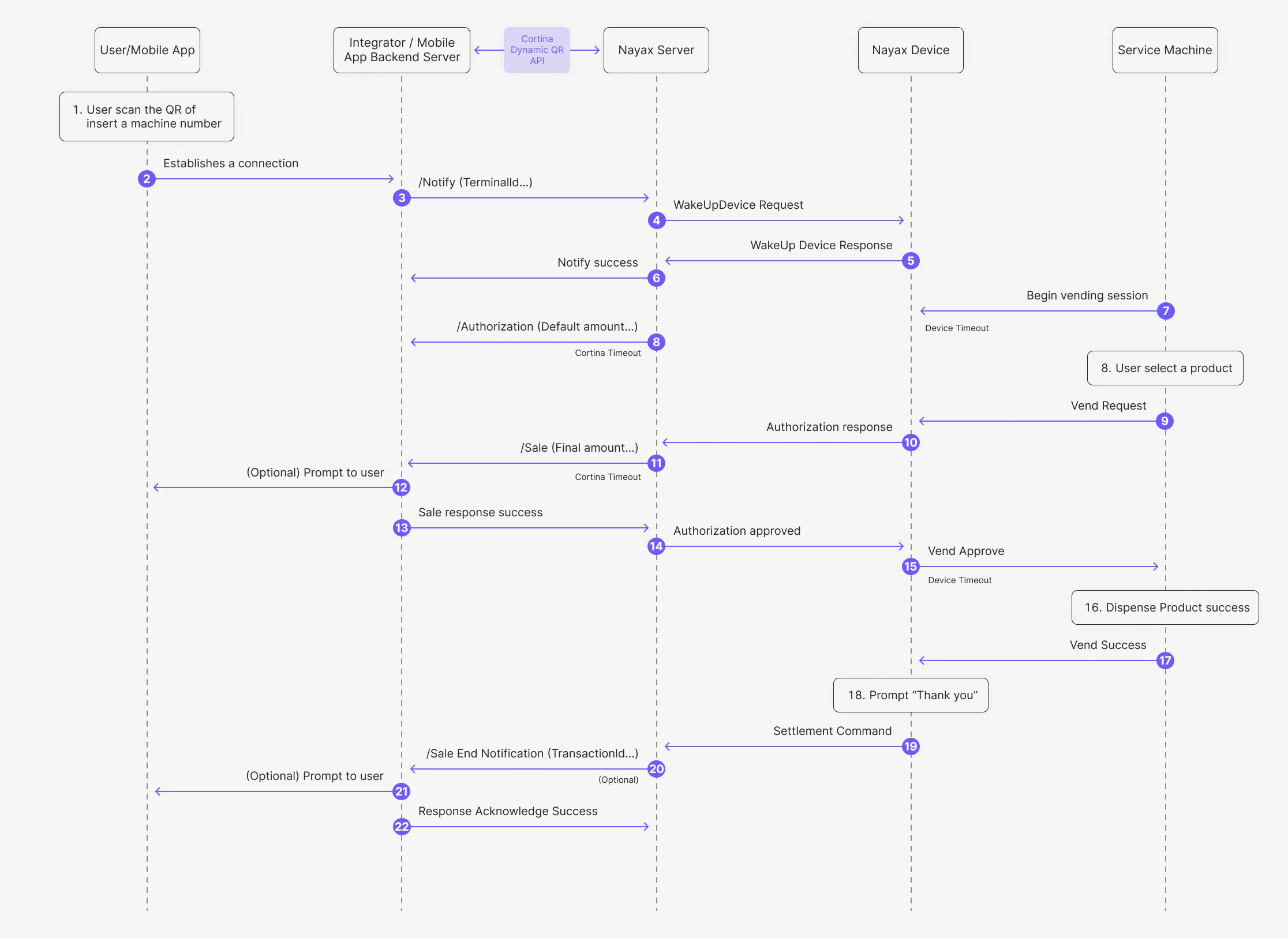 The steps in this process are as follows:
1. The user scans the QR code or enters the machine number into their mobile app.
2. The Mobile App establishes a connection with the Integrator's backend server.
3. The Integrator sends a /Notify (TerminalID) request to the Nayax Server via the [StaticQR Start](/reference/cortina/staticqr/cortina-staticqr-start) endpoint.
4. The Nayax Server sends a WakeUpDevice Request to the Nayax Device.
5. The Nayax Device returns a WakeUp Device Response to the Nayax Server.
6. The Nayax Server sends a Notify success message back to the Integrator.
7. The Nayax Device sends a Begin vending session command to the Service Machine.
8. The user selects a product on the Service Machine.
9. The Service Machine sends a Vend Request to the Nayax Device.
10. The Nayax Device sends an Authorization response to the Nayax Server.
11. The Nayax Server sends the /Sale (Final amount) request to the Integrator via the [StaticQR Sale](/reference/cortina/staticqr/cortina-staticqr-sale) endpoint.
12. (Optional) The Integrator may display a prompt to the user on their mobile device.
13. The Integrator sends a Sale response success back to the Nayax Server.
14. The Nayax Server sends an Authorization approved message to the Nayax Device.
15. The Nayax Device sends a Vend Approve response to the Service Machine.
16. The Service Machine dispenses the product successfully.
17. The Service Machine sends a Vend Success notification to the Nayax Device.
18. The Nayax Device displays a "Thank you" message.
19. The Nayax Device sends the Settlement Command to the Nayax Server.
20. The Nayax Server sends the /Sale End Notification (TransactionId) to the Integrator via the [Sale End Notification](/reference/cortina/cortina/post-sale-end-notification) endpoint.
21. (Optional) The Integrator may display a final prompt to the user on their mobile device.
22. The Integrator sends a Response Acknowledge Success to the Nayax Server.
This response is typically always approved in this flow, as the authorization has already been granted.
**Void**
In case the product fails to be dispensed to client or no Sale Response until timeout, the Nayax Engine uses the [StaticQR Void](https://devzone.nayax.com/docs/cortina/staticqr/static-qr-void) endpoint to void the payment request.
### Pre-Authorization
The Pre-authorization Flow for Static QR involves several key steps to authenticate and authorize a payment using a static QR code. This flow ensures the transaction is valid before dispensing the product or service.
See the diagram below:
The steps in this process are as follows:
1. The user scans the QR code or enters the machine number into their mobile app.
2. The Mobile App establishes a connection with the Integrator's backend server.
3. The Integrator sends a /Notify (TerminalID) request to the Nayax Server via the [StaticQR Start](/reference/cortina/staticqr/cortina-staticqr-start) endpoint.
4. The Nayax Server sends a WakeUpDevice Request to the Nayax Device.
5. The Nayax Device returns a WakeUp Device Response to the Nayax Server.
6. The Nayax Server sends a Notify success message back to the Integrator.
7. The Nayax Device sends a Begin vending session command to the Service Machine.
8. The user selects a product on the Service Machine.
9. The Service Machine sends a Vend Request to the Nayax Device.
10. The Nayax Device sends an Authorization response to the Nayax Server.
11. The Nayax Server sends the /Sale (Final amount) request to the Integrator via the [StaticQR Sale](/reference/cortina/staticqr/cortina-staticqr-sale) endpoint.
12. (Optional) The Integrator may display a prompt to the user on their mobile device.
13. The Integrator sends a Sale response success back to the Nayax Server.
14. The Nayax Server sends an Authorization approved message to the Nayax Device.
15. The Nayax Device sends a Vend Approve response to the Service Machine.
16. The Service Machine dispenses the product successfully.
17. The Service Machine sends a Vend Success notification to the Nayax Device.
18. The Nayax Device displays a "Thank you" message.
19. The Nayax Device sends the Settlement Command to the Nayax Server.
20. The Nayax Server sends the /Sale End Notification (TransactionId) to the Integrator via the [Sale End Notification](/reference/cortina/cortina/post-sale-end-notification) endpoint.
21. (Optional) The Integrator may display a final prompt to the user on their mobile device.
22. The Integrator sends a Response Acknowledge Success to the Nayax Server.
This response is typically always approved in this flow, as the authorization has already been granted.
**Void**
In case the product fails to be dispensed to client or no Sale Response until timeout, the Nayax Engine uses the [StaticQR Void](https://devzone.nayax.com/docs/cortina/staticqr/static-qr-void) endpoint to void the payment request.
### Pre-Authorization
The Pre-authorization Flow for Static QR involves several key steps to authenticate and authorize a payment using a static QR code. This flow ensures the transaction is valid before dispensing the product or service.
See the diagram below:
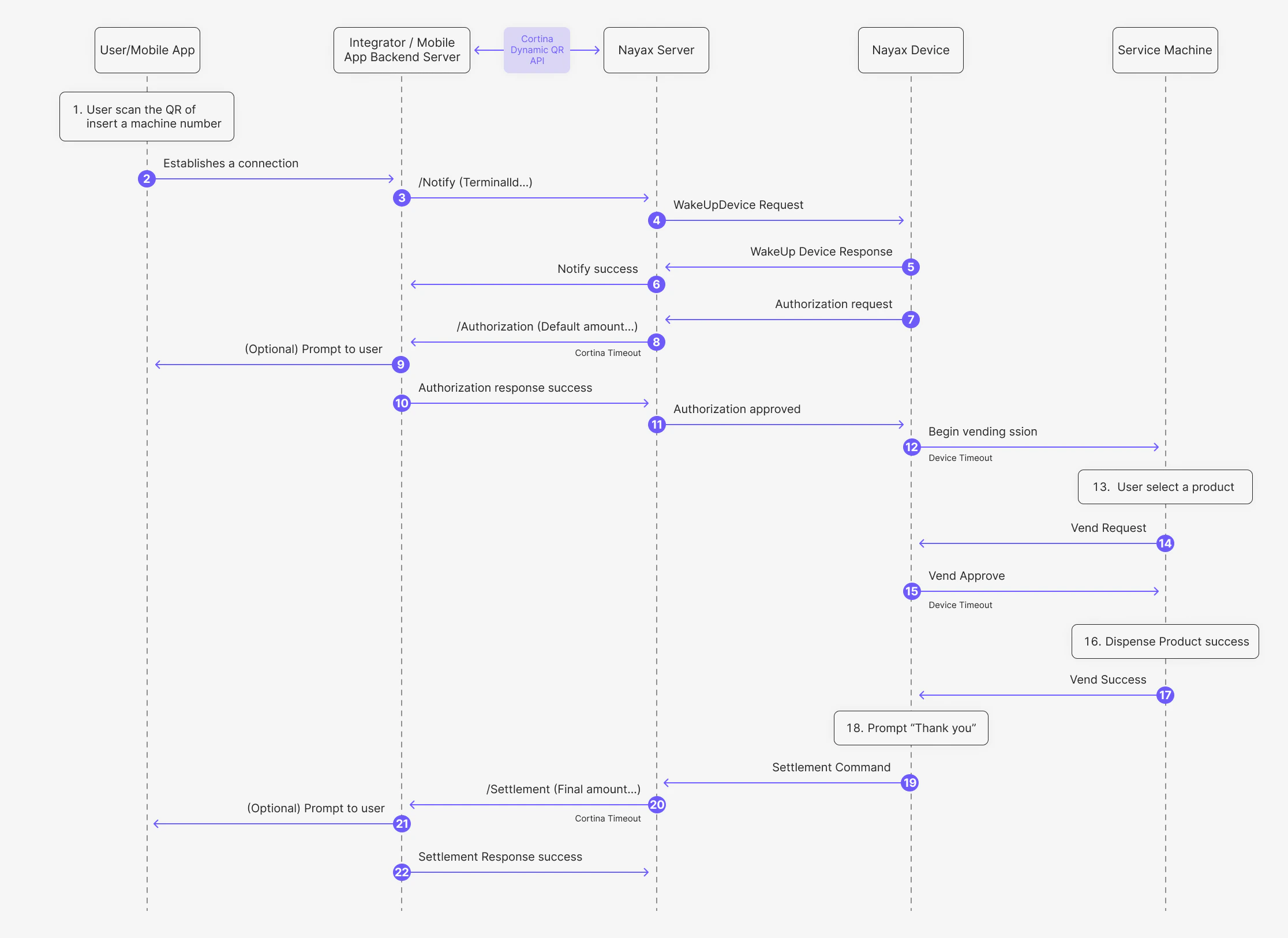 Where:
1. The user scans the QR code or enters the machine number into their mobile app.
2. The Mobile App establishes a connection with the Integrator's backend server.
3. The Integrator sends a /Notify (TerminalID) request to the Nayax Server via the [StaticQR Start](/reference/cortina/staticqr/cortina-staticqr-start) endpoint.
4. The Nayax Server sends a WakeUpDevice Request to the Nayax Device.
5. The Nayax Device returns a WakeUp Device Response to the Nayax Server.
6. The Nayax Server sends a Notify success message back to the Integrator.
7. The Nayax Device sends an Authorization request to the Nayax Server.
8. The Nayax Server sends an /Authorization (Default amount) request to the Integrator via the [StaticQR Authorization](/reference/cortina/staticqr/cortina-staticqr-authorization) endpoint.
9. (Optional) The Integrator may display a prompt to the user on their mobile device.
10. The Integrator sends an Authorization response success back to the Nayax Server.
11. The Nayax Server sends an Authorization approved message to the Nayax Device.
12. The Nayax Device sends a Begin vending session command to the Service Machine.
13. The user selects the desired product on the Service Machine.
14. The Service Machine sends a Vend Request to the Nayax Device.
15. The Nayax Device sends a Vend Approve response to the Service Machine.
16. The Service Machine dispenses the product successfully.
17. The Service Machine sends a Vend Success notification to the Nayax Device.
18. The Nayax Device displays a "Thank you" message.
19. The Nayax Device sends the Settlement Command to the Nayax Server.
20. The Nayax Server sends the /Settlement (Final amount) request to the Integrator via the [StaticQR Settlement](/reference/cortina/staticqr/cortina-staticqr-settlement) endpoint.
21. (Optional) The Integrator may display a final prompt to the user on their mobile device.
22. The Integrator sends a Settlement Response success to the Nayax Server.
**Cancellation**
In case the product fails to be dispensed to client or no Authorization Response until timeout, the Nayax Engine uses the [StaticQR Cancel](/reference/cortina/staticqr/cortina-staticqr-cancel) endpoint to cancel the Pre Authorization and the transaction.
Where:
1. The user scans the QR code or enters the machine number into their mobile app.
2. The Mobile App establishes a connection with the Integrator's backend server.
3. The Integrator sends a /Notify (TerminalID) request to the Nayax Server via the [StaticQR Start](/reference/cortina/staticqr/cortina-staticqr-start) endpoint.
4. The Nayax Server sends a WakeUpDevice Request to the Nayax Device.
5. The Nayax Device returns a WakeUp Device Response to the Nayax Server.
6. The Nayax Server sends a Notify success message back to the Integrator.
7. The Nayax Device sends an Authorization request to the Nayax Server.
8. The Nayax Server sends an /Authorization (Default amount) request to the Integrator via the [StaticQR Authorization](/reference/cortina/staticqr/cortina-staticqr-authorization) endpoint.
9. (Optional) The Integrator may display a prompt to the user on their mobile device.
10. The Integrator sends an Authorization response success back to the Nayax Server.
11. The Nayax Server sends an Authorization approved message to the Nayax Device.
12. The Nayax Device sends a Begin vending session command to the Service Machine.
13. The user selects the desired product on the Service Machine.
14. The Service Machine sends a Vend Request to the Nayax Device.
15. The Nayax Device sends a Vend Approve response to the Service Machine.
16. The Service Machine dispenses the product successfully.
17. The Service Machine sends a Vend Success notification to the Nayax Device.
18. The Nayax Device displays a "Thank you" message.
19. The Nayax Device sends the Settlement Command to the Nayax Server.
20. The Nayax Server sends the /Settlement (Final amount) request to the Integrator via the [StaticQR Settlement](/reference/cortina/staticqr/cortina-staticqr-settlement) endpoint.
21. (Optional) The Integrator may display a final prompt to the user on their mobile device.
22. The Integrator sends a Settlement Response success to the Nayax Server.
**Cancellation**
In case the product fails to be dispensed to client or no Authorization Response until timeout, the Nayax Engine uses the [StaticQR Cancel](/reference/cortina/staticqr/cortina-staticqr-cancel) endpoint to cancel the Pre Authorization and the transaction.