> ## Documentation Index
> Fetch the complete documentation index at: https://devzone.nayax.com/llms.txt
> Use this file to discover all available pages before exploring further.
# JSON-RPC API
While integrators should use the [C API](/docs/integrate-pos-device/emv-core/rtos/rtos-c-api) provided by `libecodsdk`, the JSON-RPC API is used by the EMV Core logs and is very useful during integration debugging.
## Protocol Rules
### Syntax Rules
All commands follow these formatting conventions:
* All commands and events use the **JSON-RPC 2.0** protocol with named parameters.
* All commands and events require a response, **except** `log()` and `ReaderMessageEvent()`, which have no `id`.
* Message format:
```json theme={null}
{"jsonrpc":"2.0", "method":"CommandName", "params": {"param1":value1, "param2":value2}, "id":idNumber}
```
* Use a different `id` for each command (e.g., a running counter) to aid synchronization.
* An illegal command returns a `"Not existing command"` response from the EMV Core.
### Send & Receive
**Sending a message:**
1. Send the JSON-RPC message.
2. Wait for the JSON-RPC response.
3. Once data starts arriving, wait for a complete JSON (all parentheses closed), or a 1-second timeout.
**Receiving a message (loop):**
1. Wait for incoming data.
2. Once data starts arriving, wait for complete JSON, or a 1-second timeout.
3. Parse and process the message as JSON-RPC.
4. Send a JSON-RPC response (no response needed for `ReaderMessageEvent`; no response is sent for `socket_data_received`).
## Payment Flow
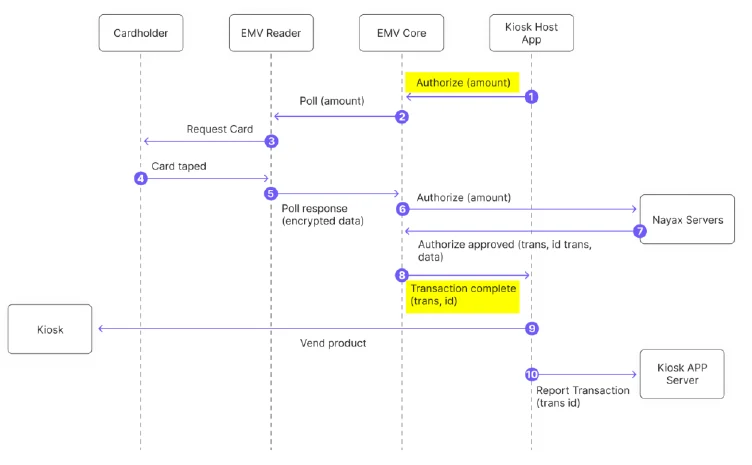
A typical payment session follows this sequence:
1. POS sends `PreAuthorize`.
2. EMV Core responds (after card tap and authorization) with `TransactionComplete`.
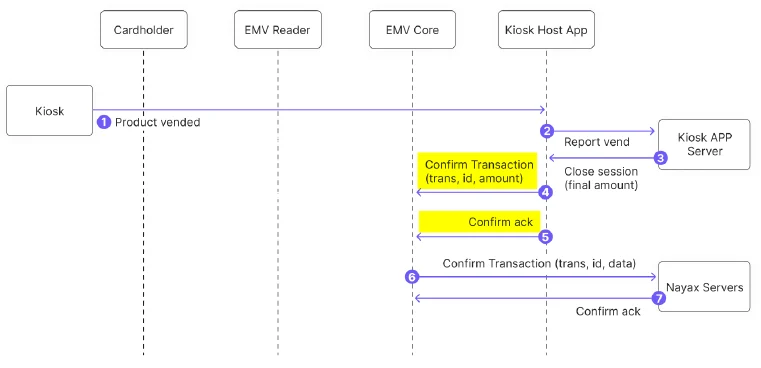
3. POS sends either `ConfirmTransaction` (product delivered) or `VoidTransaction` (otherwise).
4. POS may send `CancelTransaction` at any time; `TransactionComplete` will return with status `Cancelled`.
**Important notes:**
* Always close a `PreAuthorize` session with Confirm or Void/Cancel. An unclosed session will be reversed by the processor after some time, which may incur higher fees.
* Once `ConfirmTransaction` has been acknowledged by the EMV Core, do not re-send it.
* To force synchronous processing, set `PAYMENT_SVC_SYNCHRONOUS=1`.
 ### Closed Loop (CLP) Flow
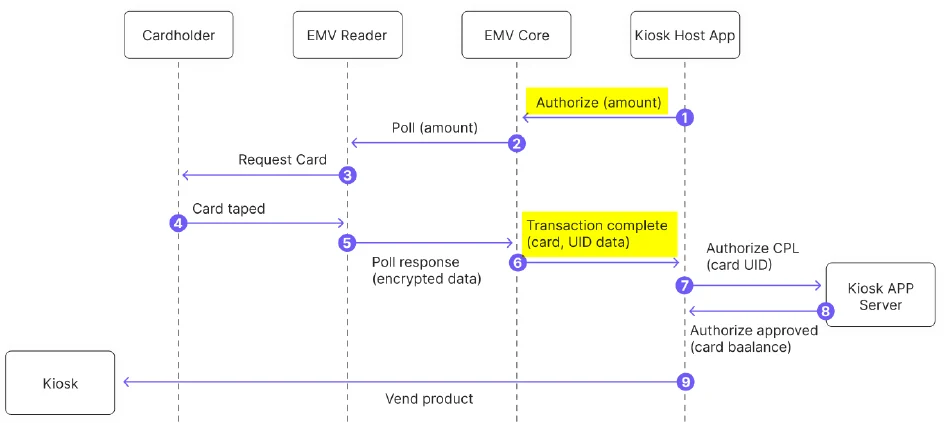
For pre-paid cards, EMV Core immediately returns the card UID to the host application via `TransactionComplete` without sending to the Nayax server.
### Closed Loop (CLP) Flow
For pre-paid cards, EMV Core immediately returns the card UID to the host application via `TransactionComplete` without sending to the Nayax server.
 ## Commands
### PreAuthorize
Pre-authorize a card with the payment processor. The EMV Core waits for a card, reads it, processes it, then sends `TransactionComplete`.
**Example:**
```json theme={null}
>> {"jsonrpc":"2.0", "method":"PreAuthorize",
"params": {"amount":150, "currency":840, "productid":5, "continuous":false, "timeout":60},
"id":801}
<< {"jsonrpc": "2.0", "result": true, "id": 801}
```
**Parameters:**
| Parameter | Description |
| :----------- | :---------------------------------------------------------------------------------------------------------- |
| `amount` | Amount to charge in full units (dollars, not cents) |
| `currency` | ISO 4217 code (e.g., 840 = USD) |
| `productID` | Optional: product ID selected by consumer, saved in server for reports |
| `continuous` | If `true`, poll for card restarts immediately after timeout; `TransactionComplete` returns `PollContinuous` |
| `timeout` | Maximum seconds to wait for a card. Returns `Timeout` status if no card arrives. |
***
### ConfirmTransaction
Confirms the pre-authorization so the payment can settle.
**Example:**
```json theme={null}
>> {"jsonrpc":"2.0", "method":"ConfirmTransaction",
"params": {"amount":150, "productID":1, "transaction_Reference":"8453F02DFD33413EBA7733"},
"id":616386422}
<< {"jsonrpc":"2.0", "result":true, "id":616386422}
```
**Parameters:**
| Parameter | Description |
| :--------------------- | :------------------------------------------------------------------------------------ |
| `Amount` | Actual amount to charge in minor units (cents) |
| `transactionReference` | `TransactionDbID` from the `TransactionComplete` event |
| `productID` | Optional: product ID, saved in server for reports |
| `terminal_data` | Optional: `terminal_data=(key1=value1,key2=value2)`; passed to PSP in online requests |
***
### VoidTransaction
Void a transaction in two cases:
* Transaction was pre-authorized but not confirmed, to release reserved funds.
* Transaction was completed but needs to be canceled (e.g., product not vended).
**Example:**
```json theme={null}
>> {"jsonrpc":"2.0", "method":"VoidTransaction",
"params": {"transaction_Reference":"8453F02DFD33413EBA77334B696D5991"}, "id":803}
<< {"jsonrpc":"2.0", "result":true, "id":803}
```
| Parameter | Description |
| :--------------------- | :--------------------------------------------------------- |
| `transactionReference` | Transaction reference from the `TransactionComplete` event |
`VoidTransaction` does not return an event. Check voided transaction status in TMS by searching for `Cancel` and `Cancel Declined` statuses.
***
### CancelTransaction
Cancels the last transaction started by `PreAuthorize`:
* **Card not yet presented:** Stops the reader poll sequence. The display shows "Cancelling"; the host application must update the display.
* **Card already presented but not completed:** Returns `CannotCancel`. `TransactionComplete` arrives after the online authorization result.
* **Transaction already completed:** Returns `NoTransaction`.
* For `CannotCancel` or `NoTransaction`, use `VoidTransaction` to undo a successful transaction.
* If `TransactionComplete` returns `Decline`, no `VoidTransaction` is needed.
**Example:**
```json theme={null}
>> {"jsonrpc":"2.0", "method":"CancelTransaction", "id":802}
<< {"jsonrpc":"2.0", "result":true, "id":802}
```
***
### GetCardToken
Returns a card token without performing a payment transaction. Returns `CardTokenReceived` event.
* For payment cards: returns a base64 card token.
* For CLP (e.g., Mifare) cards: returns the card UID.
**Example:**
```json theme={null}
>> {"jsonrpc":"2.0","method":"GetCardToken","params":{"continuous":false,"timeout":60},"id":5820}
<< {"jsonrpc":"2.0", "result":true, "id":5820}
```
| Parameter | Description |
| :--------------- | :-------------------------------------------------- |
| `timeoutSeconds` | Maximum seconds to wait. Maximum value: 60 seconds. |
**Notes:**
* Requires tag `DFA155` added to the reader's Clear results tag list.
* CLP card UID is returned only when `CLP_MIFARE_ENABLED=2`.
***
### GetStatus
Returns the current EMV Core status.
**Example:**
```json theme={null}
>> {"jsonrpc":"2.0", "method":"GetStatus", "id":805}
<< {"jsonrpc":"2.0", "result":"Ready", "id":805}
```
**Result values:** `{NotReady, Ready, PaymentTransaction, Update, NoReader, NoTerminalId}`
***
### ShowMessage
Shows a message on the OTI Saturn Reader display.
**Example:**
```json theme={null}
>> {"jsonrpc":"2.0", "method":"ShowMessage",
"params": {"line1":"Please Select", "line2":"Your Product"}, "id":901}
<< {"jsonrpc":"2.0", "result":true, "id":901}
```
| Parameter | Description |
| :-------- | :-------------------------------------------------------- |
| `line1` | Text for line 1 of the reader display (max 16 characters) |
| `line2` | Text for line 2 of the reader display (max 16 characters) |
***
### GetVersion
Returns the version of components in the system.
**Example:**
```json theme={null}
>> {"jsonrpc":"2.0", "method":"GetVersion", "params":{"component":"Reader"}, "id":902}
<< {"jsonrpc":"2.0", "result":"S8_v054105", "id":902}
```
| Parameter | Values |
| :---------- | :-------------------------------------------- |
| `component` | `otiKiosk` (for EMV Core version) or `Reader` |
***
### GetKioskID
Returns the Kiosk identification number.
**Example:**
```json theme={null}
>> {"jsonrpc":"2.0", "method":"GetKioskID", "params":{}, "id":902}
<< {"jsonrpc":"2.0", "result":"00130226001C9C69", "id":902}
```
***
### GetAttribute
Returns the value of an EMV Core configuration attribute.
**Example:**
```json theme={null}
>> {"jsonrpc":"2.0","method":"GetAttribute", "params": {"Key":"PRE_AUTH_AMOUNT"}, "id":12}
<< {"jsonrpc":"2.0", "result":"150", "id":12}
// If attribute not found:
<< {"jsonrpc":"2.0", "error":{"code":-1, "message":"Get attribute key not found"}, "id":12}
```
***
## Events
### TransactionComplete
Sent by the EMV Core when a transaction completes (success or failure). Contains all data needed for receipts and dispute resolution.
**Note:** If no acknowledgment is received, the EMV Core resends up to 2 times (3 total). If still no answer, it assumes the message was received and does not cancel the transaction.
**Example (open loop):**
```json theme={null}
<< {"jsonrpc":"2.0", "method":"TransactionComplete", "params": {
"status":"OK", "errorCode":0, "errorDescription":"",
"transactionId":"6856770806",
"authorizationDetails": {
"AmountAuthorized":4.50, "AmountRequested":4.50,
"AuthorizationCode":"AuthOK", "PartialPan":"453997******4280",
"CardType":"Visa Credit", "IsTransactionApproved":true,
"eReceipt":"https://wee.ai/tr/...",
"Card_ID":"2026-02-10 10:15:32.057|6|3", "Card_Balance":0.00,
"RRN":"260210081532", "TransactionDbID":"6856770806",
"Transaction_Referance":"6856770806",
"CardToken":"kC7WxiEKKUMw/lNddlT5MiMGX/uvea4/aEtjOljLNlY=",
"Additional_Parameters": {
"hwSerial":"4207012624000108","SiteId":"6","EntryMode":"4",
"MachineAuTime":"2026-02-10T10:15:32.057",
"NayaxTransactionId":"6856770806"
}}}, "id":701}
>> {"jsonrpc":"2.0", "result":true, "id":701}
```
**Parameters:**
| Field | Description |
| :----------------- | :------------------------------------------------------------------------------------- |
| `status` | `OK`, `Declined`, `Error`, `Timeout`, `Cancelled`, `LocalCLP` |
| `errorCode` | Numeric error code (0 = no error; positive = PSP errors; negative = OTI system errors) |
| `errorDescription` | Technical error description for developers; do not display to users |
| `transactionId` | Use for `ConfirmTransaction` or `VoidTransaction` |
**Authorization Details fields:**
| Field | Description |
| :---------------------- | :---------------------------------------------------------------------------------------------------------- |
| `AmountAuthorized` | Amount approved in major units (may be lower for prepaid cards) |
| `AmountRequested` | Amount requested in major units |
| `Authorization_Code` | PSP transaction identifier for approved transactions |
| `PartialPan` | Masked PAN (first 6 and last 4 digits) |
| `CardType` | Card scheme (MasterCard, Visa, Amex, etc.) or closed-loop card technology |
| `IsTransactionApproved` | Boolean approval status |
| `eReceipt` | URL for Nayax eReceipt |
| `Card_ID` | Mifare UID when `CLP_MIFARE_ENABLED=2` |
| `RRN` | Processor reference number for approved transactions |
| `CardToken` | Base64 token for payment cards; card UID for closed-loop cards |
| `Additional_Parameters` | Optional fields for Nayax External Settlement: `SiteId`, `EntryMode`, `MachineAuTime`, `NayaxTransactionId` |
**Closed-loop card types:**
| Card Type | Description |
| :----------- | :----------------------- |
| `Type A` | ISO/IEC 14443 Type A |
| `Type B` | ISO/IEC 14443 Type B |
| `Mifare` | Mifare |
| `Mifare-U` | Mifare Ultralight |
| `DesFire` | Mifare DESFire |
| `Mifare-P` | Mifare Plus |
| `Vicinity` | ISO/IEC 15693 |
| `Vicinity-P` | ISO/IEC 15693 HID iClass |
| `Felica` | FeliCa JIS X 6319-4 |
| `CLP` | Unknown closed loop |
***
### CardTokenReceived
Sent when `GetCardToken` is completed.
**Example:**
```json theme={null}
>> {"jsonrpc":"2.0", "method":"CardTokenReceived", "params": {
"status":"OK", "errorCode":0, "errorDescription":"",
"CardToken":"WSAr79nKPywW3INXrWvr6IL3vgTgSJlwZBgseKDmMHM=",
"PartialPan":""}, "id":702}
```
***
### ReaderMessageEvent
Sent when the display message on the Saturn Reader changes. Use this to synchronize the kiosk application with reader state.
**Note:** Requires the reader to be configured to send External Display message events (Tag DF 46 with index 04). This event does **not** require acknowledgment.
**Example:**
```json theme={null}
<< {"jsonrpc":"2.0", "method":"ReaderMessageEvent",
"params": {"index":36, "line1":"Authorizing", "line2":"Please wait"}}
```
**Message Index:**
| Hex | Decimal | Message | LED |
| :--- | :------ | :------------------------------ | :----------- |
| 0x01 | 1 | Present card | LED1 On |
| 0x11 | 17 | Welcome | LED1 Blink |
| 0x05 | 5 | Please present one card only | — |
| 0x33 | 39 | Read error — Please try again | — |
| 0x24 | 36 | Authorizing — Please wait | Chasing LEDs |
| 0x06 | 6 | Approved | — |
| 0x09 | 9 | Not Approved | — |
| 0x30 | 30 | Timeout — No Card | — |
| 0x26 | 38 | Insert Card | — |
| 0x0A | 10 | Terminated | — |
| 0x0B | 11 | Contactless fail — PIN required | — |
| 0x0C | 12 | See Phone | — |
| — | 255 | Declined | — |
***
## Network Protocol
### Socket API
#### socket\_connect
Opens a TCP socket to a remote host.
```json theme={null}
>> {"jsonrpc":"2.0", "method":"socket_connect",
"params": {"address":"tms.otiglobal.com", "port":80, "timeout_sec":10}, "id":1426}
<< {"jsonrpc":"2.0", "result":2, "id":1426}
```
Returns a positive socket ID on success, or a negative error number on failure.
#### socket\_send
Sends data in binary form. Blocks until data is sent. `hex_data` is a hex-encoded string (2 ASCII characters per byte).
```json theme={null}
>> {"jsonrpc":"2.0", "method":"socket_send",
"params": {"socket_id":2, "hex_data":"474554202F..."}, "id":813}
<< {"jsonrpc":"2.0", "result":165, "id":813}
```
#### socket\_recv
Receives data from a socket. Returns hex-encoded data.
```json theme={null}
>> {"jsonrpc":"2.0", "method":"socket_recv",
"params": {"socket_id":16, "max_bytes":99}, "id":1644}
<< {"jsonrpc":"2.0", "result":"7B2243757272656E74...", "id":1644}
```
#### socket\_close
```json theme={null}
>> {"jsonrpc":"2.0","method":"socket_close","params":{"socket_id":2}, "id":815}
<< {"jsonrpc":"2.0", "result":0, "id":815}
```
#### socket\_data\_received (event)
Sent by the host when data is available on an open socket. The device does not respond.
```json theme={null}
<< {"jsonrpc":"2.0","method":"socket_data_received",
"params":{"socket_id":2, "number_of_bytes":458}}
>> [no response]
```
***
### Network Management APIs
#### network\_get\_status
Returns `"on"` if network is available.
```json theme={null}
>> {"jsonrpc":"2.0", "method":"network_get_status", "id":811}
<< {"jsonrpc":"2.0", "result":"on", "id":811}
```
#### network\_get\_info
Returns network channel, operator, technology (3G/4G), signal strength, and BER.
#### resolve\_host\_name
DNS resolution: returns list of IP addresses and TTL.
```json theme={null}
>> {"jsonrpc":"2.0", "method":"resolve_host_name",
"params": {"host_name":"httpbin.org"}, "id":812}
<< {"jsonrpc":"2.0", "result": {"addresses":"44.217.225.103, 107.23.72.23", "TTL":10}, "id":812}
```
## Commands
### PreAuthorize
Pre-authorize a card with the payment processor. The EMV Core waits for a card, reads it, processes it, then sends `TransactionComplete`.
**Example:**
```json theme={null}
>> {"jsonrpc":"2.0", "method":"PreAuthorize",
"params": {"amount":150, "currency":840, "productid":5, "continuous":false, "timeout":60},
"id":801}
<< {"jsonrpc": "2.0", "result": true, "id": 801}
```
**Parameters:**
| Parameter | Description |
| :----------- | :---------------------------------------------------------------------------------------------------------- |
| `amount` | Amount to charge in full units (dollars, not cents) |
| `currency` | ISO 4217 code (e.g., 840 = USD) |
| `productID` | Optional: product ID selected by consumer, saved in server for reports |
| `continuous` | If `true`, poll for card restarts immediately after timeout; `TransactionComplete` returns `PollContinuous` |
| `timeout` | Maximum seconds to wait for a card. Returns `Timeout` status if no card arrives. |
***
### ConfirmTransaction
Confirms the pre-authorization so the payment can settle.
**Example:**
```json theme={null}
>> {"jsonrpc":"2.0", "method":"ConfirmTransaction",
"params": {"amount":150, "productID":1, "transaction_Reference":"8453F02DFD33413EBA7733"},
"id":616386422}
<< {"jsonrpc":"2.0", "result":true, "id":616386422}
```
**Parameters:**
| Parameter | Description |
| :--------------------- | :------------------------------------------------------------------------------------ |
| `Amount` | Actual amount to charge in minor units (cents) |
| `transactionReference` | `TransactionDbID` from the `TransactionComplete` event |
| `productID` | Optional: product ID, saved in server for reports |
| `terminal_data` | Optional: `terminal_data=(key1=value1,key2=value2)`; passed to PSP in online requests |
***
### VoidTransaction
Void a transaction in two cases:
* Transaction was pre-authorized but not confirmed, to release reserved funds.
* Transaction was completed but needs to be canceled (e.g., product not vended).
**Example:**
```json theme={null}
>> {"jsonrpc":"2.0", "method":"VoidTransaction",
"params": {"transaction_Reference":"8453F02DFD33413EBA77334B696D5991"}, "id":803}
<< {"jsonrpc":"2.0", "result":true, "id":803}
```
| Parameter | Description |
| :--------------------- | :--------------------------------------------------------- |
| `transactionReference` | Transaction reference from the `TransactionComplete` event |
`VoidTransaction` does not return an event. Check voided transaction status in TMS by searching for `Cancel` and `Cancel Declined` statuses.
***
### CancelTransaction
Cancels the last transaction started by `PreAuthorize`:
* **Card not yet presented:** Stops the reader poll sequence. The display shows "Cancelling"; the host application must update the display.
* **Card already presented but not completed:** Returns `CannotCancel`. `TransactionComplete` arrives after the online authorization result.
* **Transaction already completed:** Returns `NoTransaction`.
* For `CannotCancel` or `NoTransaction`, use `VoidTransaction` to undo a successful transaction.
* If `TransactionComplete` returns `Decline`, no `VoidTransaction` is needed.
**Example:**
```json theme={null}
>> {"jsonrpc":"2.0", "method":"CancelTransaction", "id":802}
<< {"jsonrpc":"2.0", "result":true, "id":802}
```
***
### GetCardToken
Returns a card token without performing a payment transaction. Returns `CardTokenReceived` event.
* For payment cards: returns a base64 card token.
* For CLP (e.g., Mifare) cards: returns the card UID.
**Example:**
```json theme={null}
>> {"jsonrpc":"2.0","method":"GetCardToken","params":{"continuous":false,"timeout":60},"id":5820}
<< {"jsonrpc":"2.0", "result":true, "id":5820}
```
| Parameter | Description |
| :--------------- | :-------------------------------------------------- |
| `timeoutSeconds` | Maximum seconds to wait. Maximum value: 60 seconds. |
**Notes:**
* Requires tag `DFA155` added to the reader's Clear results tag list.
* CLP card UID is returned only when `CLP_MIFARE_ENABLED=2`.
***
### GetStatus
Returns the current EMV Core status.
**Example:**
```json theme={null}
>> {"jsonrpc":"2.0", "method":"GetStatus", "id":805}
<< {"jsonrpc":"2.0", "result":"Ready", "id":805}
```
**Result values:** `{NotReady, Ready, PaymentTransaction, Update, NoReader, NoTerminalId}`
***
### ShowMessage
Shows a message on the OTI Saturn Reader display.
**Example:**
```json theme={null}
>> {"jsonrpc":"2.0", "method":"ShowMessage",
"params": {"line1":"Please Select", "line2":"Your Product"}, "id":901}
<< {"jsonrpc":"2.0", "result":true, "id":901}
```
| Parameter | Description |
| :-------- | :-------------------------------------------------------- |
| `line1` | Text for line 1 of the reader display (max 16 characters) |
| `line2` | Text for line 2 of the reader display (max 16 characters) |
***
### GetVersion
Returns the version of components in the system.
**Example:**
```json theme={null}
>> {"jsonrpc":"2.0", "method":"GetVersion", "params":{"component":"Reader"}, "id":902}
<< {"jsonrpc":"2.0", "result":"S8_v054105", "id":902}
```
| Parameter | Values |
| :---------- | :-------------------------------------------- |
| `component` | `otiKiosk` (for EMV Core version) or `Reader` |
***
### GetKioskID
Returns the Kiosk identification number.
**Example:**
```json theme={null}
>> {"jsonrpc":"2.0", "method":"GetKioskID", "params":{}, "id":902}
<< {"jsonrpc":"2.0", "result":"00130226001C9C69", "id":902}
```
***
### GetAttribute
Returns the value of an EMV Core configuration attribute.
**Example:**
```json theme={null}
>> {"jsonrpc":"2.0","method":"GetAttribute", "params": {"Key":"PRE_AUTH_AMOUNT"}, "id":12}
<< {"jsonrpc":"2.0", "result":"150", "id":12}
// If attribute not found:
<< {"jsonrpc":"2.0", "error":{"code":-1, "message":"Get attribute key not found"}, "id":12}
```
***
## Events
### TransactionComplete
Sent by the EMV Core when a transaction completes (success or failure). Contains all data needed for receipts and dispute resolution.
**Note:** If no acknowledgment is received, the EMV Core resends up to 2 times (3 total). If still no answer, it assumes the message was received and does not cancel the transaction.
**Example (open loop):**
```json theme={null}
<< {"jsonrpc":"2.0", "method":"TransactionComplete", "params": {
"status":"OK", "errorCode":0, "errorDescription":"",
"transactionId":"6856770806",
"authorizationDetails": {
"AmountAuthorized":4.50, "AmountRequested":4.50,
"AuthorizationCode":"AuthOK", "PartialPan":"453997******4280",
"CardType":"Visa Credit", "IsTransactionApproved":true,
"eReceipt":"https://wee.ai/tr/...",
"Card_ID":"2026-02-10 10:15:32.057|6|3", "Card_Balance":0.00,
"RRN":"260210081532", "TransactionDbID":"6856770806",
"Transaction_Referance":"6856770806",
"CardToken":"kC7WxiEKKUMw/lNddlT5MiMGX/uvea4/aEtjOljLNlY=",
"Additional_Parameters": {
"hwSerial":"4207012624000108","SiteId":"6","EntryMode":"4",
"MachineAuTime":"2026-02-10T10:15:32.057",
"NayaxTransactionId":"6856770806"
}}}, "id":701}
>> {"jsonrpc":"2.0", "result":true, "id":701}
```
**Parameters:**
| Field | Description |
| :----------------- | :------------------------------------------------------------------------------------- |
| `status` | `OK`, `Declined`, `Error`, `Timeout`, `Cancelled`, `LocalCLP` |
| `errorCode` | Numeric error code (0 = no error; positive = PSP errors; negative = OTI system errors) |
| `errorDescription` | Technical error description for developers; do not display to users |
| `transactionId` | Use for `ConfirmTransaction` or `VoidTransaction` |
**Authorization Details fields:**
| Field | Description |
| :---------------------- | :---------------------------------------------------------------------------------------------------------- |
| `AmountAuthorized` | Amount approved in major units (may be lower for prepaid cards) |
| `AmountRequested` | Amount requested in major units |
| `Authorization_Code` | PSP transaction identifier for approved transactions |
| `PartialPan` | Masked PAN (first 6 and last 4 digits) |
| `CardType` | Card scheme (MasterCard, Visa, Amex, etc.) or closed-loop card technology |
| `IsTransactionApproved` | Boolean approval status |
| `eReceipt` | URL for Nayax eReceipt |
| `Card_ID` | Mifare UID when `CLP_MIFARE_ENABLED=2` |
| `RRN` | Processor reference number for approved transactions |
| `CardToken` | Base64 token for payment cards; card UID for closed-loop cards |
| `Additional_Parameters` | Optional fields for Nayax External Settlement: `SiteId`, `EntryMode`, `MachineAuTime`, `NayaxTransactionId` |
**Closed-loop card types:**
| Card Type | Description |
| :----------- | :----------------------- |
| `Type A` | ISO/IEC 14443 Type A |
| `Type B` | ISO/IEC 14443 Type B |
| `Mifare` | Mifare |
| `Mifare-U` | Mifare Ultralight |
| `DesFire` | Mifare DESFire |
| `Mifare-P` | Mifare Plus |
| `Vicinity` | ISO/IEC 15693 |
| `Vicinity-P` | ISO/IEC 15693 HID iClass |
| `Felica` | FeliCa JIS X 6319-4 |
| `CLP` | Unknown closed loop |
***
### CardTokenReceived
Sent when `GetCardToken` is completed.
**Example:**
```json theme={null}
>> {"jsonrpc":"2.0", "method":"CardTokenReceived", "params": {
"status":"OK", "errorCode":0, "errorDescription":"",
"CardToken":"WSAr79nKPywW3INXrWvr6IL3vgTgSJlwZBgseKDmMHM=",
"PartialPan":""}, "id":702}
```
***
### ReaderMessageEvent
Sent when the display message on the Saturn Reader changes. Use this to synchronize the kiosk application with reader state.
**Note:** Requires the reader to be configured to send External Display message events (Tag DF 46 with index 04). This event does **not** require acknowledgment.
**Example:**
```json theme={null}
<< {"jsonrpc":"2.0", "method":"ReaderMessageEvent",
"params": {"index":36, "line1":"Authorizing", "line2":"Please wait"}}
```
**Message Index:**
| Hex | Decimal | Message | LED |
| :--- | :------ | :------------------------------ | :----------- |
| 0x01 | 1 | Present card | LED1 On |
| 0x11 | 17 | Welcome | LED1 Blink |
| 0x05 | 5 | Please present one card only | — |
| 0x33 | 39 | Read error — Please try again | — |
| 0x24 | 36 | Authorizing — Please wait | Chasing LEDs |
| 0x06 | 6 | Approved | — |
| 0x09 | 9 | Not Approved | — |
| 0x30 | 30 | Timeout — No Card | — |
| 0x26 | 38 | Insert Card | — |
| 0x0A | 10 | Terminated | — |
| 0x0B | 11 | Contactless fail — PIN required | — |
| 0x0C | 12 | See Phone | — |
| — | 255 | Declined | — |
***
## Network Protocol
### Socket API
#### socket\_connect
Opens a TCP socket to a remote host.
```json theme={null}
>> {"jsonrpc":"2.0", "method":"socket_connect",
"params": {"address":"tms.otiglobal.com", "port":80, "timeout_sec":10}, "id":1426}
<< {"jsonrpc":"2.0", "result":2, "id":1426}
```
Returns a positive socket ID on success, or a negative error number on failure.
#### socket\_send
Sends data in binary form. Blocks until data is sent. `hex_data` is a hex-encoded string (2 ASCII characters per byte).
```json theme={null}
>> {"jsonrpc":"2.0", "method":"socket_send",
"params": {"socket_id":2, "hex_data":"474554202F..."}, "id":813}
<< {"jsonrpc":"2.0", "result":165, "id":813}
```
#### socket\_recv
Receives data from a socket. Returns hex-encoded data.
```json theme={null}
>> {"jsonrpc":"2.0", "method":"socket_recv",
"params": {"socket_id":16, "max_bytes":99}, "id":1644}
<< {"jsonrpc":"2.0", "result":"7B2243757272656E74...", "id":1644}
```
#### socket\_close
```json theme={null}
>> {"jsonrpc":"2.0","method":"socket_close","params":{"socket_id":2}, "id":815}
<< {"jsonrpc":"2.0", "result":0, "id":815}
```
#### socket\_data\_received (event)
Sent by the host when data is available on an open socket. The device does not respond.
```json theme={null}
<< {"jsonrpc":"2.0","method":"socket_data_received",
"params":{"socket_id":2, "number_of_bytes":458}}
>> [no response]
```
***
### Network Management APIs
#### network\_get\_status
Returns `"on"` if network is available.
```json theme={null}
>> {"jsonrpc":"2.0", "method":"network_get_status", "id":811}
<< {"jsonrpc":"2.0", "result":"on", "id":811}
```
#### network\_get\_info
Returns network channel, operator, technology (3G/4G), signal strength, and BER.
#### resolve\_host\_name
DNS resolution: returns list of IP addresses and TTL.
```json theme={null}
>> {"jsonrpc":"2.0", "method":"resolve_host_name",
"params": {"host_name":"httpbin.org"}, "id":812}
<< {"jsonrpc":"2.0", "result": {"addresses":"44.217.225.103, 107.23.72.23", "TTL":10}, "id":812}
```