> ## Documentation Index
> Fetch the complete documentation index at: https://devzone.nayax.com/llms.txt
> Use this file to discover all available pages before exploring further.
# Overview
The EMV Core RTOS SDK is a portable C99 library for adding EMV payment to MCU and RTOS-based hardware. Your application calls the SDK APIs; the SDK handles card reading, authorization, and server communication.
This documentation covers SDK v1.0 for MCU and RTOS platforms. For the Android or Linux SDK, see [Android Installation](/docs/integrate-pos-device/emv-core/get-started/emv-core-android-installation) or [Linux Installation](/docs/integrate-pos-device/emv-core/get-started/emv-core-linux-installation).
## SDK Highlights
* **C99 source code** designed for embedded systems
* **Complete EMV transaction processing**, including command handling and authorization
* **Platform abstraction layer** to run on any RTOS without code changes
* **Linux reference implementation** included with the SDK
* **Example application** to test your setup quickly
## System Overview
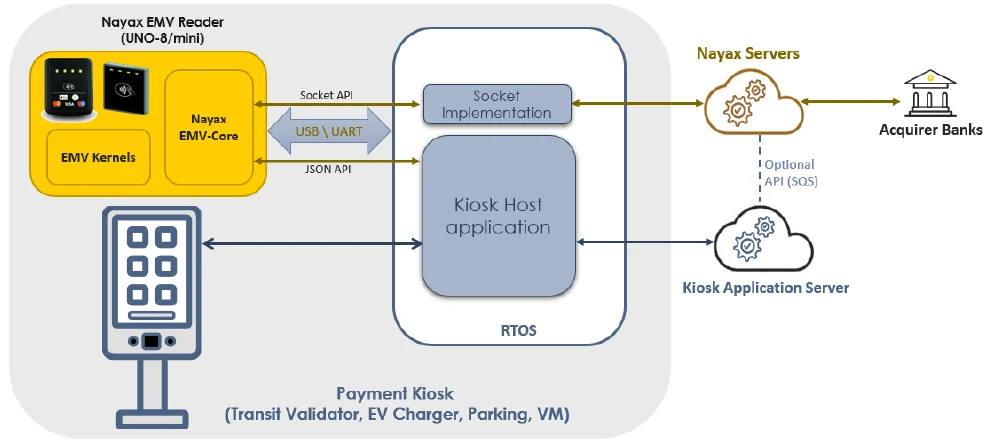
The Nayax Embedded solution includes three elements:
The UNO-mini reader running EMV Core firmware, exposing a JSON Payment API and network socket interface.
C99 sample code implementing the network socket and payment API calls.
Cloud service for remote terminal management and transaction clearing.
 ## Hardware and Software Architecture
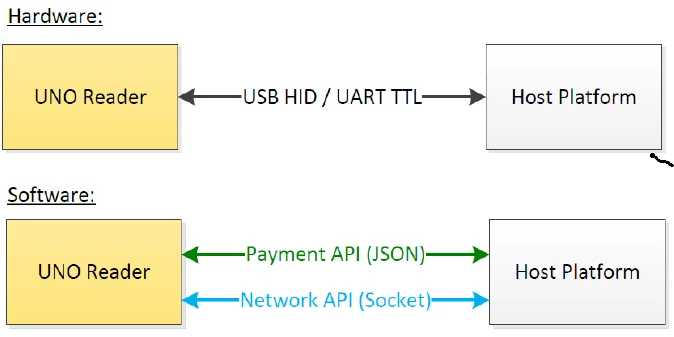
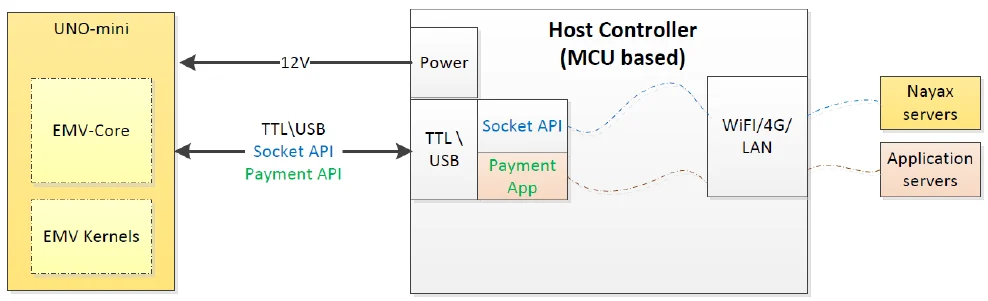
The UNO-mini reader running EMV Core connects to the Host platform (MCU/RTOS) via UART TTL or USB HID.
## Hardware and Software Architecture
The UNO-mini reader running EMV Core connects to the Host platform (MCU/RTOS) via UART TTL or USB HID.
 ### Application Layers
Communication flows through the following layers:
| Layer | Description |
| :-------------------- | :---------------------------------------------------------------------- |
| **Application Layer** | Your code calls SDK APIs (e.g., `EcodSdk_PreAuthorize()`) |
| **JSON-RPC Layer** | Converts API calls to JSON-RPC messages with datalink framing |
| **Serial Transport** | Sends framed messages via UART (`/dev/ttyUSB0`) or HID (`/dev/hidraw0`) |
| **EMV Core Device** | Processes payment requests and returns responses |
| **Callback System** | Async responses delivered via registered callbacks |
## Requirements Summary
| Requirement | Details |
| :-------------------- | :-------------------------------------------- |
| **Device connection** | USB HID or UART TTL |
| **Minimum RAM** | 64 KB (configurable for smaller systems) |
| **Reader power** | 5–12 VDC, 0.7 W idle / 3 W peak |
| **Network** | IPv4 TCP sockets, DNS resolution, client-only |
| **Compiler** | GCC 4.8+ or Clang 3.5+ with C99 support |
## Next Steps
SDK delivery, firmware installation, and obtaining your Device ID.
Threading, callbacks, error handling, and configuration.
Complete C API function reference and key data types.
### Application Layers
Communication flows through the following layers:
| Layer | Description |
| :-------------------- | :---------------------------------------------------------------------- |
| **Application Layer** | Your code calls SDK APIs (e.g., `EcodSdk_PreAuthorize()`) |
| **JSON-RPC Layer** | Converts API calls to JSON-RPC messages with datalink framing |
| **Serial Transport** | Sends framed messages via UART (`/dev/ttyUSB0`) or HID (`/dev/hidraw0`) |
| **EMV Core Device** | Processes payment requests and returns responses |
| **Callback System** | Async responses delivered via registered callbacks |
## Requirements Summary
| Requirement | Details |
| :-------------------- | :-------------------------------------------- |
| **Device connection** | USB HID or UART TTL |
| **Minimum RAM** | 64 KB (configurable for smaller systems) |
| **Reader power** | 5–12 VDC, 0.7 W idle / 3 W peak |
| **Network** | IPv4 TCP sockets, DNS resolution, client-only |
| **Compiler** | GCC 4.8+ or Clang 3.5+ with C99 support |
## Next Steps
SDK delivery, firmware installation, and obtaining your Device ID.
Threading, callbacks, error handling, and configuration.
Complete C API function reference and key data types.