> ## Documentation Index
> Fetch the complete documentation index at: https://devzone.nayax.com/llms.txt
> Use this file to discover all available pages before exploring further.
# Event Callbacks
The SDK triggers event callbacks in the EMV Core SDK to notify the application of specific events during the transaction lifecycle. They enable developers to respond dynamically to changes in transaction status and system events. These callbacks provide real-time updates, ensuring seamless communication between the SDK and the application.
These are the available callbacks.
* [CardTokenReceived](#cardtokenreceived)
* [ReaderMessageEvent](#readermessageevent)
* [SystemStatusChanged](#systemstatuschanged)
* [TransactionComplete](#transactioncomplete)
You can read a more detailed description of each Callback event in the sections below.
***
## `CardTokenReceived`
This event is triggered after a card token is successfully retrieved.
Open loop example:
```json theme={null}
{"jsonrpc":"2.0", "method": "CardTokenReceived", "params": {"status": "OK",
"errorCode": 0, "errorDescription": "", "CardToken":
"WSAr79nKPywW3INXrWvr6IL3vgTgSJlwZBgseKDmMHM=", "PartialPan": "",
"CardType": "EMV"}, "id": 702}
```
Closed loop example:
```json theme={null}
{"jsonrpc":"2.0", "method": "CardTokenReceived", "params": {"status":
"LocalCLP", "errorCode": 0, "errorDescription": "", "CardToken": "73D0D1C5",
"PartialPan": "", "CardType": "Type A"}, "id": 702}
```
**Parameters:**
| Parameter | Description |
| :----------- | :-------------------------------------------------------------------------------------------------------------------------- |
| `status` | Transaction result: `OK`, `Declined`, `Error`, `Timeout`, `Cancelled`, or `LocalCLP`. |
| `errorCode` | Numerical error code. `0` when there is no error. |
| `CardToken` | Card token. Base64 string for payment cards, or the card UID for closed loop (Mifare) cards. |
| `PartialPan` | Masked PAN with the card account number's first six and last four digits. Empty for closed loop cards. |
| `CardType` | Card scheme (for example, EMV, MasterCard, Visa). For closed loop cards, the card technology (for example, Type A, Mifare). |
```java Java theme={null}
void CardTokenReceived(TokenDetails tokenDetails);
```
Where:
| Parameter | Description |
| :------------- | :-------------------------- |
| `tokenDetails` | String with the Card token. |
```c Linux theme={null}
void LibOtiKiosk_Register_GetTokenResponse_Callback(GetTokenCb_t cb);
```
**Parameters:**
**`cb`**: A callback function of type `void (*)(otiKioskGetTokenResponse* resp)`. This function is triggered automatically when a card token operation completes.
The callback receives a pointer to an `otiKioskGetTokenResponse` struct with the token result:
```c C theme={null}
typedef struct {
otiTransactionStatus status; // Operation status
int error_code; // Error code if failed
char error_message[100]; // Error description
char card_token[128]; // Generated card token
char card_type[32]; // Card scheme (e.g., EMV, Visa, Mifare)
} otiKioskGetTokenResponse;
```
**Struct fields:**
| Field | Description |
| :-------------- | :------------------------------------------------------------------------------------------------------------------------------ |
| `status` | Status of the token operation. Same values as the JSON `status` field. |
| `error_code` | Numerical error code. `0` when there is no error. |
| `error_message` | Short technical description of the error, for developer and support use. Do not display to users. |
| `card_token` | Generated card token. Base64 string for payment cards, or the card UID for closed loop cards. |
| `card_type` | Card scheme (for example, EMV, Visa) for payment cards, or card technology (for example, Type A, Mifare) for closed loop cards. |
***
## `ReaderMessageEvent`
This callback provides updates on user interface messages from the card reader.
```json theme={null}
{"jsonrpc": "2.0", "method": "ReaderMessageEvent", "params": {"index": 36,
"line1": "Authorizing", "line2": "Please wait"}}
```
| Parameter | Description |
| :-------- | :---------------------------------------------------------------------------------------------------------------------------------------------------------------------------------------------------------------- |
| **index** | The index of the message – Decimal value according to the Message Index table. **Note:** The actual text presented on the reader display depends on the Kiosk configuration and may differ from the table values. |
```java Java theme={null}
public ReaderMessage(int index, String line1, String line2)
```
Parameters:
| Parameter | Description |
| :-------- | :----------------------------------------------------------------------------------------------------------------------------------------------------------------- |
| `index` | The index of the message. Decimal value according to the [Reader messages Index table](/docs/integrate-pos-device/emv-core/sdk-methods-functions/reader-messages). |
| `line1` | Text is shown on the 1st line of the reader display. |
| `line2` | Text is shown on the 2nd line of the reader display. |
**Reader Configuration**
For this feature to work, the reader must be configured to send External Display message events (Tag DF 46 with index 04).
```c Linux theme={null}
void on_reader_event(uint8_t msg_index, char* line1, char* line2) {
printf("Reader Display: %s | %s\n", line1, line2);
}
LibOtiKiosk_Register_ReaderEvent_Callback(on_reader_event);
```
***
## `SystemStatusChanged`
This method is only available for the Android operating system.
The `SystemStatusChanged` event indicates changes in the SDKs or connected devices' operational state.
```java Java theme={null}
void onTransactionComplete(TransactionResult result);
```
`SystemStatus` is an enumeration representing the current state of the system. See the possible result values in the table below:
| Result | Description |
| -------------------- | ---------------------------------------------- |
| `Ready` | The SDK is ready for transactions. |
| `NotReady` | The SDK is not operational. |
| `PaymentTransaction` | A transaction is currently in progress. |
| `Update` | A firmware or configuration update is ongoing. |
***
## `TransactionComplete`
EMV Core calls `TransactionComplete` when a transaction completes, whether it succeeds or fails. It gives your application the details needed to print a receipt and link transactions to sale events (for example, in a dispute).
Open loop request:
```json JSON theme={null}
{
"jsonrpc": "2.0",
"method": "TransactionComplete",
"params": {
"status": "OK",
"errorCode": 0,
"errorDescription": "",
"transactionId": "2046651064",
"authorizationDetails": {
"AmountAuthorized": 4.50,
"AmountRequested": 4.50,
"AuthorizationCode": "",
"PartialPan": "541333******4111",
"CardType": "MasterCard",
"IsTransactionApproved": true,
"eReceipt": "https://s.wee.ai/tr/...eIHT",
"Card_ID": "",
"Card_Balance": 0.00,
"RRN": "",
"TransactionDbID": "2046651064",
"Transaction_Referance": "2046651064",
"CardToken": "5VXkNqtUDJBxQj9p/qTGt74jWaPHlRs7xxWa1Yu0gDI=",
"Additional_Parameters": {
"hwSerial": "0207122525168550",
"SiteId": "6",
"AllowFundsOverAuthAmount": "false",
"IncrementalMaxDefaultCredit": "450.0",
"EntryMode": "4",
"MachineAuTime": "2026-05-10T16:53:39.017",
"NayaxTransactionId": "6811150712"
}
}
},
"id": 701
}
```
Closed loop request with mifare\_read:
To use `mifare_read`, set the **Mifare Blocks to Read** attribute in Nayax Core under **Embedded Advanced**. The following example uses `KA01B10B14` to read block 1 with key A, and blocks 10 and 14.
 ```json JSON theme={null}
{
"jsonrpc": "2.0",
"method": "TransactionComplete",
"params": {
"status": "LocalCLP",
"errorCode": 0,
"errorDescription": "",
"transactionId": "4701113B",
"authorizationDetails": {
"CardType": "Mifare",
"Card_ID": "4701113B",
"Card_Balance": 0.00,
"CardToken": "4701113B",
"Additional_Parameters": {}
}
},
"mifare_read": {
"UID": "4701113B",
"B10": "00000000000000000000000000000000",
"B14": "00000000000000000000000000000000"
},
"id": 701
}
```
Response:
```json JSON theme={null}
{"jsonrpc":"2.0", "result":true, "id":701}
```
**Parameters:**
| Parameter | Description |
| :------------------------- | :------------------------------------------------------------------------------------------------------------------------------------------------ |
| **id** | Command ID. |
| **status** | Transaction result: `OK`, `Declined`, `Error`, `Timeout`, `Cancelled`, or `LocalCLP`. |
| **errorCode** | Numerical error code. `0` when there is no error. |
| **errorDescription** | Short technical description of the error, for developer and support use. Do not display to users. |
| **transactionId** | Transaction ID. Use this value in `ConfirmTransaction` or `VoidTransaction`. |
| **authorizationDetails** | Authorization details including amount authorized, amount requested, authorization code, partial PAN, card type, approval status, and card token. |
| **Additional\_Parameters** | Optional data from the PSP in `{"fieldName": "fieldValue"}` format. Use these values for Nayax External Settlement (Remote Settlement). |
| **mifare\_read** | Block data read from the Mifare card, based on the `CLP_MIFARE_READ` attribute. Empty when absent. |
```java Java theme={null}
void TransactionComplete(AuthorizationDetails authorizationDetails);
```
**In case of no response**
If EMV Core doesn’t get an answer, it will re-send 2 times (for a total of 3 messages), and if it still doesn’t get an answer, it will assume the message received and will not cancel the transaction.
Where:
| Parameter | Description |
| :---------------------------- | :-------------------------------------------------------------------------------------------------------------------------------------------------------------------------------------------------------------------------------------------------------------------- |
| `errorDescription` | A short technical description of the error intended to help developers and tech support personnel identify the problem. It should not be presented to users. |
| `errorCode` | A numerical code describing the error if one occurs. See the table below for details on each code. |
| `status` | Possible statuses: OK, Declined, Error, Timeout, Cancelled, LocalCLP. |
| `amountAuthorized` | Amount approved for the transaction in major units (for example, dollars, not cents). May be lower than the original request if the card is prepaid. |
| `amountRequested` | Amount requested for transaction approval in major units (for example, dollars, not cents). |
| `authorization_Code` | PSP Transaction Identifier issued for approved transactions (EVO, Apriva, Traderoot). |
| `partialPan` | Masked PAN with the card account number's first six and last four digits. |
| `cardType` | Card scheme (MasterCard, Visa, Amex, and others). For closed-loop cards, the card technology type. See the closed loop card types table below. |
| `authID` | Approval Code from the processor (for some processors). |
| `receiptID` | Digital receipt ID in the PSP System. |
| `Transaction_Referance` | Deprecated. Use `transactionId` instead. |
| `TransactionDbID` | Deprecated. Use `transactionId` instead. |
| `RRN` | Processor reference number for approved transactions. |
| `card_ID` | Mifare UID in case of a Mifare card and `CLP_MIFARE_ENABLED=2`. |
| `isTransactionApproved` | Boolean indicating the transaction approval status. |
| `eReceipt` | URL for the Nayax eReceipt. See eReceipt settings in Nayax Core for required configuration. |
| `CardToken` | A token identifying the card. For payment cards, it returns a Base64 string. For closed-loop cards (for example, Mifare), it returns the card UID. |
| `Channel` | Channel used for card reading (for example, Contactless, Magstripe, Contact). |
| `AID, TVR, IAD, TSI, ARC` | Card/Transaction parameters that may be used for the receipt. |
| `transactionTime` | Transaction time. |
| `application_Label` | Card scheme (for example, Visa, MasterCard, American Express). |
| `currency` | Currency code according to ISO 4217 (for example, 840 means US dollars). |
| `CVM` | Card Verification Method. |
| `additional_Parameters` | Optional additional parameters from the payment processor. Used for Nayax External Settlement (Remote Settlement). Includes: `SiteId`, `EntryMode`, `MachineAuTime`, `NayaxTransactionId`, `hwSerial`, `AllowFundsOverAuthAmount`, and `IncrementalMaxDefaultCredit`. |
| `hwSerial` | Hardware serial number of the terminal. |
| `AllowFundsOverAuthAmount` | Whether incremental charges above the authorized amount are permitted (`"true"` or `"false"`). |
| `IncrementalMaxDefaultCredit` | Maximum credit amount allowed for incremental authorization. |
| `card_Balance` | Card balance for closed-loop cards managed by Nayax. |
### `TransactionComplete` Closed loop card types
The following card technology types may be returned in the `cardType` field for closed-loop transactions.
| Card Type | Description |
| :----------- | :----------------------- |
| `Type A` | ISO/IEC 14443 Type A |
| `Type B` | ISO/IEC 14443 Type B |
| `Mifare` | Mifare |
| `Mifare-U` | Mifare Ultralight |
| `DesFire` | Mifare DESFire |
| `Mifare-P` | Mifare Plus |
| `Vicinity` | ISO/IEC 15693 |
| `Vicinity-P` | ISO/IEC 15693 HID iClass |
| `Felica` | FeliCa JIS X 6319-4 |
### `TransactionComplete` Error codes
These are the possible error codes in the response:
| Error Type | Error Code |
| -------------------- | ------------------------------------- |
| JsonParse | -1 |
| General | -1 |
| Terminate | -1 |
| Timeout | -1 |
| Transaction Declined | -1 |
| Positive code | Payment Service Provider (PSP) errors |
```c Linux theme={null}
void on_transaction_complete(otiKioskPaymentResponse* resp) {
if (resp->status == otiTransactionStatus_OK) {
printf("Transaction successful: %s\n", resp->transaction_reference);
} else {
printf("Transaction failed: %s\n", resp->error_message);
}
}
LibOtiKiosk_Register_TransactionComplete_Callback(on_transaction_complete);
```
**Parameters:**
**`cb`**: A callback function of type `void (*)(otiKioskPaymentResponse* resp)`. This function is triggered automatically when a transaction reaches a final state.
The callback receives a pointer to an `otiKioskPaymentResponse` struct with the full transaction result:
```c C theme={null}
typedef struct {
otiTransactionStatus status; // Transaction status
int error_code; // Error code if failed
char error_message[100]; // Error description
double amount_requested; // Requested amount
double amount_authorized; // Authorized amount
char transaction_reference[128]; // Unique transaction reference
char partial_PAN[20]; // Masked card number
char card_type[32]; // Card type (Visa, MasterCard, etc.)
char card_id[32]; // Card identifier
char card_token[128]; // Secure card token
char EReceipt[256]; // Electronic receipt URL
char Additional_Parameters[256]; // Additional parameters, used for remote settlement
double card_balance; // RFU: card balance for closed-loop cards
bool is_transaction_approved; // Approval status
char authorization_code[128]; // PSP authorization code
char rrn[128]; // Processor reference number
NayaxTransactionIdInfo nayax_info; // Fields for remote settlement
char mifare_read[256]; // Raw JSON of mifare_read params for CLP_MIFARE_READ, empty when absent
} otiKioskPaymentResponse;
```
**Struct fields:**
| Field | Description |
| :------------------------ | :------------------------------------------------------------------------------------------------------------- |
| `status` | Transaction status. Same values as the JSON `status` field. |
| `error_code` | Numerical error code. `0` when there is no error. |
| `error_message` | Short technical description of the error, for developer and support use. Do not display to users. |
| `amount_requested` | Amount requested for transaction approval, in major units (for example, dollars, not cents). |
| `amount_authorized` | Amount approved for the transaction, in major units. May be lower than the requested amount for prepaid cards. |
| `transaction_reference` | Transaction ID. Use this value in `ConfirmTransaction` or `VoidTransaction`. |
| `partial_PAN` | Masked PAN with the card account number's first six and last four digits. |
| `card_type` | Card scheme for open-loop cards, or card technology for closed-loop cards. |
| `card_id` | Mifare UID when the card is a Mifare card and `CLP_MIFARE_ENABLED=2`. |
| `card_token` | Token identifying the card. Base64 string for payment cards, or the card UID for closed-loop cards. |
| `EReceipt` | URL for the Nayax eReceipt. See eReceipt settings in Nayax Core below. |
| `Additional_Parameters` | Optional data from the PSP, used for Nayax External Settlement (Remote Settlement). |
| `card_balance` | RFU. Card balance for closed-loop cards managed by Nayax. |
| `is_transaction_approved` | Whether the transaction was approved. |
| `authorization_code` | PSP transaction identifier issued for approved transactions. |
| `rrn` | Processor reference number for approved transactions. |
| `nayax_info` | Fields required for Nayax External Settlement (Remote Settlement). |
| `mifare_read` | Raw JSON of the blocks read from a Mifare card, based on the `CLP_MIFARE_READ` attribute. Empty when absent. |
For the full closed-loop card type list and error code list, see the equivalent fields in the Android tab above.
### eReceipt settings in Nayax Core
To receive eReceipts, configure the operator in Nayax Core with the following settings.
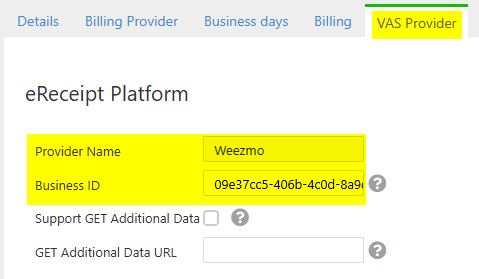
In the operator settings, go to the **VAS Provider** tab. Under **eReceipt Platform**, enter the **Provider Name** and **Business ID**.
```json JSON theme={null}
{
"jsonrpc": "2.0",
"method": "TransactionComplete",
"params": {
"status": "LocalCLP",
"errorCode": 0,
"errorDescription": "",
"transactionId": "4701113B",
"authorizationDetails": {
"CardType": "Mifare",
"Card_ID": "4701113B",
"Card_Balance": 0.00,
"CardToken": "4701113B",
"Additional_Parameters": {}
}
},
"mifare_read": {
"UID": "4701113B",
"B10": "00000000000000000000000000000000",
"B14": "00000000000000000000000000000000"
},
"id": 701
}
```
Response:
```json JSON theme={null}
{"jsonrpc":"2.0", "result":true, "id":701}
```
**Parameters:**
| Parameter | Description |
| :------------------------- | :------------------------------------------------------------------------------------------------------------------------------------------------ |
| **id** | Command ID. |
| **status** | Transaction result: `OK`, `Declined`, `Error`, `Timeout`, `Cancelled`, or `LocalCLP`. |
| **errorCode** | Numerical error code. `0` when there is no error. |
| **errorDescription** | Short technical description of the error, for developer and support use. Do not display to users. |
| **transactionId** | Transaction ID. Use this value in `ConfirmTransaction` or `VoidTransaction`. |
| **authorizationDetails** | Authorization details including amount authorized, amount requested, authorization code, partial PAN, card type, approval status, and card token. |
| **Additional\_Parameters** | Optional data from the PSP in `{"fieldName": "fieldValue"}` format. Use these values for Nayax External Settlement (Remote Settlement). |
| **mifare\_read** | Block data read from the Mifare card, based on the `CLP_MIFARE_READ` attribute. Empty when absent. |
```java Java theme={null}
void TransactionComplete(AuthorizationDetails authorizationDetails);
```
**In case of no response**
If EMV Core doesn’t get an answer, it will re-send 2 times (for a total of 3 messages), and if it still doesn’t get an answer, it will assume the message received and will not cancel the transaction.
Where:
| Parameter | Description |
| :---------------------------- | :-------------------------------------------------------------------------------------------------------------------------------------------------------------------------------------------------------------------------------------------------------------------- |
| `errorDescription` | A short technical description of the error intended to help developers and tech support personnel identify the problem. It should not be presented to users. |
| `errorCode` | A numerical code describing the error if one occurs. See the table below for details on each code. |
| `status` | Possible statuses: OK, Declined, Error, Timeout, Cancelled, LocalCLP. |
| `amountAuthorized` | Amount approved for the transaction in major units (for example, dollars, not cents). May be lower than the original request if the card is prepaid. |
| `amountRequested` | Amount requested for transaction approval in major units (for example, dollars, not cents). |
| `authorization_Code` | PSP Transaction Identifier issued for approved transactions (EVO, Apriva, Traderoot). |
| `partialPan` | Masked PAN with the card account number's first six and last four digits. |
| `cardType` | Card scheme (MasterCard, Visa, Amex, and others). For closed-loop cards, the card technology type. See the closed loop card types table below. |
| `authID` | Approval Code from the processor (for some processors). |
| `receiptID` | Digital receipt ID in the PSP System. |
| `Transaction_Referance` | Deprecated. Use `transactionId` instead. |
| `TransactionDbID` | Deprecated. Use `transactionId` instead. |
| `RRN` | Processor reference number for approved transactions. |
| `card_ID` | Mifare UID in case of a Mifare card and `CLP_MIFARE_ENABLED=2`. |
| `isTransactionApproved` | Boolean indicating the transaction approval status. |
| `eReceipt` | URL for the Nayax eReceipt. See eReceipt settings in Nayax Core for required configuration. |
| `CardToken` | A token identifying the card. For payment cards, it returns a Base64 string. For closed-loop cards (for example, Mifare), it returns the card UID. |
| `Channel` | Channel used for card reading (for example, Contactless, Magstripe, Contact). |
| `AID, TVR, IAD, TSI, ARC` | Card/Transaction parameters that may be used for the receipt. |
| `transactionTime` | Transaction time. |
| `application_Label` | Card scheme (for example, Visa, MasterCard, American Express). |
| `currency` | Currency code according to ISO 4217 (for example, 840 means US dollars). |
| `CVM` | Card Verification Method. |
| `additional_Parameters` | Optional additional parameters from the payment processor. Used for Nayax External Settlement (Remote Settlement). Includes: `SiteId`, `EntryMode`, `MachineAuTime`, `NayaxTransactionId`, `hwSerial`, `AllowFundsOverAuthAmount`, and `IncrementalMaxDefaultCredit`. |
| `hwSerial` | Hardware serial number of the terminal. |
| `AllowFundsOverAuthAmount` | Whether incremental charges above the authorized amount are permitted (`"true"` or `"false"`). |
| `IncrementalMaxDefaultCredit` | Maximum credit amount allowed for incremental authorization. |
| `card_Balance` | Card balance for closed-loop cards managed by Nayax. |
### `TransactionComplete` Closed loop card types
The following card technology types may be returned in the `cardType` field for closed-loop transactions.
| Card Type | Description |
| :----------- | :----------------------- |
| `Type A` | ISO/IEC 14443 Type A |
| `Type B` | ISO/IEC 14443 Type B |
| `Mifare` | Mifare |
| `Mifare-U` | Mifare Ultralight |
| `DesFire` | Mifare DESFire |
| `Mifare-P` | Mifare Plus |
| `Vicinity` | ISO/IEC 15693 |
| `Vicinity-P` | ISO/IEC 15693 HID iClass |
| `Felica` | FeliCa JIS X 6319-4 |
### `TransactionComplete` Error codes
These are the possible error codes in the response:
| Error Type | Error Code |
| -------------------- | ------------------------------------- |
| JsonParse | -1 |
| General | -1 |
| Terminate | -1 |
| Timeout | -1 |
| Transaction Declined | -1 |
| Positive code | Payment Service Provider (PSP) errors |
```c Linux theme={null}
void on_transaction_complete(otiKioskPaymentResponse* resp) {
if (resp->status == otiTransactionStatus_OK) {
printf("Transaction successful: %s\n", resp->transaction_reference);
} else {
printf("Transaction failed: %s\n", resp->error_message);
}
}
LibOtiKiosk_Register_TransactionComplete_Callback(on_transaction_complete);
```
**Parameters:**
**`cb`**: A callback function of type `void (*)(otiKioskPaymentResponse* resp)`. This function is triggered automatically when a transaction reaches a final state.
The callback receives a pointer to an `otiKioskPaymentResponse` struct with the full transaction result:
```c C theme={null}
typedef struct {
otiTransactionStatus status; // Transaction status
int error_code; // Error code if failed
char error_message[100]; // Error description
double amount_requested; // Requested amount
double amount_authorized; // Authorized amount
char transaction_reference[128]; // Unique transaction reference
char partial_PAN[20]; // Masked card number
char card_type[32]; // Card type (Visa, MasterCard, etc.)
char card_id[32]; // Card identifier
char card_token[128]; // Secure card token
char EReceipt[256]; // Electronic receipt URL
char Additional_Parameters[256]; // Additional parameters, used for remote settlement
double card_balance; // RFU: card balance for closed-loop cards
bool is_transaction_approved; // Approval status
char authorization_code[128]; // PSP authorization code
char rrn[128]; // Processor reference number
NayaxTransactionIdInfo nayax_info; // Fields for remote settlement
char mifare_read[256]; // Raw JSON of mifare_read params for CLP_MIFARE_READ, empty when absent
} otiKioskPaymentResponse;
```
**Struct fields:**
| Field | Description |
| :------------------------ | :------------------------------------------------------------------------------------------------------------- |
| `status` | Transaction status. Same values as the JSON `status` field. |
| `error_code` | Numerical error code. `0` when there is no error. |
| `error_message` | Short technical description of the error, for developer and support use. Do not display to users. |
| `amount_requested` | Amount requested for transaction approval, in major units (for example, dollars, not cents). |
| `amount_authorized` | Amount approved for the transaction, in major units. May be lower than the requested amount for prepaid cards. |
| `transaction_reference` | Transaction ID. Use this value in `ConfirmTransaction` or `VoidTransaction`. |
| `partial_PAN` | Masked PAN with the card account number's first six and last four digits. |
| `card_type` | Card scheme for open-loop cards, or card technology for closed-loop cards. |
| `card_id` | Mifare UID when the card is a Mifare card and `CLP_MIFARE_ENABLED=2`. |
| `card_token` | Token identifying the card. Base64 string for payment cards, or the card UID for closed-loop cards. |
| `EReceipt` | URL for the Nayax eReceipt. See eReceipt settings in Nayax Core below. |
| `Additional_Parameters` | Optional data from the PSP, used for Nayax External Settlement (Remote Settlement). |
| `card_balance` | RFU. Card balance for closed-loop cards managed by Nayax. |
| `is_transaction_approved` | Whether the transaction was approved. |
| `authorization_code` | PSP transaction identifier issued for approved transactions. |
| `rrn` | Processor reference number for approved transactions. |
| `nayax_info` | Fields required for Nayax External Settlement (Remote Settlement). |
| `mifare_read` | Raw JSON of the blocks read from a Mifare card, based on the `CLP_MIFARE_READ` attribute. Empty when absent. |
For the full closed-loop card type list and error code list, see the equivalent fields in the Android tab above.
### eReceipt settings in Nayax Core
To receive eReceipts, configure the operator in Nayax Core with the following settings.
In the operator settings, go to the **VAS Provider** tab. Under **eReceipt Platform**, enter the **Provider Name** and **Business ID**.
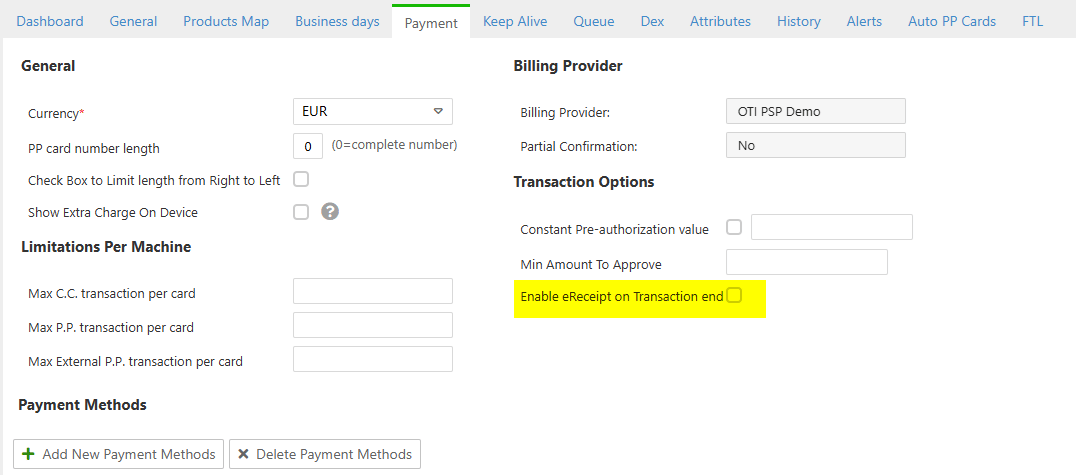
 In the machine settings, go to the **Payment** tab. Under **Transaction Options**, uncheck **Enable eReceipt on Transaction end**.