> ## Documentation Index
> Fetch the complete documentation index at: https://devzone.nayax.com/llms.txt
> Use this file to discover all available pages before exploring further.
# Single Session Pre-Authorization with External Settlement
The Marshall implementation of [ExternalSettlement](/reference/spark/transactions/externalsettlement) separates the authorization and settlement phases of a transaction.
While the Marshall peripheral and Nayax device manage the initial interaction with the consumer and the payment card, the final financial settlement is performed by a 3rd Party Server that sends the settlement request to Nayax's servers.
**Prerequisite**
For this flow to function, the [ExternalSettlement](/reference/spark/transactions/externalsettlement) setting must be enabled by Nayax.
## Configuration & Device Behavior
Once enabled, the Nayax Engine changes how the physical device handles transactions:
* The device will not send its own settlement command after a successful authorization.
* The transaction remains unsettled until an external request is received.
* The only way to settle a transaction is via the [ExternalSettlement](/reference/spark/transactions/externalsettlement) command.
* For Multi-session flows, the "Close Session" command is no longer relevant; use [ExternalSettlement](/reference/spark/transactions/externalsettlement) instead.
* To allow the settlement price to differ from the authorized amount (settlement price ≤ authorized price), enable the `price not final` flag in the Marshall SDK.
This gives you the flexibility to trigger the settlement stage externally according to your own business logic, supporting all flow types (Pre-Selection/Pre-Authorization).
| Feature | Requirement |
| :-------------------- | :---------------------------------------------------------------------------------------------------------------------------- |
| **Settlement Window** | Transactions must be settled within **48 hours** of initiation. |
| **Expiry** | Settlement attempts performed after the 48-hour window will fail. |
| **Auto-Cleanup** | Transactions unsettled for >48 hours are automatically canceled via card scheme regulations (this should not be relied upon). |
| **Incremental Auth** | The final settlement price must not exceed the Maximum Default Credit set for the operator/machine. |
**Incremental Authorization**
External Settlement supports Incremental Authorization. Ensure your logic adheres to the Maximum Default Credit limits to avoid settlement failure. More on this in the [Incremental Authorization documentation](/docs/integrate-pos-device/marshall/payment-flows/sub-flows-features#incremental-authorization).
## Managing Unsettled Transactions
When no product or service is provided, you must proactively manage the transaction to maintain a good user experience.
* **External Cancel:** If you know no settlement will occur, you must send an **External Cancel** immediately.
* **Consumer Impact:** If a transaction remains authorized without being canceled or settled, the consumer's funds will stay captured on their payment method, leading to potential disputes.
## External Settlement Flow
The flow consists of two phases: payment authorization handled by the Marshall peripheral and Nayax device, and settlement or cancellation triggered by your 3rd-party server.
### Payment authorization
The steps below cover the authorization phase, from card tap through session completion.
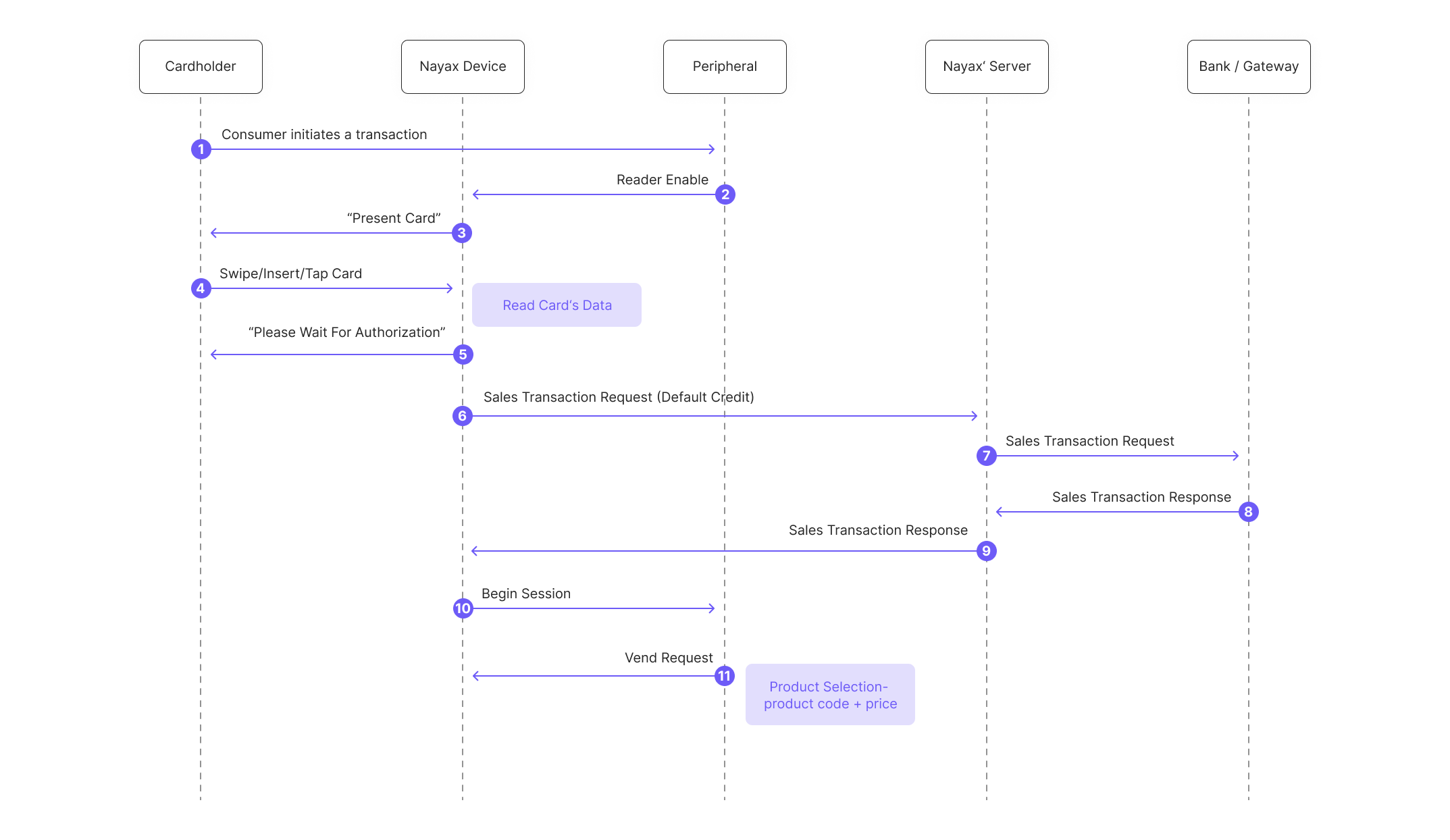 1. The consumer initiates a transaction with the peripheral.
2. The Peripheral enables the Nayax's device card reader.
3. The consumer is prompted to present their card.
4. The customer presents the card to the Nayax Device.
5. The consumer is notified about the authorization process taking place.
6. The Nayax Device sends an authorization request to the Nayax Server.
7. The Nayax Server performs authorization with the Billing Provider.
8. The Billing Provider sends an authorization response (approved) to the Nayax Server.
9. The Nayax Server sends the authorization response back to the Nayax Device.
10. The peripheral's SDK triggers the "session begin" event:
```java Java theme={null}
vmc_vend_events() (via onBeginSession(funds_avail))
```
```csharp C# theme={null}
vend_callbacks(onBeginSession(funds_avail))
```
```c C theme={null}
vmc_vend_event_handler_cb(vm_vend_event_on_session_begin)
```
This is the signal for the peripheral, such as the vending machine, to prepare for payment approval.
```java Java theme={null}
m_sessions[0] = new vmc_vend_t.vend_session_t((short) 0, 1, (byte) 0, 10);
//the fields are (from left to right): produce code (2 bytes long,meaning value up to 65535), quantity (2 byte), unit of measure (1 byte), price (2 bytes, meaning value up to 65535)
```
```csharp C# theme={null}
List list = new List ();
list.Add(new vmc_vend_t.vend_item_t(0, 10, 1, 1));
//the fields are (from left to right): produce code (2 bytes long,meaning value up to 65535), price (2 bytes, meaning value up to 65535), quantity (2 bytes), unit of measure (1 byte), .
session = new vmc_vend_t.vend_session_t(list);
```
```c C theme={null}
session_product.code = 1;
session_product .qty = 1;
session_product.price = 10;
session_product.unit = 1;
session->products = &session_product;
session->total_products = 1;
```
11. The machine display shows: "Please Select a Product." and the customer selects a product, prompting the peripheral's SDK to send a "vend request" to the Nayax Device.
```java Java theme={null}
m_vmc.vend.vend_request(m_sessions[m_active_session]);
```
```csharp C# theme={null}
vmc_instance.vend.vend_request(session);
```
```c C theme={null}
vmc_vend_vend_request(session);
```
1. The consumer initiates a transaction with the peripheral.
2. The Peripheral enables the Nayax's device card reader.
3. The consumer is prompted to present their card.
4. The customer presents the card to the Nayax Device.
5. The consumer is notified about the authorization process taking place.
6. The Nayax Device sends an authorization request to the Nayax Server.
7. The Nayax Server performs authorization with the Billing Provider.
8. The Billing Provider sends an authorization response (approved) to the Nayax Server.
9. The Nayax Server sends the authorization response back to the Nayax Device.
10. The peripheral's SDK triggers the "session begin" event:
```java Java theme={null}
vmc_vend_events() (via onBeginSession(funds_avail))
```
```csharp C# theme={null}
vend_callbacks(onBeginSession(funds_avail))
```
```c C theme={null}
vmc_vend_event_handler_cb(vm_vend_event_on_session_begin)
```
This is the signal for the peripheral, such as the vending machine, to prepare for payment approval.
```java Java theme={null}
m_sessions[0] = new vmc_vend_t.vend_session_t((short) 0, 1, (byte) 0, 10);
//the fields are (from left to right): produce code (2 bytes long,meaning value up to 65535), quantity (2 byte), unit of measure (1 byte), price (2 bytes, meaning value up to 65535)
```
```csharp C# theme={null}
List list = new List ();
list.Add(new vmc_vend_t.vend_item_t(0, 10, 1, 1));
//the fields are (from left to right): produce code (2 bytes long,meaning value up to 65535), price (2 bytes, meaning value up to 65535), quantity (2 bytes), unit of measure (1 byte), .
session = new vmc_vend_t.vend_session_t(list);
```
```c C theme={null}
session_product.code = 1;
session_product .qty = 1;
session_product.price = 10;
session_product.unit = 1;
session->products = &session_product;
session->total_products = 1;
```
11. The machine display shows: "Please Select a Product." and the customer selects a product, prompting the peripheral's SDK to send a "vend request" to the Nayax Device.
```java Java theme={null}
m_vmc.vend.vend_request(m_sessions[m_active_session]);
```
```csharp C# theme={null}
vmc_instance.vend.vend_request(session);
```
```c C theme={null}
vmc_vend_vend_request(session);
```
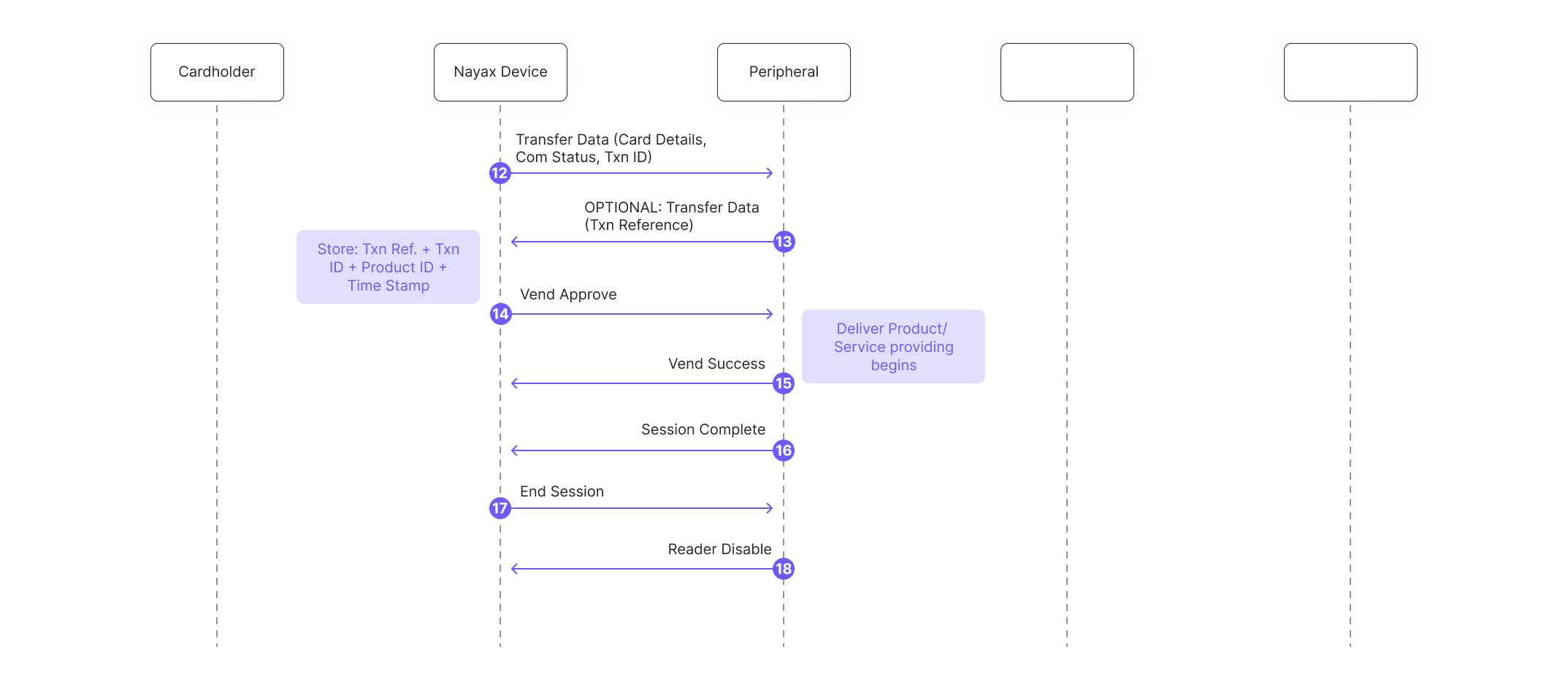 12. The peripheral's SDK handles transaction data received via Transfer Data command (includes Nayax Transaction ID and card details):
```java Java theme={null}
vmc_vend_events() (via onTransactionInfo(data))
```
```csharp C# theme={null}
vend_callbacks(onTransactionInfo(data))
```
```c C theme={null}
vmc_vend_event_handler_cb(vm_vend_event_on_transaction_info)
```
At this point, the peripheral must retain the (Nayax's) Transaction ID and Site ID received for later use in the External Settlement/External Cancel.
13. **Optional:** The peripheral's SDK can respond to Nayax's device with its own Transaction number (this information won't be used anywhere, just in case the peripheral would like to have its own Transaction ID appearing in the SDK's logs).
14. Nayax's device sends "Vend Approved", triggering the peripheral's SDK "vend approved" event:
```java Java theme={null}
vmc_vend_events() (via onVendApproved(session))
```
```csharp C# theme={null}
vend_callbacks(via onVendApproved(session))
```
```c C theme={null}
vmc_vend_event_handler_cb(vm_vend_event_on_vend_approved)
```
15. The peripheral dispenses the product or provides the service to the consumer, and the SDK reports success and completes the local session:
```java Java theme={null}
onVendApproved(session)
```
```csharp C# theme={null}
onVendApproved(session)
```
```c C theme={null}
vmc_vend_vend_status(&session, __true)` and `vmc_vend_vend_session_complete_lowlevel()
```
16. The peripheral sends `Session Complete` to indicate completion of the ongoing transaction process (not yet settling it).
17. Nayax's device sends `End Session` to the peripheral.
18. The peripheral sends `Reader Disable` to put the reader in standby.
### Settling the transaction
After session close, a 3rd-party server handles either settlement or cancellation depending on whether the service was provided.
If the service was provided:
19. The 3rd Party Server initiates communication by calling the `StartAuthentication` method with an encrypted cipher to authenticate.
20. The Nayax Server decrypts the cipher, validates the credentials and timestamps to confirm authenticity.
12. The peripheral's SDK handles transaction data received via Transfer Data command (includes Nayax Transaction ID and card details):
```java Java theme={null}
vmc_vend_events() (via onTransactionInfo(data))
```
```csharp C# theme={null}
vend_callbacks(onTransactionInfo(data))
```
```c C theme={null}
vmc_vend_event_handler_cb(vm_vend_event_on_transaction_info)
```
At this point, the peripheral must retain the (Nayax's) Transaction ID and Site ID received for later use in the External Settlement/External Cancel.
13. **Optional:** The peripheral's SDK can respond to Nayax's device with its own Transaction number (this information won't be used anywhere, just in case the peripheral would like to have its own Transaction ID appearing in the SDK's logs).
14. Nayax's device sends "Vend Approved", triggering the peripheral's SDK "vend approved" event:
```java Java theme={null}
vmc_vend_events() (via onVendApproved(session))
```
```csharp C# theme={null}
vend_callbacks(via onVendApproved(session))
```
```c C theme={null}
vmc_vend_event_handler_cb(vm_vend_event_on_vend_approved)
```
15. The peripheral dispenses the product or provides the service to the consumer, and the SDK reports success and completes the local session:
```java Java theme={null}
onVendApproved(session)
```
```csharp C# theme={null}
onVendApproved(session)
```
```c C theme={null}
vmc_vend_vend_status(&session, __true)` and `vmc_vend_vend_session_complete_lowlevel()
```
16. The peripheral sends `Session Complete` to indicate completion of the ongoing transaction process (not yet settling it).
17. Nayax's device sends `End Session` to the peripheral.
18. The peripheral sends `Reader Disable` to put the reader in standby.
### Settling the transaction
After session close, a 3rd-party server handles either settlement or cancellation depending on whether the service was provided.
If the service was provided:
19. The 3rd Party Server initiates communication by calling the `StartAuthentication` method with an encrypted cipher to authenticate.
20. The Nayax Server decrypts the cipher, validates the credentials and timestamps to confirm authenticity.
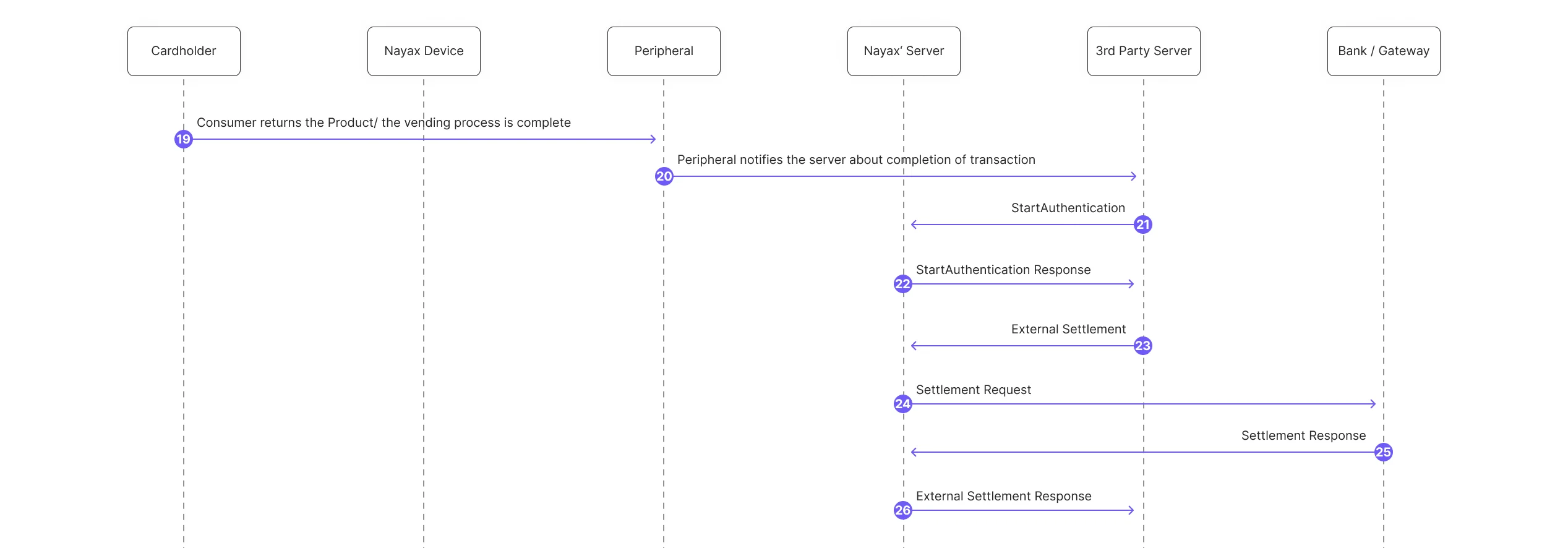 21. The 3rd Party Server sends an [ExternalSettlement](/reference/spark/transactions/externalsettlement) request. It must contain: `NayaxTransactionId`, `SiteId` (information retrieved from the transaction's Transfer Data's command) and be sent within 48 hours of the authorization of the consumer's card.
* To allow the settlement price to differ from the authorized amount (settlement price ≤ authorized price), enable the `price not final` flag in the Marshall SDK.
22. The peripheral notifies the server of the transaction's completion.
23. The 3rd party server starts the authentication process.
24. Nayax server sends a response.
25. Nayax's servers send an [ExternalSettlement](/reference/spark/transactions/externalsettlement) response to the 3rd-party server.
26. Nayax's servers notify the device of the settlement.
27. Nayax's device notifies the consumer that the transaction has been settled for the final amount they were charged.
28. Nayax Server sends an external settlement response.
If the service was not provided:
21. The 3rd Party Server sends an [ExternalSettlement](/reference/spark/transactions/externalsettlement) request. It must contain: `NayaxTransactionId`, `SiteId` (information retrieved from the transaction's Transfer Data's command) and be sent within 48 hours of the authorization of the consumer's card.
* To allow the settlement price to differ from the authorized amount (settlement price ≤ authorized price), enable the `price not final` flag in the Marshall SDK.
22. The peripheral notifies the server of the transaction's completion.
23. The 3rd party server starts the authentication process.
24. Nayax server sends a response.
25. Nayax's servers send an [ExternalSettlement](/reference/spark/transactions/externalsettlement) response to the 3rd-party server.
26. Nayax's servers notify the device of the settlement.
27. Nayax's device notifies the consumer that the transaction has been settled for the final amount they were charged.
28. Nayax Server sends an external settlement response.
If the service was not provided:
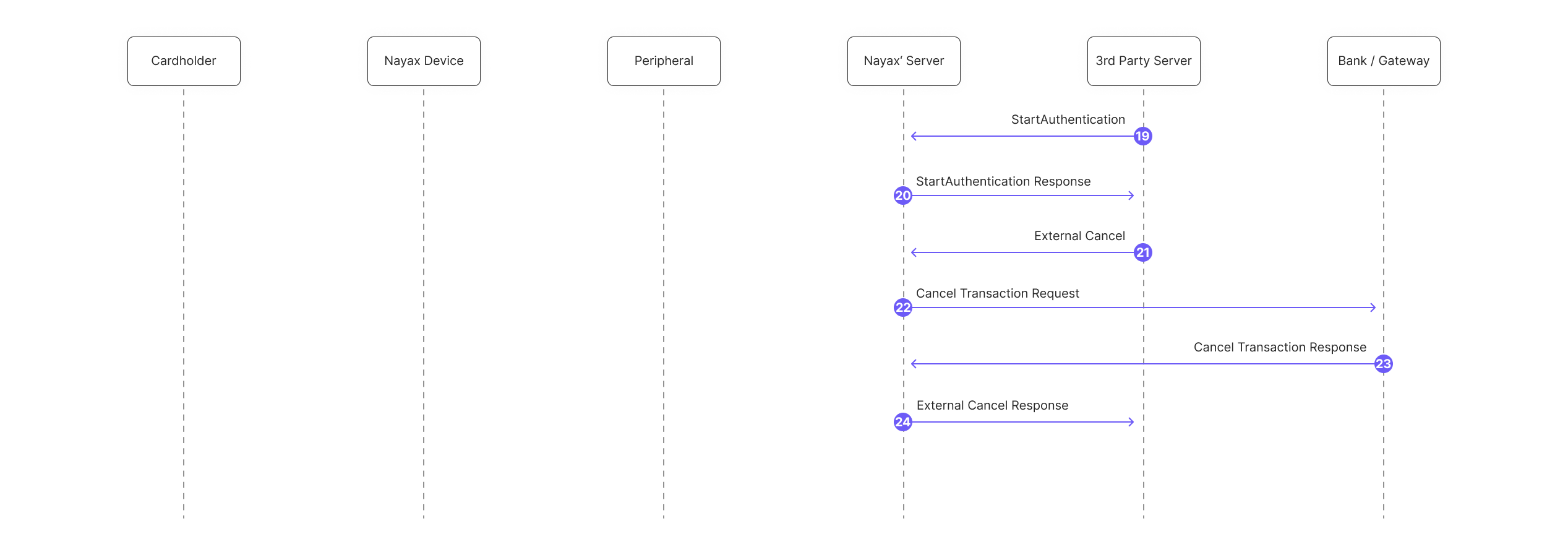 24. The 3rd Party Server starts the authentication process.
25. Nayax server sends a response.
26. The 3rd Party Server sends an [ExternalCancel](/reference/spark/transactions/externalcancel) request. It must contain: `NayaxTransactionId`, `SiteId` (information retrieved from the transaction's Transfer Data's command) and be sent within 48 hours of the authorization of the consumer's card.
27. Nayax Servers initiate the cancellation process with the payment provider.
28. Nayax's servers receive the response from the payment provider.
29. Nayax's servers send an [ExternalCancel](/reference/spark/transactions/externalcancel) response to the 3rd Party Server.
## Next steps
API reference for the ExternalSettlement endpoint used to settle authorized transactions from a 3rd-party server.
API reference for the ExternalCancel endpoint used to cancel authorized transactions when no service is provided.
Details on Incremental Authorization and Maximum Default Credit limits that apply to External Settlement.
24. The 3rd Party Server starts the authentication process.
25. Nayax server sends a response.
26. The 3rd Party Server sends an [ExternalCancel](/reference/spark/transactions/externalcancel) request. It must contain: `NayaxTransactionId`, `SiteId` (information retrieved from the transaction's Transfer Data's command) and be sent within 48 hours of the authorization of the consumer's card.
27. Nayax Servers initiate the cancellation process with the payment provider.
28. Nayax's servers receive the response from the payment provider.
29. Nayax's servers send an [ExternalCancel](/reference/spark/transactions/externalcancel) response to the 3rd Party Server.
## Next steps
API reference for the ExternalSettlement endpoint used to settle authorized transactions from a 3rd-party server.
API reference for the ExternalCancel endpoint used to cancel authorized transactions when no service is provided.
Details on Incremental Authorization and Maximum Default Credit limits that apply to External Settlement.