> ## Documentation Index
> Fetch the complete documentation index at: https://devzone.nayax.com/llms.txt
> Use this file to discover all available pages before exploring further.
# Device Start Configuration
> Configure a machine in Nayax Core to support Spark Device Start, for a single service station or for two to six service stations.
The settings on this page prepare a machine for Spark Device Start, where a transaction
starts from the terminal when a consumer interacts with it. Configure a single service
station when the device serves one service point, or multiple service stations when it
serves two to six. Apply these settings to the machine you selected in
[Machine Configuration](/docs/integrate-pos-device/spark/machine-configuration).
For other machine configurations not covered here, contact your Nayax Support
representative.
## Single Service Station
Use this configuration when the Nayax device serves one service point.
### Card Readers
These settings control the device hardware and how a transaction can start:
* **Decimal Place**: defines the Nayax device and affects the **Default Credit** value.
This is usually `2`.
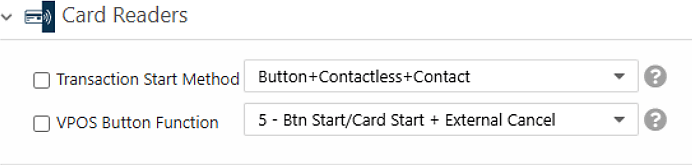
* **Transaction Start Method**: set to **Button**, **Contactless**, and **Contact** so
a transaction can start either from a card presented in idle mode or from a button
press on the device screen.
* **VPOS Button Function**: set to **5 - Btn Start/Card Start + External Cancel**.
 ### MDB
The **MDB Flags** setting tells the server which payment flow the device supports.
Device Start uses the **Pre-Authorization** flow, which applies when the transaction
starts before the consumer chooses a product or service and before the final amount is
known.
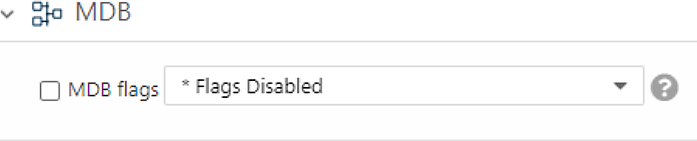
Set **MDB Flags** to **\* Flags Disabled**.
### MDB
The **MDB Flags** setting tells the server which payment flow the device supports.
Device Start uses the **Pre-Authorization** flow, which applies when the transaction
starts before the consumer chooses a product or service and before the final amount is
known.
Set **MDB Flags** to **\* Flags Disabled**.
 ### Payment
The **Default Credit** setting sets the authorization amount for the Pre-Authorization
flow. It applies when the `Amount` field in the `InfoQuery` response is empty. The
value is in cents and is affected by the **Decimal Place** value. The settlement value
cannot be higher than this amount.
### Pulse/ccTalk
These settings define the credit applied per pulse and the authorization source:
* **Credit per Pulse 1**: set to `1`.
* **Number of Pulses per Vend 1**: set to `1`.
* **Pulse Options**: set to **Use Default Credit for Authorization**.
### VPOS Touch
The **VAS configurations** setting informs the server that the machine supports the
Spark Device Start flow. Set it to **Spark Device Start (V2)**. Without this
indication, Device Start does not function. This setting covers both Device Start and
Device Stop.
After you finish, click **Save** to store the configuration.
## Multiple Service Stations (2, 4, or 6)
Use this configuration when the Nayax device serves two to six service points. The
device supports an even number of service stations only (2, 4, or 6).
### Card Readers
These settings control the device hardware and how a transaction can start:
* **Decimal Place**: defines the Nayax device and affects the **Default Credit** value.
When the device serves more than one service point, the decimal place also affects
the amount shown for each service station. This is usually `2`.
* **Transaction Start Method**: set to **Product**. With service station selection, the
flow must start by selecting the desired service station first.
### Payment
The **Default Credit** setting sets the authorization amount for the Pre-Authorization
flow. It applies when the `Amount` field in the `InfoQuery` response is empty. The
value is in cents and is affected by the **Decimal Place** value. The settlement value
cannot be higher than this amount.
### Pulse/ccTalk
These settings define the credit applied per pulse and the authorization source:
* **Credit per Pulse 1**: set to `1`.
* **Number of Pulses per Vend 1**: set to `1`.
* **Pulse Options**: set to **Use Default Credit for Authorization**.
### VPOS Touch
The **VAS configurations** setting informs the server that the machine supports the
Spark Device Start flow. Set it to **Spark Device Start (V2)**. Without this
indication, Device Start does not function. This setting covers both Device Start and
Device Stop.
After you finish, click **Save** to store the configuration.
## Multiple Service Stations (2, 4, or 6)
Use this configuration when the Nayax device serves two to six service points. The
device supports an even number of service stations only (2, 4, or 6).
### Card Readers
These settings control the device hardware and how a transaction can start:
* **Decimal Place**: defines the Nayax device and affects the **Default Credit** value.
When the device serves more than one service point, the decimal place also affects
the amount shown for each service station. This is usually `2`.
* **Transaction Start Method**: set to **Product**. With service station selection, the
flow must start by selecting the desired service station first.
 ### MDB
The **MDB Flags** setting tells the server which payment flow the device supports.
Multi-station Device Start uses the **Pre-Authorization** flow.
Set **MDB Flags** to **\* Flags Disabled**.
### Payment
The **Default Credit** setting sets the authorization amount for the Pre-Authorization
flow. It applies when the `Amount` field in the `InfoQuery` response is empty. The
value is in cents and is affected by the **Decimal Place** value.
### Pulse/ccTalk
This section sets up the display for two to six service stations. Each pulse line
represents one service station the device serves. The amount shown for each service
station is the **Credit per Pulse** multiplied by the **Number of Pulses**.
The authorization amount can be the same for every service station or set individually:
* For an identical amount across all stations, set the amount in **Default Credit** and
set **Pulse Options** to **Use Default Credit for Authorization**.
* For different amounts per station, configure **Credit per Pulse** and **Number of
Pulses** and do not use **Pulse Options**.
Configure the following attributes. Separate each value with a semicolon, and match the
position of each value to its service station:
* **Credit per Pulse 1-6 (Cents)**: the amount to display for each service station,
stations 1 to 6. This is multiplied by **Number of Pulses per Vend 1-6**. To hide the
prices from the display, set this to `0`.
* **Number of Pulses per Vend 1-6**: set each station to `1` (`1;1;1;1;1;1`). The amount
displayed is **Credit per Pulse** multiplied by this number, so a value of `1` shows
the **Credit per Pulse** amount unchanged.
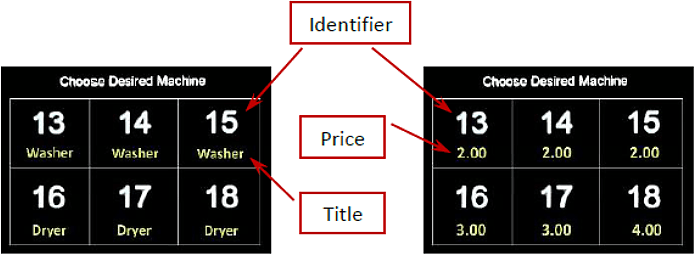
* **Pulse Identifier 1-6**: the identifier shown in idle mode for each service point.
The default values are `1` to `6`.
* **Pulse Title 1-6**: an optional description shown below each identifier. When set,
the screen alternates between the price and the title every 3 seconds. If you do not
set a title, the description screen is not shown. Examples: Charger, Air and Vac,
Washer and Dryer.
* **Pulse Options**: set to **Use Default Credit for Authorization** to base the
authorization on the **Default Credit** amount and ignore the amounts shown per
station. To use the displayed amounts instead, leave this attribute unset.
* **Pulse Line Welcome Message**: an optional one-line message shown during idle mode,
above the service stations layout. The default is "Choose Desired Machine". Use it to
tell consumers how to start a flow.
For example, with **Decimal Place** `2` and currency USD, setting **Credit per Pulse
1-6** to `200;200;200;300;300;400` and **Number of Pulses per Vend 1-6** to
`1;1;1;1;1;1` displays six prices: three at \$2, two at \$3, and one at \$4. Setting
**Pulse Options** to **Use Default Credit for Authorization** then authorizes each
transaction against **Default Credit**.
### MDB
The **MDB Flags** setting tells the server which payment flow the device supports.
Multi-station Device Start uses the **Pre-Authorization** flow.
Set **MDB Flags** to **\* Flags Disabled**.
### Payment
The **Default Credit** setting sets the authorization amount for the Pre-Authorization
flow. It applies when the `Amount` field in the `InfoQuery` response is empty. The
value is in cents and is affected by the **Decimal Place** value.
### Pulse/ccTalk
This section sets up the display for two to six service stations. Each pulse line
represents one service station the device serves. The amount shown for each service
station is the **Credit per Pulse** multiplied by the **Number of Pulses**.
The authorization amount can be the same for every service station or set individually:
* For an identical amount across all stations, set the amount in **Default Credit** and
set **Pulse Options** to **Use Default Credit for Authorization**.
* For different amounts per station, configure **Credit per Pulse** and **Number of
Pulses** and do not use **Pulse Options**.
Configure the following attributes. Separate each value with a semicolon, and match the
position of each value to its service station:
* **Credit per Pulse 1-6 (Cents)**: the amount to display for each service station,
stations 1 to 6. This is multiplied by **Number of Pulses per Vend 1-6**. To hide the
prices from the display, set this to `0`.
* **Number of Pulses per Vend 1-6**: set each station to `1` (`1;1;1;1;1;1`). The amount
displayed is **Credit per Pulse** multiplied by this number, so a value of `1` shows
the **Credit per Pulse** amount unchanged.
* **Pulse Identifier 1-6**: the identifier shown in idle mode for each service point.
The default values are `1` to `6`.
* **Pulse Title 1-6**: an optional description shown below each identifier. When set,
the screen alternates between the price and the title every 3 seconds. If you do not
set a title, the description screen is not shown. Examples: Charger, Air and Vac,
Washer and Dryer.
* **Pulse Options**: set to **Use Default Credit for Authorization** to base the
authorization on the **Default Credit** amount and ignore the amounts shown per
station. To use the displayed amounts instead, leave this attribute unset.
* **Pulse Line Welcome Message**: an optional one-line message shown during idle mode,
above the service stations layout. The default is "Choose Desired Machine". Use it to
tell consumers how to start a flow.
For example, with **Decimal Place** `2` and currency USD, setting **Credit per Pulse
1-6** to `200;200;200;300;300;400` and **Number of Pulses per Vend 1-6** to
`1;1;1;1;1;1` displays six prices: three at \$2, two at \$3, and one at \$4. Setting
**Pulse Options** to **Use Default Credit for Authorization** then authorizes each
transaction against **Default Credit**.
 ### VPOS Touch
The **VAS configurations** setting informs the server that the machine supports the
Spark Device Start flow. Set it to **Spark Device Start (V2)**. Without this
indication, Device Start does not function. This setting covers both Device Start and
Device Stop.
After you finish, click **Save** to store the configuration.
## Configuration Summary
Use the following table as a quick reference for the Device Start settings:
| Group | Property | Single service station | Multiple service stations |
| :------------------- | :--------------------------------- | :----------------------------------------------------------------------------------------------------------------------------------------- | :----------------------------------------------------------------------------------------------------------------------------------------- |
| Card Readers | Decimal Place | Usually 2 | Usually 2 |
| Card Readers | Transaction Start Method | Button+Contactless+Contact | Product |
| Card Readers | VPOS Button Function | 5 - Btn Start/Card Start + External Cancel | — |
| MDB | MDB Flags | Pre-Authorization: Flags Disabled | Pre-Authorization: Flags Disabled |
| Payment | Default Credit | Authorization value (settlement value cannot be higher) | Authorization value (settlement value cannot be higher) |
| Print Receipt Format | Receipt Button Display Duration | Optional, for eReceipt. Recommendation: 15 | Optional, for eReceipt. Recommendation: 15 |
| Print Receipt Format | Receipt QR Display Duration | Optional, for eReceipt. Recommendation: 60 | Optional, for eReceipt. Recommendation: 60 |
| Pulse/ccTalk | Credit per Pulse 1 | Greater than 0 | — |
| Pulse/ccTalk | Number of Pulses per Vend 1 | 1 | — |
| Pulse/ccTalk | Pulse Options | Use Default Credit for Authorization | Use Default Credit for Authorization |
| Pulse/ccTalk | Credit per Pulse 1-6 (Cents) | — | 0, or prices to display them |
| Pulse/ccTalk | Number of Pulses per Vend 1-6 | — | 1 per service station (for example, 1;1;1;1) |
| Pulse/ccTalk | Pulse Identifier 1-6 | — | The service station identifiers |
| Pulse/ccTalk | Pulse Title 1-6 | — | Optional: one word per service station |
| Pulse/ccTalk | Pulse Line Welcome Message | Optional: replace the default "Choose Desired Machine" | Optional: replace the default "Choose Desired Machine" |
| VPOS Touch | Approve button UI display duration | 0 to 60 seconds (see [Additional Features](/docs/integrate-pos-device/spark/machine-configuration/additional-features#pos-display-tariff)) | 0 to 60 seconds (see [Additional Features](/docs/integrate-pos-device/spark/machine-configuration/additional-features#pos-display-tariff)) |
| VPOS Touch | Informative State Display Timeout | 0 to 10 seconds (see [Additional Features](/docs/integrate-pos-device/spark/machine-configuration/additional-features#pos-display-tariff)) | 0 to 10 seconds (see [Additional Features](/docs/integrate-pos-device/spark/machine-configuration/additional-features#pos-display-tariff)) |
| VPOS Touch | VAS configurations | Spark Device Start (V2) | Spark Device Start (V2) |
| VPOS Touch | Vend Flow Options | Optional, for eReceipt: Dynamic Receipt | Optional, for eReceipt: Dynamic Receipt |
## Next Steps
See how the Device Start transaction flow works at the API level.
Add the settings to stop a transaction from the device.
### VPOS Touch
The **VAS configurations** setting informs the server that the machine supports the
Spark Device Start flow. Set it to **Spark Device Start (V2)**. Without this
indication, Device Start does not function. This setting covers both Device Start and
Device Stop.
After you finish, click **Save** to store the configuration.
## Configuration Summary
Use the following table as a quick reference for the Device Start settings:
| Group | Property | Single service station | Multiple service stations |
| :------------------- | :--------------------------------- | :----------------------------------------------------------------------------------------------------------------------------------------- | :----------------------------------------------------------------------------------------------------------------------------------------- |
| Card Readers | Decimal Place | Usually 2 | Usually 2 |
| Card Readers | Transaction Start Method | Button+Contactless+Contact | Product |
| Card Readers | VPOS Button Function | 5 - Btn Start/Card Start + External Cancel | — |
| MDB | MDB Flags | Pre-Authorization: Flags Disabled | Pre-Authorization: Flags Disabled |
| Payment | Default Credit | Authorization value (settlement value cannot be higher) | Authorization value (settlement value cannot be higher) |
| Print Receipt Format | Receipt Button Display Duration | Optional, for eReceipt. Recommendation: 15 | Optional, for eReceipt. Recommendation: 15 |
| Print Receipt Format | Receipt QR Display Duration | Optional, for eReceipt. Recommendation: 60 | Optional, for eReceipt. Recommendation: 60 |
| Pulse/ccTalk | Credit per Pulse 1 | Greater than 0 | — |
| Pulse/ccTalk | Number of Pulses per Vend 1 | 1 | — |
| Pulse/ccTalk | Pulse Options | Use Default Credit for Authorization | Use Default Credit for Authorization |
| Pulse/ccTalk | Credit per Pulse 1-6 (Cents) | — | 0, or prices to display them |
| Pulse/ccTalk | Number of Pulses per Vend 1-6 | — | 1 per service station (for example, 1;1;1;1) |
| Pulse/ccTalk | Pulse Identifier 1-6 | — | The service station identifiers |
| Pulse/ccTalk | Pulse Title 1-6 | — | Optional: one word per service station |
| Pulse/ccTalk | Pulse Line Welcome Message | Optional: replace the default "Choose Desired Machine" | Optional: replace the default "Choose Desired Machine" |
| VPOS Touch | Approve button UI display duration | 0 to 60 seconds (see [Additional Features](/docs/integrate-pos-device/spark/machine-configuration/additional-features#pos-display-tariff)) | 0 to 60 seconds (see [Additional Features](/docs/integrate-pos-device/spark/machine-configuration/additional-features#pos-display-tariff)) |
| VPOS Touch | Informative State Display Timeout | 0 to 10 seconds (see [Additional Features](/docs/integrate-pos-device/spark/machine-configuration/additional-features#pos-display-tariff)) | 0 to 10 seconds (see [Additional Features](/docs/integrate-pos-device/spark/machine-configuration/additional-features#pos-display-tariff)) |
| VPOS Touch | VAS configurations | Spark Device Start (V2) | Spark Device Start (V2) |
| VPOS Touch | Vend Flow Options | Optional, for eReceipt: Dynamic Receipt | Optional, for eReceipt: Dynamic Receipt |
## Next Steps
See how the Device Start transaction flow works at the API level.
Add the settings to stop a transaction from the device.