> ## Documentation Index
> Fetch the complete documentation index at: https://devzone.nayax.com/llms.txt
> Use this file to discover all available pages before exploring further.
# Remote Start Configuration
> Configure a machine in Nayax Core to support the Spark Remote Start feature, where your server starts transactions on the terminal remotely.
The settings on this page prepare a machine for Spark Remote Start, where your server
starts a transaction on the terminal instead of a consumer acting on the device. Apply
them to the machine you selected in [Machine Configuration](/docs/integrate-pos-device/spark/machine-configuration).
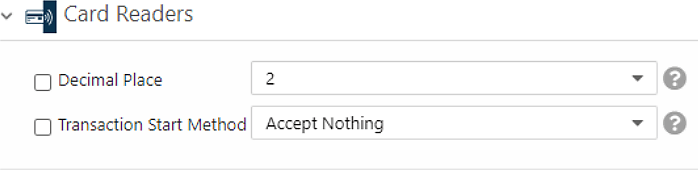
## Card Readers
These settings control the device hardware and how a transaction can start:
* **Decimal Place**: defines the Nayax device and affects the **Default Credit** value.
This is usually `2`.
* **Transaction Start Method**: set to **Accept Nothing**. This defines what can start
a transaction through the card reader while it is idle. For Remote Start, the server
calls the card reader, so no physical action is needed and physical starts are
blocked.
 If you use Device Stop on this machine, the **Transaction Start Method** is set
differently. Follow [Device Stop Configuration](/docs/integrate-pos-device/spark/machine-configuration/spark-device-stop-configuration).
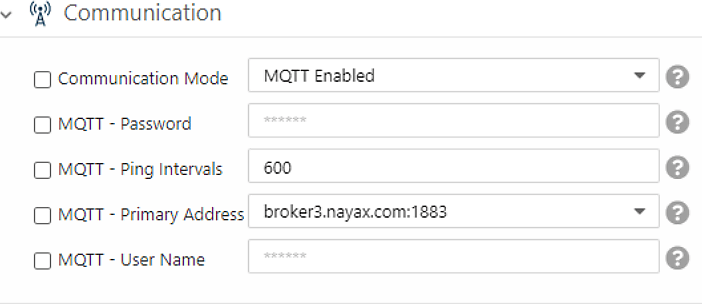
## Communication
This setting defines how the Nayax device communicates with the Nayax servers:
* **Communication Mode**: set to **MQTT Enabled**. For Remote Start, the server has to
wake the device, so the device must listen for requests coming from the server. The
MQTT protocol supports this. The alternative is **VPN Enabled**, which needs a SIM
card that supports the protocol.
* **MQTT - Primary Address**: contact your Nayax Support representative for the address
that fits your device location.
The remaining MQTT settings hold default values. Do not change them unless instructed.
If you use Device Stop on this machine, the **Transaction Start Method** is set
differently. Follow [Device Stop Configuration](/docs/integrate-pos-device/spark/machine-configuration/spark-device-stop-configuration).
## Communication
This setting defines how the Nayax device communicates with the Nayax servers:
* **Communication Mode**: set to **MQTT Enabled**. For Remote Start, the server has to
wake the device, so the device must listen for requests coming from the server. The
MQTT protocol supports this. The alternative is **VPN Enabled**, which needs a SIM
card that supports the protocol.
* **MQTT - Primary Address**: contact your Nayax Support representative for the address
that fits your device location.
The remaining MQTT settings hold default values. Do not change them unless instructed.
 ## MDB
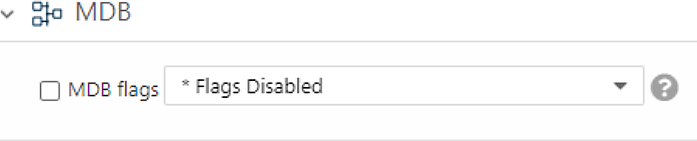
The **MDB Flags** setting tells the server which payment flow the device supports:
* **Pre-Authorization** is used when the transaction starts before the consumer chooses
a product or service and before the final amount is known. Set **MDB Flags** to
**\* Flags Disabled**.
* **Pre-Selection** is the flow used when the price is known when the card is
presented. Set **MDB Flags** to **02 PreSelection Enabled**.
## MDB
The **MDB Flags** setting tells the server which payment flow the device supports:
* **Pre-Authorization** is used when the transaction starts before the consumer chooses
a product or service and before the final amount is known. Set **MDB Flags** to
**\* Flags Disabled**.
* **Pre-Selection** is the flow used when the price is known when the card is
presented. Set **MDB Flags** to **02 PreSelection Enabled**.
 ## Payment
These settings control the authorization amount and how long the device waits for a
card:
* **Default Credit**: set the authorization amount. This applies to the
Pre-Authorization flow only. It is the amount authorized when the `Amount` field in
the `TriggerTransaction` request is empty. The value is in cents and is affected by
the **Decimal Place** value. The settlement value cannot be higher than this amount.
* **Present Card Timeout**: the time in seconds the device waits for a card after the
server wakes it. The default is 15 seconds. We recommend 30 to 60 seconds so
consumers have enough time to reach the terminal and present their card.
When the device reaches the **Present Card Timeout** and no card is presented, no
`TransactionCallback` is sent. Set your own timeout too, equal to or longer than this
value, so your system can handle a missing callback.
## Pulse/ccTalk
These settings define the credit applied per pulse:
* **Credit per Pulse 1**: set to `1`.
* **Number of Pulses per Vend 1**: set to `1`.
## VPOS Touch
The **VAS configurations** setting is optional for Remote Start. You can add an
indication that the machine performs Spark Remote Start. This is not required for the
flow to work and is only for management purposes.
Spark Remote Start and Spark Device Start cannot coexist on the same machine.
After you finish, click **Save** to store the configuration.
## Configuration Summary
Use the following table as a quick reference for the Remote Start settings:
| Group | Property | Value |
| :------------------- | :--------------------------------- | :-------------------------------------------------------------------------------------------------------------------------------------------------------- |
| Card Readers | Decimal Place | Usually 2 |
| Card Readers | Transaction Start Method | Accept Nothing (for Device Stop, see [Device Stop Configuration](/docs/integrate-pos-device/spark/machine-configuration/spark-device-stop-configuration)) |
| Communication | Communication Mode | MQTT Enabled or VPN Enabled |
| Communication | MQTT - Primary Address | Contact your Nayax Support representative |
| MDB | MDB Flags | Pre-Authorization: Flags Disabled. Pre-Selection: PreSelection Enabled |
| Payment | Default Credit | Authorization value (settlement value cannot be higher) |
| Payment | Present Card Timeout | Recommendation: 30 to 60 seconds |
| Print Receipt Format | Receipt Button Display Duration | Optional, for eReceipt. Recommendation: 15 |
| Print Receipt Format | Receipt QR Display Duration | Optional, for eReceipt. Recommendation: 60 |
| Pulse/ccTalk | Credit per Pulse 1 | Greater than 0 |
| Pulse/ccTalk | Number of Pulses per Vend 1 | 1 |
| VPOS Touch | Approve button UI display duration | 0 to 60 seconds (see [Additional Features](/docs/integrate-pos-device/spark/machine-configuration/additional-features#pos-display-tariff)) |
| VPOS Touch | Informative State Display Timeout | 0 to 10 seconds (see [Additional Features](/docs/integrate-pos-device/spark/machine-configuration/additional-features#pos-display-tariff)) |
| VPOS Touch | VAS configurations | Optional: Spark Remote Start |
| VPOS Touch | Vend Flow Options | Optional, for eReceipt: Dynamic Receipt |
| VPOS Touch | Idle Mode Custom Image | See [Additional Features](/docs/integrate-pos-device/spark/machine-configuration/additional-features#idle-mode-custom-image) |
| VPOS Touch | Idle Mode Screens | Contact your Nayax Support representative |
## Next Steps
See how the Remote Start transaction flow works at the API level.
Add the settings to stop a transaction from the device.
## Payment
These settings control the authorization amount and how long the device waits for a
card:
* **Default Credit**: set the authorization amount. This applies to the
Pre-Authorization flow only. It is the amount authorized when the `Amount` field in
the `TriggerTransaction` request is empty. The value is in cents and is affected by
the **Decimal Place** value. The settlement value cannot be higher than this amount.
* **Present Card Timeout**: the time in seconds the device waits for a card after the
server wakes it. The default is 15 seconds. We recommend 30 to 60 seconds so
consumers have enough time to reach the terminal and present their card.
When the device reaches the **Present Card Timeout** and no card is presented, no
`TransactionCallback` is sent. Set your own timeout too, equal to or longer than this
value, so your system can handle a missing callback.
## Pulse/ccTalk
These settings define the credit applied per pulse:
* **Credit per Pulse 1**: set to `1`.
* **Number of Pulses per Vend 1**: set to `1`.
## VPOS Touch
The **VAS configurations** setting is optional for Remote Start. You can add an
indication that the machine performs Spark Remote Start. This is not required for the
flow to work and is only for management purposes.
Spark Remote Start and Spark Device Start cannot coexist on the same machine.
After you finish, click **Save** to store the configuration.
## Configuration Summary
Use the following table as a quick reference for the Remote Start settings:
| Group | Property | Value |
| :------------------- | :--------------------------------- | :-------------------------------------------------------------------------------------------------------------------------------------------------------- |
| Card Readers | Decimal Place | Usually 2 |
| Card Readers | Transaction Start Method | Accept Nothing (for Device Stop, see [Device Stop Configuration](/docs/integrate-pos-device/spark/machine-configuration/spark-device-stop-configuration)) |
| Communication | Communication Mode | MQTT Enabled or VPN Enabled |
| Communication | MQTT - Primary Address | Contact your Nayax Support representative |
| MDB | MDB Flags | Pre-Authorization: Flags Disabled. Pre-Selection: PreSelection Enabled |
| Payment | Default Credit | Authorization value (settlement value cannot be higher) |
| Payment | Present Card Timeout | Recommendation: 30 to 60 seconds |
| Print Receipt Format | Receipt Button Display Duration | Optional, for eReceipt. Recommendation: 15 |
| Print Receipt Format | Receipt QR Display Duration | Optional, for eReceipt. Recommendation: 60 |
| Pulse/ccTalk | Credit per Pulse 1 | Greater than 0 |
| Pulse/ccTalk | Number of Pulses per Vend 1 | 1 |
| VPOS Touch | Approve button UI display duration | 0 to 60 seconds (see [Additional Features](/docs/integrate-pos-device/spark/machine-configuration/additional-features#pos-display-tariff)) |
| VPOS Touch | Informative State Display Timeout | 0 to 10 seconds (see [Additional Features](/docs/integrate-pos-device/spark/machine-configuration/additional-features#pos-display-tariff)) |
| VPOS Touch | VAS configurations | Optional: Spark Remote Start |
| VPOS Touch | Vend Flow Options | Optional, for eReceipt: Dynamic Receipt |
| VPOS Touch | Idle Mode Custom Image | See [Additional Features](/docs/integrate-pos-device/spark/machine-configuration/additional-features#idle-mode-custom-image) |
| VPOS Touch | Idle Mode Screens | Contact your Nayax Support representative |
## Next Steps
See how the Remote Start transaction flow works at the API level.
Add the settings to stop a transaction from the device.