> ## Documentation Index
> Fetch the complete documentation index at: https://devzone.nayax.com/llms.txt
> Use this file to discover all available pages before exploring further.
# External Cancel
The **External Cancel** is a mandatory operation for authorized transactions where the service or product was not provided. Its purpose is to release the captured funds on the consumer's card immediately.
If no service is provided, you must send a cancellation request immediately. Failure to do so results in funds being captured, leading to a poor consumer experience and potential disputes.
### External Cancel Flow Methods
The External Cancel flow makes use of the following Spark methods:
* [StartAuthentication](/reference/spark/transactions/startauthentication)
* [ExternalCancel](/reference/spark/transactions/externalcancel)
### External Cancel Flow
This flow is required when a transaction was authorized on the Nayax Device, but the service failed or was canceled at the point of interaction.
To understand the External Cancel flow, see the diagram below:
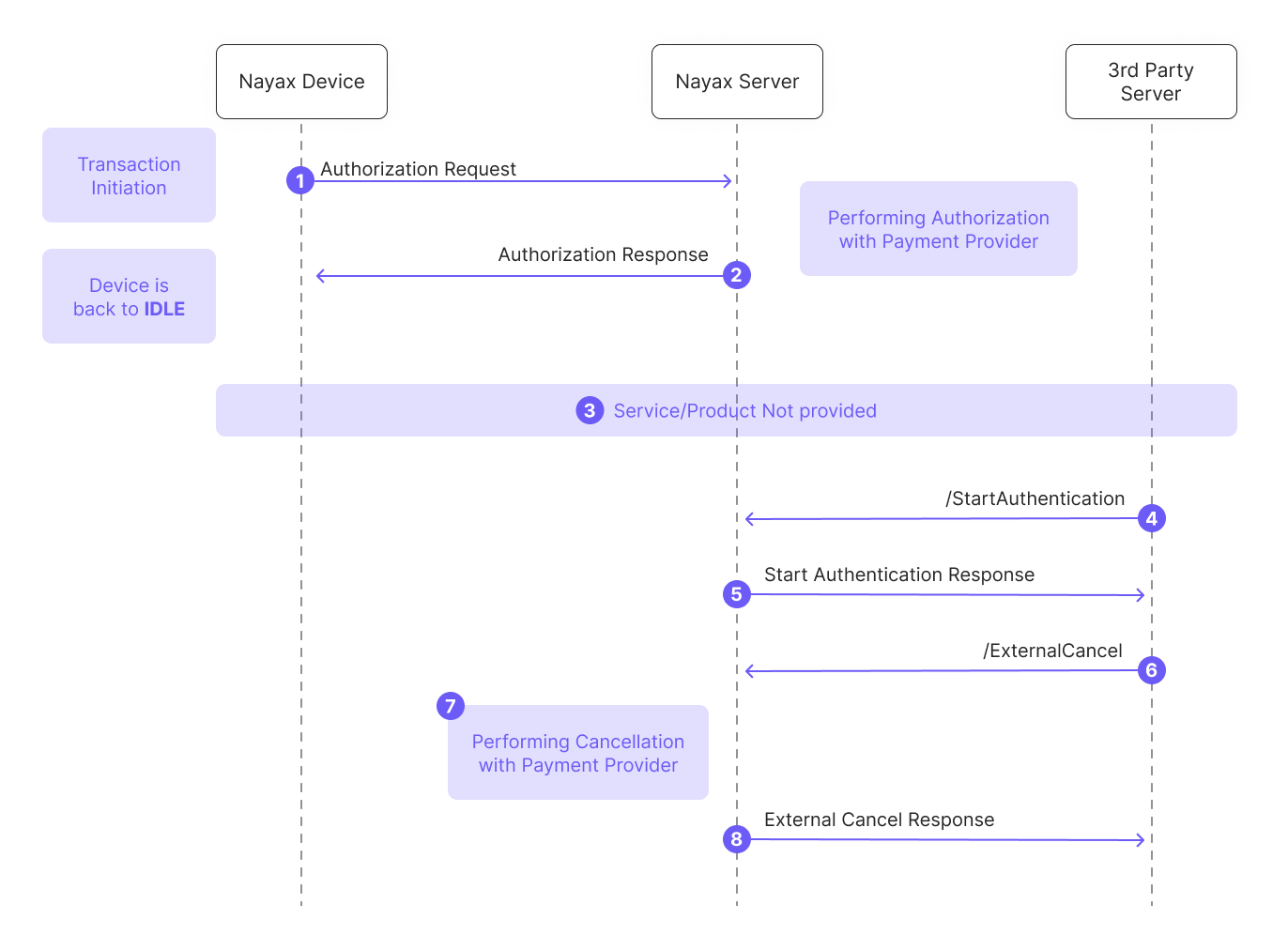
Below is a breakdown of the diagram:
1. **Authorization Request**: The process begins when a transaction is initiated on the Nayax Device, which sends an authorization request to the Nayax Server.
2. **Authorization Response**: The Nayax Server authorizes the amount with the payment provider and sends the response to the device. The device then returns to an **IDLE** state.
3. **Service Failure**: A failure occurs, and no service or product is delivered to the consumer.
4. **/StartAuthentication**: To resolve the failed transaction, the **Third-Party Server** initiates communication by calling the [StartAuthentication](/reference/spark/transactions/startauthentication) method.
5. **Authentication Response**: The Nayax Server validates the credentials and responds with a success message.
6. **/ExternalCancel**: The **Third-Party Server** sends the [ExternalCancel](/reference/spark/transactions/externalcancel) request. This must include the original `NayaxTransactionId` and `SiteId`.
7. **Financial Reversal**: Upon receiving the request, the Nayax Server performs the cancellation with the payment provider to release the funds.
8. **External Cancel Response**: The Nayax Server confirms the cancellation outcome to the Third-Party Server.
## Failure Handling and Retries
If a request fails, the follow-up action depends on which stage of the process failed:
| Failure Type | Description | Recommended Action |
| :-------------------------- | :--------------------------------------------------------------------------------------------------- | :---------------------------------------------------------------------------------------------------------------------------------------------------------------- |
| **Authentication Failure** | The [StartAuthentication](/reference/spark/transactions/startauthentication) call failed. | The Third-Party Server should retry the authentication request immediately. |
| **External Cancel Failure** | The [ExternalCancel](/reference/spark/transactions/externalcancel) call failed or returned an error. | **No manual action required.** If the initial request fails, the Nayax Server provides a safeguard by automatically retrying the cancellation later (AutoCancel). |
**Important Terminologies:**
In a **Pre-Authorization** flow, this operation is a "Cancel." In a **Pre-Selection** flow, it is a "Void." You must indicate the correct type in your request payload.