> ## Documentation Index
> Fetch the complete documentation index at: https://devzone.nayax.com/llms.txt
> Use this file to discover all available pages before exploring further.
# Pre-Selection
The pre-selection transaction flow processes, authorizes, and settles a payment request before completing the transaction. This streamlined approach ensures that all payment stages are finalized in a single, continuous sequence.
## Transaction Flow
To understand the pre-selection transaction flow, consider the following sequence of events:
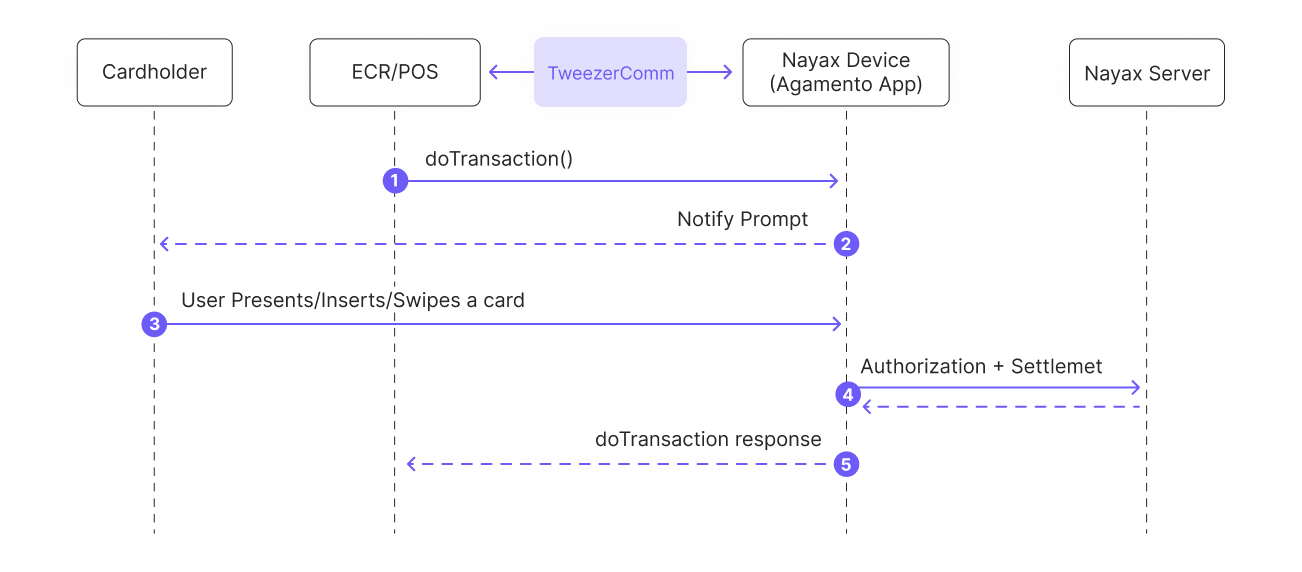 Here's a breakdown of each step:
1. After the cardholder selects the product or service, the ECR/POS sends a [`doTransaction`](/docs/integrate-pos-device/tweezercomm/global-payment-methods/dotransaction) Request to the Nayax Device (Agamento App).
2. The application then displays a prompt for the cardholder, requesting him to insert or swipe a card.
3. The cardholder inserts, swipes, or taps their card on the ECR/POS.
4. The Nayax Device communicates with the Nayax Server to request payment authorization and settlement.
5. The Nayax Server responds with the transaction status (approved or declined). The Nayax Device then relays this status back to the ECR/POS, completing the process.
## See Also
Here's a breakdown of each step:
1. After the cardholder selects the product or service, the ECR/POS sends a [`doTransaction`](/docs/integrate-pos-device/tweezercomm/global-payment-methods/dotransaction) Request to the Nayax Device (Agamento App).
2. The application then displays a prompt for the cardholder, requesting him to insert or swipe a card.
3. The cardholder inserts, swipes, or taps their card on the ECR/POS.
4. The Nayax Device communicates with the Nayax Server to request payment authorization and settlement.
5. The Nayax Server responds with the transaction status (approved or declined). The Nayax Device then relays this status back to the ECR/POS, completing the process.
## See Also