> ## Documentation Index
> Fetch the complete documentation index at: https://devzone.nayax.com/llms.txt
> Use this file to discover all available pages before exploring further.
# Get Started
TweezerComm follows the [JSON-RPC 2.0](http://www.jsonrpc.org/specification) specification to standardize transaction processing between the POS/ECR and Agamento payment application (that runs on Nayax attended devices). JSON-RPC is a lightweight, remote procedure call (RPC) protocol encoded in JSON. It allows client and server communication using structured requests and responses.
Refer to the sections below to learn how to submit requests on TweezerComm.
## Server Endpoint
TweezerComm operates over HTTPS using a standard REST API convention. The SPICy Server acts as the entry point for processing JSON-RPC messages. The server endpoint is structured as follows:
```text theme={null}
https://device_ip:8080/SPICy
```
* The POS/ECR and Agamento payment application needs to be connected to the same local network
All requests are processed at this endpoint using a **POST** method. Remember to replace `device_ip` with the actual IP address of your device.
**Agamento Port**
Agamento listens on port **8080** for TC Lan integration and **9090** for Bonjour integration, allowing communication between the client application and the payment device.
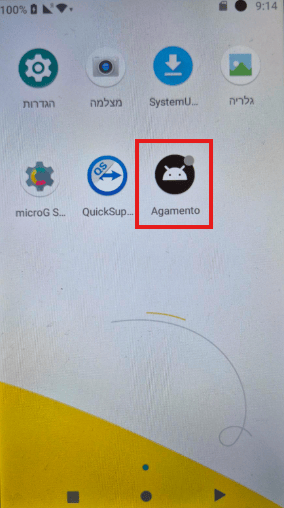
## Enter the Agamento app on Nayax's device
 ## Perform a Request
To request TweezerComm via the SPICy server, the client application must send an adequately formatted JSON-RPC request to the specified endpoint. Below is an example of how to initiate a basic transaction:
```json theme={null}
{
"jsonrpc": "2.0",
"method": "doTransaction",
"id": "123454352",
"params": [
"engine",
{
"vuid": "44d96006",
"amount": 100,
"tranType": 1
}
]
}
```
In this request, you need to configure the following parameters:
* `jsonrpc`: Defines the JSON-RPC version. In this case, always set it to `2.0`.
* `method`: Specifies the method to be used. See [Global Payment Methods](/docs/integrate-pos-device/tweezercomm/global-payment-methods/payment-services-methods-copy-1), [Israel Payment Methods](/docs/integrate-pos-device/tweezercomm/israel-payment-methods/tweezercomm-israel-payment-methods), and [Device Methods](/docs/integrate-pos-device/tweezercomm/device-methods/index) for a list and description of available methods.
* `id`: A unique identifier for tracking the request.
* `params`: This is an array divided into two parts.
* The first specifies the payment service to be used:
* `engine` for global transactions. See [Global Payment Flows](/docs/integrate-pos-device/tweezercomm/global-payment-flows/payment-flows-copy-1) for more details.
* `ashrait` for Israel transactions. See [Israel Payment Flows](/docs/integrate-pos-device/tweezercomm/israel-payment-flows/tweezercomm-israel-payment-flows) for more details.
* The second part contains the parameters specific to the requested method.
By following this structure, client applications can reliably interact with TweezerComm for secure and efficient payment processing.
## Perform a Request
To request TweezerComm via the SPICy server, the client application must send an adequately formatted JSON-RPC request to the specified endpoint. Below is an example of how to initiate a basic transaction:
```json theme={null}
{
"jsonrpc": "2.0",
"method": "doTransaction",
"id": "123454352",
"params": [
"engine",
{
"vuid": "44d96006",
"amount": 100,
"tranType": 1
}
]
}
```
In this request, you need to configure the following parameters:
* `jsonrpc`: Defines the JSON-RPC version. In this case, always set it to `2.0`.
* `method`: Specifies the method to be used. See [Global Payment Methods](/docs/integrate-pos-device/tweezercomm/global-payment-methods/payment-services-methods-copy-1), [Israel Payment Methods](/docs/integrate-pos-device/tweezercomm/israel-payment-methods/tweezercomm-israel-payment-methods), and [Device Methods](/docs/integrate-pos-device/tweezercomm/device-methods/index) for a list and description of available methods.
* `id`: A unique identifier for tracking the request.
* `params`: This is an array divided into two parts.
* The first specifies the payment service to be used:
* `engine` for global transactions. See [Global Payment Flows](/docs/integrate-pos-device/tweezercomm/global-payment-flows/payment-flows-copy-1) for more details.
* `ashrait` for Israel transactions. See [Israel Payment Flows](/docs/integrate-pos-device/tweezercomm/israel-payment-flows/tweezercomm-israel-payment-flows) for more details.
* The second part contains the parameters specific to the requested method.
By following this structure, client applications can reliably interact with TweezerComm for secure and efficient payment processing.