> ## Documentation Index
> Fetch the complete documentation index at: https://devzone.nayax.com/llms.txt
> Use this file to discover all available pages before exploring further.
# DEX Audit File Delivery
To set up DEX file delivery to Amazon SQS, you must have access to **Nayax Core** with the appropriate user permissions. Specifically, the following roles are required:
* **VMO-Manager**
* **DEX Notify - SQS**
Additionally, ensure you have the **Amazon SQS Queue URL**, **Access Key**, and **Secret Key** obtained during the queue setup process.
**Prerequisite: Dex Read Schedule Configuration**
These setup instructions assume that the DEX Read schedule has already been configured.
## Operator Level Setup
Follow these steps to configure DEX delivery at the operator level in the Nayax Core:
1. Go to **Administration > Operator**.
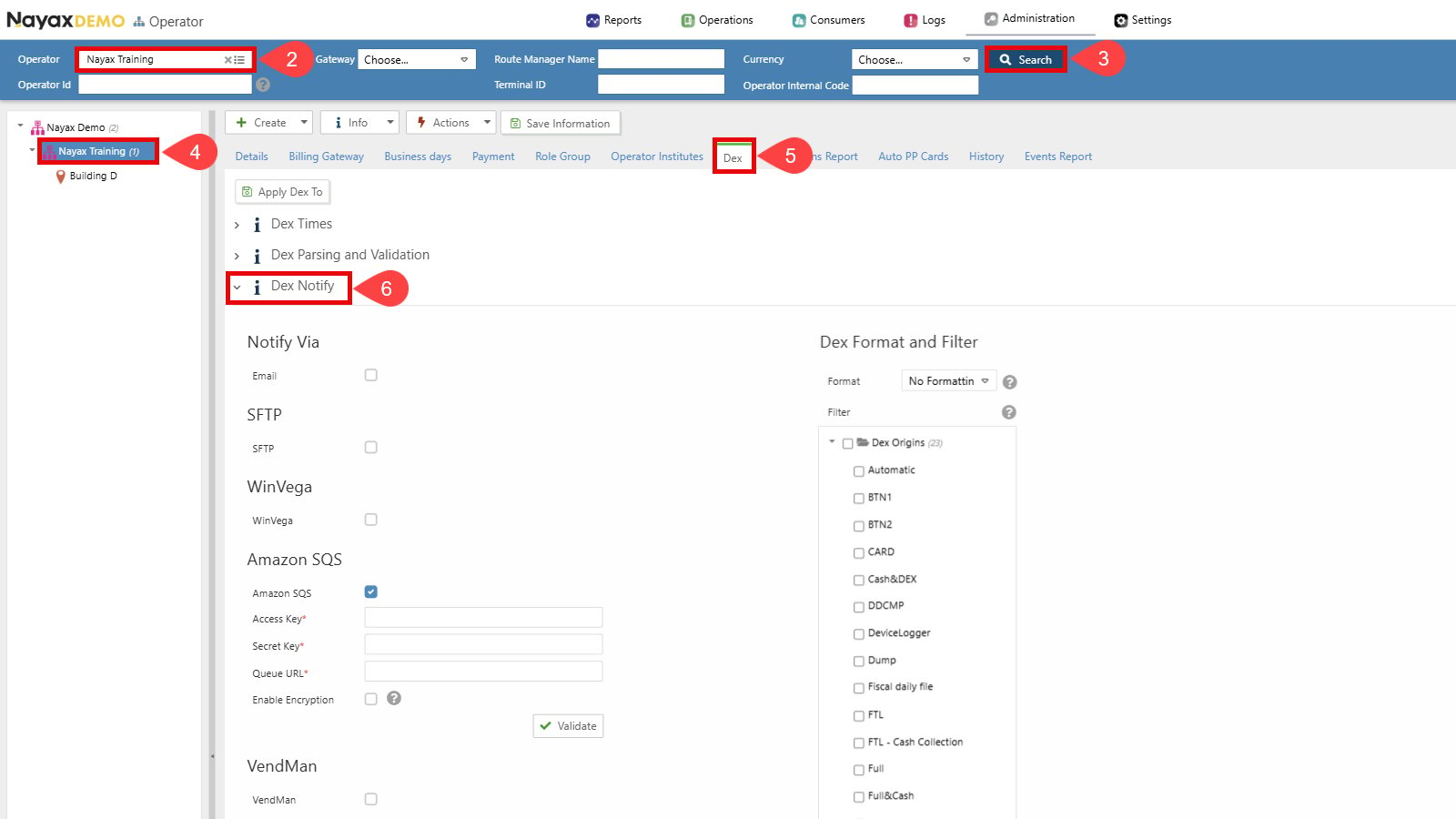
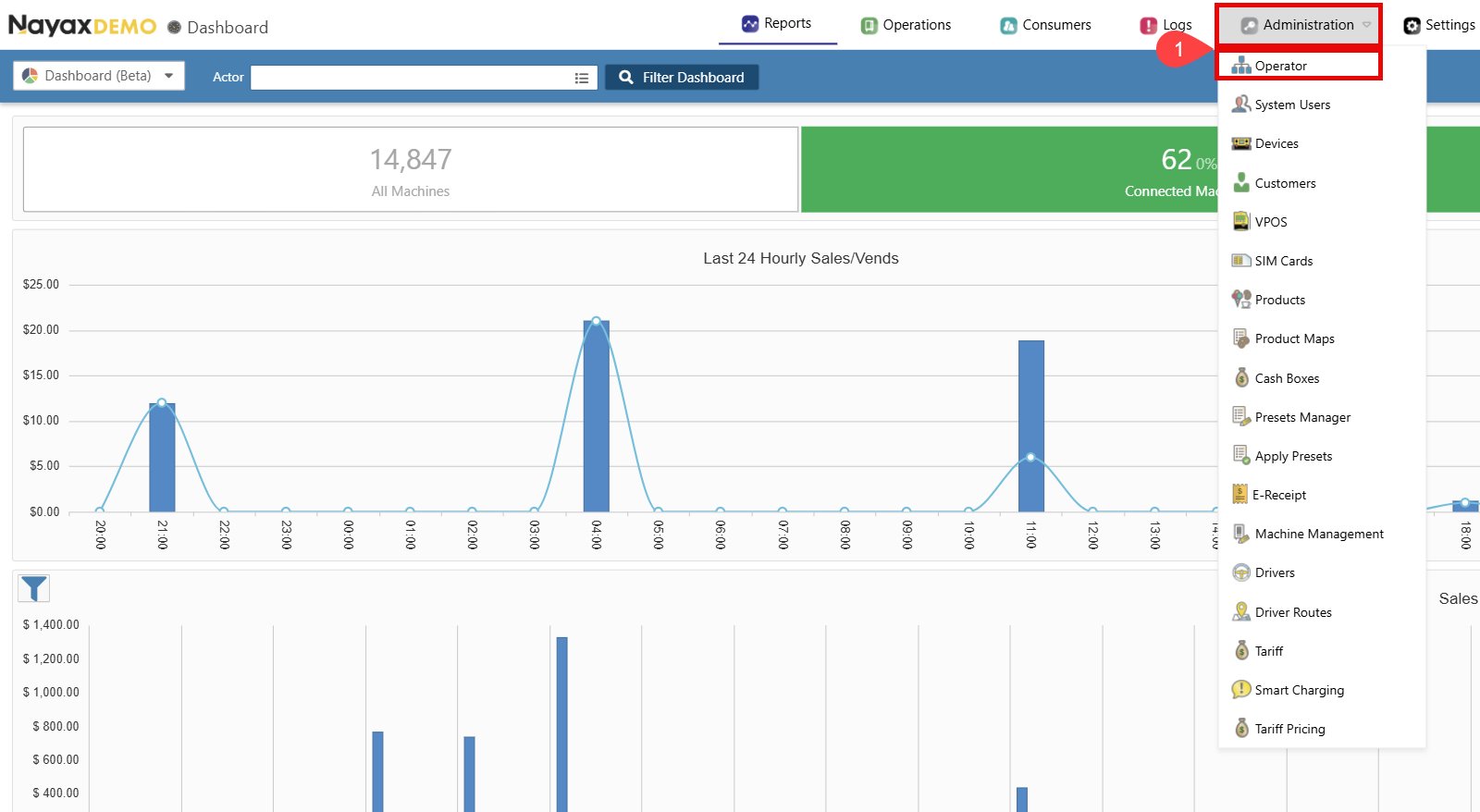 2. Find the Operator you wish to set up.
3. Click the **Search** button.
4. Select the operator to display all tabs and details.
5. Go to the **Dex** tab.
6. Click to open the **Dex Notify** section.
2. Find the Operator you wish to set up.
3. Click the **Search** button.
4. Select the operator to display all tabs and details.
5. Go to the **Dex** tab.
6. Click to open the **Dex Notify** section.
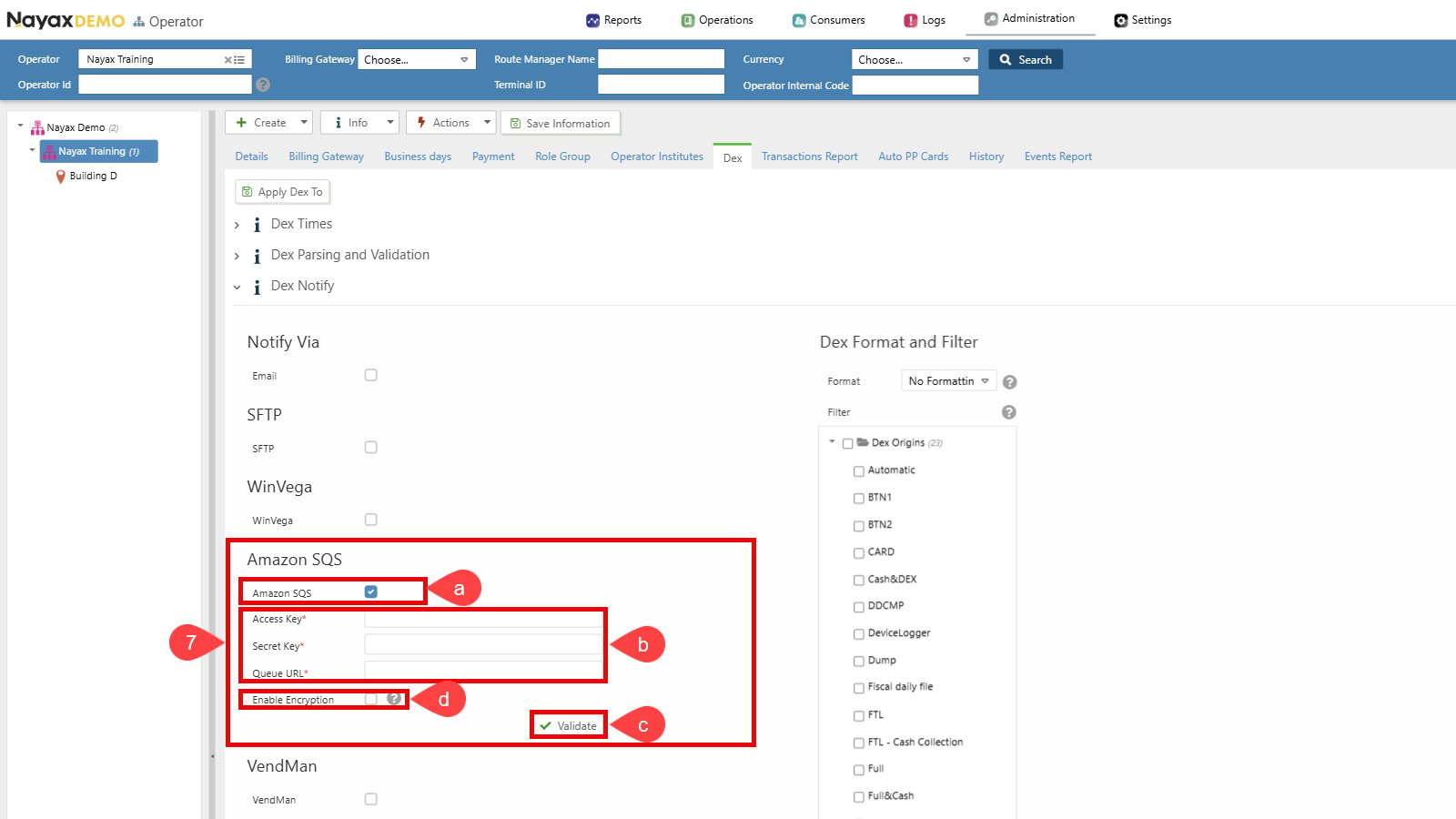
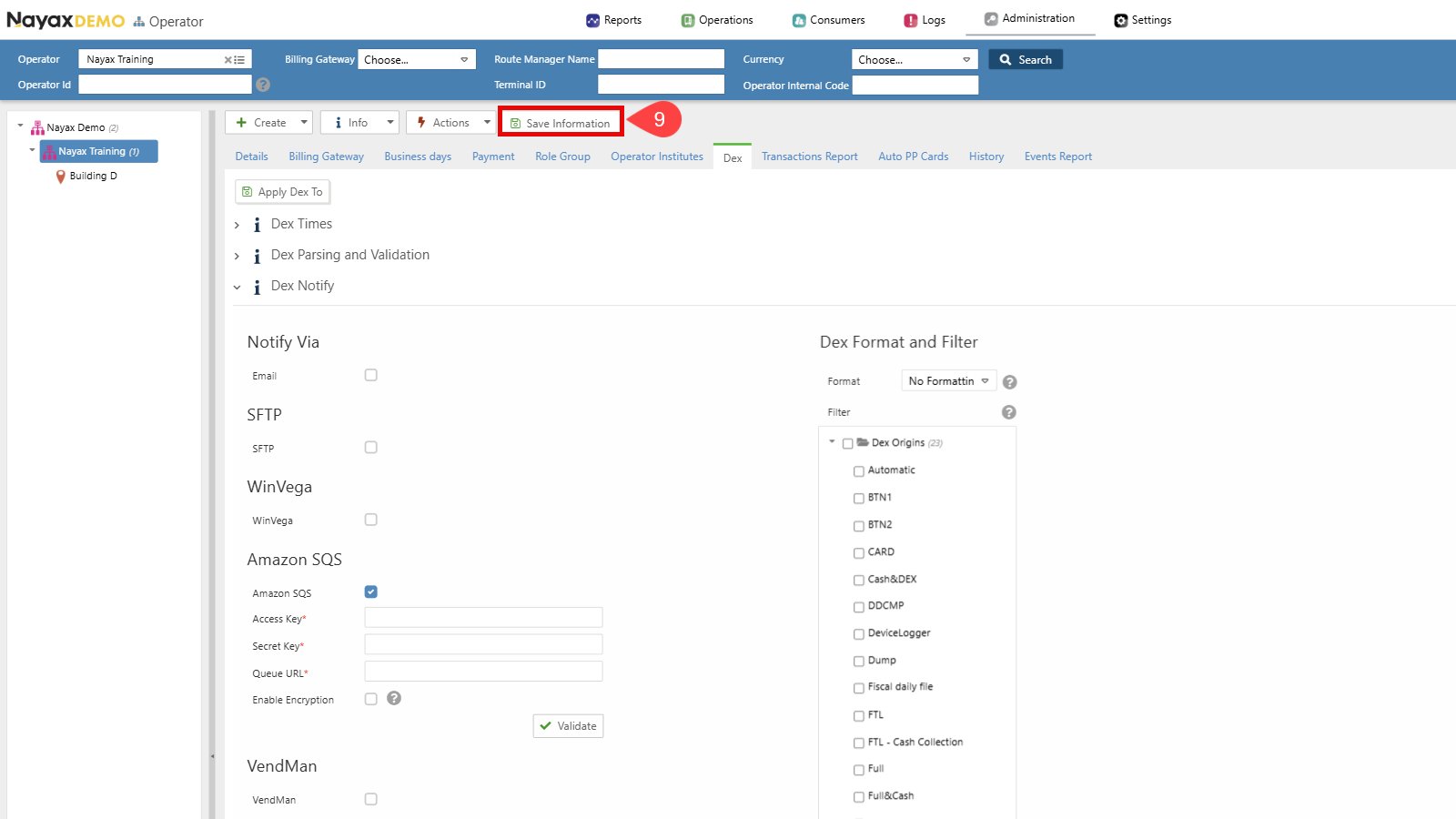
 7. Set up Dex Transmission to Amazon SQS:
a. Select the checkbox next to **Amazon SQS** to enable this option.
b. Enter the SQS credentials (**Access Key**, **Secret Key** and **Queue URL**).
c. Click the **Validate** button to ensure the Queue credentials are correct.
d. Enable Encryption (Optional). See the [**Set Up Encryption**](/docs/manage-data-operations/amazon-sqs/set-up-nayax-core/set-up-encryption-on-amazon-sqs-delivery) section for details.
7. Set up Dex Transmission to Amazon SQS:
a. Select the checkbox next to **Amazon SQS** to enable this option.
b. Enter the SQS credentials (**Access Key**, **Secret Key** and **Queue URL**).
c. Click the **Validate** button to ensure the Queue credentials are correct.
d. Enable Encryption (Optional). See the [**Set Up Encryption**](/docs/manage-data-operations/amazon-sqs/set-up-nayax-core/set-up-encryption-on-amazon-sqs-delivery) section for details.
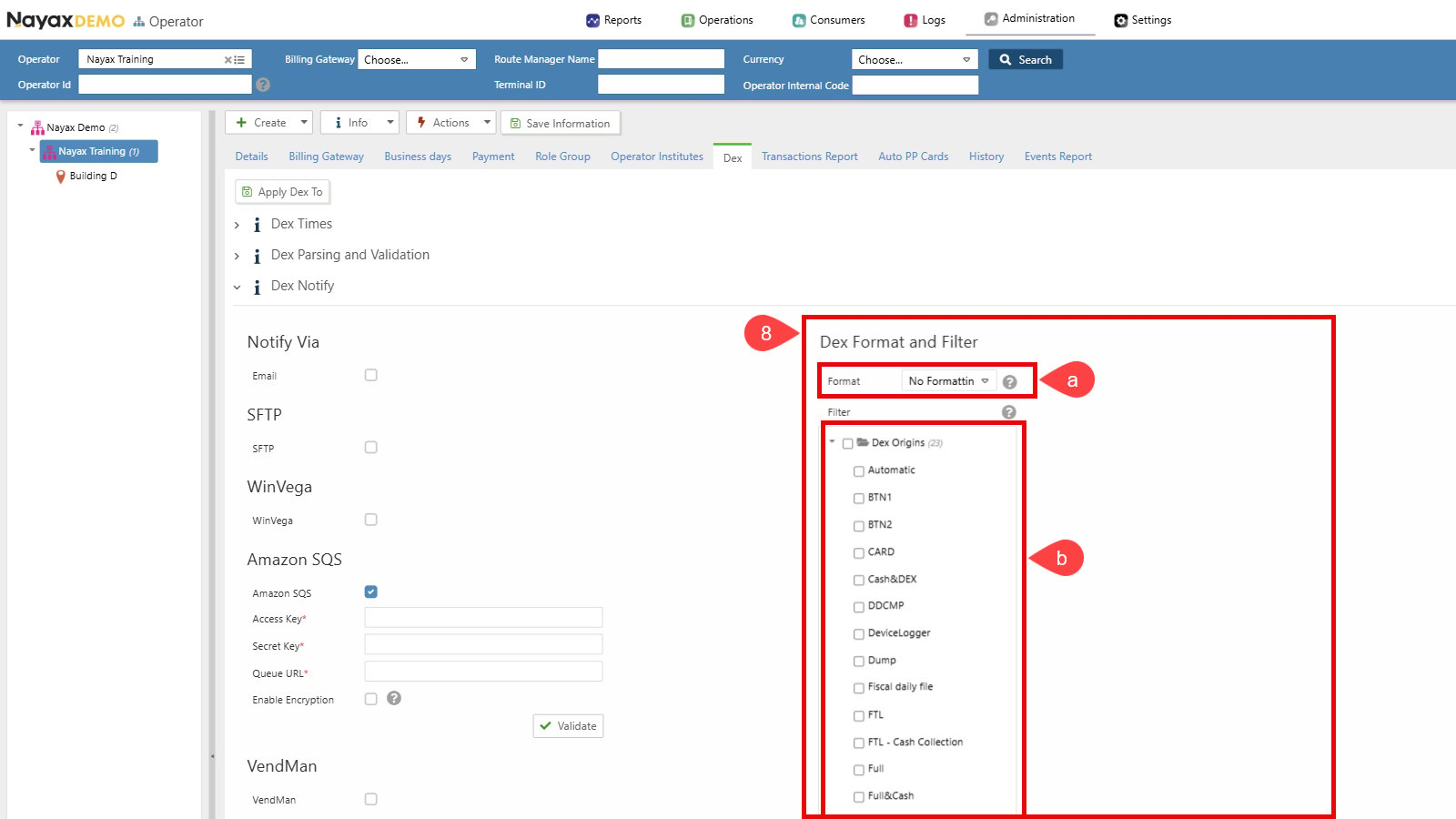
 8. Choose Dex Format and Filter settings:
a. Ensure the format is set to **No Formatting**.
b. Select the desired DEX Read Types. Only the selected Dex Origins will be sent to the Queue.
8. Choose Dex Format and Filter settings:
a. Ensure the format is set to **No Formatting**.
b. Select the desired DEX Read Types. Only the selected Dex Origins will be sent to the Queue.
 9. Click the **Save Information** button to apply the changes.
 **Operator Defaults vs Machine-Level Configuration**
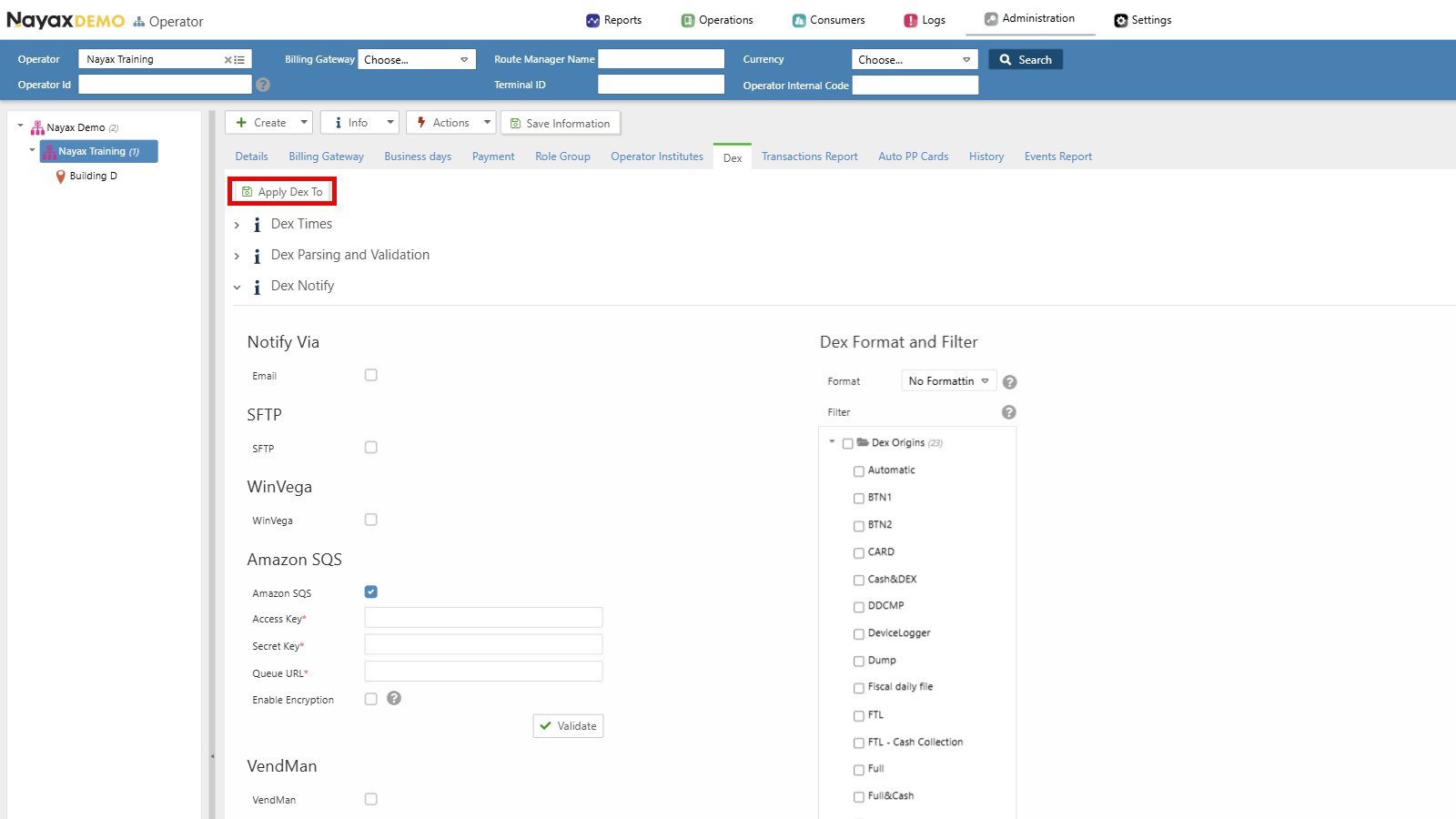
Setting up DEX delivery at the operator level does not initiate the delivery of DEX files to the queue. Instead, these configurations act as defaults for new machines under the operator’s hierarchy. You can propagate these settings using the **Apply Dex to** button or perform individual setups at the machine level as explained below.
**Operator Defaults vs Machine-Level Configuration**
Setting up DEX delivery at the operator level does not initiate the delivery of DEX files to the queue. Instead, these configurations act as defaults for new machines under the operator’s hierarchy. You can propagate these settings using the **Apply Dex to** button or perform individual setups at the machine level as explained below.
 ## Machine Level Setup
**Prerequisite: Dex Read Schedule Configuration**
These setup instructions assume that the DEX Read schedule has already been configured.
To configure DEX delivery at the machine level:
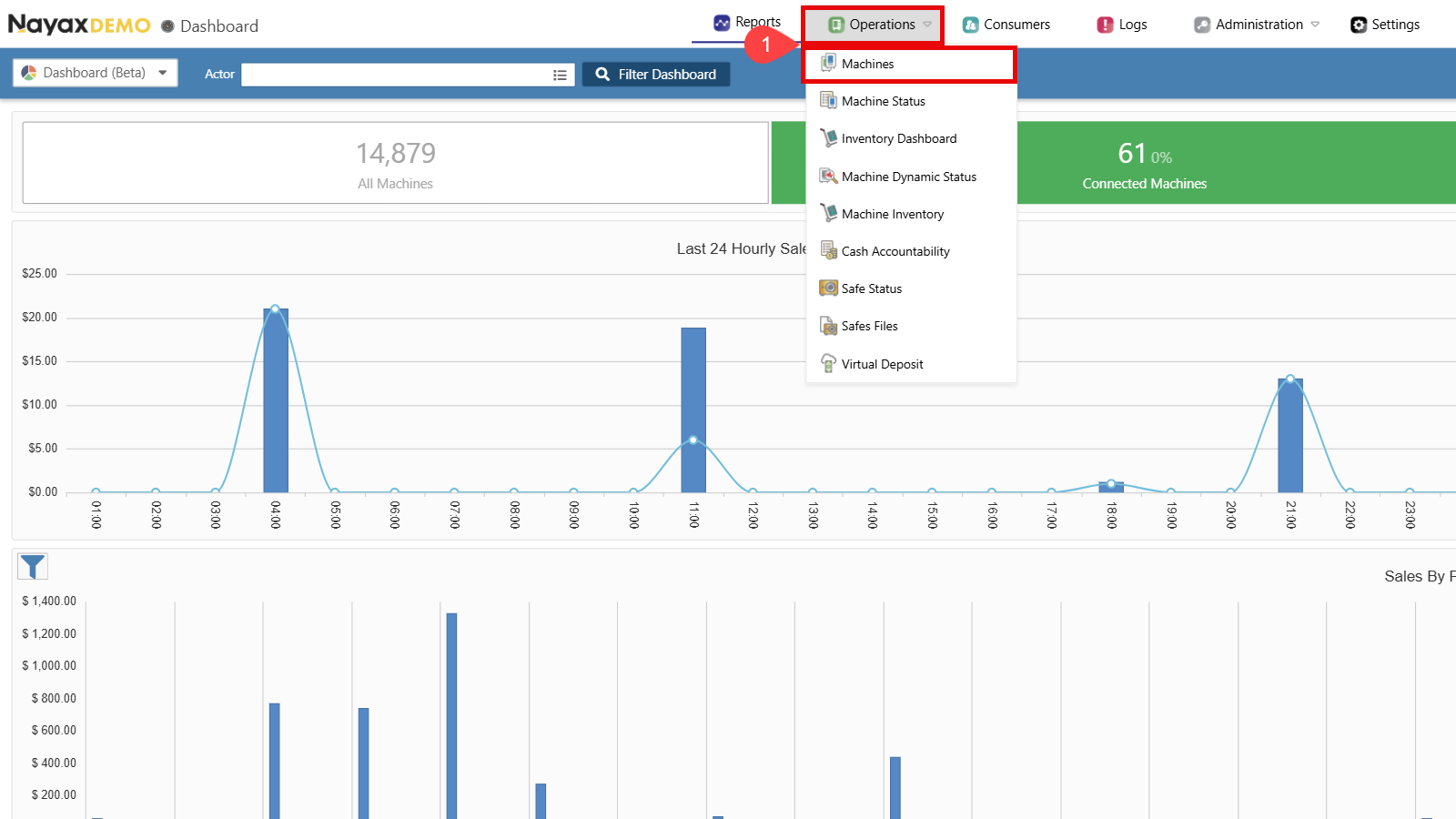
1. Go to **Operations > Machines** in the Nayax Core.
## Machine Level Setup
**Prerequisite: Dex Read Schedule Configuration**
These setup instructions assume that the DEX Read schedule has already been configured.
To configure DEX delivery at the machine level:
1. Go to **Operations > Machines** in the Nayax Core.
 2. Find the Operator you wish to set up.
3. Click the **Search** button.
4. Select the operator to display all tabs and details.
5. Go to the **Dex** tab.
6. Click to open the **Dex Notify** section.
2. Find the Operator you wish to set up.
3. Click the **Search** button.
4. Select the operator to display all tabs and details.
5. Go to the **Dex** tab.
6. Click to open the **Dex Notify** section.
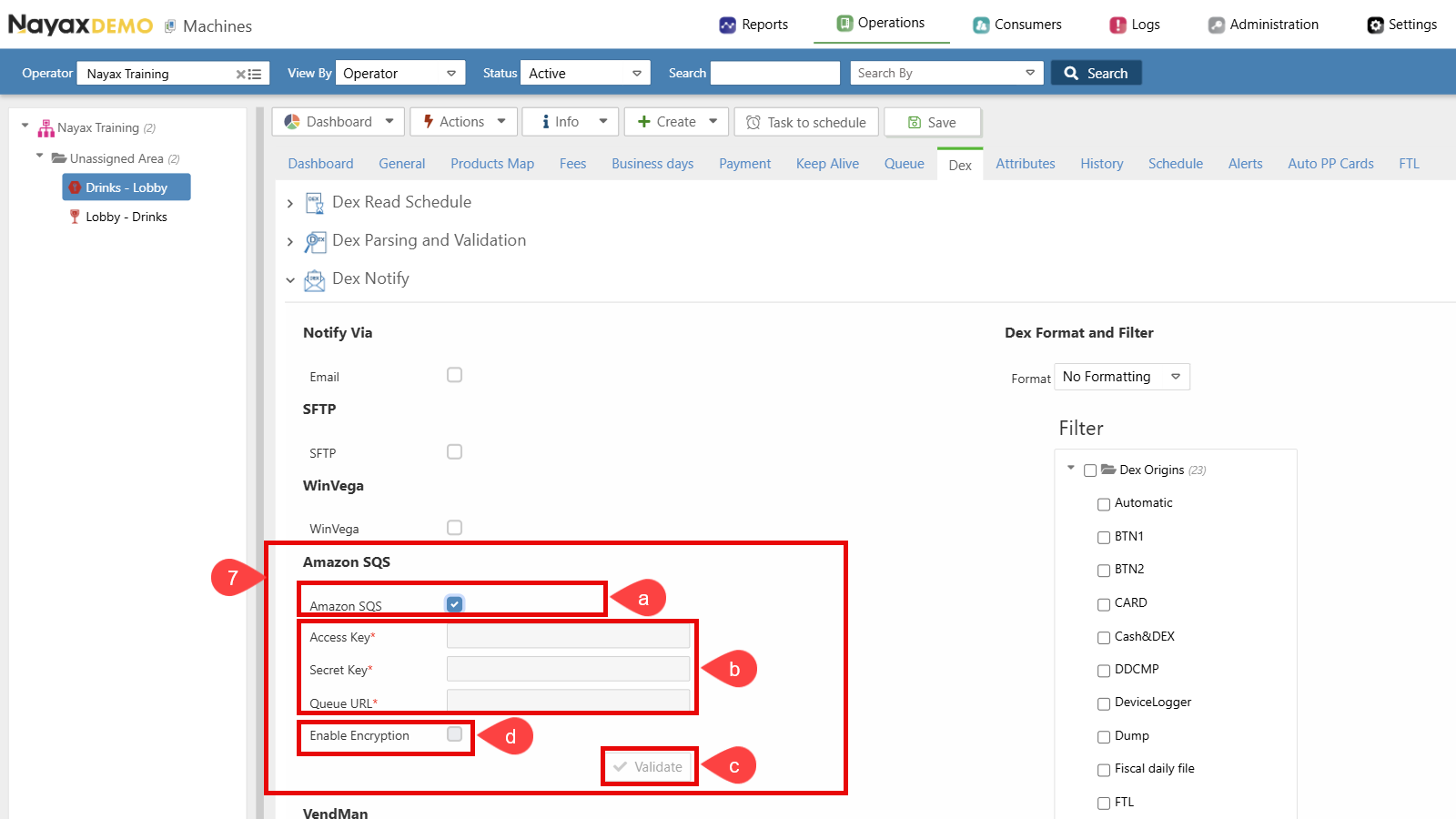
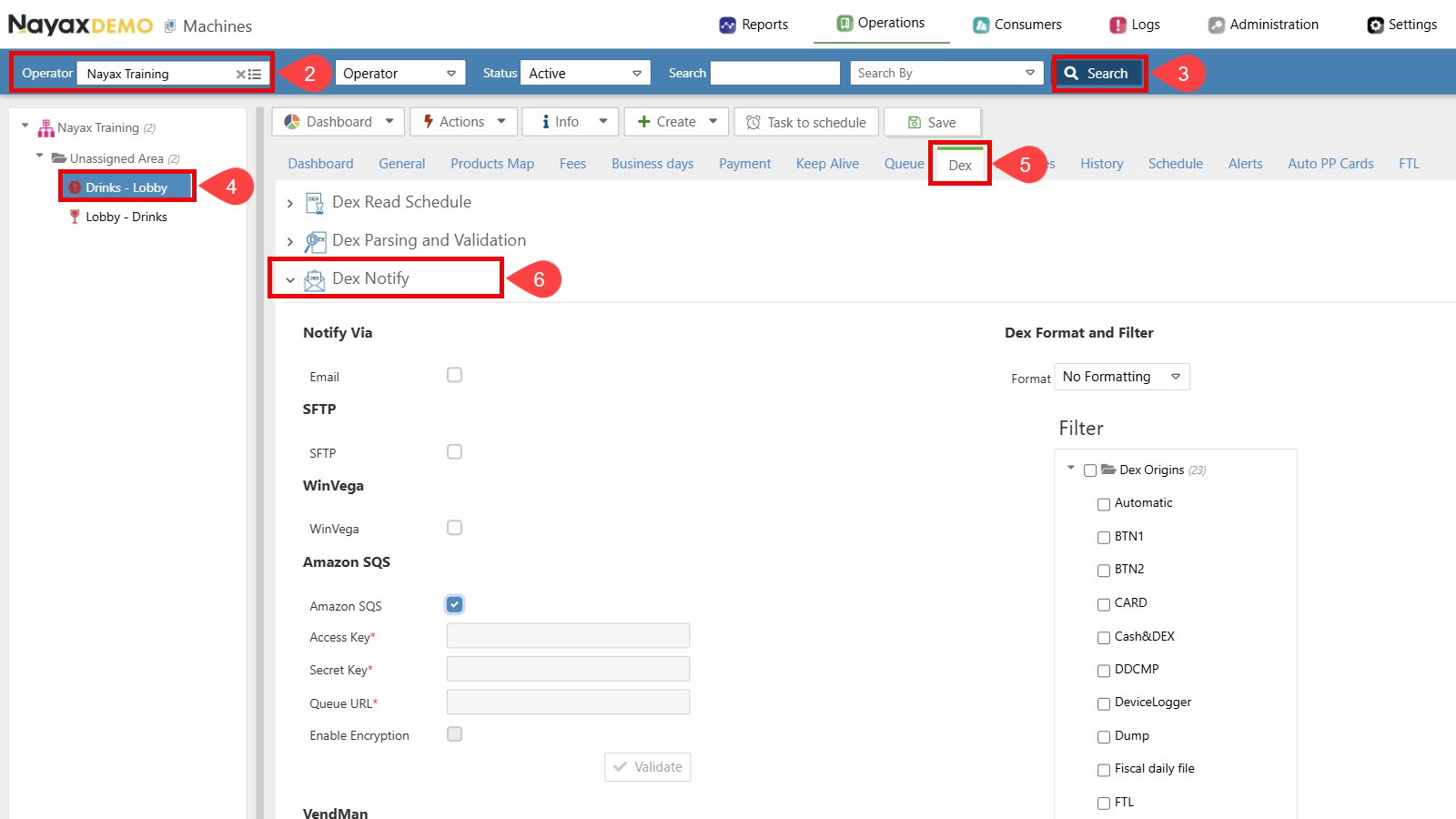 7. Set up Dex Transmission to Amazon SQS:
a. Select the checkbox next to **Amazon SQS** to enable this option.
b. Enter the SQS credentials (**Access Key**, **Secret Key** and **Queue URL**).
c. Click the **Validate** button to ensure the Queue credentials are correct.
d. Enable Encryption (Optional). See the [**Set Up Encryption**](/docs/manage-data-operations/amazon-sqs/set-up-nayax-core/set-up-encryption-on-amazon-sqs-delivery) section for details.
7. Set up Dex Transmission to Amazon SQS:
a. Select the checkbox next to **Amazon SQS** to enable this option.
b. Enter the SQS credentials (**Access Key**, **Secret Key** and **Queue URL**).
c. Click the **Validate** button to ensure the Queue credentials are correct.
d. Enable Encryption (Optional). See the [**Set Up Encryption**](/docs/manage-data-operations/amazon-sqs/set-up-nayax-core/set-up-encryption-on-amazon-sqs-delivery) section for details.
 8. Choose Dex Format and Filter settings:
a. Ensure the format is set to **No Formatting**.
b. Select the desired DEX Read Types. Only the selected Dex Origins will be sent to the Queue.
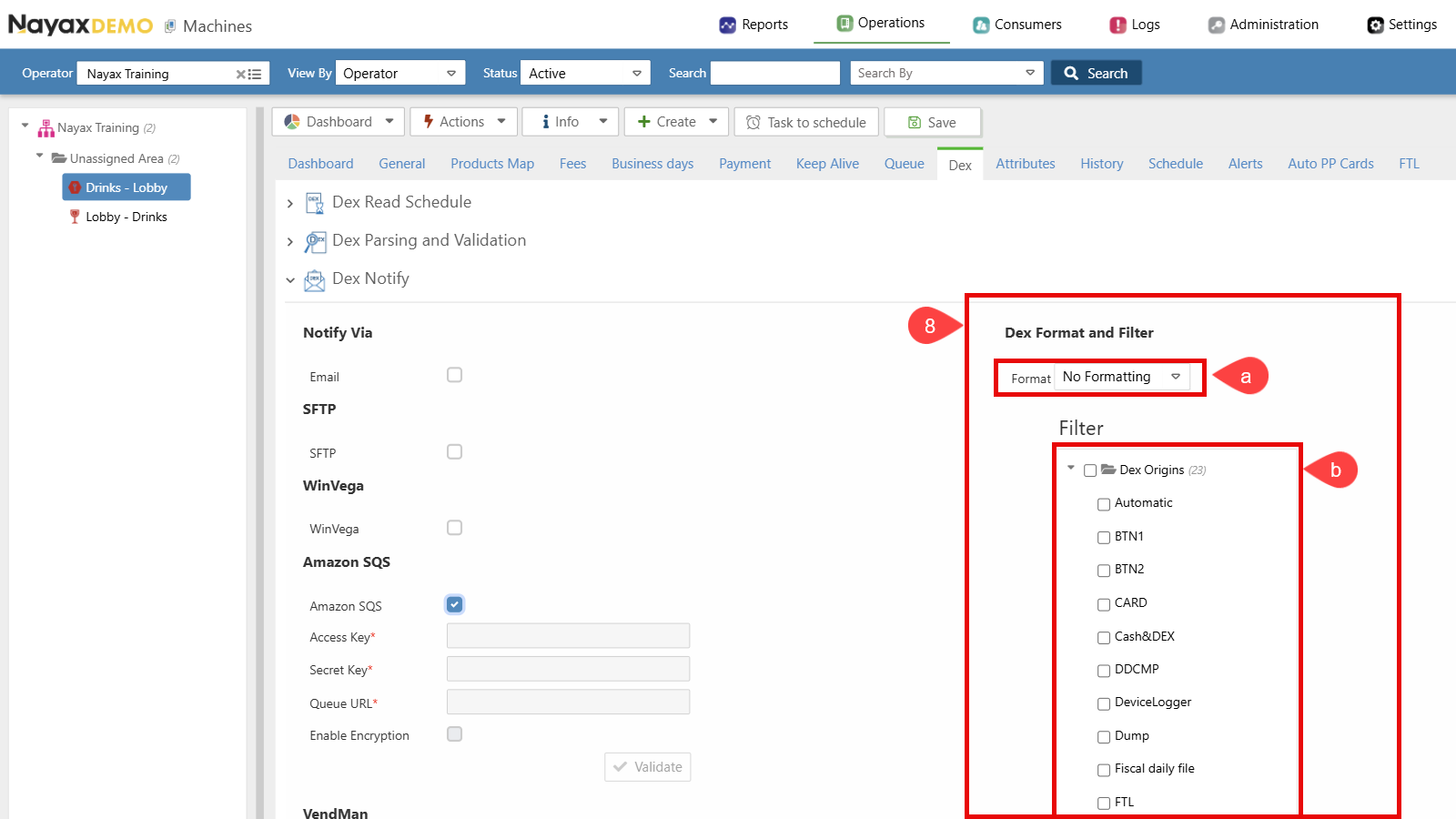
8. Choose Dex Format and Filter settings:
a. Ensure the format is set to **No Formatting**.
b. Select the desired DEX Read Types. Only the selected Dex Origins will be sent to the Queue.
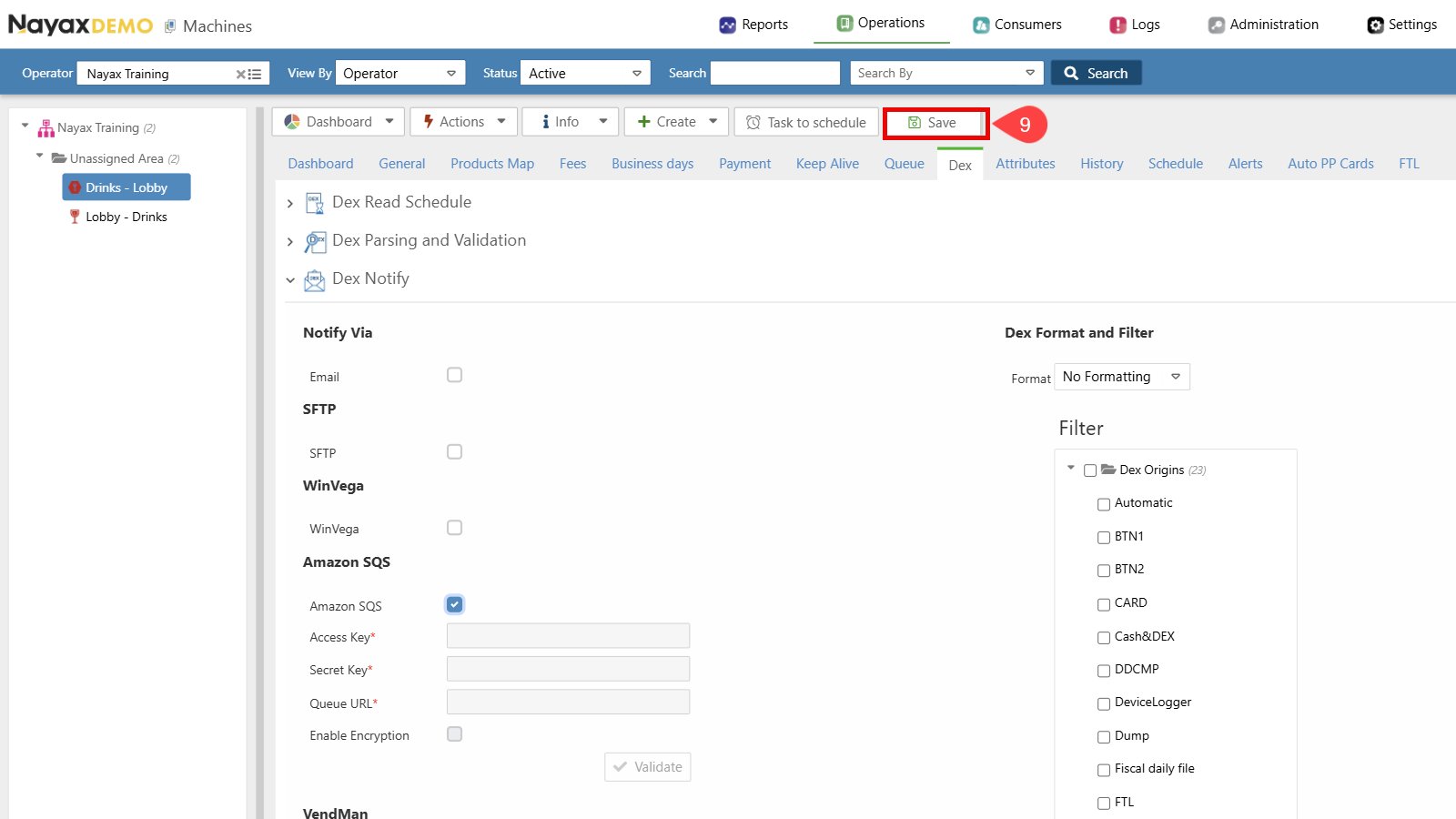
 9. Click the **Save** button to apply the changes.
 ## Example DEX/DDCMP Audit file JSON Message
Below is an example of the JSON message format for the DEX/DDCMP audit file that will be sent to Amazon SQS upon completing the setup:
```
{
"HWSerial": "534332119000155",
"MachineDate": "20200325 090132_660",
"OperatorIdentifier": "500454",
"Origin": "AUTOMATIC",
"DexData": "DXS*AUTSENSIT3*VA*V0/6*1\r\nST*001*0001\r\nID1*P138140482*AMS SENSIT
III*****6*0\r\nID4*2*0178*1\r\nID5*200325*0358**NA\r\nCB1*P138140482*AMS SENSIT III*3426-
v1.37*2.50\r\nVA1*7037419*11431*0*0*3165272*6786*0*0\r\nCA1*000045003002*ILS-G801-
009*3600\r\nCA2*4110*8*0*0\r\nCA3*0*0*0*0*1950*0*1950*0*0*0\r\nCA4*0*0*100*0\r\nCA6*9823*1014\r\nCA7*0*0*0*0\r\nCA8*0*18800\r\nCA10*0*0
\r\nCA15*0\r\nBA1*151100011754*XBA-EUR40000*0120\r\nDA1*332119000155*DMX - 2011
*0100\r\nDA2*7033309*11423*0*0\r\nDA4*0*0\r\nDA5*0*0*3165272*6786***31038*220\r\nDA9*0*0\r\nPA1*10*550*Kinder Bueno
Whi\r\nPA2*2*1100*0*0\r\nPA1*11*600*dortos green\r\nPA2*241*143500*0*0*156*73500*0*0*0*0\r\nPA1*13*600*Bamba
nugget\r\nPA2*271*161300*0*0*178*94700*0*0*0*0\r\nPA1*15*450*bamba
big\r\nPA2*504*273000*0*0*375*190037*0*0*20*1700\r\nPA1*17*600*Chips\r\nPA2*269*161300*0*0*191*88050*0*0*0*0\r\nPA1*19*600*Chips\r\nPA2*
196*117300*0*0*145*73350*0*0*0*0\r\nPA1*21*600*milka\r\nPA2*282*168900*0*0*149*66800*0*0*34*3400\r\nPA1*23*350*Bisli
Gril\r\nPA2*453*213350*0*0*315*108300*0*0*5*650\r\nPA1*25*550* Bisli
Gril\r\nPA2*332*174350*0*0*205*81350*0*0*0*0\r\nPA1*27*600*nishnushim\r\nPA2*280*164700*0*0*179*73750*0*0*0*0\r\nPA1*29*600*Abadi\r\nPA2
*254*135500*0*0*142*54600*0*0*9*900\r\nPA1*31*600*Click BW\r\nPA2*363*233500*0*0*179*89050*0*0*22*2100\r\nPA1*33*700*Click-
cariot\r\nPA2*372*244700*0*0*165*76500*0*0*0*0\r\nPA1*35*700*Click-BW\r\nPA2*425*289100*0*0*282*163500*0*0*0*0\r\nPA1*37*700*Click-
Red\r\nPA2*462*313000*0*0*237*119900*0*0*0*0\r\nPA1*39*700*crunch
red\r\nPA2*428*292300*0*0*220*118000*0*0*0*0\r\nPA1*40*550*mekupelet\r\nPA2*269*151650*0*0*129*50450*0*0*2*1100\r\nPA1*41*550*Kinder
Bueno Whi\r\nPA2*494*275350*0*0*301*121000*0*0*0*0\r\nPA1*42*550*Twix\r\nPA2*353*196800*0*0*261*101387*0*0*0*0\r\nPA1*43*550*Pesek
azman\r\nPA2*302*167350*0*0*203*91100*0*0*1*550\r\nPA1*44*600*gardena\r\nPA2*389*232900*0*0*278*87600*0*0*0*0\r\nPA1*45*600*Kitkat-
Chunky\r\nPA2*388*232300*0*0*201*78350*0*0*0*0\r\nPA1*46*600*Mike and
Ike\r\nPA2*370*221400*0*0*233*82950*0*0*0*0\r\nPA1*47*600*Mentos\r\nPA2*285*170700*0*0*164*45450*0*0*0*0\r\nPA1*48*600*must\r\nPA2*346
*205700*0*0*223*104550*0*0*0*0\r\nPA1*49*500*Must\r\nPA2*272*119765*0*0*200*83950*0*0*12*5388\r\nPA1*50*550*bueno\r\nPA2*432*242150*0
*0*216*76350*0*0*0*0\r\nPA1*51*550*Corny Choco Bana\r\nPA2*404*226050*0*0*235*76950*0*0*7*350\r\nPA1*52*600*Corny
Chocolate\r\nPA2*324*184000*0*0*180*77050*0*0*0*0\r\nPA1*53*1350*EXCE\r\nPA2*358*343750*0*0*197*193574*0*0*33*2600\r\nPA1*54*1200*volta
ge\r\nPA2*214*145700*0*0*111*60150*0*0*3*1500\r\nPA1*55*1350*EXCE\r\nPA2*408*437050*0*0*235*268737*0*0*67*6300\r\nPA1*56*500*Fitness
\r\nPA2*288*165800*0*0*115*43050*0*0*5*4500\r\nPA1*57*500*Fitness \r\nPA2*227*134600*0*0*102*28100*0*0*0*0\r\nPA1*58*500*Fitness
\r\nPA2*143*82500*0*0*84*23137*0*0*0*0\r\nPA1*59*100*Embedded
Testing****1\r\nPA2*31*15004*0*0\r\nEA1*EGS*200205*0104***58\r\nEA1*EGT*200205*0112***63\r\nEA1*EGS*200205*0412***57\r\nEA1*EGT*200205*
0418***66\r\nEA1*EGS*200205*0454***56\r\nEA1*EGT*200205*0455***59\r\nEA1*EGS*200205*0456***62\r\nEA1*EGT*200205*0457***64\r\nEA1*EGS*
200205*0705***57\r\nEA1*EGT*200205*0708***63\r\nEA7*0*151\r\nEA3*6923*200325*0358*1234567890*200325*0307*1234567890**9823*6923\r\nEA4
*151213*0630*1234567890\r\nSD1*****AUTO*AUTO\r\nMA5*TEMP*59*15\r\nG85*3CE2\r\nSE*110*0001\r\
}
```
## JSON Message Fields Description
The following table describes the fields included in the DEX/DDCMP audit file JSON message:
| **Field Name** | **Type** | **Description** |
| ---------------------- | -------- | -------------------------------------------- |
| **HWSerial** | `string` | Hardware serial number of the machine. |
| **MachineDate** | `string` | Date and time recorded by the machine. |
| **OperatorIdentifier** | `string` | Unique identifier for the machine operator. |
| **Origin** | `string` | Source or origin of the data. |
| **DexData** | `string` | DEX protocol data captured from the machine. |
## Example DEX/DDCMP Audit file JSON Message
Below is an example of the JSON message format for the DEX/DDCMP audit file that will be sent to Amazon SQS upon completing the setup:
```
{
"HWSerial": "534332119000155",
"MachineDate": "20200325 090132_660",
"OperatorIdentifier": "500454",
"Origin": "AUTOMATIC",
"DexData": "DXS*AUTSENSIT3*VA*V0/6*1\r\nST*001*0001\r\nID1*P138140482*AMS SENSIT
III*****6*0\r\nID4*2*0178*1\r\nID5*200325*0358**NA\r\nCB1*P138140482*AMS SENSIT III*3426-
v1.37*2.50\r\nVA1*7037419*11431*0*0*3165272*6786*0*0\r\nCA1*000045003002*ILS-G801-
009*3600\r\nCA2*4110*8*0*0\r\nCA3*0*0*0*0*1950*0*1950*0*0*0\r\nCA4*0*0*100*0\r\nCA6*9823*1014\r\nCA7*0*0*0*0\r\nCA8*0*18800\r\nCA10*0*0
\r\nCA15*0\r\nBA1*151100011754*XBA-EUR40000*0120\r\nDA1*332119000155*DMX - 2011
*0100\r\nDA2*7033309*11423*0*0\r\nDA4*0*0\r\nDA5*0*0*3165272*6786***31038*220\r\nDA9*0*0\r\nPA1*10*550*Kinder Bueno
Whi\r\nPA2*2*1100*0*0\r\nPA1*11*600*dortos green\r\nPA2*241*143500*0*0*156*73500*0*0*0*0\r\nPA1*13*600*Bamba
nugget\r\nPA2*271*161300*0*0*178*94700*0*0*0*0\r\nPA1*15*450*bamba
big\r\nPA2*504*273000*0*0*375*190037*0*0*20*1700\r\nPA1*17*600*Chips\r\nPA2*269*161300*0*0*191*88050*0*0*0*0\r\nPA1*19*600*Chips\r\nPA2*
196*117300*0*0*145*73350*0*0*0*0\r\nPA1*21*600*milka\r\nPA2*282*168900*0*0*149*66800*0*0*34*3400\r\nPA1*23*350*Bisli
Gril\r\nPA2*453*213350*0*0*315*108300*0*0*5*650\r\nPA1*25*550* Bisli
Gril\r\nPA2*332*174350*0*0*205*81350*0*0*0*0\r\nPA1*27*600*nishnushim\r\nPA2*280*164700*0*0*179*73750*0*0*0*0\r\nPA1*29*600*Abadi\r\nPA2
*254*135500*0*0*142*54600*0*0*9*900\r\nPA1*31*600*Click BW\r\nPA2*363*233500*0*0*179*89050*0*0*22*2100\r\nPA1*33*700*Click-
cariot\r\nPA2*372*244700*0*0*165*76500*0*0*0*0\r\nPA1*35*700*Click-BW\r\nPA2*425*289100*0*0*282*163500*0*0*0*0\r\nPA1*37*700*Click-
Red\r\nPA2*462*313000*0*0*237*119900*0*0*0*0\r\nPA1*39*700*crunch
red\r\nPA2*428*292300*0*0*220*118000*0*0*0*0\r\nPA1*40*550*mekupelet\r\nPA2*269*151650*0*0*129*50450*0*0*2*1100\r\nPA1*41*550*Kinder
Bueno Whi\r\nPA2*494*275350*0*0*301*121000*0*0*0*0\r\nPA1*42*550*Twix\r\nPA2*353*196800*0*0*261*101387*0*0*0*0\r\nPA1*43*550*Pesek
azman\r\nPA2*302*167350*0*0*203*91100*0*0*1*550\r\nPA1*44*600*gardena\r\nPA2*389*232900*0*0*278*87600*0*0*0*0\r\nPA1*45*600*Kitkat-
Chunky\r\nPA2*388*232300*0*0*201*78350*0*0*0*0\r\nPA1*46*600*Mike and
Ike\r\nPA2*370*221400*0*0*233*82950*0*0*0*0\r\nPA1*47*600*Mentos\r\nPA2*285*170700*0*0*164*45450*0*0*0*0\r\nPA1*48*600*must\r\nPA2*346
*205700*0*0*223*104550*0*0*0*0\r\nPA1*49*500*Must\r\nPA2*272*119765*0*0*200*83950*0*0*12*5388\r\nPA1*50*550*bueno\r\nPA2*432*242150*0
*0*216*76350*0*0*0*0\r\nPA1*51*550*Corny Choco Bana\r\nPA2*404*226050*0*0*235*76950*0*0*7*350\r\nPA1*52*600*Corny
Chocolate\r\nPA2*324*184000*0*0*180*77050*0*0*0*0\r\nPA1*53*1350*EXCE\r\nPA2*358*343750*0*0*197*193574*0*0*33*2600\r\nPA1*54*1200*volta
ge\r\nPA2*214*145700*0*0*111*60150*0*0*3*1500\r\nPA1*55*1350*EXCE\r\nPA2*408*437050*0*0*235*268737*0*0*67*6300\r\nPA1*56*500*Fitness
\r\nPA2*288*165800*0*0*115*43050*0*0*5*4500\r\nPA1*57*500*Fitness \r\nPA2*227*134600*0*0*102*28100*0*0*0*0\r\nPA1*58*500*Fitness
\r\nPA2*143*82500*0*0*84*23137*0*0*0*0\r\nPA1*59*100*Embedded
Testing****1\r\nPA2*31*15004*0*0\r\nEA1*EGS*200205*0104***58\r\nEA1*EGT*200205*0112***63\r\nEA1*EGS*200205*0412***57\r\nEA1*EGT*200205*
0418***66\r\nEA1*EGS*200205*0454***56\r\nEA1*EGT*200205*0455***59\r\nEA1*EGS*200205*0456***62\r\nEA1*EGT*200205*0457***64\r\nEA1*EGS*
200205*0705***57\r\nEA1*EGT*200205*0708***63\r\nEA7*0*151\r\nEA3*6923*200325*0358*1234567890*200325*0307*1234567890**9823*6923\r\nEA4
*151213*0630*1234567890\r\nSD1*****AUTO*AUTO\r\nMA5*TEMP*59*15\r\nG85*3CE2\r\nSE*110*0001\r\
}
```
## JSON Message Fields Description
The following table describes the fields included in the DEX/DDCMP audit file JSON message:
| **Field Name** | **Type** | **Description** |
| ---------------------- | -------- | -------------------------------------------- |
| **HWSerial** | `string` | Hardware serial number of the machine. |
| **MachineDate** | `string` | Date and time recorded by the machine. |
| **OperatorIdentifier** | `string` | Unique identifier for the machine operator. |
| **Origin** | `string` | Source or origin of the data. |
| **DexData** | `string` | DEX protocol data captured from the machine. |