> ## Documentation Index
> Fetch the complete documentation index at: https://devzone.nayax.com/llms.txt
> Use this file to discover all available pages before exploring further.
# Event and Alert Delivery
To set up Events and Alerts Delivery to Amazon SQS, you must have access to **Nayax Core** with the appropriate user permissions. Specifically, the following roles are required:
* **VMO - Manager**
Additionally, ensure you have the **Amazon SQS Queue URL**, **Access Key**, and **Secret Key** obtained during the queue setup process.
## Operator Level Setup
Follow these steps to configure Events and Alerts Delivery in Nayax Core:
1. Go to **Administration > Operator**.
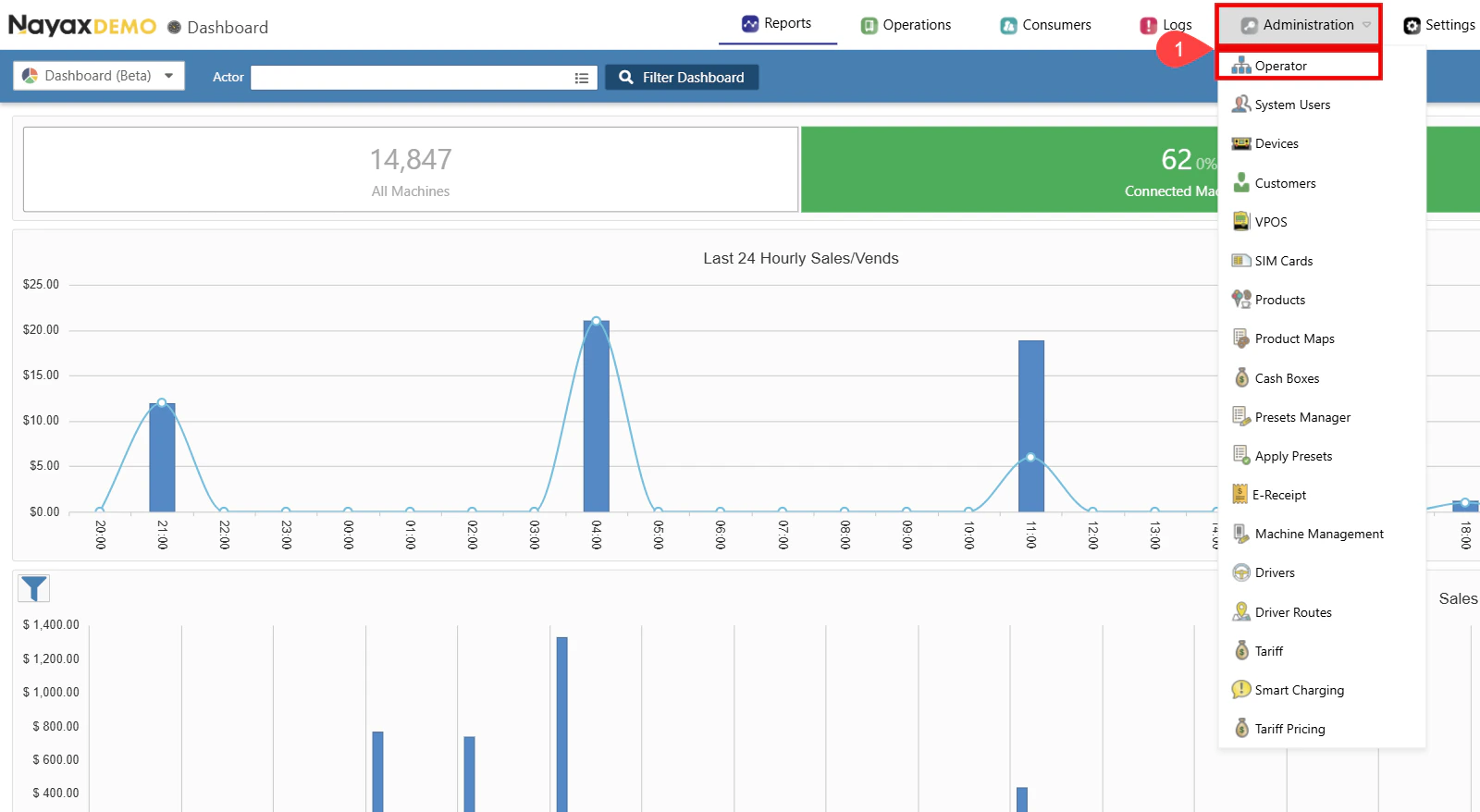 2. Find the Operator you wish to set up.
3. Click the **Search** button.
4. Select the operator to display all tabs and details.
2. Find the Operator you wish to set up.
3. Click the **Search** button.
4. Select the operator to display all tabs and details.
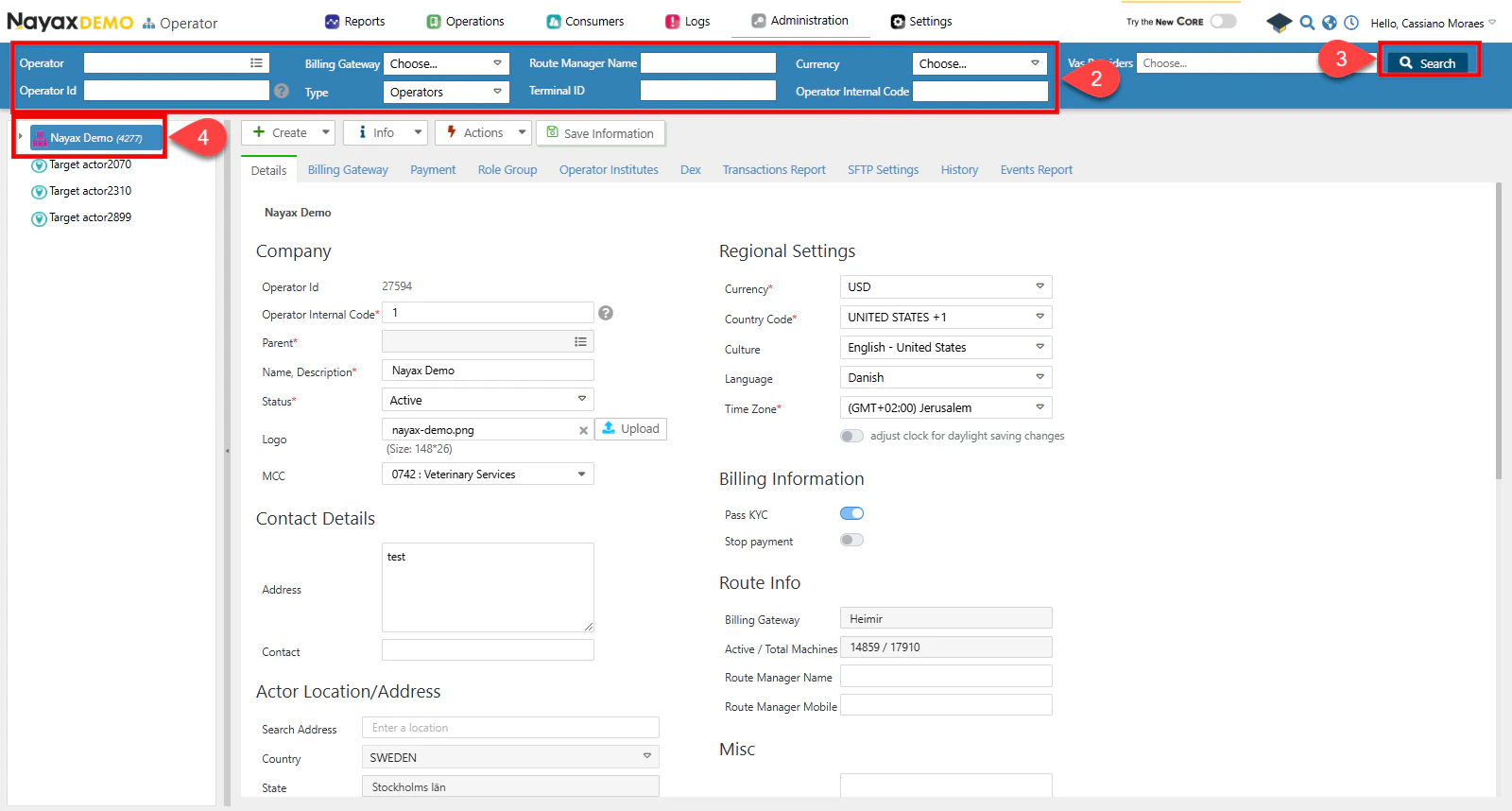 5. Go to the **Events Report** tab.
6. Setup General and Alert via SQS:
a. Select the checkbox next to **Is Active** to enable this option.
b. Enter the SQS credentials (**Access Key**, **Secret Key** and **Queue URL**).
c. Click the **Validate** button to ensure the Queue credentials are correct.
d. Enable Encryption (Optional). See the [**Set Up Encryption**](/docs/manage-data-operations/amazon-sqs/set-up-nayax-core/set-up-encryption-on-amazon-sqs-delivery) section for details.
5. Go to the **Events Report** tab.
6. Setup General and Alert via SQS:
a. Select the checkbox next to **Is Active** to enable this option.
b. Enter the SQS credentials (**Access Key**, **Secret Key** and **Queue URL**).
c. Click the **Validate** button to ensure the Queue credentials are correct.
d. Enable Encryption (Optional). See the [**Set Up Encryption**](/docs/manage-data-operations/amazon-sqs/set-up-nayax-core/set-up-encryption-on-amazon-sqs-delivery) section for details.
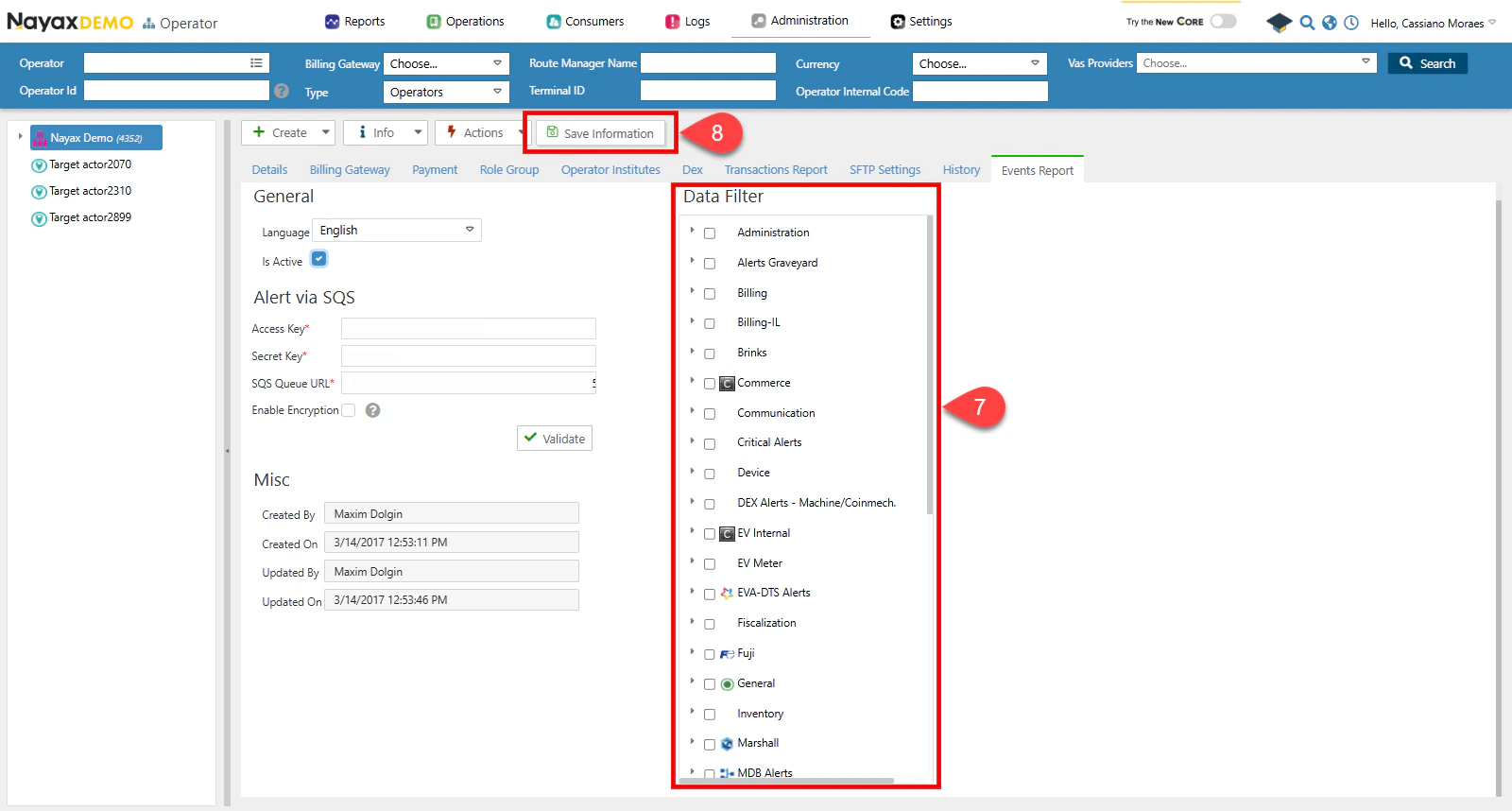
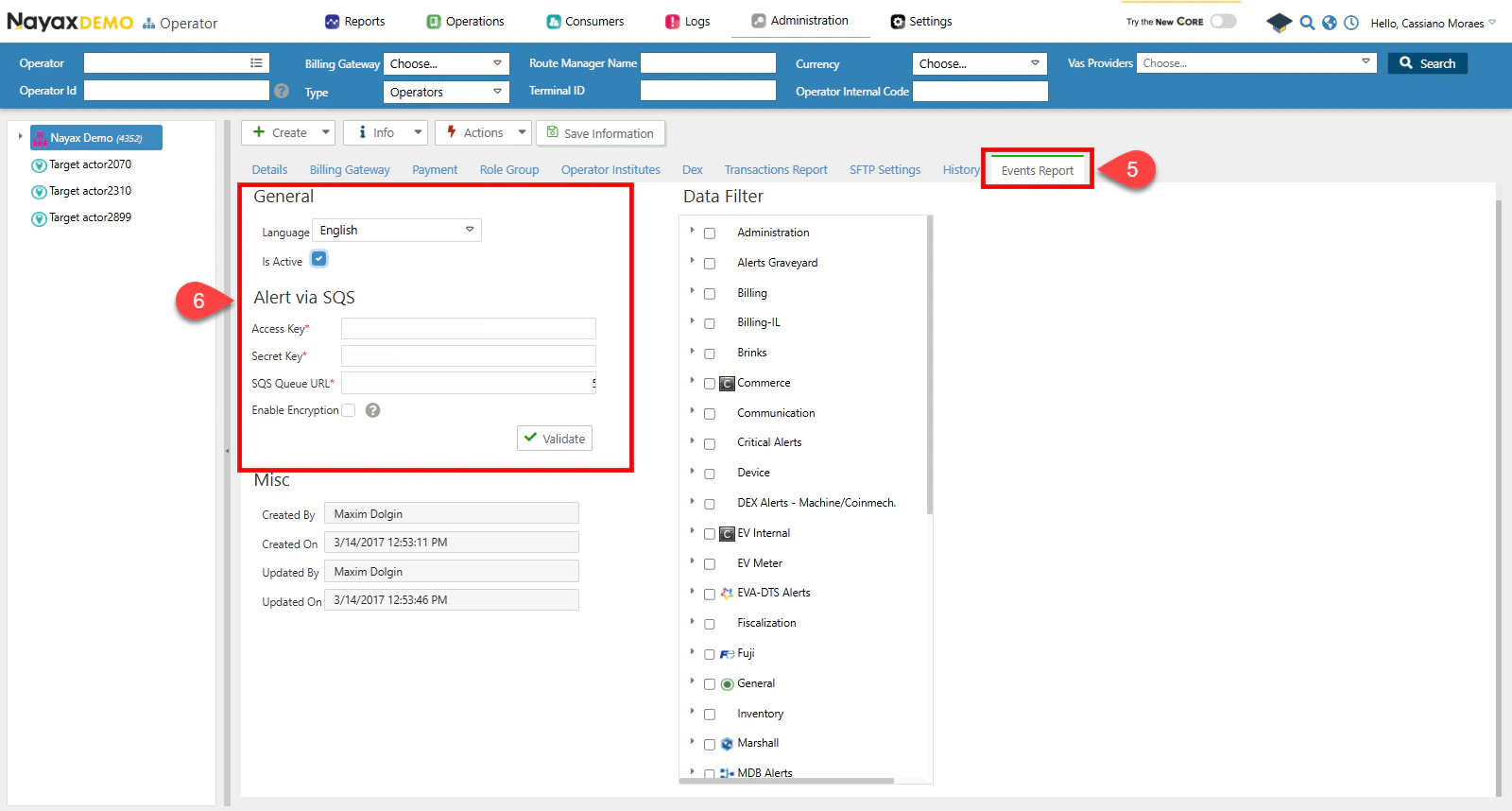 7. Apply Data Filters for Event Delivery
a. Ensure the format is set to **No Formatting**.
b. Select the desired DEX Read Types. Only the selected Dex Origins will be sent to the Queue.
8. Click the **Save Information** button to apply the changes.
7. Apply Data Filters for Event Delivery
a. Ensure the format is set to **No Formatting**.
b. Select the desired DEX Read Types. Only the selected Dex Origins will be sent to the Queue.
8. Click the **Save Information** button to apply the changes.
 ## Example Event/Alert JSON Message
Below is an example of the JSON message format for Events and Alerts that will be sent to Amazon SQS:
```json theme={null}
{
"distributorld": "27594",
"distributorName": "Nayax Demo",
"operatorld": "2000144542",
"operatorName": "Daniel_OP",
"actorld": "2000144542",
"actorName": "Daniel_OP",
"machineld": "697356467",
"machineName": "EX PP Machine",
"machineNumber": null,
"machineSerial": null,
"deviceld": "25795395",
"deviceSerial": "0404041919567757",
"eventSourceld": "6",
"eventSourceName": "Device",
"eventCode": "1",
"eventName": "Power up",
"eventData": "Device Serial #:0404041919567757\nDevice FW Version:4.0.0.5-rc3 - Jan 9 2019\nDevice Hardware:4.13\nVPOS\nSerial #:\nVPOS FW Version:2009-rc07\nMDB Max Response Time:7\nDevice MDB Level:1\nDecimal Place:2\nManufacturer\nCode:4805701\nMachine MDB Level:1\nModem IMEI: 357036091438914\nModem Model (HW Revision): UE910-EUD\nModem FW\nVersion:12.00.414\nModem Type:3G\nSIM Card Serial #:89462008002001388010\nSIM Card Mobile Number:NO CLIn\nMobile\nOperator Name:42501\nModem CDMA SN (MEID):\nLast Power Down time: 23/03/2020 14:27:30",
"eventDateTimeGMT": "2020-03-23T14:11:35.980",
"eventDateTimeVMC": "2020-03-23T17:11:35.980",
"enc_ver": "1",
"enc_key": "63562b7245cb478cb38a509ec764e012"
}
```
## JSON Message Fields Description
The following table describes the fields included in the Event/Alert JSON message:
| **Field Name** | **Type** | **Description** |
| -------------------- | -------- | ----------------------------------------------- |
| **distributorId** | `string` | Unique identifier for the distributor. |
| **distributorName** | `string` | Name of the distributor. |
| **operatorId** | `string` | Unique identifier for the operator. |
| **operatorName** | `string` | Name of the operator. |
| **actorId** | `string` | Unique identifier for the actor. |
| **actorName** | `string` | Name of the actor. |
| **machineId** | `string` | Unique identifier for the machine. |
| **machineName** | `string` | Name of the machine. |
| **machineNumber** | `string` | Internal number assigned to the machine. |
| **machineSerial** | `string` | Serial number of the machine. |
| **deviceId** | `string` | Unique identifier for the device. |
| **deviceSerial** | `string` | Serial number of the device. |
| **eventSourceId** | `string` | Unique identifier for the event source. |
| **eventSourceName** | `string` | Name of the event source. |
| **eventCode** | `string` | Code associated with the event. |
| **eventName** | `string` | Name of the event. |
| **eventData** | `string` | Data associated with the event. |
| **eventDateTimeGMT** | `string` | Event date and time in GMT format. |
| **eventDateTimeVMC** | `string` | Event date and time as recorded by the machine. |
| **enc\_ver** | `string` | Encryption version used for the data. |
| **enc\_key** | `string` | Encryption key used for securing the data. |
## Example Event/Alert JSON Message
Below is an example of the JSON message format for Events and Alerts that will be sent to Amazon SQS:
```json theme={null}
{
"distributorld": "27594",
"distributorName": "Nayax Demo",
"operatorld": "2000144542",
"operatorName": "Daniel_OP",
"actorld": "2000144542",
"actorName": "Daniel_OP",
"machineld": "697356467",
"machineName": "EX PP Machine",
"machineNumber": null,
"machineSerial": null,
"deviceld": "25795395",
"deviceSerial": "0404041919567757",
"eventSourceld": "6",
"eventSourceName": "Device",
"eventCode": "1",
"eventName": "Power up",
"eventData": "Device Serial #:0404041919567757\nDevice FW Version:4.0.0.5-rc3 - Jan 9 2019\nDevice Hardware:4.13\nVPOS\nSerial #:\nVPOS FW Version:2009-rc07\nMDB Max Response Time:7\nDevice MDB Level:1\nDecimal Place:2\nManufacturer\nCode:4805701\nMachine MDB Level:1\nModem IMEI: 357036091438914\nModem Model (HW Revision): UE910-EUD\nModem FW\nVersion:12.00.414\nModem Type:3G\nSIM Card Serial #:89462008002001388010\nSIM Card Mobile Number:NO CLIn\nMobile\nOperator Name:42501\nModem CDMA SN (MEID):\nLast Power Down time: 23/03/2020 14:27:30",
"eventDateTimeGMT": "2020-03-23T14:11:35.980",
"eventDateTimeVMC": "2020-03-23T17:11:35.980",
"enc_ver": "1",
"enc_key": "63562b7245cb478cb38a509ec764e012"
}
```
## JSON Message Fields Description
The following table describes the fields included in the Event/Alert JSON message:
| **Field Name** | **Type** | **Description** |
| -------------------- | -------- | ----------------------------------------------- |
| **distributorId** | `string` | Unique identifier for the distributor. |
| **distributorName** | `string` | Name of the distributor. |
| **operatorId** | `string` | Unique identifier for the operator. |
| **operatorName** | `string` | Name of the operator. |
| **actorId** | `string` | Unique identifier for the actor. |
| **actorName** | `string` | Name of the actor. |
| **machineId** | `string` | Unique identifier for the machine. |
| **machineName** | `string` | Name of the machine. |
| **machineNumber** | `string` | Internal number assigned to the machine. |
| **machineSerial** | `string` | Serial number of the machine. |
| **deviceId** | `string` | Unique identifier for the device. |
| **deviceSerial** | `string` | Serial number of the device. |
| **eventSourceId** | `string` | Unique identifier for the event source. |
| **eventSourceName** | `string` | Name of the event source. |
| **eventCode** | `string` | Code associated with the event. |
| **eventName** | `string` | Name of the event. |
| **eventData** | `string` | Data associated with the event. |
| **eventDateTimeGMT** | `string` | Event date and time in GMT format. |
| **eventDateTimeVMC** | `string` | Event date and time as recorded by the machine. |
| **enc\_ver** | `string` | Encryption version used for the data. |
| **enc\_key** | `string` | Encryption key used for securing the data. |