> ## Documentation Index
> Fetch the complete documentation index at: https://devzone.nayax.com/llms.txt
> Use this file to discover all available pages before exploring further.
# App Tokens (JWT)
App tokens let you grant limited, time-boxed API access to your own
downstream customers or integrations. Each token carries an expiration
date you set and permissions a Nayax admin assigns, scoped to exactly what
the integration needs.
## Token types
Nayax Core offers two choices under **Add Token**. Pick **App Token** for this
flow. The app token is a JWT. **Lynx Token** is an API key, covered on
[Security & Token](/docs/manage-data-operations/lynx-api/security#access-token).
The app token you create is a refresh token. You exchange it for a short-lived
access token, and that access token authenticates your Lynx API requests.
| Token type | Lifetime | Used for |
| - | - | - |
| App token (refresh token) | Up to 100 years | Requesting access tokens |
| Access token | 24 hours | Making Lynx API requests |
## Scopes
A scope is a permission string that defines what a token can access. Scopes
follow the format `{domain}:{action}` or `{domain}:{resource}:{action}`,
where the domain identifies the area the scope applies to, the optional
resource narrows it to a specific resource within that domain, and the
action identifies the allowed operation.
Common scope examples:
* `machines:read` grants read access to machine data.
* `orders:*:read` grants read access to all order-related resources.
* `users:app-token:create` grants permission to create app tokens.
Avoid assigning the bare `*` scope. It grants full access to every resource
and action, which defeats the purpose of scoping a token to a specific
integration.
## Claim types
An app token carries its permissions in one of three claim types, each with
its own priority and validation behavior.
| Claim | Purpose | Priority | Validation |
| - | - | - | - |
| `appScope` | Authenticates external services and integrations | Checked before `scope` | Must match exactly if present |
| `internalScope` | Authenticates internal Nayax microservices | Checked before `scope` | Must match exactly if present |
| `scope` | Standard OAuth2 (a token-based authorization scheme) user-level scope | Checked last, as a fallback | Checked after other authorization checks pass |
For most customer integrations, `appScope` is the claim type a Nayax admin
assigns to describe the machines, devices, or orders the integration needs
to access.
## Prerequisites
You need a Nayax Core account to create the app token. A Nayax admin must
assign its scopes and claim type before you can use it, so requesting a token
involves waiting on that approval rather than a fully self-service flow.
## Create an app token
You create the app token yourself in Nayax Core, but you don't choose its
scopes or claim type. A Nayax admin assigns those separately.
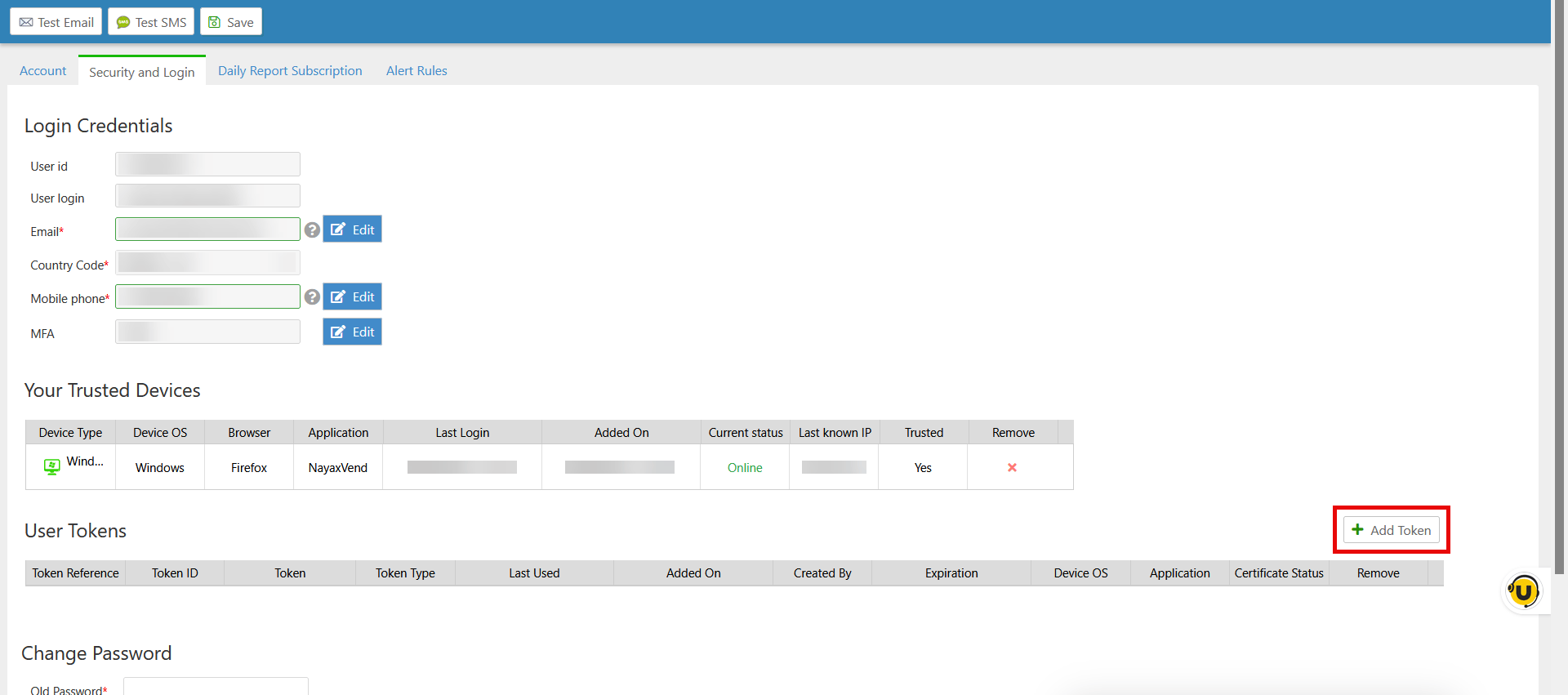
From [Security & Token](/docs/manage-data-operations/lynx-api/security#access-token),
navigate to the **User Tokens** section, then click **Add Token**.
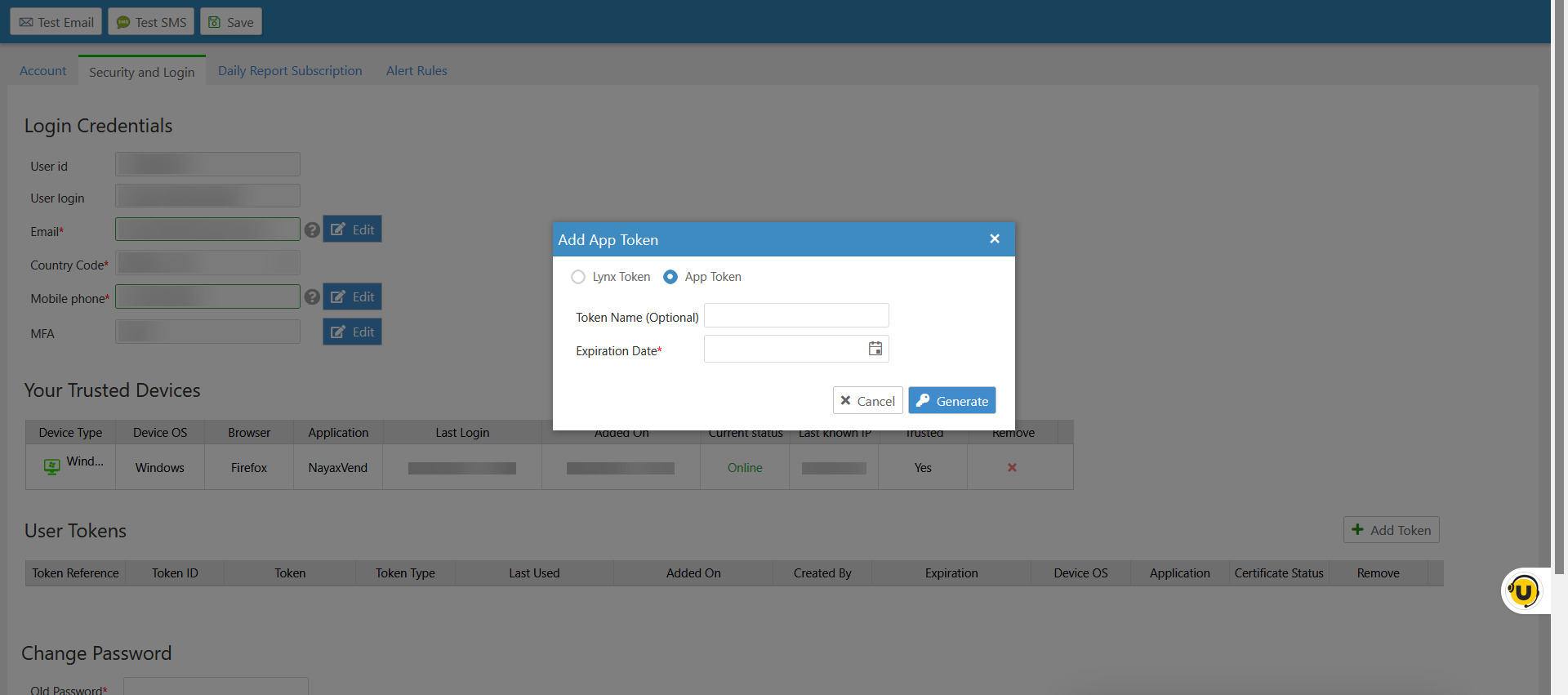
 In the **Add App Token** dialog, select **App Token**, enter an optional
**Token Name** such as `Analytics Platform - Read Only`, set an
**Expiration Date**, then click **Generate**.
In the **Add App Token** dialog, select **App Token**, enter an optional
**Token Name** such as `Analytics Platform - Read Only`, set an
**Expiration Date**, then click **Generate**.
 The admin picks the `appScope`, `internalScope`, or `scope` claims
described above, based on what the integration needs. You can't set
these yourself.
Once the admin assigns the scopes, you have a scoped app token with the
requested claims and expiration, ready to exchange for an access token.
## Exchange the app token
Exchange it for an access token before making requests, using the Lynx
API's endpoint below.
```bash theme={null}
curl -X POST "https://lynx-api.nayax.com/v1/issue-access-token" \
-H "Authorization: jwt "
```
The Lynx API endpoint expects `Authorization: jwt `, not
`Bearer`. Sending a refresh token with the `Bearer` scheme to this endpoint
fails.
The endpoint returns the access token in the following shape:
```json theme={null}
{
"Token": "eyJhbGciOiJSUzI1NiIsInR5cCI6IkpXVCJ9..."
}
```
`Token` is the access token itself, a JWT. Use it as a `Bearer` credential
on subsequent Lynx API requests. For example, retrieving a list of machines:
```bash theme={null}
curl -X GET "https://qa-lynx.nayax.com/operational/v1/machines" \
-H "Authorization: Bearer "
```
## Security best practices
Follow these practices when requesting and managing app tokens.
### Storage
Store app tokens in a secure key management system, or as environment
variables if you manage your own servers. Encrypt tokens at rest. Never
store a token in a plain text file, commit it to version control, or
include it in a URL.
### Scope and expiration
Grant only the scopes an integration needs, and request the shortest
expiration that covers its use case, rather than creating tokens casually.
Nayax limits each user to 50 tokens, so plan token reuse across integrations
that need the same access.
## Troubleshooting
If a request using an app token, or the access token it produces, fails,
check the following common causes.
### 401 Unauthorized
The token is invalid or has expired. Verify the token hasn't passed its
expiration date and that you're sending it with the correct authorization
scheme for the endpoint you're calling.
### 403 Forbidden
The API returns `{"message": "Insufficient permissions to perform this action."}`.
The token's scopes don't include the resource or action you're requesting.
Compare the required scope for the endpoint against the `appScope`,
`internalScope`, or `scope` claims on your token, and request a token with
the missing scope if needed.
### 429 Too Many Requests
You've exceeded the rate limit. Cache and reuse access tokens for their
full 24-hour lifetime instead of requesting a new one on every call.
## Next steps
Make your first authenticated call with the access token.
Browse the full set of available endpoints.
This documentation is built and hosted on [Mintlify](https://mintlify.com), a developer documentation platform.
The admin picks the `appScope`, `internalScope`, or `scope` claims
described above, based on what the integration needs. You can't set
these yourself.
Once the admin assigns the scopes, you have a scoped app token with the
requested claims and expiration, ready to exchange for an access token.
## Exchange the app token
Exchange it for an access token before making requests, using the Lynx
API's endpoint below.
```bash theme={null}
curl -X POST "https://lynx-api.nayax.com/v1/issue-access-token" \
-H "Authorization: jwt "
```
The Lynx API endpoint expects `Authorization: jwt `, not
`Bearer`. Sending a refresh token with the `Bearer` scheme to this endpoint
fails.
The endpoint returns the access token in the following shape:
```json theme={null}
{
"Token": "eyJhbGciOiJSUzI1NiIsInR5cCI6IkpXVCJ9..."
}
```
`Token` is the access token itself, a JWT. Use it as a `Bearer` credential
on subsequent Lynx API requests. For example, retrieving a list of machines:
```bash theme={null}
curl -X GET "https://qa-lynx.nayax.com/operational/v1/machines" \
-H "Authorization: Bearer "
```
## Security best practices
Follow these practices when requesting and managing app tokens.
### Storage
Store app tokens in a secure key management system, or as environment
variables if you manage your own servers. Encrypt tokens at rest. Never
store a token in a plain text file, commit it to version control, or
include it in a URL.
### Scope and expiration
Grant only the scopes an integration needs, and request the shortest
expiration that covers its use case, rather than creating tokens casually.
Nayax limits each user to 50 tokens, so plan token reuse across integrations
that need the same access.
## Troubleshooting
If a request using an app token, or the access token it produces, fails,
check the following common causes.
### 401 Unauthorized
The token is invalid or has expired. Verify the token hasn't passed its
expiration date and that you're sending it with the correct authorization
scheme for the endpoint you're calling.
### 403 Forbidden
The API returns `{"message": "Insufficient permissions to perform this action."}`.
The token's scopes don't include the resource or action you're requesting.
Compare the required scope for the endpoint against the `appScope`,
`internalScope`, or `scope` claims on your token, and request a token with
the missing scope if needed.
### 429 Too Many Requests
You've exceeded the rate limit. Cache and reuse access tokens for their
full 24-hour lifetime instead of requesting a new one on every call.
## Next steps
Make your first authenticated call with the access token.
Browse the full set of available endpoints.
This documentation is built and hosted on [Mintlify](https://mintlify.com), a developer documentation platform.