> ## Documentation Index
> Fetch the complete documentation index at: https://devzone.nayax.com/llms.txt
> Use this file to discover all available pages before exploring further.
# Retrieve Card Data
export const EndpointCard = ({method = "API", title, children, href, arrow = true}) => {
const METHOD_STYLES = {
GET: {
bg: "mint-bg-green-400/20 dark:mint-bg-green-400/20",
text: "mint-text-green-700 dark:mint-text-green-400",
border: "mint-border-green-300 dark:mint-border-green-700"
},
POST: {
bg: "mint-bg-blue-400/20 dark:mint-bg-blue-400/20",
text: "mint-text-blue-700 dark:mint-text-blue-400"
},
PUT: {
bg: "mint-bg-yellow-400/20 dark:mint-bg-yellow-400/20",
text: "mint-text-yellow-700 dark:mint-text-yellow-400"
},
PATCH: {
bg: "mint-bg-orange-400/20 dark:mint-bg-orange-400/20",
text: "mint-text-orange-700 dark:mint-text-orange-400"
},
DELETE: {
bg: "mint-bg-red-400/20 dark:mint-bg-red-400/20",
text: "mint-text-red-700 dark:mint-text-red-400"
},
API: {
bg: "mint-bg-black",
text: "mint-text-white"
}
};
const MethodBadge = ({method}) => {
const style = METHOD_STYLES[method?.toUpperCase()] ?? METHOD_STYLES.GET;
return
{method?.toUpperCase()}
;
};
const content =
{}
{title}
{children &&
{children}
}
{}
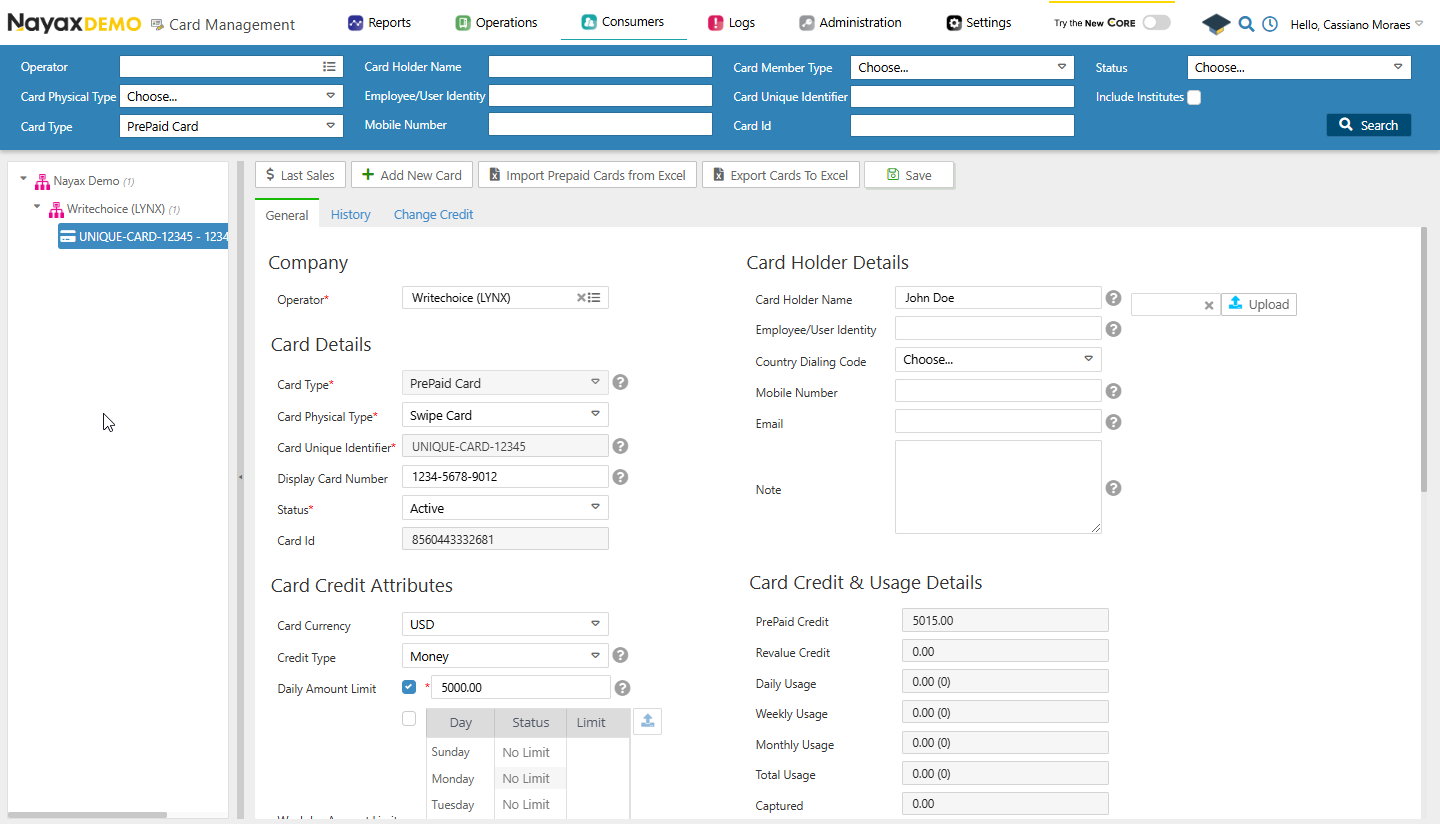 You will see all the details of the card presented to you, this is the same data retrieved by the Lynx API Endpoints mentioned before.
## Get cards
This general endpoint will retrieve an overview of all cards, including essential details like Card ID, Card Holder Name, and Card Status. See the example query:
```sh Request theme={null}
curl --request GET \
--url https://qa-lynx.nayax.com/operational/v1/cards \
--header 'accept: application/json' \
--header 'Authorization: Bearer '
```
This endpoint can also retrieve details of a specific card instead of all cards by adding query parameters to the request. For example, to get the details of a card with the Card Unique Identifier `1409315030` you can use the query in the code block below.
```sh Request theme={null}
curl --request GET \
--url 'https://qa-lynx.nayax.com/operational/v1/cards?CardUniqueIdentifier=1409315030%20' \
--header 'accept: application/json' \
--header 'Authorization: Bearer '
```
Any of the following details of a card can be used as a query parameter:
* `CardID`
* `CardUniqueIdentifier`
* `CardDisplayNumber`
* `CardMobileNumber`
* `ExternalApplicationUserID`
* `CardEmail`
* `CardHolderName`
## Get card by the card's display number
It fetches card details based on its display number, which is the physical card number. This is ideal for cases where only the display number is available for reference.
See the code block below for an example query:
```sh theme={null}
curl --request GET \
--url https://qa-lynx.nayax.com/operational/v1/cards/displayNumber/{CardDisplayNumber} \
--header 'Authorization: Bearer ' \
--header 'accept: application/json'
```
Replace `{CardDisplayNumber}` with the actual number of the card.
## Get prepaid card
It retrieves details of a prepaid card associated with a specific card ID. Use this to manage prepaid cards or verify their status and attributes.
See the code block below for an example query:
```sh Request theme={null}
curl --request GET \
--url https://qa-lynx.nayax.com/operational/v1/cards/CardID/prepaid \
--header 'accept: application/json' \
--header 'Authorization: Bearer '
```
Replace `{CardID}` with the actual `CardID` of the card.
The response will have the details of the requested card.
## Get the credit from a card
This option fetches the current credit balance for a specific card, identified by its unique identifier. Use it to monitor card balances, such as those of prepaid or technician cards.
See the code block below for an example query:
```sh Request theme={null}
curl --request GET \
--url https://qa-lynx.nayax.com/operational/v1/cards/{CardUniqueIdentifier}/credit \
--header 'Authorization: Bearer ' \
--header 'accept: application/json'
```
```json Response theme={null}
{
"value": 5320
}
```
Replace `{CardUniqueIdentifier}` with the actual identifier of the card.
The response will include the credit balance of the card.
## Get card's revalue
Retrieves the revalue amount associated with a specific card, identified by the card's unique identifier. See the query example below:
```sh Request theme={null}
curl --request GET \
--url https://qa-lynx.nayax.com/operational/v1/cards/{CardUniqueIdentifier}/revalue \
--header 'Authorization: Bearer ' \
--header 'accept: application/json'
```
Replace `{CardUniqueIdentifier}` with the actual identifier of the card.
The response will include the revalue amount of the card.
You will see all the details of the card presented to you, this is the same data retrieved by the Lynx API Endpoints mentioned before.
## Get cards
This general endpoint will retrieve an overview of all cards, including essential details like Card ID, Card Holder Name, and Card Status. See the example query:
```sh Request theme={null}
curl --request GET \
--url https://qa-lynx.nayax.com/operational/v1/cards \
--header 'accept: application/json' \
--header 'Authorization: Bearer '
```
This endpoint can also retrieve details of a specific card instead of all cards by adding query parameters to the request. For example, to get the details of a card with the Card Unique Identifier `1409315030` you can use the query in the code block below.
```sh Request theme={null}
curl --request GET \
--url 'https://qa-lynx.nayax.com/operational/v1/cards?CardUniqueIdentifier=1409315030%20' \
--header 'accept: application/json' \
--header 'Authorization: Bearer '
```
Any of the following details of a card can be used as a query parameter:
* `CardID`
* `CardUniqueIdentifier`
* `CardDisplayNumber`
* `CardMobileNumber`
* `ExternalApplicationUserID`
* `CardEmail`
* `CardHolderName`
## Get card by the card's display number
It fetches card details based on its display number, which is the physical card number. This is ideal for cases where only the display number is available for reference.
See the code block below for an example query:
```sh theme={null}
curl --request GET \
--url https://qa-lynx.nayax.com/operational/v1/cards/displayNumber/{CardDisplayNumber} \
--header 'Authorization: Bearer ' \
--header 'accept: application/json'
```
Replace `{CardDisplayNumber}` with the actual number of the card.
## Get prepaid card
It retrieves details of a prepaid card associated with a specific card ID. Use this to manage prepaid cards or verify their status and attributes.
See the code block below for an example query:
```sh Request theme={null}
curl --request GET \
--url https://qa-lynx.nayax.com/operational/v1/cards/CardID/prepaid \
--header 'accept: application/json' \
--header 'Authorization: Bearer '
```
Replace `{CardID}` with the actual `CardID` of the card.
The response will have the details of the requested card.
## Get the credit from a card
This option fetches the current credit balance for a specific card, identified by its unique identifier. Use it to monitor card balances, such as those of prepaid or technician cards.
See the code block below for an example query:
```sh Request theme={null}
curl --request GET \
--url https://qa-lynx.nayax.com/operational/v1/cards/{CardUniqueIdentifier}/credit \
--header 'Authorization: Bearer ' \
--header 'accept: application/json'
```
```json Response theme={null}
{
"value": 5320
}
```
Replace `{CardUniqueIdentifier}` with the actual identifier of the card.
The response will include the credit balance of the card.
## Get card's revalue
Retrieves the revalue amount associated with a specific card, identified by the card's unique identifier. See the query example below:
```sh Request theme={null}
curl --request GET \
--url https://qa-lynx.nayax.com/operational/v1/cards/{CardUniqueIdentifier}/revalue \
--header 'Authorization: Bearer ' \
--header 'accept: application/json'
```
Replace `{CardUniqueIdentifier}` with the actual identifier of the card.
The response will include the revalue amount of the card.