> ## Documentation Index
> Fetch the complete documentation index at: https://devzone.nayax.com/llms.txt
> Use this file to discover all available pages before exploring further.
# Pick List Actions
export const EndpointCard = ({method = "API", title, children, href, arrow = true}) => {
const METHOD_STYLES = {
GET: {
bg: "mint-bg-green-400/20 dark:mint-bg-green-400/20",
text: "mint-text-green-700 dark:mint-text-green-400",
border: "mint-border-green-300 dark:mint-border-green-700"
},
POST: {
bg: "mint-bg-blue-400/20 dark:mint-bg-blue-400/20",
text: "mint-text-blue-700 dark:mint-text-blue-400"
},
PUT: {
bg: "mint-bg-yellow-400/20 dark:mint-bg-yellow-400/20",
text: "mint-text-yellow-700 dark:mint-text-yellow-400"
},
PATCH: {
bg: "mint-bg-orange-400/20 dark:mint-bg-orange-400/20",
text: "mint-text-orange-700 dark:mint-text-orange-400"
},
DELETE: {
bg: "mint-bg-red-400/20 dark:mint-bg-red-400/20",
text: "mint-text-red-700 dark:mint-text-red-400"
},
API: {
bg: "mint-bg-black",
text: "mint-text-white"
}
};
const MethodBadge = ({method}) => {
const style = METHOD_STYLES[method?.toUpperCase()] ?? METHOD_STYLES.GET;
return
{method?.toUpperCase()}
;
};
const content =
{}
{title}
{children &&
{children}
}
{}
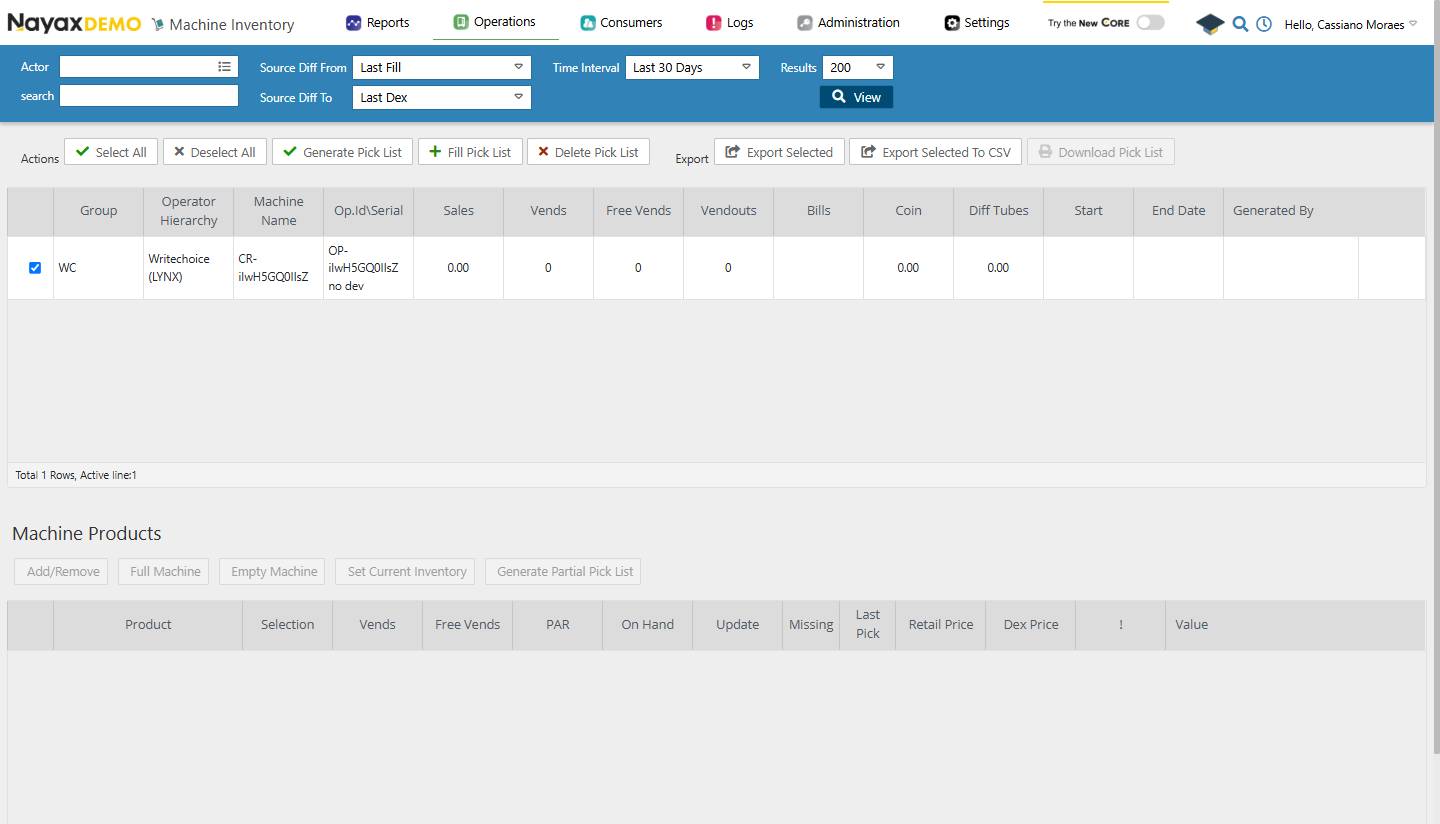 These actions can also be performed through Lynx API using the following endpoints:
**Authentication**
Refer to the [Security & Token](/docs/manage-data-operations/lynx-api/security) page of this documentation to learn how to access your tokens, and how to properly use it to authenticate your API requests.
## Get a pick list
Use the [Get Pick List](/reference/lynx/machine-inventory/get-pick-list) endpoint to retrieve the pick list associated with a specific machine.
```sh Request theme={null}
curl --request GET \
--url https://qa-lynx.nayax.com/operational/v1/machines/{MachineID}/pickList \
--header 'Authorization: Bearer ' \
--header 'accept: application/json'
```
**Path Param**
Change `MachineID` with the actual ID of the machine to retrieve the pick list from.
A successful response returns the pick list with all products associated with the machine.
## Update a pick list
Use the [Update Pick List](/reference/lynx/machine-inventory/update-pick-list) endpoint to modify product quantities or other details in a machine's pick list.
```sh Request theme={null}
curl --request PUT \
--url https://qa-lynx.nayax.com/operational/v1/machines/inventory/picklists/update \
--header 'Authorization: Bearer ' \
--header 'accept: application/json' \
--header 'Content-Type: application/json' \
--data '{
"MachineId": 12345,
"Products": [
{
"MachineProductId": 67890,
"PickQty": 10
},
{
"MachineProductId": 54321,
"PickQty": 5
}
]
}'
```
The request body contains the following parameters:
| Parameter | Type | Description |
| :---------- | :----------------- | :--------------------------------------------------------------------------------------------------------------------------------------------------------------------- |
| `MachineId` | `int64` | The unique identifier of the machine whose pick list is being updated. |
| `Products` | `array of objects` | A list of products to update. Each object contains `MachineProductId` (unique identifier of the product in the machine) and `PickQty` (updated quantity to be picked). |
A successful response returns the pick list with the updated pick quantities.
## Delete a pick list
Use the [Delete Pick List](/reference/lynx/machine-inventory/delete-pick-list) endpoint to remove the pick list associated with a specific machine.
```sh Request theme={null}
curl --request DELETE \
--url https://qa-lynx.nayax.com/operational/v1/machines/{MachineID}/pickList \
--header 'Authorization: Bearer ' \
--header 'accept: application/json'
```
A `200 OK` response confirms the pick list has been deleted.
## See also
* [Inventory Workflow](/docs/manage-data-operations/lynx-api/inventory-management/inventory-workflow)
* [Pick Lists](/docs/manage-data-operations/lynx-api/inventory-management/pick-lists)
These actions can also be performed through Lynx API using the following endpoints:
**Authentication**
Refer to the [Security & Token](/docs/manage-data-operations/lynx-api/security) page of this documentation to learn how to access your tokens, and how to properly use it to authenticate your API requests.
## Get a pick list
Use the [Get Pick List](/reference/lynx/machine-inventory/get-pick-list) endpoint to retrieve the pick list associated with a specific machine.
```sh Request theme={null}
curl --request GET \
--url https://qa-lynx.nayax.com/operational/v1/machines/{MachineID}/pickList \
--header 'Authorization: Bearer ' \
--header 'accept: application/json'
```
**Path Param**
Change `MachineID` with the actual ID of the machine to retrieve the pick list from.
A successful response returns the pick list with all products associated with the machine.
## Update a pick list
Use the [Update Pick List](/reference/lynx/machine-inventory/update-pick-list) endpoint to modify product quantities or other details in a machine's pick list.
```sh Request theme={null}
curl --request PUT \
--url https://qa-lynx.nayax.com/operational/v1/machines/inventory/picklists/update \
--header 'Authorization: Bearer ' \
--header 'accept: application/json' \
--header 'Content-Type: application/json' \
--data '{
"MachineId": 12345,
"Products": [
{
"MachineProductId": 67890,
"PickQty": 10
},
{
"MachineProductId": 54321,
"PickQty": 5
}
]
}'
```
The request body contains the following parameters:
| Parameter | Type | Description |
| :---------- | :----------------- | :--------------------------------------------------------------------------------------------------------------------------------------------------------------------- |
| `MachineId` | `int64` | The unique identifier of the machine whose pick list is being updated. |
| `Products` | `array of objects` | A list of products to update. Each object contains `MachineProductId` (unique identifier of the product in the machine) and `PickQty` (updated quantity to be picked). |
A successful response returns the pick list with the updated pick quantities.
## Delete a pick list
Use the [Delete Pick List](/reference/lynx/machine-inventory/delete-pick-list) endpoint to remove the pick list associated with a specific machine.
```sh Request theme={null}
curl --request DELETE \
--url https://qa-lynx.nayax.com/operational/v1/machines/{MachineID}/pickList \
--header 'Authorization: Bearer ' \
--header 'accept: application/json'
```
A `200 OK` response confirms the pick list has been deleted.
## See also
* [Inventory Workflow](/docs/manage-data-operations/lynx-api/inventory-management/inventory-workflow)
* [Pick Lists](/docs/manage-data-operations/lynx-api/inventory-management/pick-lists)