> ## Documentation Index
> Fetch the complete documentation index at: https://devzone.nayax.com/llms.txt
> Use this file to discover all available pages before exploring further.

# Get a Machine's Last Sales & Generate eReceipt

export const EndpointCard = ({method = "API", title, children, href, arrow = true}) => {
  const METHOD_STYLES = {
    GET: {
      bg: "mint-bg-green-400/20 dark:mint-bg-green-400/20",
      text: "mint-text-green-700 dark:mint-text-green-400",
      border: "mint-border-green-300 dark:mint-border-green-700"
    },
    POST: {
      bg: "mint-bg-blue-400/20 dark:mint-bg-blue-400/20",
      text: "mint-text-blue-700 dark:mint-text-blue-400"
    },
    PUT: {
      bg: "mint-bg-yellow-400/20 dark:mint-bg-yellow-400/20",
      text: "mint-text-yellow-700 dark:mint-text-yellow-400"
    },
    PATCH: {
      bg: "mint-bg-orange-400/20 dark:mint-bg-orange-400/20",
      text: "mint-text-orange-700 dark:mint-text-orange-400"
    },
    DELETE: {
      bg: "mint-bg-red-400/20 dark:mint-bg-red-400/20",
      text: "mint-text-red-700 dark:mint-text-red-400"
    },
    API: {
      bg: "mint-bg-black",
      text: "mint-text-white"
    }
  };
  const MethodBadge = ({method}) => {
    const style = METHOD_STYLES[method?.toUpperCase()] ?? METHOD_STYLES.GET;
    return <span className={`
          method-pill rounded-lg font-bold px-1.5 py-0.5 text-xs leading-5 ${style.bg} ${style.text}`}>
        {method?.toUpperCase()}
      </span>;
  };
  const content = <div className="group flex items-center gap-4 border border-gray-200 dark:border-gray-700 rounded-xl p-5 bg-white dark:bg-[#1e1e1e] hover:border-gray-400 dark:hover:border-gray-500 hover:shadow-md transition-all cursor-pointer">
      {}
      <div className="flex-1 min-w-0">
        <p className="font-semibold text-gray-900 dark:text-white text-sm leading-snug">{title}</p>
        {children && <p className="mt-1 text-sm text-gray-500 dark:text-gray-400 line-clamp-2">{children}</p>}
      </div>

      {}
      <div className="shrink-0">
        <MethodBadge method={method} />
      </div>
    </div>;
  if (!href) return content;
  return <a href={href} className="block no-underline border-b-0 mb-2">
      {content}
    </a>;
};

This page presents how to retrieve a Machine's Last Sales using its Machine ID with Lynx API and also with Nayax core. The guide will use the following endpoints:

<Columns cols={2}>
  <EndpointCard title="Get Last Sales" href="/reference/lynx/machines/get-last-sales-for-machine-by-machineid" method="get" />

  <EndpointCard title="Generate eReceipt" href="/reference/lynx/ereceipt/generate-ereceipt-for-your-transaction" method="post" />
</Columns>

<Warning>
  **Authentication**

  Refer to the [Security & Token](/docs/manage-data-operations/lynx-api/security) page of this documentation to learn how to access your tokens, and how to properly use it to authenticate your API requests.
</Warning>

## Retrieving a machine's last sales

To retrieve a machine's Last Sales using its Machine ID, you need to use the [Get Last Sales for Machine](/reference/lynx/machines/get-last-sales-for-machine-by-machineid) endpoint. By providing the machine's Machine ID in the request you can retrieve the corresponding machine's unique identifier.

The code block below exemplifies the request, using the `MachineID` as a query parameter to filter the result:

```sh theme={null}
curl -X 'GET' \
  'https://qa-lynx.nayax.com/operational/v1/machines/<MACHINE_ID>/lastSales' \
  -H 'accept: text/plain' \
  -H 'Authorization: Bearer <YOUR_ACCESS_TOKEN>'
```

<Note>
  Remember to replace `<MACHINE_ID>` with the actual machine's Machine ID.
</Note>

The response will include details about the machine, including the Machine's ID.

```json theme={null}
[
  {
    "TransactionID": 4625276436,
    "PaymentServiceTransactionID": null,
    "PaymentServiceProviderName": null,
    "MachineID": 629665354,
    "MachineName": "Marshall temp- do not touch #3",
    "MachineNumber": "",
    "InstituteLocationName": null,
    "AuthorizationValue": 700,
    "SettlementValue": 700,
    "CurrencyCode": "AUD",
    "PaymentMethod": "Prepaid Credit",
    "RecognitionMethod": "Prepaid Credit",
    "CardNumber": "2736390748",
    "CardBrand": null,
    "CLI": null,
    "ProductName": "Unknown(0 = 700.00)\n",
    "MultivendTransactionBit": false,
    "MultivendNumverOfProducts": 0,
    "UnitOfMeasurement": null,
    "Quantity": 1,
    "EnergyConsumed": 0,
    "AuthorizationDateTimeGMT": "2026-02-08T09:31:51.817",
    "MachineAuthorizationTime": "2026-02-08T11:31:51.46",
    "SettlementDateTimeGMT": "2026-02-09T01:53:07.96",
    "SiteID": 4,
    "SiteName": "US"
  },
  {
    "TransactionID": 4625272758,
    "PaymentServiceTransactionID": null,
    "PaymentServiceProviderName": null,
    "MachineID": 629665354,
    "MachineName": "Marshall temp- do not touch #3",
    "MachineNumber": "",
    "InstituteLocationName": null,
    "AuthorizationValue": 44.64,
    "SettlementValue": 44.64,
    "CurrencyCode": "AUD",
    "PaymentMethod": "Prepaid Credit",
    "RecognitionMethod": "Prepaid Credit",
    "CardNumber": "2736390748",
    "CardBrand": null,
    "CLI": null,
    "ProductName": "Unknown(0 = 44.64)\n",
    "MultivendTransactionBit": false,
    "MultivendNumverOfProducts": 0,
    "UnitOfMeasurement": null,
    "Quantity": 1,
    "EnergyConsumed": 0,
    "AuthorizationDateTimeGMT": "2026-02-08T09:28:18.38",
    "MachineAuthorizationTime": "2026-02-08T11:28:18.117",
    "SettlementDateTimeGMT": "2026-02-08T09:29:37.527",
    "SiteID": 4,
    "SiteName": "US"
  },
  {
    "TransactionID": 4600648084,
    "PaymentServiceTransactionID": null,
    "PaymentServiceProviderName": null,
    "MachineID": 629665354,
    "MachineName": "Marshall temp- do not touch #3",
    "MachineNumber": "",
    "InstituteLocationName": null,
    "AuthorizationValue": 0.1,
    "SettlementValue": 0.05,
    "CurrencyCode": "AUD",
    "PaymentMethod": "Prepaid Credit",
    "RecognitionMethod": "Prepaid Credit",
    "CardNumber": "2736390748",
    "CardBrand": null,
    "CLI": null,
    "ProductName": "Unknown(0 = 0.05)\n",
    "MultivendTransactionBit": false,
    "MultivendNumverOfProducts": 0,
    "UnitOfMeasurement": null,
    "Quantity": 1,
    "EnergyConsumed": 0,
    "AuthorizationDateTimeGMT": "2026-02-03T08:18:01.53",
    "MachineAuthorizationTime": "2026-02-03T10:18:01.143",
    "SettlementDateTimeGMT": "2026-02-03T08:18:15.617",
    "SiteID": 4,
    "SiteName": "US"
  },
  {
    "TransactionID": 4600630276,
    "PaymentServiceTransactionID": null,
    "PaymentServiceProviderName": null,
    "MachineID": 629665354,
    "MachineName": "Marshall temp- do not touch #3",
    "MachineNumber": "",
    "InstituteLocationName": null,
    "AuthorizationValue": 0.1,
    "SettlementValue": 0.05,
    "CurrencyCode": "AUD",
    "PaymentMethod": "Prepaid Credit",
    "RecognitionMethod": "Prepaid Credit",
    "CardNumber": "2736390748",
    "CardBrand": null,
    "CLI": null,
    "ProductName": "Unknown(0 = 0.05)\n",
    "MultivendTransactionBit": false,
    "MultivendNumverOfProducts": 0,
    "UnitOfMeasurement": null,
    "Quantity": 1,
    "EnergyConsumed": 0,
    "AuthorizationDateTimeGMT": "2026-02-03T08:07:52.03",
    "MachineAuthorizationTime": "2026-02-03T10:07:51.663",
    "SettlementDateTimeGMT": "2026-02-03T08:08:11.187",
    "SiteID": 4,
    "SiteName": "US"
  },
  {
    "TransactionID": 4545673740,
    "PaymentServiceTransactionID": "260122075902",
    "PaymentServiceProviderName": "Stub Billing",
    "MachineID": 629665354,
    "MachineName": "Marshall temp- do not touch #3",
    "MachineNumber": "",
    "InstituteLocationName": null,
    "AuthorizationValue": 0.1,
    "SettlementValue": 0.1,
    "CurrencyCode": "AUD",
    "PaymentMethod": "Credit Card",
    "RecognitionMethod": "Credit Card",
    "CardNumber": "5453 xxxx xxxx 5803",
    "CardBrand": "MASTERCARD",
    "CLI": null,
    "ProductName": "Unknown(0 = 0.10)\n",
    "MultivendTransactionBit": false,
    "MultivendNumverOfProducts": 0,
    "UnitOfMeasurement": null,
    "Quantity": 1,
    "EnergyConsumed": 0,
    "AuthorizationDateTimeGMT": "2026-01-22T07:59:02.103",
    "MachineAuthorizationTime": "2026-01-22T09:59:02.07",
    "SettlementDateTimeGMT": "2026-01-22T08:53:02.977",
    "SiteID": 4,
    "SiteName": "US"
  },
  {
    "TransactionID": 4545672122,
    "PaymentServiceTransactionID": "260122075814",
    "PaymentServiceProviderName": "Stub Billing",
    "MachineID": 629665354,
    "MachineName": "Marshall temp- do not touch #3",
    "MachineNumber": "",
    "InstituteLocationName": null,
    "AuthorizationValue": 0.1,
    "SettlementValue": 0.1,
    "CurrencyCode": "AUD",
    "PaymentMethod": "Credit Card",
    "RecognitionMethod": "Credit Card",
    "CardNumber": "5453 xxxx xxxx 5803",
    "CardBrand": "MASTERCARD",
    "CLI": null,
    "ProductName": "Unknown(0 = 0.10)\n",
    "MultivendTransactionBit": false,
    "MultivendNumverOfProducts": 0,
    "UnitOfMeasurement": null,
    "Quantity": 1,
    "EnergyConsumed": 0,
    "AuthorizationDateTimeGMT": "2026-01-22T07:58:14.687",
    "MachineAuthorizationTime": "2026-01-22T09:58:14.643",
    "SettlementDateTimeGMT": "2026-01-22T07:58:30.44",
    "SiteID": 4,
    "SiteName": "US"
  },
  {
    "TransactionID": 4515594836,
    "PaymentServiceTransactionID": null,
    "PaymentServiceProviderName": null,
    "MachineID": 629665354,
    "MachineName": "Marshall temp- do not touch #3",
    "MachineNumber": "",
    "InstituteLocationName": null,
    "AuthorizationValue": 0.1,
    "SettlementValue": 0.1,
    "CurrencyCode": "AUD",
    "PaymentMethod": "Prepaid Credit",
    "RecognitionMethod": "Prepaid Credit",
    "CardNumber": "2736390748",
    "CardBrand": null,
    "CLI": null,
    "ProductName": "Unknown(0 = 0.10)\n",
    "MultivendTransactionBit": false,
    "MultivendNumverOfProducts": 0,
    "UnitOfMeasurement": null,
    "Quantity": 1,
    "EnergyConsumed": 0,
    "AuthorizationDateTimeGMT": "2026-01-15T11:44:11.867",
    "MachineAuthorizationTime": "2026-01-15T13:44:11.53",
    "SettlementDateTimeGMT": "2026-01-15T11:45:58.207",
    "SiteID": 4,
    "SiteName": "US"
  },
  {
    "TransactionID": 4515585818,
    "PaymentServiceTransactionID": null,
    "PaymentServiceProviderName": null,
    "MachineID": 629665354,
    "MachineName": "Marshall temp- do not touch #3",
    "MachineNumber": "",
    "InstituteLocationName": null,
    "AuthorizationValue": 0.1,
    "SettlementValue": 0.05,
    "CurrencyCode": "AUD",
    "PaymentMethod": "Prepaid Credit",
    "RecognitionMethod": "Prepaid Credit",
    "CardNumber": "2736390748",
    "CardBrand": null,
    "CLI": null,
    "ProductName": "Unknown(0 = 0.05)\n",
    "MultivendTransactionBit": false,
    "MultivendNumverOfProducts": 0,
    "UnitOfMeasurement": null,
    "Quantity": 1,
    "EnergyConsumed": 0,
    "AuthorizationDateTimeGMT": "2026-01-15T11:40:29.583",
    "MachineAuthorizationTime": "2026-01-15T13:40:29.207",
    "SettlementDateTimeGMT": "2026-01-15T11:40:49.12",
    "SiteID": 4,
    "SiteName": "US"
  },
  {
    "TransactionID": 4515573274,
    "PaymentServiceTransactionID": null,
    "PaymentServiceProviderName": null,
    "MachineID": 629665354,
    "MachineName": "Marshall temp- do not touch #3",
    "MachineNumber": "",
    "InstituteLocationName": null,
    "AuthorizationValue": 0.1,
    "SettlementValue": 0.1,
    "CurrencyCode": "AUD",
    "PaymentMethod": "Prepaid Credit",
    "RecognitionMethod": "Prepaid Credit",
    "CardNumber": "2736390748",
    "CardBrand": null,
    "CLI": null,
    "ProductName": "Unknown(0 = 0.10)\n",
    "MultivendTransactionBit": false,
    "MultivendNumverOfProducts": 0,
    "UnitOfMeasurement": null,
    "Quantity": 1,
    "EnergyConsumed": 0,
    "AuthorizationDateTimeGMT": "2026-01-15T11:35:16.5",
    "MachineAuthorizationTime": "2026-01-15T13:35:16.15",
    "SettlementDateTimeGMT": "2026-01-15T11:36:57.857",
    "SiteID": 4,
    "SiteName": "US"
  },
  {
    "TransactionID": 4515568878,
    "PaymentServiceTransactionID": null,
    "PaymentServiceProviderName": null,
    "MachineID": 629665354,
    "MachineName": "Marshall temp- do not touch #3",
    "MachineNumber": "",
    "InstituteLocationName": null,
    "AuthorizationValue": 0.1,
    "SettlementValue": 0.1,
    "CurrencyCode": "AUD",
    "PaymentMethod": "Prepaid Credit",
    "RecognitionMethod": "Prepaid Credit",
    "CardNumber": "2736390748",
    "CardBrand": null,
    "CLI": null,
    "ProductName": "Unknown(0 = 0.10)\n",
    "MultivendTransactionBit": false,
    "MultivendNumverOfProducts": 0,
    "UnitOfMeasurement": null,
    "Quantity": 1,
    "EnergyConsumed": 0,
    "AuthorizationDateTimeGMT": "2026-01-15T11:33:23.537",
    "MachineAuthorizationTime": "2026-01-15T13:33:23.113",
    "SettlementDateTimeGMT": "2026-01-15T11:34:58.007",
    "SiteID": 4,
    "SiteName": "US"
  }
]

```

<br />

### Nayax Core

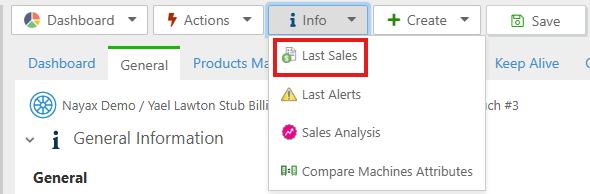
You can also find the Machine's Last Sales in Nayax Core in the machine's details, to do so follow the steps below:

1. Access **Operations > Machines**.
2. Use the **Search** feature to find the machine.
3. Select the machine from the list.
4. Click on **Info > Last Sales**:
<Frame>
  <img src="https://mintcdn.com/nayax-44d6e37b/27KIupf5oHU9adsO/images/docs/getting-a-machines-last-sales-ereceipt-information/image1.png?fit=max&auto=format&n=27KIupf5oHU9adsO&q=85&s=44cf3f083a88a94e77666f14f74e07c2" width="590" height="194" data-path="images/docs/getting-a-machines-last-sales-ereceipt-information/image1.png" />
</Frame>

<br />

## Generating eReceipt

To generate a transaction's eReceipt, you need to use the [Generate eReceipt](/reference/lynx/ereceipt/generate-ereceipt) endpoint. By providing the following information in the request:

* TransactionID, MachineAuthorizationTime, SiteID - all 3 fields' values are retrieved via the Last Sales method mentioned above
* Machine ID
* Consumer's full name
* Consumer's email address

You can retrieve the corresponding machine's unique identifier.

The code block below exemplifies the request, using the `DeviceSerial` as a query parameter to filter the result:

```sh theme={null}
curl -X 'POST' \
  'https://qa-lynx.nayax.com/operational/v1/ereceipt/generate' \
  -H 'accept: text/plain' \
  -H 'Content-Type: application/json-patch+json' \
  -d '{
  "TrasactionID": <TRANSACTION_ID>,
  "TransactionDateTime": <MACHINE_AUTHORIZATION_TIME>,
  "TrasactionSiteID": <SITE_ID>,
  "MachineID": <MACHINE_ID>,
  "FullName": "string",
  "Email": "string"
}'
```

<Note>
  Remember to replace `<TRANSACTION_ID>`, `<MACHINE_AUTHORIZATION_TIME>`, `<SITE_ID>`, `<MACHINE_ID>` with the actual details of the transaction.
</Note>

The response will include details about the eReceipt sent, including the PDF's link.

```json theme={null}
{
  "ReceiptURL": "https://nayax-ereceipt.s3.amazonaws.com/2026/02/12/YaelLawtonStubBilling/OFpQBN-x25GKRbZE8ySlnDnrO44iYVAEUKcw-vKmpoY1/ereceipt4625276436.pdf",
  "EmailSent": true,
  "EreceiptID": 6203654
}
```

### Nayax Core

You can also find the Machine's Last Sales in Nayax Core in the machine's details, to do so follow the steps below:

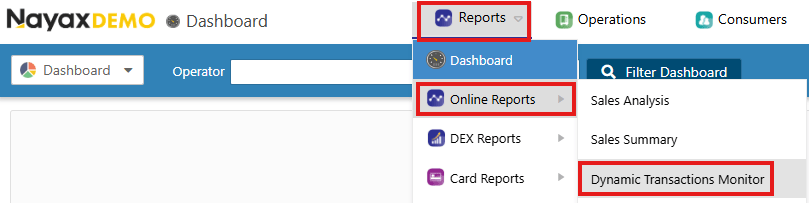
1. Access **Reports > Online Reports > Dynamic Transactions Monitor**.
<Frame>
  <img src="https://mintcdn.com/nayax-44d6e37b/27KIupf5oHU9adsO/images/docs/getting-a-machines-last-sales-ereceipt-information/image2.png?fit=max&auto=format&n=27KIupf5oHU9adsO&q=85&s=e613f7c8952d00bd9b78febc69c557c2" width="809" height="203" data-path="images/docs/getting-a-machines-last-sales-ereceipt-information/image2.png" />
</Frame>

2. Use the **Search** feature to find the relevant transaction by the transaction ID.

<Frame>
  <img src="https://mintcdn.com/nayax-44d6e37b/27KIupf5oHU9adsO/images/docs/getting-a-machines-last-sales-ereceipt-information/image3.png?fit=max&auto=format&n=27KIupf5oHU9adsO&q=85&s=2712360bae50b19aeb2db868437fa75c" width="1692" height="248" data-path="images/docs/getting-a-machines-last-sales-ereceipt-information/image3.png" />
</Frame>

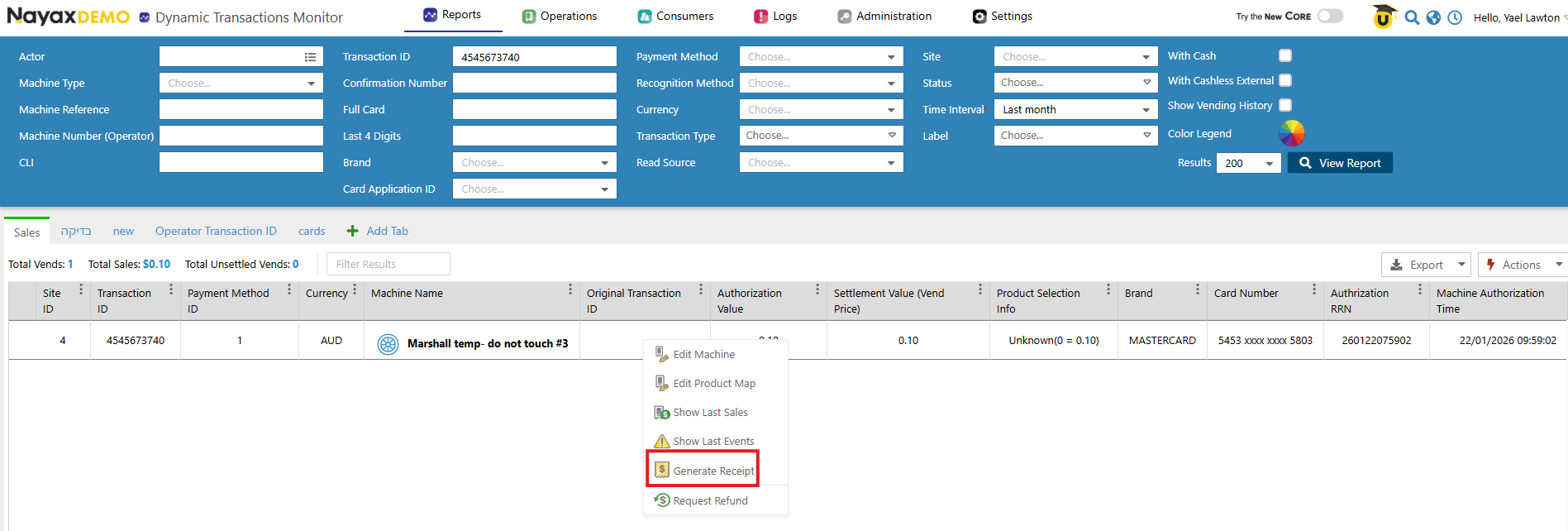
3. Select the relevant transaction from the list.
4. Right-click on the transaction, then select **Generate eReceipt**:
<Frame>
  <img src="https://mintcdn.com/nayax-44d6e37b/27KIupf5oHU9adsO/images/docs/getting-a-machines-last-sales-ereceipt-information/image4.png?fit=max&auto=format&n=27KIupf5oHU9adsO&q=85&s=56b2e68b219036ed67a26c9d5da9575d" width="1897" height="642" data-path="images/docs/getting-a-machines-last-sales-ereceipt-information/image4.png" />
</Frame>

<br />

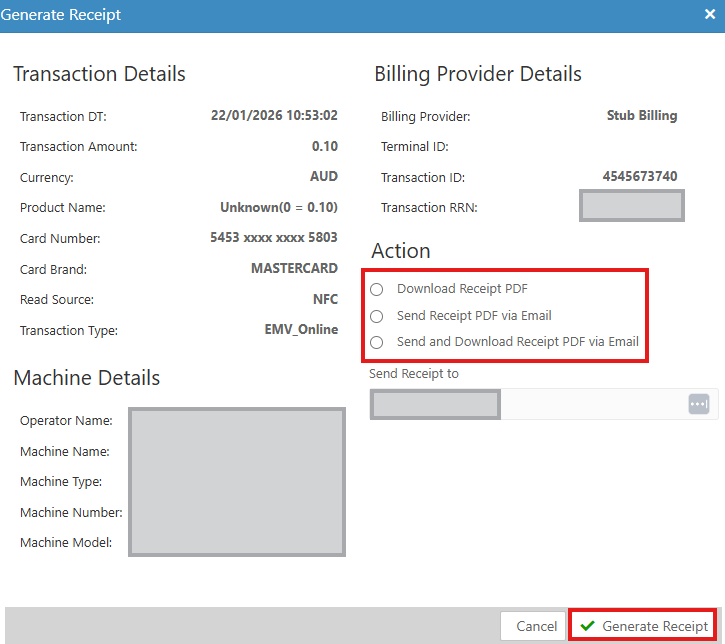
5. Insert the relevant details and click on "Generate eReceipt":
<Frame>
  <img src="https://mintcdn.com/nayax-44d6e37b/27KIupf5oHU9adsO/images/docs/getting-a-machines-last-sales-ereceipt-information/image5.png?fit=max&auto=format&n=27KIupf5oHU9adsO&q=85&s=798d782894b579ff6e3d97ac31d39539" width="725" height="644" data-path="images/docs/getting-a-machines-last-sales-ereceipt-information/image5.png" />
</Frame>
