> ## Documentation Index
> Fetch the complete documentation index at: https://devzone.nayax.com/llms.txt
> Use this file to discover all available pages before exploring further.
# Sales By Period
> A bar chart widget showing revenue generated across your fleet or a specific set of machines over a selected time period.
The **Sales By Period** widget shows a bar chart of revenue generated across your fleet or a specific set of machines. It allows operators to identify sales trends, peak performance days, and transaction volume at a glance.
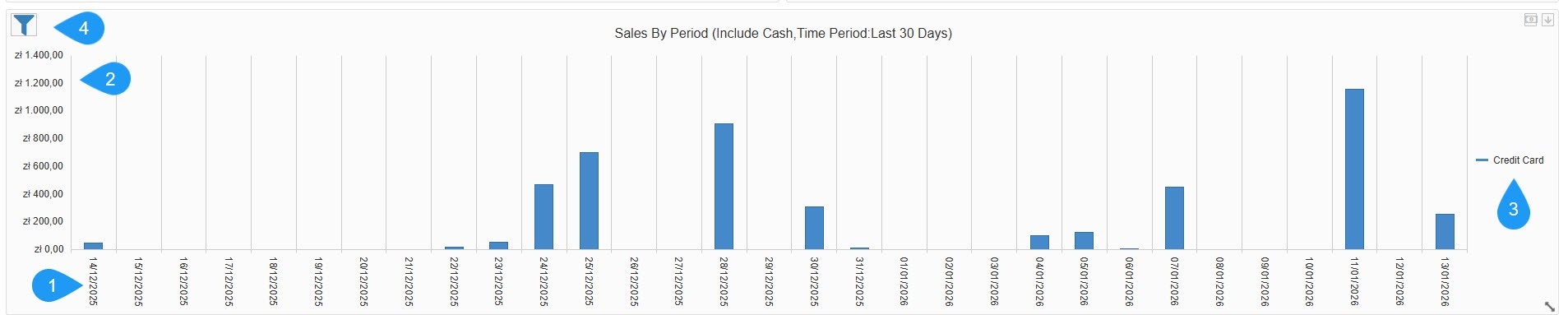 1. **Time Dimension (X-Axis)**: Shows a daily breakdown of the selected timeframe, such as the last 30 days.
2. **Revenue Scale (Y-Axis)**: Shows the total value of sales in the local currency, such as zł - Polish złoty.
3. **Legend**: Categorizes sales by payment method. In this view, it is tracking Credit Card transactions (indicated by the blue bars).
* **Chart Style**: Choose the data visualization format: column, area, or line.
* **Category Axis Major Grid Line**: A toggle to show or hide vertical background lines for better readability.
* **Include Cash**: A checkbox to add or remove physical cash transactions from the totals.
* **Split Payment Method**: An option to see separate bars/lines for different payment types (Cash vs. Credit Card) rather than one combined total.
* **Payment Method**: A dropdown to filter the entire widget by a specific provider or type.
* **Time Period**: Defines the date range for the data, such as Last 30 Days.
1. **Time Dimension (X-Axis)**: Shows a daily breakdown of the selected timeframe, such as the last 30 days.
2. **Revenue Scale (Y-Axis)**: Shows the total value of sales in the local currency, such as zł - Polish złoty.
3. **Legend**: Categorizes sales by payment method. In this view, it is tracking Credit Card transactions (indicated by the blue bars).
* **Chart Style**: Choose the data visualization format: column, area, or line.
* **Category Axis Major Grid Line**: A toggle to show or hide vertical background lines for better readability.
* **Include Cash**: A checkbox to add or remove physical cash transactions from the totals.
* **Split Payment Method**: An option to see separate bars/lines for different payment types (Cash vs. Credit Card) rather than one combined total.
* **Payment Method**: A dropdown to filter the entire widget by a specific provider or type.
* **Time Period**: Defines the date range for the data, such as Last 30 Days.
