> ## Documentation Index
> Fetch the complete documentation index at: https://devzone.nayax.com/llms.txt
> Use this file to discover all available pages before exploring further.
# 预付卡
快速查找关于 Nayax API 集成、设备配置、交易跟踪和部署流程等常见问题的答案和分步指南。浏览下方分类以查找解决方案和最佳实践。
### 所有调用都指向同一个 TCP 端口吗?
是的,这是此类集成最常见和标准的配置方式。
所讨论的所有通信调用(例如 StartSession、Sale、Authorization 等)通常都会指向您服务器上的同一个 TCP 端口,具体由提供给 Nayax 的基础 URL 指定。
### 我们如何将调用指向特定端口?
您可以在客户的基础 URL 后附加冒号(`:`)和端口号,从而将调用指向特定端口。
| 组件 | 例子 |
| :- | :- |
| 客户 URL | `XXX.com` |
| 目标端口 | `1234` |
| 完整 URL 配置 | `XXX.com:1234` |
此格式可确保所有调用(例如 `StartSession`、`SaleEndNotification` 等)都指向客户服务器上的该特定端口。
### 我们如何追踪一笔交易?
在您的系统中追踪交易的主要标识符是 Transaction ID 字段。
只要满足以下条件,您可以向我们发送任意您希望的 Transaction ID:
* 它必须由 36 个数字字符组成。
* It must be included and encrypted in the `StartSession` response body. (For full details, please refer to the [Start Session authentication process](/docs/cortina/start-session/cortina-auth#/)).
要查看哪个 Nayax 内部 ID 与您的 Transaction ID 相匹配,请参阅后续请求,例如 `Sale` 请求。
> 示例:在 `Sale` 请求中,您将看到:
>
> * 您的 Transaction ID(在您系统的上下文中)。
> * Nayax 匹配的 Transaction ID。
 ### 我如何识别交易来自我的哪台机器?
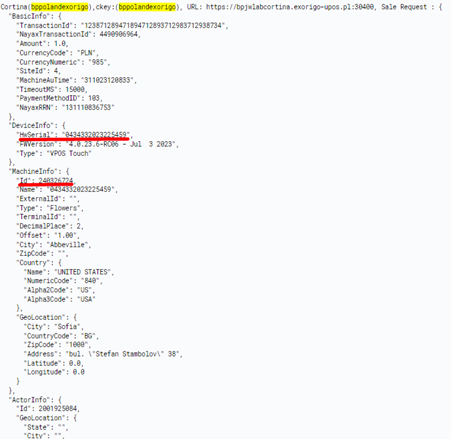
您可以通过检查 `Sale` 请求数据来识别交易的来源机器。
### 1. 推荐方法:`MachineInfo`
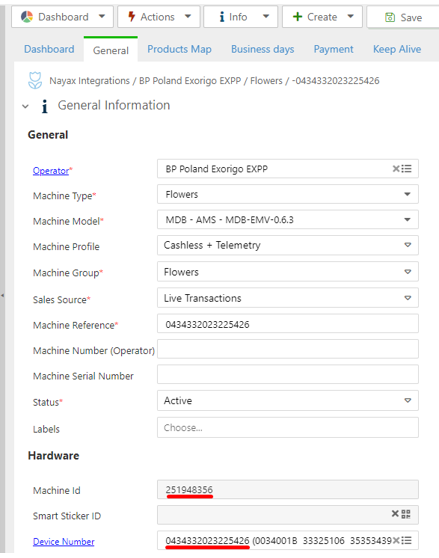
The best method is to use the **`Id` field** found within the **`MachineInfo`** object in the request.
* 此 `Id` 代表您虚拟机器的 ID。
* 建议:我们建议按虚拟机器 ID 进行匹配,因为它比物理设备更不容易发生变化(例如,当您更换支付终端时)。
> 行动建议:我们建议在您的内部追踪表中添加一列,用于将 `MachineInfo.Id` 与设备的物理位置相关联。
### 2. 备选方法:`DeviceInfo`
您也可以使用物理设备的序列号来识别来源,该序列号会在 `DeviceInfo` 对象中发送。如果设备更换较为频繁,这作为长期使用的键则不太可靠。
### 我如何识别交易来自我的哪台机器?
您可以通过检查 `Sale` 请求数据来识别交易的来源机器。
### 1. 推荐方法:`MachineInfo`
The best method is to use the **`Id` field** found within the **`MachineInfo`** object in the request.
* 此 `Id` 代表您虚拟机器的 ID。
* 建议:我们建议按虚拟机器 ID 进行匹配,因为它比物理设备更不容易发生变化(例如,当您更换支付终端时)。
> 行动建议:我们建议在您的内部追踪表中添加一列,用于将 `MachineInfo.Id` 与设备的物理位置相关联。
### 2. 备选方法:`DeviceInfo`
您也可以使用物理设备的序列号来识别来源,该序列号会在 `DeviceInfo` 对象中发送。如果设备更换较为频繁,这作为长期使用的键则不太可靠。
 ### 每个命令对应的端点是什么?
Each method has its own endpoint, as specified in the URL provided to Nayax.
The structure is: `(customer's URL)/Cortina/ followed by the command/integration path`.
### 1. 简单命令(会话和通知)
这些命令使用直接的路径结构:
| 命令 | 端点示例 |
| :- | :- |
| 开始会话 | `(customer's URL)/Cortina/StartSession` |
| SaleEndNotification | `(customer's URL)/Cortina/SaleEndNotification` |
***
### 2. 预付卡集成命令
这些命令在路径中包含集成类型(`PrePaid`):
| 命令 | 端点示例 |
| :- | :- |
| 授权 | `(customer's URL)/Cortina/PrePaid/Authorization` |
| 沉降 | `(customer's URL)/Cortina/PrePaid/Settlement` |
| 取消 | `(customer's URL)/Cortina/PrePaid/Cancel` |
| 销售 | `(customer's URL)/Cortina/PrePaid/Sale` |
| **Void** | `(customer's URL)/Cortina/PrePaid/Void` |
### 我从哪里获取消费者的卡片详情?
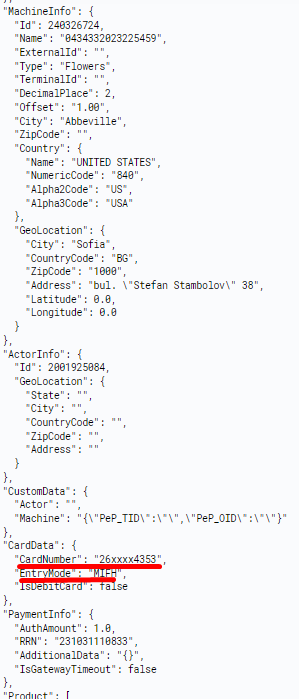
消费者的卡片详情位于 `CardData` 对象中,该对象包含在 `Sale` 请求内。
### 每个命令对应的端点是什么?
Each method has its own endpoint, as specified in the URL provided to Nayax.
The structure is: `(customer's URL)/Cortina/ followed by the command/integration path`.
### 1. 简单命令(会话和通知)
这些命令使用直接的路径结构:
| 命令 | 端点示例 |
| :- | :- |
| 开始会话 | `(customer's URL)/Cortina/StartSession` |
| SaleEndNotification | `(customer's URL)/Cortina/SaleEndNotification` |
***
### 2. 预付卡集成命令
这些命令在路径中包含集成类型(`PrePaid`):
| 命令 | 端点示例 |
| :- | :- |
| 授权 | `(customer's URL)/Cortina/PrePaid/Authorization` |
| 沉降 | `(customer's URL)/Cortina/PrePaid/Settlement` |
| 取消 | `(customer's URL)/Cortina/PrePaid/Cancel` |
| 销售 | `(customer's URL)/Cortina/PrePaid/Sale` |
| **Void** | `(customer's URL)/Cortina/PrePaid/Void` |
### 我从哪里获取消费者的卡片详情?
消费者的卡片详情位于 `CardData` 对象中,该对象包含在 `Sale` 请求内。
This documentation is built and hosted on [Mintlify](https://mintlify.com), a developer documentation platform.