> ## Documentation Index
> Fetch the complete documentation index at: https://devzone.nayax.com/llms.txt
> Use this file to discover all available pages before exploring further.
# 产品远程销售
Remote Vend 允许集成方使用 `Start` 调用,通过所选产品发起一笔交易。
对于 MDB 或 Marshal 机器,所选产品可以作为产品代码发送;对于 Pulse 机器,则可以作为特定的脉冲线 ID 发送。
此功能仅支持以下协议:
* MDB level 3(需要物理机器支持 MDB level 3,并且在 Nayax Core 上有匹配的配置)
* Pulse
不支持以下情况:
* MDB level 1 / 2
* 马歇尔
此功能目前仅在 `VPOS\ONYX` 设备上受支持。
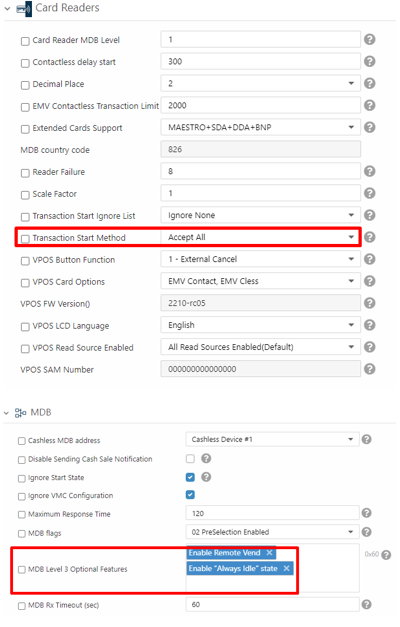
## 虚拟机配置
 **Pulse 机器**
在 Pulse 机器上,请将 `MDB Level 3 Optional Features` 留空。`Enable Remote Vend` 和 `Enable "Always Idle" state` 属于 MDB 功能,可能会在 Pulse 机器上引发问题。
## 如何实施
发送 Start 请求时,添加一个名为“Products”的属性,该属性包含一个或多个产品,如下所示:
### 脉冲机
#### 它支持从哪个固件版本开始?
4.0.10.23
#### 通话形式是什么?
所选产品放在 Start 请求的 `Products` 数组中。Pulse 机器根据其配置方式,使用 `Code` 或 `PulseLineNumber`。
有关应发送哪个字段以及编号规则,请参阅 [Remote vend: product selection](/docs/cortina/staticqr/static-qr-start#remote-vend-product-selection)。
### 非Pulse(MDB、Marshall等)
* MDB - 请注意,远程销售功能仅在 MDB 3 级机器上受支持(协议限制)。
#### 通话形式是什么?
Cortina V1(仅适用于旧版集成):
```json theme={null}
{
"AppUserId": "260760",
"TerminalId": "0456789456789456",
"TransactionId": "12345129",
"SecretToken": "1234qgODDqYgkJbSU-Vxw0MkZM1XjHvbQeSTnHmhwltUM_5kB-ZSgofkCxNk3ZN0",
"Products": [
{
"ProductCode": 2
}
]
}
```
Cortina V2:
```json theme={null}
{
"AppUserId": "260760",
"TerminalId": "0456789456789456",
"TransactionId": "12345129",
"SecretToken": "1234OqgODDqYgkJbSU-Vxw0MkZM1XjHvbQeSTnHmhwltUM_5kB-ZSgofkCxNk3ZN0",
"Products": [
{
"Code": 2
}
]
}
```
This documentation is built and hosted on [Mintlify](https://mintlify.com), a developer documentation platform.
**Pulse 机器**
在 Pulse 机器上,请将 `MDB Level 3 Optional Features` 留空。`Enable Remote Vend` 和 `Enable "Always Idle" state` 属于 MDB 功能,可能会在 Pulse 机器上引发问题。
## 如何实施
发送 Start 请求时,添加一个名为“Products”的属性,该属性包含一个或多个产品,如下所示:
### 脉冲机
#### 它支持从哪个固件版本开始?
4.0.10.23
#### 通话形式是什么?
所选产品放在 Start 请求的 `Products` 数组中。Pulse 机器根据其配置方式,使用 `Code` 或 `PulseLineNumber`。
有关应发送哪个字段以及编号规则,请参阅 [Remote vend: product selection](/docs/cortina/staticqr/static-qr-start#remote-vend-product-selection)。
### 非Pulse(MDB、Marshall等)
* MDB - 请注意,远程销售功能仅在 MDB 3 级机器上受支持(协议限制)。
#### 通话形式是什么?
Cortina V1(仅适用于旧版集成):
```json theme={null}
{
"AppUserId": "260760",
"TerminalId": "0456789456789456",
"TransactionId": "12345129",
"SecretToken": "1234qgODDqYgkJbSU-Vxw0MkZM1XjHvbQeSTnHmhwltUM_5kB-ZSgofkCxNk3ZN0",
"Products": [
{
"ProductCode": 2
}
]
}
```
Cortina V2:
```json theme={null}
{
"AppUserId": "260760",
"TerminalId": "0456789456789456",
"TransactionId": "12345129",
"SecretToken": "1234OqgODDqYgkJbSU-Vxw0MkZM1XjHvbQeSTnHmhwltUM_5kB-ZSgofkCxNk3ZN0",
"Products": [
{
"Code": 2
}
]
}
```
This documentation is built and hosted on [Mintlify](https://mintlify.com), a developer documentation platform.