> ## Documentation Index
> Fetch the complete documentation index at: https://devzone.nayax.com/llms.txt
> Use this file to discover all available pages before exploring further.

# 退款

Cortina SQR 使用 `Refund` 命令通知集成方退款请求,以便集成方与 Cortina 支付提供商启动退款流程。

## 如何触发退款

您可以通过以下两种方式触发退款请求:

* 在 Nayax Core 的动态交易监控器中。
* 通过 Lynx API。

### 通过动态交易监控器

<Warning>
  **需要 Refunds Admin 角色**

  在动态交易监控器中申请和批准退款需要 Refunds Admin 角色。请联系您的集成支持工程师为您分配该角色。
</Warning>

<Steps>
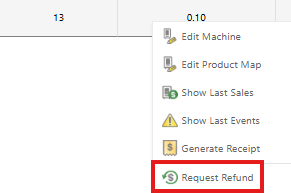
  <Step title="申请退款">
    右键单击相关交易,然后选择**申请退款**。

    <Frame>
      <img src="https://mintcdn.com/nayax-44d6e37b/XyvrHwtHlwko_UeF/images/docs/dynamicqr-refund/request-refund.png?fit=max&auto=format&n=XyvrHwtHlwko_UeF&q=85&s=3ab1f61100eb51215c2e8eec488b3b7d" alt="Nayax Core 交易右键菜单,其中突出显示了“申请退款”" width="291" height="193" data-path="images/docs/dynamicqr-refund/request-refund.png" />
    </Frame>
  </Step>

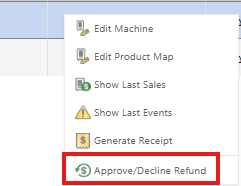
  <Step title="批准退款">
    再次右键单击同一笔交易,然后选择**批准/拒绝退款**。

    <Frame>
      <img src="https://mintcdn.com/nayax-44d6e37b/XyvrHwtHlwko_UeF/images/docs/dynamicqr-refund/approve-refund.png?fit=max&auto=format&n=XyvrHwtHlwko_UeF&q=85&s=c836c566f1489c9ff7cccf6cf2beb1d4" alt="Nayax Core 交易右键菜单,其中突出显示了“批准/拒绝退款”" width="241" height="186" data-path="images/docs/dynamicqr-refund/approve-refund.png" />
    </Frame>
  </Step>
</Steps>

随后,Nayax 会按下文所述,向您的端点发送 `Refund` 命令。

### 通过 Lynx API

先调用 [Request a Payment Refund](/reference/lynx/payment/request-a-payment-refund) 端点,再调用 [Approve Payment Refund](/reference/lynx/payment/approve-payment-refund) 端点。

## 要求

Nayax's servers send a POST request to your configured `Refund` endpoint, which would be of the following format:

`(customer's URL)/Cortina/StaticQR/Refund`

该负载（payload）包含读卡操作的完整结果：

```json theme={null}
{
  "ReasonCode": 999,
  "ReasonText": "General exception",
  "BasicInfo": {
    "TransactionId": "236584335969834429321847829253667359,",
    "Amount": 0.1,
    "CurrencyCode": "USD",
    "CurrencyNumeric": 376,
    "SiteId": 12
  },
  "MachineInfo": {
    "Id": 869761713,
    "Name": "TestPayStaticQR V2",
    "TerminalId": 987654321,
    "DecimalPlace": 2,
    "Offset": 2,
    "GroupId": "Beverages",
    "OperatorId": 12345,
    "ZipCode": 10001,
    "Country": {
      "Name": "United States of America",
      "NumericCode": 840,
      "Alpha2Code": "US",
      "Alpha3Code": "USA"
    }
  },
  "ActorInfo": {
    "Id": 2001102296,
    "Name": "Far East Dev Zone",
    "OperatorId": 2000305191,
    "OperatorName": "TanyaT_OP",
    "MerchantId": 10011
  },
  "CustomData": {
    "DirectActor": 12312312,
    "Operator": 123121434134,
    "Distributor": "superDistributor",
    "Actor": 12312312,
    "Machine": 131231348
  },
  "PaymentInfo": {
    "SrvTranId": "string",
    "AuthCode": "string",
    "AuthAmount": 0,
    "SettAmount": 0,
    "RRN": "string",
    "Token": "string",
    "AuthDateTime": "string",
    "SettDateTime": "string",
    "TraceNumber": "string",
    "AuthSource": "string",
    "AdditionalData": "string",
    "IsGatewayTimeout": true
  }
}
```

### 请求参数

下表描述了请求正文中包含的参数：

<table>
  <thead>
    <tr>
      字段
      类型
      描述
    </tr>
  </thead>

  <tbody>
    <tr>
      交易标识符和参考信息
    </tr>

    <tr>
      `TransactionId`
      String(36)

      <td style={{ textAlign: "left" }}>
        此交易的**唯一标识符**。

        <ul>
          如果使用了 `/StartSession`，则回显其加密后的 ID。
          否则，将由 Nayax Engine 生成此值。
        </ul>
      </td>
    </tr>

    <tr>
      `NayaxTransactionId`
      Int(64)

      <td style={{ textAlign: "left" }}>
        **Nayax 内部交易的唯一 ID** ，在后续请求中会重复出现。
      </td>
    </tr>

    <tr>
      `SrvTranId`
      String

      <td style={{ textAlign: "left" }}>
        **集成商的内部交易 ID** 。

        <ul>
          条件性：如果未使用 `/StartSession`，则为必填字段。
          如果使用了 /StartSession，则该字段应为空，或回显交易 ID（Transaction ID）。
        </ul>
      </td>
    </tr>

    <tr>
      `RRN`
      String

      <td style={{ textAlign: "left" }}>
        **参考检索编号（RRN）** 。建议向**消费者/持卡人**公开，以便获得支持。
      </td>
    </tr>

    <tr>
      `AuthCode`
      String(40)

      <td style={{ textAlign: "left" }}>
        **外部授权码**（通常来自发卡行的银行）。
      </td>
    </tr>

    <tr>
      `Token`
      String(256)

      <td style={{ textAlign: "left" }}>
        交易的唯一令牌。**仅供 Nayax 内部使用。**
      </td>
    </tr>

    <tr>
      `TraceNumber`
      String

      <td style={{ textAlign: "left" }}>
        追踪编号。**仅供Nayax内部使用。**
      </td>
    </tr>

    <tr>
      `AuthSource`
      String(5)

      <td style={{ textAlign: "left" }}>
        仅供 Nayax 内部使用。
      </td>
    </tr>

    <tr>
      财务和时间详情
    </tr>

    <tr>
      `Amount`
      Double

      <td style={{ textAlign: "left" }}>
        **付款金额**（以美分为单位，最多保留 3 位小数）。

        <ul>
          示例:1 分 = `0.01`。
          没有小数位的货币仍以双精度数表示(例如,234 JYN = `234.0`)。
        </ul>
      </td>
    </tr>

    <tr>
      `AuthAmount`
      Double

      <td style={{ textAlign: "left" }}>
        `/Authorization` 请求中所请求的原始金额。是否显示取决于 `/Authorization` 的响应。
      </td>
    </tr>

    <tr>
      `SettAmount`
      Double

      <td style={{ textAlign: "left" }}>
        `/Settlement` 或 `/Sale` 流程中请求的原始金额。与 Authorization 无关。
      </td>
    </tr>

    <tr>
      `AuthDateTime`
      String

      <td style={{ textAlign: "left" }}>
        `/Authorization` 发生的日期和时间。格式：`ddMMyyHHmmss`。
      </td>
    </tr>

    <tr>
      `SettDateTime`
      Double

      <td style={{ textAlign: "left" }}>
        结算日期/时间。与授权命令无关。
      </td>
    </tr>

    <tr>
      卡片及支付详情
    </tr>

    <tr>
      `CardNumber`
      String

      <td style={{ textAlign: "left" }}>
        根据交易类型提供的卡片信息：

        <ul>
          对于卡片在场（card-present）的 Authorization/Sale，为完整的 Track 2 数据。
          对于其他交易类型，仅为卡号（Card PAN）。
        </ul>
      </td>
    </tr>

    <tr>
      `EntryMode`
      String(4)

      <td style={{ textAlign: "left" }}>
        卡片信息的读取方式：

        <ul>
          MCR：磁条读取（刷卡）
          CON：接触式芯片（插卡）
          CLS：非接触式芯片（挥卡）
          NFC：手机/移动设备非接触式
          QR：由 DOT 读取的二维码
          有关特定边缘情况，请咨询 Nayax POC。
        </ul>
      </td>
    </tr>

    <tr>
      `ExpYear`
      String

      <td style={{ textAlign: "left" }}>
        卡片到期年份（ **YY**格式）。**条件性**（仅当接口为 1 或 10 时）。
      </td>
    </tr>

    <tr>
      `ExpMonth`
      String

      <td style={{ textAlign: "left" }}>
        卡片到期月份（ **MM**格式）。**条件性**（仅当接口为 1 或 10 时）。
      </td>
    </tr>

    <tr>
      `EMVData`
      String

      <td style={{ textAlign: "left" }}>
        EMV标签数据采用**TLV（标签长度-值）格式**。
      </td>
    </tr>

    <tr>
      `CVV2`
      String

      <td style={{ textAlign: "left" }}>
        卡验证值 2（CVV2）。
      </td>
    </tr>

    <tr>
      `IDNumber`
      String

      <td style={{ textAlign: "left" }}>
        持卡人**ID号码**。
      </td>
    </tr>

    <tr>
      `RandomNumber`
      String

      <td style={{ textAlign: "left" }}>
        暂无更多信息。
      </td>
    </tr>

    <tr>
      `PrimaryId`
      String

      <td style={{ textAlign: "left" }}>
        主要品牌 ID。
      </td>
    </tr>

    <tr>
      `PrimaryDescription`
      String

      <td style={{ textAlign: "left" }}>
        主要品牌描述。
      </td>
    </tr>

    <tr>
      `SecondaryId`
      String

      <td style={{ textAlign: "left" }}>
        次要品牌 ID。
      </td>
    </tr>

    <tr>
      `SecondaryDescription`
      String

      <td style={{ textAlign: "left" }}>
        次要品牌描述。
      </td>
    </tr>

    <tr>
      `CardHolderName`
      String

      <td style={{ textAlign: "left" }}>
        持卡人姓名。
      </td>
    </tr>

    <tr>
      系统和外部数据
    </tr>

    <tr>
      `AdditionalData`
      String

      <td style={{ textAlign: "left" }}>
        附加数据字符串， **JSON 格式**。请联系 Nayax TPOC 进行定义。
      </td>
    </tr>

    <tr>
      `IsGatewayTimeout`
      Bool

      <td style={{ textAlign: "left" }}>
        指示是否发生**网关超时**（响应中有效）。
      </td>
    </tr>
  </tbody>
</table>

## 回复

客户的支付方式会向 Nayax 服务器发送的退款响应。负载应如下所示：

```json theme={null}
{
  "Status": {
    "Verdict": "Approved",
    "StatusMessage": "Cortina V2 Stub Tester"
  }
}
```

### 响应参数

下表描述了 API 响应中返回的字段：

<table>
  <thead>
    <tr>
      字段
      类型
      描述
    </tr>
  </thead>

  <tbody>
    <tr>
      交易状态及错误代码
    </tr>

    <tr>
      `Verdict`
      String

      <td style={{ textAlign: "left" }}>
        表示**请求最终状态的**常量字符串：

        <ul>
          <li>**`Approved`**</li>
          <li>**`Declined`**</li>
        </ul>
      </td>
    </tr>

    <tr>
      `Code`
      Int(32)

      <td style={{ textAlign: "left" }}>
        拒绝代码（Decline Code）。条件性字段——仅当 `Verdict` 为 “Declined” 时才会出现。有效代码包括：

        <ul>
          1：余额不足
          5：疑似欺诈
          6：系统一般性故障
          7：金额无效
          8 / 998：格式/解析错误或验证错误
          992：超时异常
          997：缺少必填参数
          999：一般性异常
          有关其他状态和内部错误（例如 40、990、1011），请参阅完整列表。
        </ul>
      </td>
    </tr>

    <tr>
      `StatusMessage`
      String(255)

      <td style={{ textAlign: "left" }}>
        包含**交易状态消息**或有关结果的其他不同数据的自由文本字段。
      </td>
    </tr>

    <tr>
      忠诚度和信用信息
    </tr>

    <tr>
      `RegularCreditType`
      Int(32)

      <td style={{ textAlign: "left" }}>
        定义 `RegularCredit` 的计量单位（枚举值）：

        <ul>
          0：信用额度以交易次数计（count）。
          1：信用额度以金额计（currency）。
        </ul>
      </td>
    </tr>

    <tr>
      `RegularCredit`
      Double

      <td style={{ textAlign: "left" }}>
        根据 `RegularCreditType` 计算的常规信用额度值（金额或交易次数）。使用小数位数 2。
      </td>
    </tr>

    <tr>
      `RevalueCredit`
      Int(32)

      <td style={{ textAlign: "left" }}>
        充值金额。仅当关联卡配置为可充值时才存在。使用小数点后 2 位。
      </td>
    </tr>
  </tbody>
</table>


This documentation is built and hosted on [Mintlify](https://mintlify.com), a developer documentation platform.