> ## Documentation Index
> Fetch the complete documentation index at: https://devzone.nayax.com/llms.txt
> Use this file to discover all available pages before exploring further.

# 开始

## 要求

Cortina 支付方式将向 Nayax 服务器发送 `Start` 命令,以通知其交易已开始。该调用的格式如下:

`https://lynx.nayax.com/payment/v2/transactions/cortina/(payment method's name)/start`

有效载荷包含以下详细信息：

<CodeGroup>
  ```json JSON-TerminalID theme={null}
  {
    "AppUserID": "19",
  	"TerminalId": "0456789456789456",
    "TransactionId": "123456789qwertyuioasdfghjkl",
    "SecretToken": "mrV3U3nsgGFrE3w5-wnBo_WCLPce-pZ1awRvTVTkungMIKThTVbj_fiXdfoGclhn0"
  }
  ```

  ```json JSON-UniQR theme={null}
  {
    "AppUserID": "19",
  	"UniQR": "https://qr.nayax.com/v1/rWg_p6pZh1pwjvbkGrmBLy3KgwSz3dq-y63r5FPxk2NOWw2",
    "TransactionId": "123456789qwertyuioasdfghjkl",
    "SecretToken": "mrV3U3nsgGFrE3w5-wnBo_WCLPce-pZ1awRvTVTkungMIKThTVbj_fiXdfoGclhn0"
  }
  ```

  ```json Product selection (relevant only for PreSelection flow) theme={null}
  {
    "AppUserID": "19",
  	"UniQR": "https://qr.nayax.com/v1/rWg_p6pZh1pwjvbkGrmBLy3KgwSz3dq-y63r5FPxk2NOWw2",
    "TransactionId": "123456789qwertyuioasdfghjkl",
    "SecretToken": "mrV3U3nsgGFrE3w5-wnBo_WCLPce-pZ1awRvTVTkungMIKThTVbj_fiXdfoGclhn0"
    "Products":
  	[
  	 {
         "Code":2
   		}
  	]
  }
  ```
</CodeGroup>

### 请求参数

下表描述了请求正文中包含的参数：

<table>
  <thead>
    <tr>
      字段
      类型
      描述
    </tr>
  </thead>

  <tbody>
    <tr>
      用户和安全标识符
    </tr>

    <tr>
      `AppUserID`
      String(40)

      <td style={{ textAlign: "left" }}>
        消费者**在第三方应用程序上的用户 ID** 。
      </td>
    </tr>

    <tr>
      `TransactionId`
      String(40)

      <td style={{ textAlign: "left" }}>
        **交易的唯一标识符**。

        <ul>
          将在所有后续请求和响应中回显。
          最小长度为 8 个字符。
        </ul>
      </td>
    </tr>

    <tr>
      `SecretToken`
      String(64)

      <td style={{ textAlign: "left" }}>
        Nayax 会提前提供您系统的**唯一密钥**，**请务必妥善保管。**
      </td>
    </tr>

    <tr>
      `Balance`
      Double

      <td style={{ textAlign: "left" }}>
        **用户账户余额**。小数形式（分最多保留3位数字）。
      </td>
    </tr>

    <tr>
      机器识别码（至少需要一项）
    </tr>

    <tr>
      `TerminalId`
      String(255)

      <td style={{ textAlign: "left" }}>
        **自动售货机的唯一标识符**（设备的硬件序列号）。

        <ul>
          条件性字段:如果未发送 `UniQR`,则必须发送此字段。
        </ul>
      </td>
    </tr>

    <tr>
      `UniQR`
      String

      <td style={{ textAlign: "left" }}>
        与机器关联的**二维码值**。

        <ul>
          条件性字段:如果未发送 `TerminalId`,则必须发送此字段。
        </ul>
      </td>
    </tr>

    <tr>
      产品选择(`Products` 数组)
    </tr>

    <tr>
      `Products` 数组
      \*\*\*

      <td style={{ textAlign: "left" }}>
        该数组为**可选参数**，但如果提供，则某些内部字段为必填项。仅与**预选流程**相关。
      </td>
    </tr>

    <tr>
      <td style={{ textAlign: "left" }}>`Code` inside `Products`</td>
      <td style={{ textAlign: "left" }}>Int(16)</td>

      <td style={{ textAlign: "left" }}>
        **所选项目的代码**。

        <ul>
          **条件**：如果机器**不是**脉冲式机器，则为必填项。
        </ul>
      </td>
    </tr>

    <tr>
      <td style={{ textAlign: "left" }}>`PulseLineNumber` inside `Products`</td>
      <td style={{ textAlign: "left" }}>Int(32)</td>

      <td style={{ textAlign: "left" }}>
        远程销售功能的脉冲线路编号。

        <ul>
          条件性字段:如果机器是 Pulse 机器,则为必填项。
          必须为正整数($\ge 0$)。
        </ul>
      </td>
    </tr>

    <tr>
      <td style={{ textAlign: "left" }}>`Name` inside `Products`</td>
      <td style={{ textAlign: "left" }}>String(255)</td>

      <td style={{ textAlign: "left" }}>
        Nayax 后台中定义的**产品名称**。
      </td>
    </tr>

    <tr>
      <td style={{ textAlign: "left" }}>`Price` inside `Products`</td>
      <td style={{ textAlign: "left" }}>Double</td>

      <td style={{ textAlign: "left" }}>
        机器货币的**原始产品价格**。

        <ul>
          条件性字段:如果机器未为该产品代码设置价格,则为必填项。
          注意:交易金额是经调整后的最终计费价格。
        </ul>
      </td>
    </tr>

    <tr>
      <td style={{ textAlign: "left" }}>`UnitOfMeasurement` inside `Products`</td>
      <td style={{ textAlign: "left" }}>String(64)</td>

      <td style={{ textAlign: "left" }}>
        产品的计量单位（例如 “unit” 或 “Liter”）。
      </td>
    </tr>
  </tbody>
</table>

### Remote Vend:产品选择

The following applies to the **PreSelection flow** only. To specify which product to vend, include a `"code"` field inside the `"Products"` array with the corresponding product index.

脉冲机器代码编号

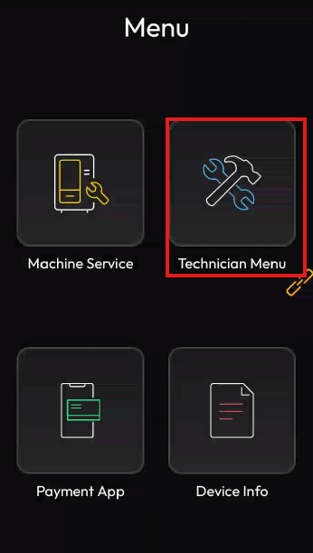
对于 Pulse 阵列机器(除 Pulse Line 之外的任何 Pulse 配置),`"code"` 编号从 0 开始。例如,若为:

<Frame>
  <img src="https://mintcdn.com/nayax-44d6e37b/1QIVivDOW8wpzFhJ/images/image.png?fit=max&auto=format&n=1QIVivDOW8wpzFhJ&q=85&s=7ec91ecf64188b246d4f9b0648e1967b" alt="图像" width="313" height="553" data-path="images/image.png" />
</Frame>

* `"Code": 0` → "Ultimate" 产品
* `"Code": 1` → "Superior" 产品
* `"Code": 2` → "Regular" 产品

如果您发送的数字超出虚拟机数组的范围,我们的服务器将选择列表中的第一项(`Code: 0`)。

对于 Pulse 1–6 配置(Pulse Line),请使用 `"PulseLineNumber"` 而非 `"code"`,且计数从 1 开始(而非 0)。
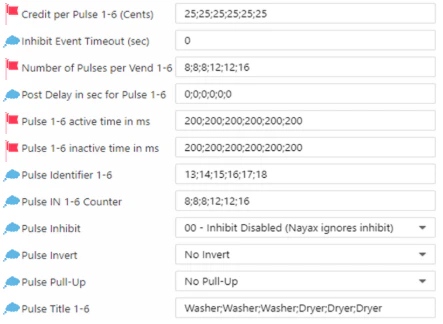
<Frame>
  <img src="https://mintcdn.com/nayax-44d6e37b/2xlghWOHUXoMSYH1/images/image-2.png?fit=max&auto=format&n=2xlghWOHUXoMSYH1&q=85&s=10cc6ca3a2e7ab60b762a6481c301e8b" alt="图像" width="443" height="324" data-path="images/image-2.png" />
</Frame>

## 回复

Nayax 服务器将发送给支付方式的 `Start` 响应。其负载应如下所示:

```json theme={null}
{
  "Status": {
    "Verdict": "Approved",
    "StatusMessage": "Cortina V2 Stub Tester"
  }
}
```

### 响应参数

下表描述了 API 响应中返回的字段：

<table>
  <thead>
    <tr>
      字段
      类型
      描述
    </tr>
  </thead>

  <tbody>
    <tr>
      交易状态及错误代码
    </tr>

    <tr>
      <td style={{ textAlign: "left" }}>`Verdict` inside `Status`</td>
      <td style={{ textAlign: "left" }}>String</td>

      <td style={{ textAlign: "left" }}>
        表示**请求最终状态的**常量字符串：

        <ul>
          <li>**`Approved`**</li>
          <li>**`Declined`**</li>
        </ul>
      </td>
    </tr>

    <tr>
      <td style={{ textAlign: "left" }}>`Code` inside `Status`</td>
      <td style={{ textAlign: "left" }}>Int(32)</td>

      <td style={{ textAlign: "left" }}>
        拒绝代码（Decline Code）。条件性字段——仅当 `Verdict` 为 “Declined” 时才会出现。有效代码包括：

        <ul>
          1：余额不足
          5：疑似欺诈
          6：系统一般性故障
          7：金额无效
          8 / 998：格式/解析错误或验证错误
          992：超时异常
          997：缺少必填参数
          999：一般性异常
          有关其他状态和内部错误（例如 40、990、1011），请参阅完整列表。
        </ul>
      </td>
    </tr>

    <tr>
      <td style={{ textAlign: "left" }}>`StatusMessage` inside `Status`</td>
      <td style={{ textAlign: "left" }}>String(255)</td>

      <td style={{ textAlign: "left" }}>
        包含**交易状态消息**或有关结果的其他不同数据的自由文本字段。
      </td>
    </tr>

    <tr>
      <td style={{ textAlign: "left" }}>`CustomDeclineCode` inside `Status`</td>
      <td style={{ textAlign: "left" }}>String</td>

      <td style={{ textAlign: "left" }}>
        用于指定自定义拒绝代码（例如与 Soft Decline 或 Switch Interface 相关的代码）。可能反映收单机构（acquirer）的响应代码。
      </td>
    </tr>
  </tbody>
</table>


This documentation is built and hosted on [Mintlify](https://mintlify.com), a developer documentation platform.