> ## Documentation Index
> Fetch the complete documentation index at: https://devzone.nayax.com/llms.txt
> Use this file to discover all available pages before exploring further.
# JSON-RPC API
虽然集成方应使用 `libecodsdk` 提供的 [C API](/docs/zh/integrate-pos-device/emv-core/rtos/rtos-c-api),但 JSON-RPC API 会被 EMV Core 日志使用,在集成调试期间非常有用。
## 协议规则
### 语法规则
所有命令均遵循以下格式约定:
* 所有命令和事件均使用带有命名参数的 **JSON-RPC 2.0** 协议。
* 所有命令和事件都需要响应,**除了** `log()` 和 `ReaderMessageEvent()`,它们没有 `id`。
* 消息格式:
```json theme={null}
{"jsonrpc":"2.0", "method":"CommandName", "params": {"param1":value1, "param2":value2}, "id":idNumber}
```
* 为每个命令使用不同的 `id`(例如递增计数器)以帮助同步。
* 非法命令会收到 EMV Core 返回的 `"Not existing command"` 响应。
### 发送和接收
**发送消息:**
1. 发送 JSON-RPC 消息。
2. 等待 JSON-RPC 响应。
3. 一旦开始接收到数据,请等待完整的 JSON(所有括号都闭合),或者等待 1 秒超时。
**接收消息(循环):**
1. 等待接收数据。
2. 一旦数据开始到达,请等待 JSON 数据完整到达,或者等待 1 秒超时。
3. 解析并处理 JSON-RPC 消息。
4. 发送 JSON-RPC 响应(`ReaderMessageEvent` 无需响应;`socket_data_received` 不发送响应)。
## 支付流程
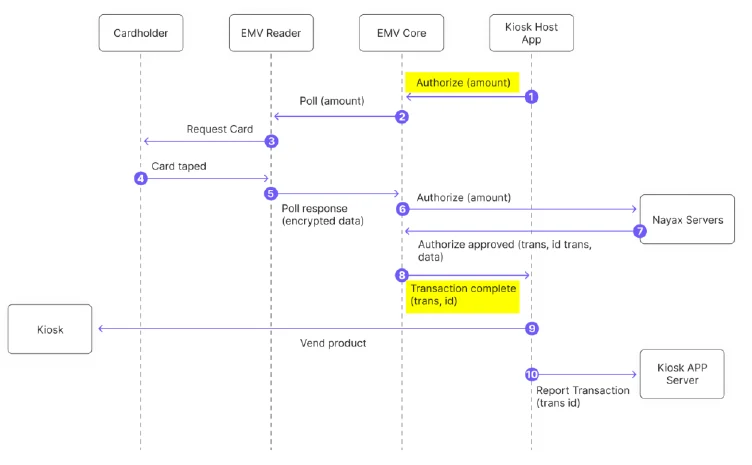
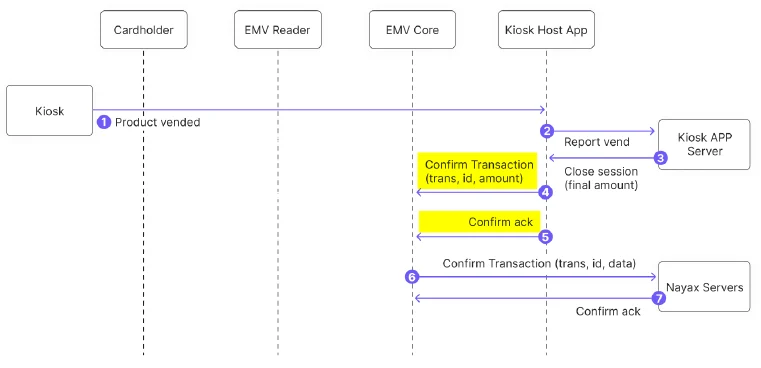
典型的支付流程如下:
1. POS 发送 `PreAuthorize`。
2. EMV Core(在轻触卡片和授权后)以 `TransactionComplete` 响应。
3. POS 发送 `ConfirmTransaction`(商品已交付)或 `VoidTransaction`(否则)。
4. POS 可随时发送 `CancelTransaction`;`TransactionComplete` 将以 `Cancelled` 状态返回。
**重要提示:**
* 始终使用 Confirm 或 Void/Cancel 关闭 `PreAuthorize` 会话。未关闭的会话在一段时间后会被处理机构撤销,这可能会产生更高的费用。
* 一旦 EMV Core 确认收到 `ConfirmTransaction`,请勿重新发送。
* 要强制同步处理,请设置 `PAYMENT_SVC_SYNCHRONOUS=1`。
 ### 闭环(CLP)流
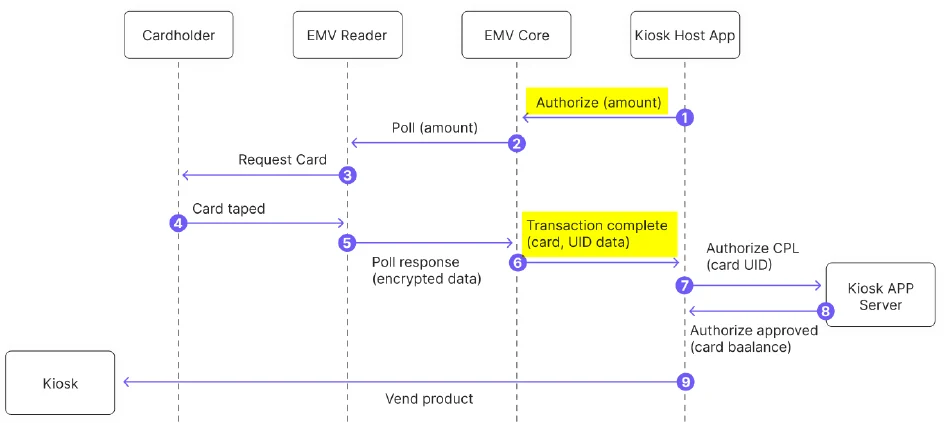
对于预付卡,EMV Core 会通过 `TransactionComplete` 立即将卡 UID 返回给主机应用程序,而不发送到 Nayax 服务器。
### 闭环(CLP)流
对于预付卡,EMV Core 会通过 `TransactionComplete` 立即将卡 UID 返回给主机应用程序,而不发送到 Nayax 服务器。
 ## 命令
### PreAuthorize
通过支付处理机构对卡进行预授权。EMV Core 等待卡片,读取卡片,处理卡片,然后发送 `TransactionComplete`。
**示例:**
```json theme={null}
>> {"jsonrpc":"2.0", "method":"PreAuthorize",
"params": {"amount":150, "currency":840, "productid":5, "continuous":false, "timeout":60},
"id":801}
<< {"jsonrpc": "2.0", "result": true, "id": 801}
```
**参数:**
| 参数 | 描述 |
| :- | :- |
| `amount` | 扣款金额,以美分为单位(例如 450 = 4.50 美元) |
| `currency` | ISO 4217 代码(例如,840 = 美元) |
| `productID` | 可选:消费者选择的产品 ID,保存在服务器中用于生成报告。 |
| `continuous` | 如果为 `true`,则在超时后立即重新开始读卡轮询;`TransactionComplete` 返回 `PollContinuous` |
| `timeout` | 等待卡片的最大秒数。如果没有卡片到来,则返回 `Timeout` 状态。 |
***
### ConfirmTransaction
确认预授权,以便完成付款结算。
**示例:**
```json theme={null}
>> {"jsonrpc":"2.0", "method":"ConfirmTransaction",
"params": {"amount":150, "productID":1, "transaction_Reference":"8453F02DFD33413EBA7733"},
"id":616386422}
<< {"jsonrpc":"2.0", "result":true, "id":616386422}
```
**参数:**
| 参数 | 描述 |
| :- | :- |
| `Amount` | 实际扣款金额,以最小货币单位(美分)表示 |
| `transactionReference` | 来自 `TransactionComplete` 事件的 `TransactionDbID` |
| `productID` | 可选:产品 ID,保存在服务器中用于生成报告。 |
| `terminal_data` | 可选:`terminal_data=(key1=value1,key2=value2)`;在在线请求中传递给 PSP |
***
### VoidTransaction
在以下两种情况下可以撤销交易:
* 交易已获得预授权但尚未确认,以释放预留资金。
* 交易已完成,但需要撤销(例如,产品未售出)。
**示例:**
```json theme={null}
>> {"jsonrpc":"2.0", "method":"VoidTransaction",
"params": {"transaction_Reference":"8453F02DFD33413EBA77334B696D5991"}, "id":803}
<< {"jsonrpc":"2.0", "result":true, "id":803}
```
| 参数 | 描述 |
| :- | :- |
| `transactionReference` | 来自 `TransactionComplete` 事件的交易引用 |
`VoidTransaction` 不返回事件。请在 TMS 中通过搜索 `Cancel` 和 `Cancel Declined` 状态来检查已撤销交易的状态。
***
### CancelTransaction
取消由 `PreAuthorize` 启动的最后一笔交易:
* **卡片尚未轻触:** 停止读卡器轮询序列。显示屏显示 “Cancelling”(取消中);主机应用程序必须更新显示内容。
* **卡片已被轻触但尚未完成:** 返回 `CannotCancel`。`TransactionComplete` 会在联机授权结果返回后到达。
* **交易已完成:** 返回 `NoTransaction`。
* 对于 `CannotCancel` 或 `NoTransaction`,请使用 `VoidTransaction` 撤销已成功的交易。
* 如果 `TransactionComplete` 返回 `Decline`,则无需 `VoidTransaction`。
**示例:**
```json theme={null}
>> {"jsonrpc":"2.0", "method":"CancelTransaction", "id":802}
<< {"jsonrpc":"2.0", "result":true, "id":802}
```
***
### GetCardToken
返回卡令牌而不执行支付交易。返回 `CardTokenReceived` 事件。
* 对于支付卡:返回 base64 卡片令牌。
* 对于 CLP(例如 Mifare)卡:返回卡 UID。
**示例:**
```json theme={null}
>> {"jsonrpc":"2.0","method":"GetCardToken","params":{"continuous":false,"timeout":60},"id":5820}
<< {"jsonrpc":"2.0", "result":true, "id":5820}
```
| 参数 | 描述 |
| :- | :- |
| `timeoutSeconds` | 等待的最长时间(秒)。最大值:60 秒。 |
**注意:**
* 需要将标签 `DFA155` 添加到读卡器的 Clear results 标签列表中。
* 仅当 `CLP_MIFARE_ENABLED=2` 时才会返回 CLP 卡 UID。
***
### GetStatus
返回当前 EMV Core 状态。
**示例:**
```json theme={null}
>> {"jsonrpc":"2.0", "method":"GetStatus", "id":805}
<< {"jsonrpc":"2.0", "result":"Ready", "id":805}
```
**结果值:** `{NotReady, Ready, PaymentTransaction, Update, NoReader, NoTerminalId}`
***
### ShowMessage
在 OTI Saturn 读卡器显示屏上显示一条消息。
**示例:**
```json theme={null}
>> {"jsonrpc":"2.0", "method":"ShowMessage",
"params": {"line1":"Please Select", "line2":"Your Product"}, "id":901}
<< {"jsonrpc":"2.0", "result":true, "id":901}
```
| 参数 | 描述 |
| :- | :- |
| `line1` | 读卡器显示屏第一行的文本(最多 16 个字符) |
| `line2` | 读卡器显示屏第二行的文本(最多 16 个字符) |
***
### GetVersion
返回系统中组件的版本。
**示例:**
```json theme={null}
>> {"jsonrpc":"2.0", "method":"GetVersion", "params":{"component":"Reader"}, "id":902}
<< {"jsonrpc":"2.0", "result":"S8_v054105", "id":902}
```
| 参数 | 值 |
| :- | :- |
| `component` | `otiKiosk`(适用于 EMV Core 版本)或 `Reader` |
***
### GetKioskID
返回自助服务终端识别号码。
**示例:**
```json theme={null}
>> {"jsonrpc":"2.0", "method":"GetKioskID", "params":{}, "id":902}
<< {"jsonrpc":"2.0", "result":"00130226001C9C69", "id":902}
```
***
### GetAttribute
返回 EMV Core 配置属性的值。
**示例:**
```json theme={null}
>> {"jsonrpc":"2.0","method":"GetAttribute", "params": {"Key":"PRE_AUTH_AMOUNT"}, "id":12}
<< {"jsonrpc":"2.0", "result":"150", "id":12}
// If attribute not found:
<< {"jsonrpc":"2.0", "error":{"code":-1, "message":"Get attribute key not found"}, "id":12}
```
***
## 事件
### TransactionComplete
EMV Core 在交易完成(成功或失败)时发送。包含生成收据和解决争议所需的所有数据。
**注意:** 如果未收到确认,EMV Core 最多会重新发送 2 次(共计 3 次)。如果仍然没有收到回复,则会假定消息已被接收,并且不会取消该交易。
示例(开环):
```json theme={null}
<< {"jsonrpc":"2.0", "method":"TransactionComplete", "params": {
"status":"OK", "errorCode":0, "errorDescription":"",
"transactionId":"6856770806",
"authorizationDetails": {
"AmountAuthorized":4.50, "AmountRequested":4.50,
"AuthorizationCode":"AuthOK", "PartialPan":"453997******4280",
"CardType":"Visa Credit", "IsTransactionApproved":true,
"eReceipt":"https://wee.ai/tr/...",
"Card_ID":"2026-02-10 10:15:32.057|6|3", "Card_Balance":0.00,
"RRN":"260210081532", "TransactionDbID":"6856770806",
"Transaction_Referance":"6856770806",
"CardToken":"kC7WxiEKKUMw/lNddlT5MiMGX/uvea4/aEtjOljLNlY=",
"Additional_Parameters": {
"hwSerial":"4207012624000108","SiteId":"6","EntryMode":"4",
"MachineAuTime":"2026-02-10T10:15:32.057",
"NayaxTransactionId":"6856770806"
}}}, "id":701}
>> {"jsonrpc":"2.0", "result":true, "id":701}
```
**参数:**
| 字段 | 描述 |
| :- | :- |
| `status` | `OK`、`Declined`、`Error`、`Timeout`、`Cancelled`、`LocalCLP` |
| `errorCode` | 数字错误代码(0 = 无错误;正数 = PSP 错误;负数 = OTI 系统错误) |
| `errorDescription` | 技术错误描述(供开发者参考;不向用户显示) |
| `transactionId` | 用于 `ConfirmTransaction` 或 `VoidTransaction` |
**授权详情字段:**
| 字段 | 描述 |
| :- | :- |
| `AmountAuthorized` | 以小数表示的核准金额,例如 4.50(预付卡可能较低) |
| `AmountRequested` | 以小数表示的请求金额,例如 4.50 |
| `Authorization_Code` | 已批准交易的支付服务提供商 (PSP) 交易标识符 |
| `PartialPan` | 掩码 PAN(前 6 位和后 4 位数字) |
| `CardType` | 卡组织(万事达卡、维萨卡、美国运通卡等)或闭环卡技术 |
| `IsTransactionApproved` | 布尔批准状态 |
| `eReceipt` | Nayax电子收据的网址 |
| `Card_ID` | 当 `CLP_MIFARE_ENABLED=2` 时的 Mifare UID |
| `RRN` | 已批准交易的处理机构参考编号 |
| `CardToken` | 支付卡的 Base64 令牌;闭环卡的卡 UID |
| `Additional_Parameters` | 用于 Nayax External Settlement 的可选字段:`SiteId`、`EntryMode`、`MachineAuTime`、`NayaxTransactionId` |
**闭环卡类型:**
| 卡类型 | 描述 |
| :- | :- |
| `Type A` | ISO/IEC 14443 A型 |
| `Type B` | ISO/IEC 14443 B型 |
| `Mifare` | Mifare |
| `Mifare-U` | Mifare 超轻型 |
| `DesFire` | Mifare DESFire |
| `Mifare-P` | Mifare Plus |
| `Vicinity` | ISO/IEC 15693 |
| `Vicinity-P` | ISO/IEC 15693 HID iClass |
| `Felica` | FeliCa JIS X 6319-4 |
| `CLP` | 未知闭环卡 |
***
### CardTokenReceived
在 `GetCardToken` 完成时发送。
**示例:**
```json theme={null}
>> {"jsonrpc":"2.0", "method":"CardTokenReceived", "params": {
"status":"OK", "errorCode":0, "errorDescription":"",
"CardToken":"WSAr79nKPywW3INXrWvr6IL3vgTgSJlwZBgseKDmMHM=",
"PartialPan":""}, "id":702}
```
***
### ReaderMessageEvent
Saturn 读卡器上显示的消息发生变化时发送。使用此事件可将自助终端应用与读卡器状态同步。
**注意:** 需要将读卡器配置为发送外部显示消息事件(标签 DF 46,索引 04)。此事件**不需要**确认。
**示例:**
```json theme={null}
<< {"jsonrpc":"2.0", "method":"ReaderMessageEvent",
"params": {"index":36, "line1":"Authorizing", "line2":"Please wait"}}
```
**消息索引:**
| 十六进制 | 十进制 | 消息 | LED |
| :- | :- | :- | :- |
| 0x01 | 1 | 请轻触银行卡 | LED1 常亮 |
| 0x11 | 17 | 欢迎 | LED1 闪烁 |
| 0x05 | 5 | 请仅出示一张卡 | — |
| 0x27 | 39 | 读取错误,请重试 | — |
| 0x24 | 36 | 正在授权,请稍候 | 流水灯 |
| 0x06 | 6 | 已批准 | — |
| 0x09 | 9 | 未批准 | — |
| 0x1E | 30 | 超时——无卡 | — |
| 0x26 | 38 | 请插卡 | — |
| 0x0A | 10 | 已终止 | — |
| 0x0B | 11 | 非接触失败——需要输入 PIN 码 | — |
| 0x0C | 12 | 请查看手机 | — |
| — | 255 | 已拒绝 | — |
***
## 网络协议
### Socket API
#### socket\_connect
打开与远程主机的 TCP 套接字。
```json theme={null}
>> {"jsonrpc":"2.0", "method":"socket_connect",
"params": {"address":"tms.otiglobal.com", "port":80, "timeout_sec":10}, "id":1426}
<< {"jsonrpc":"2.0", "result":2, "id":1426}
```
成功时返回一个正的套接字 ID,失败时返回一个负的错误号。
#### socket\_send
以二进制形式发送数据。发送数据前会阻塞。`hex_data` 是十六进制编码字符串(每字节 2 个 ASCII 字符)。
```json theme={null}
>> {"jsonrpc":"2.0", "method":"socket_send",
"params": {"socket_id":2, "hex_data":"474554202F..."}, "id":813}
<< {"jsonrpc":"2.0", "result":165, "id":813}
```
#### socket\_recv
从套接字接收数据。返回十六进制编码的数据。
```json theme={null}
>> {"jsonrpc":"2.0", "method":"socket_recv",
"params": {"socket_id":16, "max_bytes":99}, "id":1644}
<< {"jsonrpc":"2.0", "result":"7B2243757272656E74...", "id":1644}
```
#### socket\_close
```json theme={null}
>> {"jsonrpc":"2.0","method":"socket_close","params":{"socket_id":2}, "id":815}
<< {"jsonrpc":"2.0", "result":0, "id":815}
```
#### socket\_data\_received(事件)
当打开的套接字上有数据可用时,主机发送此消息。设备无响应。
```json theme={null}
<< {"jsonrpc":"2.0","method":"socket_data_received",
"params":{"socket_id":2, "number_of_bytes":458}}
>> [no response]
```
***
### 网络管理 API
#### network\_get\_status
如果网络可用,则返回 `"on"`。
```json theme={null}
>> {"jsonrpc":"2.0", "method":"network_get_status", "id":811}
<< {"jsonrpc":"2.0", "result":"on", "id":811}
```
#### network\_get\_info
返回网络信道、运营商、技术(3G/4G)、信号强度和误码率。
#### resolve\_host\_name
DNS 解析:返回 IP 地址列表和 TTL 值。
```json theme={null}
>> {"jsonrpc":"2.0", "method":"resolve_host_name",
"params": {"host_name":"httpbin.org"}, "id":812}
<< {"jsonrpc":"2.0", "result": {"addresses":"44.217.225.103, 107.23.72.23", "TTL":10}, "id":812}
```
This documentation is built and hosted on [Mintlify](https://mintlify.com), a developer documentation platform.
## 命令
### PreAuthorize
通过支付处理机构对卡进行预授权。EMV Core 等待卡片,读取卡片,处理卡片,然后发送 `TransactionComplete`。
**示例:**
```json theme={null}
>> {"jsonrpc":"2.0", "method":"PreAuthorize",
"params": {"amount":150, "currency":840, "productid":5, "continuous":false, "timeout":60},
"id":801}
<< {"jsonrpc": "2.0", "result": true, "id": 801}
```
**参数:**
| 参数 | 描述 |
| :- | :- |
| `amount` | 扣款金额,以美分为单位(例如 450 = 4.50 美元) |
| `currency` | ISO 4217 代码(例如,840 = 美元) |
| `productID` | 可选:消费者选择的产品 ID,保存在服务器中用于生成报告。 |
| `continuous` | 如果为 `true`,则在超时后立即重新开始读卡轮询;`TransactionComplete` 返回 `PollContinuous` |
| `timeout` | 等待卡片的最大秒数。如果没有卡片到来,则返回 `Timeout` 状态。 |
***
### ConfirmTransaction
确认预授权,以便完成付款结算。
**示例:**
```json theme={null}
>> {"jsonrpc":"2.0", "method":"ConfirmTransaction",
"params": {"amount":150, "productID":1, "transaction_Reference":"8453F02DFD33413EBA7733"},
"id":616386422}
<< {"jsonrpc":"2.0", "result":true, "id":616386422}
```
**参数:**
| 参数 | 描述 |
| :- | :- |
| `Amount` | 实际扣款金额,以最小货币单位(美分)表示 |
| `transactionReference` | 来自 `TransactionComplete` 事件的 `TransactionDbID` |
| `productID` | 可选:产品 ID,保存在服务器中用于生成报告。 |
| `terminal_data` | 可选:`terminal_data=(key1=value1,key2=value2)`;在在线请求中传递给 PSP |
***
### VoidTransaction
在以下两种情况下可以撤销交易:
* 交易已获得预授权但尚未确认,以释放预留资金。
* 交易已完成,但需要撤销(例如,产品未售出)。
**示例:**
```json theme={null}
>> {"jsonrpc":"2.0", "method":"VoidTransaction",
"params": {"transaction_Reference":"8453F02DFD33413EBA77334B696D5991"}, "id":803}
<< {"jsonrpc":"2.0", "result":true, "id":803}
```
| 参数 | 描述 |
| :- | :- |
| `transactionReference` | 来自 `TransactionComplete` 事件的交易引用 |
`VoidTransaction` 不返回事件。请在 TMS 中通过搜索 `Cancel` 和 `Cancel Declined` 状态来检查已撤销交易的状态。
***
### CancelTransaction
取消由 `PreAuthorize` 启动的最后一笔交易:
* **卡片尚未轻触:** 停止读卡器轮询序列。显示屏显示 “Cancelling”(取消中);主机应用程序必须更新显示内容。
* **卡片已被轻触但尚未完成:** 返回 `CannotCancel`。`TransactionComplete` 会在联机授权结果返回后到达。
* **交易已完成:** 返回 `NoTransaction`。
* 对于 `CannotCancel` 或 `NoTransaction`,请使用 `VoidTransaction` 撤销已成功的交易。
* 如果 `TransactionComplete` 返回 `Decline`,则无需 `VoidTransaction`。
**示例:**
```json theme={null}
>> {"jsonrpc":"2.0", "method":"CancelTransaction", "id":802}
<< {"jsonrpc":"2.0", "result":true, "id":802}
```
***
### GetCardToken
返回卡令牌而不执行支付交易。返回 `CardTokenReceived` 事件。
* 对于支付卡:返回 base64 卡片令牌。
* 对于 CLP(例如 Mifare)卡:返回卡 UID。
**示例:**
```json theme={null}
>> {"jsonrpc":"2.0","method":"GetCardToken","params":{"continuous":false,"timeout":60},"id":5820}
<< {"jsonrpc":"2.0", "result":true, "id":5820}
```
| 参数 | 描述 |
| :- | :- |
| `timeoutSeconds` | 等待的最长时间(秒)。最大值:60 秒。 |
**注意:**
* 需要将标签 `DFA155` 添加到读卡器的 Clear results 标签列表中。
* 仅当 `CLP_MIFARE_ENABLED=2` 时才会返回 CLP 卡 UID。
***
### GetStatus
返回当前 EMV Core 状态。
**示例:**
```json theme={null}
>> {"jsonrpc":"2.0", "method":"GetStatus", "id":805}
<< {"jsonrpc":"2.0", "result":"Ready", "id":805}
```
**结果值:** `{NotReady, Ready, PaymentTransaction, Update, NoReader, NoTerminalId}`
***
### ShowMessage
在 OTI Saturn 读卡器显示屏上显示一条消息。
**示例:**
```json theme={null}
>> {"jsonrpc":"2.0", "method":"ShowMessage",
"params": {"line1":"Please Select", "line2":"Your Product"}, "id":901}
<< {"jsonrpc":"2.0", "result":true, "id":901}
```
| 参数 | 描述 |
| :- | :- |
| `line1` | 读卡器显示屏第一行的文本(最多 16 个字符) |
| `line2` | 读卡器显示屏第二行的文本(最多 16 个字符) |
***
### GetVersion
返回系统中组件的版本。
**示例:**
```json theme={null}
>> {"jsonrpc":"2.0", "method":"GetVersion", "params":{"component":"Reader"}, "id":902}
<< {"jsonrpc":"2.0", "result":"S8_v054105", "id":902}
```
| 参数 | 值 |
| :- | :- |
| `component` | `otiKiosk`(适用于 EMV Core 版本)或 `Reader` |
***
### GetKioskID
返回自助服务终端识别号码。
**示例:**
```json theme={null}
>> {"jsonrpc":"2.0", "method":"GetKioskID", "params":{}, "id":902}
<< {"jsonrpc":"2.0", "result":"00130226001C9C69", "id":902}
```
***
### GetAttribute
返回 EMV Core 配置属性的值。
**示例:**
```json theme={null}
>> {"jsonrpc":"2.0","method":"GetAttribute", "params": {"Key":"PRE_AUTH_AMOUNT"}, "id":12}
<< {"jsonrpc":"2.0", "result":"150", "id":12}
// If attribute not found:
<< {"jsonrpc":"2.0", "error":{"code":-1, "message":"Get attribute key not found"}, "id":12}
```
***
## 事件
### TransactionComplete
EMV Core 在交易完成(成功或失败)时发送。包含生成收据和解决争议所需的所有数据。
**注意:** 如果未收到确认,EMV Core 最多会重新发送 2 次(共计 3 次)。如果仍然没有收到回复,则会假定消息已被接收,并且不会取消该交易。
示例(开环):
```json theme={null}
<< {"jsonrpc":"2.0", "method":"TransactionComplete", "params": {
"status":"OK", "errorCode":0, "errorDescription":"",
"transactionId":"6856770806",
"authorizationDetails": {
"AmountAuthorized":4.50, "AmountRequested":4.50,
"AuthorizationCode":"AuthOK", "PartialPan":"453997******4280",
"CardType":"Visa Credit", "IsTransactionApproved":true,
"eReceipt":"https://wee.ai/tr/...",
"Card_ID":"2026-02-10 10:15:32.057|6|3", "Card_Balance":0.00,
"RRN":"260210081532", "TransactionDbID":"6856770806",
"Transaction_Referance":"6856770806",
"CardToken":"kC7WxiEKKUMw/lNddlT5MiMGX/uvea4/aEtjOljLNlY=",
"Additional_Parameters": {
"hwSerial":"4207012624000108","SiteId":"6","EntryMode":"4",
"MachineAuTime":"2026-02-10T10:15:32.057",
"NayaxTransactionId":"6856770806"
}}}, "id":701}
>> {"jsonrpc":"2.0", "result":true, "id":701}
```
**参数:**
| 字段 | 描述 |
| :- | :- |
| `status` | `OK`、`Declined`、`Error`、`Timeout`、`Cancelled`、`LocalCLP` |
| `errorCode` | 数字错误代码(0 = 无错误;正数 = PSP 错误;负数 = OTI 系统错误) |
| `errorDescription` | 技术错误描述(供开发者参考;不向用户显示) |
| `transactionId` | 用于 `ConfirmTransaction` 或 `VoidTransaction` |
**授权详情字段:**
| 字段 | 描述 |
| :- | :- |
| `AmountAuthorized` | 以小数表示的核准金额,例如 4.50(预付卡可能较低) |
| `AmountRequested` | 以小数表示的请求金额,例如 4.50 |
| `Authorization_Code` | 已批准交易的支付服务提供商 (PSP) 交易标识符 |
| `PartialPan` | 掩码 PAN(前 6 位和后 4 位数字) |
| `CardType` | 卡组织(万事达卡、维萨卡、美国运通卡等)或闭环卡技术 |
| `IsTransactionApproved` | 布尔批准状态 |
| `eReceipt` | Nayax电子收据的网址 |
| `Card_ID` | 当 `CLP_MIFARE_ENABLED=2` 时的 Mifare UID |
| `RRN` | 已批准交易的处理机构参考编号 |
| `CardToken` | 支付卡的 Base64 令牌;闭环卡的卡 UID |
| `Additional_Parameters` | 用于 Nayax External Settlement 的可选字段:`SiteId`、`EntryMode`、`MachineAuTime`、`NayaxTransactionId` |
**闭环卡类型:**
| 卡类型 | 描述 |
| :- | :- |
| `Type A` | ISO/IEC 14443 A型 |
| `Type B` | ISO/IEC 14443 B型 |
| `Mifare` | Mifare |
| `Mifare-U` | Mifare 超轻型 |
| `DesFire` | Mifare DESFire |
| `Mifare-P` | Mifare Plus |
| `Vicinity` | ISO/IEC 15693 |
| `Vicinity-P` | ISO/IEC 15693 HID iClass |
| `Felica` | FeliCa JIS X 6319-4 |
| `CLP` | 未知闭环卡 |
***
### CardTokenReceived
在 `GetCardToken` 完成时发送。
**示例:**
```json theme={null}
>> {"jsonrpc":"2.0", "method":"CardTokenReceived", "params": {
"status":"OK", "errorCode":0, "errorDescription":"",
"CardToken":"WSAr79nKPywW3INXrWvr6IL3vgTgSJlwZBgseKDmMHM=",
"PartialPan":""}, "id":702}
```
***
### ReaderMessageEvent
Saturn 读卡器上显示的消息发生变化时发送。使用此事件可将自助终端应用与读卡器状态同步。
**注意:** 需要将读卡器配置为发送外部显示消息事件(标签 DF 46,索引 04)。此事件**不需要**确认。
**示例:**
```json theme={null}
<< {"jsonrpc":"2.0", "method":"ReaderMessageEvent",
"params": {"index":36, "line1":"Authorizing", "line2":"Please wait"}}
```
**消息索引:**
| 十六进制 | 十进制 | 消息 | LED |
| :- | :- | :- | :- |
| 0x01 | 1 | 请轻触银行卡 | LED1 常亮 |
| 0x11 | 17 | 欢迎 | LED1 闪烁 |
| 0x05 | 5 | 请仅出示一张卡 | — |
| 0x27 | 39 | 读取错误,请重试 | — |
| 0x24 | 36 | 正在授权,请稍候 | 流水灯 |
| 0x06 | 6 | 已批准 | — |
| 0x09 | 9 | 未批准 | — |
| 0x1E | 30 | 超时——无卡 | — |
| 0x26 | 38 | 请插卡 | — |
| 0x0A | 10 | 已终止 | — |
| 0x0B | 11 | 非接触失败——需要输入 PIN 码 | — |
| 0x0C | 12 | 请查看手机 | — |
| — | 255 | 已拒绝 | — |
***
## 网络协议
### Socket API
#### socket\_connect
打开与远程主机的 TCP 套接字。
```json theme={null}
>> {"jsonrpc":"2.0", "method":"socket_connect",
"params": {"address":"tms.otiglobal.com", "port":80, "timeout_sec":10}, "id":1426}
<< {"jsonrpc":"2.0", "result":2, "id":1426}
```
成功时返回一个正的套接字 ID,失败时返回一个负的错误号。
#### socket\_send
以二进制形式发送数据。发送数据前会阻塞。`hex_data` 是十六进制编码字符串(每字节 2 个 ASCII 字符)。
```json theme={null}
>> {"jsonrpc":"2.0", "method":"socket_send",
"params": {"socket_id":2, "hex_data":"474554202F..."}, "id":813}
<< {"jsonrpc":"2.0", "result":165, "id":813}
```
#### socket\_recv
从套接字接收数据。返回十六进制编码的数据。
```json theme={null}
>> {"jsonrpc":"2.0", "method":"socket_recv",
"params": {"socket_id":16, "max_bytes":99}, "id":1644}
<< {"jsonrpc":"2.0", "result":"7B2243757272656E74...", "id":1644}
```
#### socket\_close
```json theme={null}
>> {"jsonrpc":"2.0","method":"socket_close","params":{"socket_id":2}, "id":815}
<< {"jsonrpc":"2.0", "result":0, "id":815}
```
#### socket\_data\_received(事件)
当打开的套接字上有数据可用时,主机发送此消息。设备无响应。
```json theme={null}
<< {"jsonrpc":"2.0","method":"socket_data_received",
"params":{"socket_id":2, "number_of_bytes":458}}
>> [no response]
```
***
### 网络管理 API
#### network\_get\_status
如果网络可用,则返回 `"on"`。
```json theme={null}
>> {"jsonrpc":"2.0", "method":"network_get_status", "id":811}
<< {"jsonrpc":"2.0", "result":"on", "id":811}
```
#### network\_get\_info
返回网络信道、运营商、技术(3G/4G)、信号强度和误码率。
#### resolve\_host\_name
DNS 解析:返回 IP 地址列表和 TTL 值。
```json theme={null}
>> {"jsonrpc":"2.0", "method":"resolve_host_name",
"params": {"host_name":"httpbin.org"}, "id":812}
<< {"jsonrpc":"2.0", "result": {"addresses":"44.217.225.103, 107.23.72.23", "TTL":10}, "id":812}
```
This documentation is built and hosted on [Mintlify](https://mintlify.com), a developer documentation platform.