> ## Documentation Index
> Fetch the complete documentation index at: https://devzone.nayax.com/llms.txt
> Use this file to discover all available pages before exploring further.
# 多选自动售货机
借助**多商品自动售货**流程,您的机器可以在单次交易中售出多种商品(4.0.25.9 及更高版本最多可售出 20 种,4.0.25.9 及更高版本最多可售出 40 种),并在 SDK 中为每种商品提供差异化标识。顾客首先选择所有所需商品,然后出示支付卡。授权后,自动售货机将售出所选商品,交易会话结算完毕,并显示相应的提示信息。
## 付款流程
下图展示了多商品交易的完整事件序列。
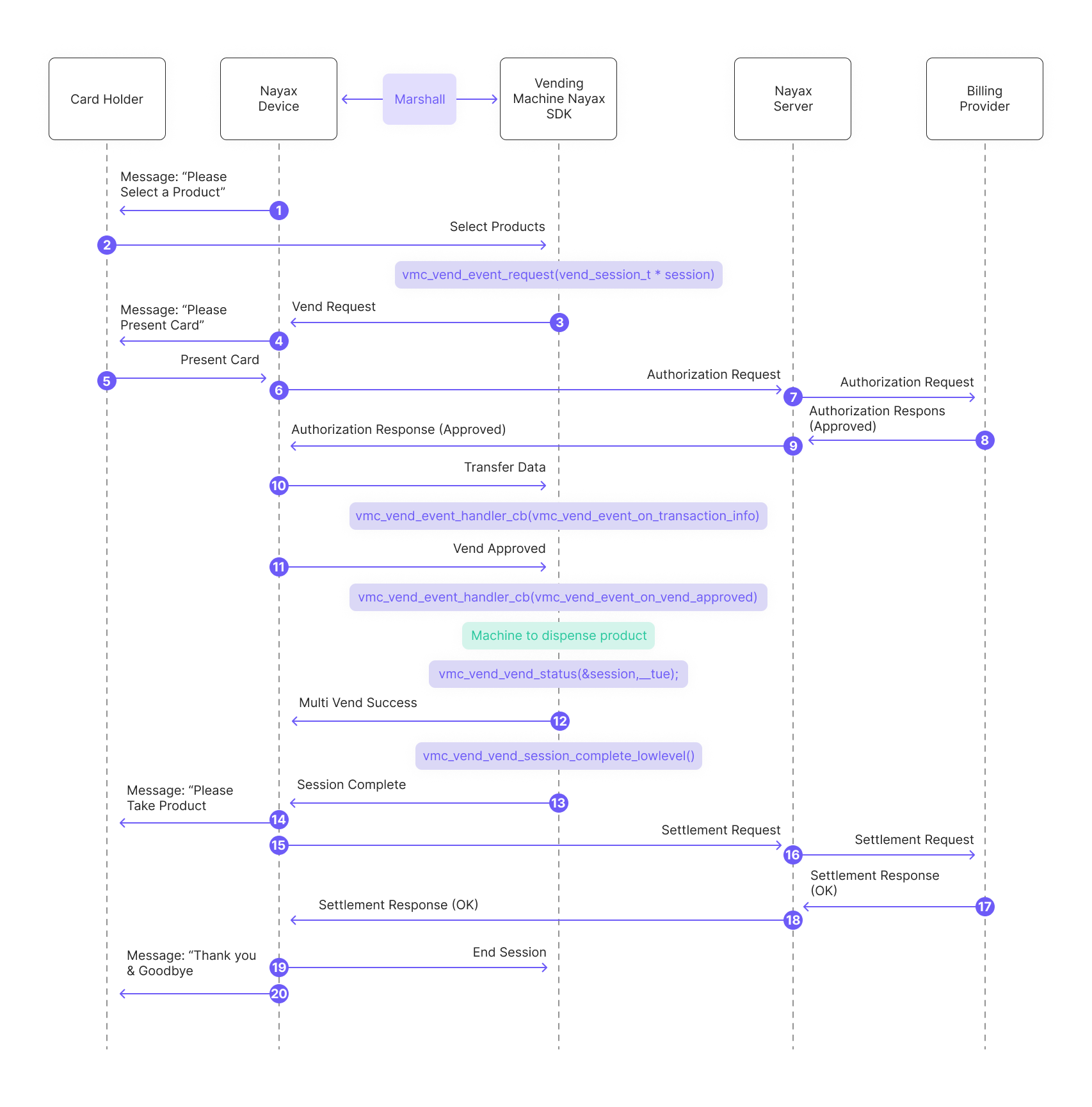 以下是图表的分解说明:
1. Nayax 设备向消费者发送消息:“请选择产品。”
2. 消费者从自动售货机中选择所需的商品。这些商品将被添加到名为“会话”的列表中:
```c C theme={null}
session_products[0].code = 1;
session_products[0] .qty = 1;
session_products[0].price = 10;
session_products[0].unit = 1;
session_products[1].code = 2;
session_products[1].qty = 1;
session_products[1].price = 20;
session_products[1].unit = 1;
if (config.multi_vend_support)
{
session->products = session_products;
session->total_products = 2;
}
```
```csharp C# theme={null}
List list = new List();
list.Add(new vmc_vend_t.vend_item_t((ushort)1, (ushort)10, (ushort)1, (byte)1));
list.Add(new vmc_vend_t.vend_item_t((ushort)2, (ushort)20, (ushort)2, (byte)1));
list.Add(new vmc_vend_t.vend_item_t((ushort)3, (ushort)30, (ushort)3, (byte)1));
// prepare single session object
session = new vmc_vend_t.vend_session_t(list);
```
```java Java theme={null}
ArrayList list = new ArrayList();
list.add(new vmc_vend_t.vend_item_t((short) 0, (short) 100, (short) 1, (byte) 1));
list.add(new vmc_vend_t.vend_item_t((short) 1, (short) 100, (short) 1, (byte) 1));
list.add(new vmc_vend_t.vend_item_t((short) 2, (short) 200, (short) 2, (byte) 1));
list.add(new vmc_vend_t.vend_item_t((short) 3, (short) 100, (short) 1, (byte) 1));
list.add(new vmc_vend_t.vend_item_t((short) 4, (short) 200, (short) 2, (byte) 1));
// in this sample we can have up to 2 sessions (in case of multi-session)
m_sessions = new vmc_vend_t.vend_session_t[1];
// prepare single session object
m_sessions[0] = new vmc_vend_t.vend_session_t(3, list);
```
3. 外围设备的 SDK 向 Nayax 设备发送售货请求:
```c C theme={null}
vmc_vend_vend_request(vend_session_t *session)
```
```csharp C# theme={null}
vmc_instance.vend.vend_request(session);
```
```java Java theme={null}
m_vmc.vend.vend_request(m_sessions[m_active_session]);
```
4. Nayax 设备向消费者发送消息:“请出示卡。”
5. 消费者出示支付卡。
6. Nayax 设备向 Nayax 服务器发送授权请求。
7. Nayax 服务器将授权请求转发给计费提供商。
8. 计费提供商向 Nayax 服务器发送授权响应(已批准)。
9. Nayax 服务器将授权响应(已批准)发送回 Nayax 设备。
10. 外围设备的 SDK 处理通过传输数据从 Nayax 设备接收的交易数据(所述数据包括有关 Nayax 交易 ID 和消费者卡详细信息的信息):
```c C theme={null}
vmc_vend_event_handler_cb(vm_vend_event_on_transaction_info)
```
```csharp C# theme={null}
vend_callbacks(onTransactionInfo(data))
```
```java Java theme={null}
vmc_vend_events()
(via onTransactionInfo(data))
```
11. SDK 会触发“供应商已批准”事件:
```c C theme={null}
vmc_vend_event_handler_cb(vm_vend_event_on_vend_approved)
```
```csharp C# theme={null}
vend_callbacks()
(via onVendApproved(session))
```
```java Java theme={null}
vmc_vend_events()
(via onVendApproved(session))
```
12. 外围设备将产品分发给消费者。
13. SDK 报告“供应商成功”:
```c C theme={null}
vmc_vend_vend_status(&session, __true)
```
```csharp C# theme={null}
vmc_vend_events()
(via onVendApproved(session) -which would return "true")
```
```java Java theme={null}
vmc_vend_events()
(via onVendApproved(session) -which would return "true")
```
\*\*注意:\*\*如果出现部分出货的情况(即并非所有选定的商品都实际售出),您可以在回复“true”之前创建一个仅包含实际售出商品的新列表:
以下是图表的分解说明:
1. Nayax 设备向消费者发送消息:“请选择产品。”
2. 消费者从自动售货机中选择所需的商品。这些商品将被添加到名为“会话”的列表中:
```c C theme={null}
session_products[0].code = 1;
session_products[0] .qty = 1;
session_products[0].price = 10;
session_products[0].unit = 1;
session_products[1].code = 2;
session_products[1].qty = 1;
session_products[1].price = 20;
session_products[1].unit = 1;
if (config.multi_vend_support)
{
session->products = session_products;
session->total_products = 2;
}
```
```csharp C# theme={null}
List list = new List();
list.Add(new vmc_vend_t.vend_item_t((ushort)1, (ushort)10, (ushort)1, (byte)1));
list.Add(new vmc_vend_t.vend_item_t((ushort)2, (ushort)20, (ushort)2, (byte)1));
list.Add(new vmc_vend_t.vend_item_t((ushort)3, (ushort)30, (ushort)3, (byte)1));
// prepare single session object
session = new vmc_vend_t.vend_session_t(list);
```
```java Java theme={null}
ArrayList list = new ArrayList();
list.add(new vmc_vend_t.vend_item_t((short) 0, (short) 100, (short) 1, (byte) 1));
list.add(new vmc_vend_t.vend_item_t((short) 1, (short) 100, (short) 1, (byte) 1));
list.add(new vmc_vend_t.vend_item_t((short) 2, (short) 200, (short) 2, (byte) 1));
list.add(new vmc_vend_t.vend_item_t((short) 3, (short) 100, (short) 1, (byte) 1));
list.add(new vmc_vend_t.vend_item_t((short) 4, (short) 200, (short) 2, (byte) 1));
// in this sample we can have up to 2 sessions (in case of multi-session)
m_sessions = new vmc_vend_t.vend_session_t[1];
// prepare single session object
m_sessions[0] = new vmc_vend_t.vend_session_t(3, list);
```
3. 外围设备的 SDK 向 Nayax 设备发送售货请求:
```c C theme={null}
vmc_vend_vend_request(vend_session_t *session)
```
```csharp C# theme={null}
vmc_instance.vend.vend_request(session);
```
```java Java theme={null}
m_vmc.vend.vend_request(m_sessions[m_active_session]);
```
4. Nayax 设备向消费者发送消息:“请出示卡。”
5. 消费者出示支付卡。
6. Nayax 设备向 Nayax 服务器发送授权请求。
7. Nayax 服务器将授权请求转发给计费提供商。
8. 计费提供商向 Nayax 服务器发送授权响应(已批准)。
9. Nayax 服务器将授权响应(已批准)发送回 Nayax 设备。
10. 外围设备的 SDK 处理通过传输数据从 Nayax 设备接收的交易数据(所述数据包括有关 Nayax 交易 ID 和消费者卡详细信息的信息):
```c C theme={null}
vmc_vend_event_handler_cb(vm_vend_event_on_transaction_info)
```
```csharp C# theme={null}
vend_callbacks(onTransactionInfo(data))
```
```java Java theme={null}
vmc_vend_events()
(via onTransactionInfo(data))
```
11. SDK 会触发“供应商已批准”事件:
```c C theme={null}
vmc_vend_event_handler_cb(vm_vend_event_on_vend_approved)
```
```csharp C# theme={null}
vend_callbacks()
(via onVendApproved(session))
```
```java Java theme={null}
vmc_vend_events()
(via onVendApproved(session))
```
12. 外围设备将产品分发给消费者。
13. SDK 报告“供应商成功”:
```c C theme={null}
vmc_vend_vend_status(&session, __true)
```
```csharp C# theme={null}
vmc_vend_events()
(via onVendApproved(session) -which would return "true")
```
```java Java theme={null}
vmc_vend_events()
(via onVendApproved(session) -which would return "true")
```
\*\*注意:\*\*如果出现部分出货的情况(即并非所有选定的商品都实际售出),您可以在回复“true”之前创建一个仅包含实际售出商品的新列表:
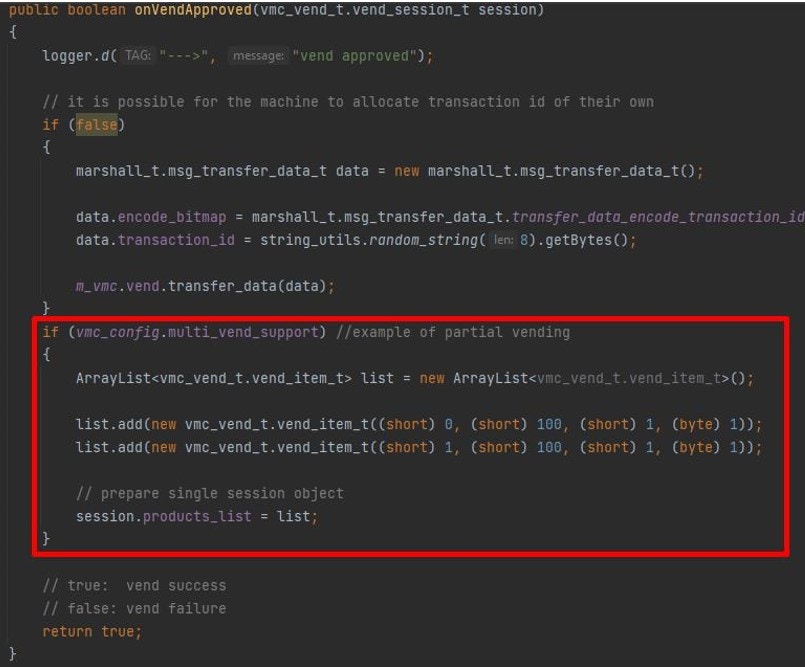 售货环节结束:
```c C theme={null}
vmc_vend_vend_session_complete_lowlevel()
```
```csharp C# theme={null}
no such function in C# or Java due to the nature of the languages
```
```java Java theme={null}
no such function in C# or Java due to the nature of the languages
```
14. 致消费者的信息:“请取走产品。”
15. Nayax设备向Nayax服务器发送结算请求。
16. Nayax服务器将结算请求转发给计费提供商。
17. 计费提供商向 Nayax 服务器发送结算响应(OK)。
18. Nayax服务器返回结算响应(OK)给Nayax设备。
## 参见
This documentation is built and hosted on [Mintlify](https://mintlify.com), a developer documentation platform.
售货环节结束:
```c C theme={null}
vmc_vend_vend_session_complete_lowlevel()
```
```csharp C# theme={null}
no such function in C# or Java due to the nature of the languages
```
```java Java theme={null}
no such function in C# or Java due to the nature of the languages
```
14. 致消费者的信息:“请取走产品。”
15. Nayax设备向Nayax服务器发送结算请求。
16. Nayax服务器将结算请求转发给计费提供商。
17. 计费提供商向 Nayax 服务器发送结算响应(OK)。
18. Nayax服务器返回结算响应(OK)给Nayax设备。
## 参见
This documentation is built and hosted on [Mintlify](https://mintlify.com), a developer documentation platform.