> ## Documentation Index
> Fetch the complete documentation index at: https://devzone.nayax.com/llms.txt
> Use this file to discover all available pages before exploring further.
# SQS消息加密
要设置通过 Amazon SQS 传递时的加密功能,您必须具备访问 Nayax Core 和
Lynx API 的权限,并拥有相应的用户权限。具体而言,需要以下角色:
* Lynx - SQS Encryption
要为发送到 Amazon SQS 的消息启用加密功能,您应在前面章节所述的相关配置部分中,勾选 Enable Encryption
复选框。
## 访问 Lynx API
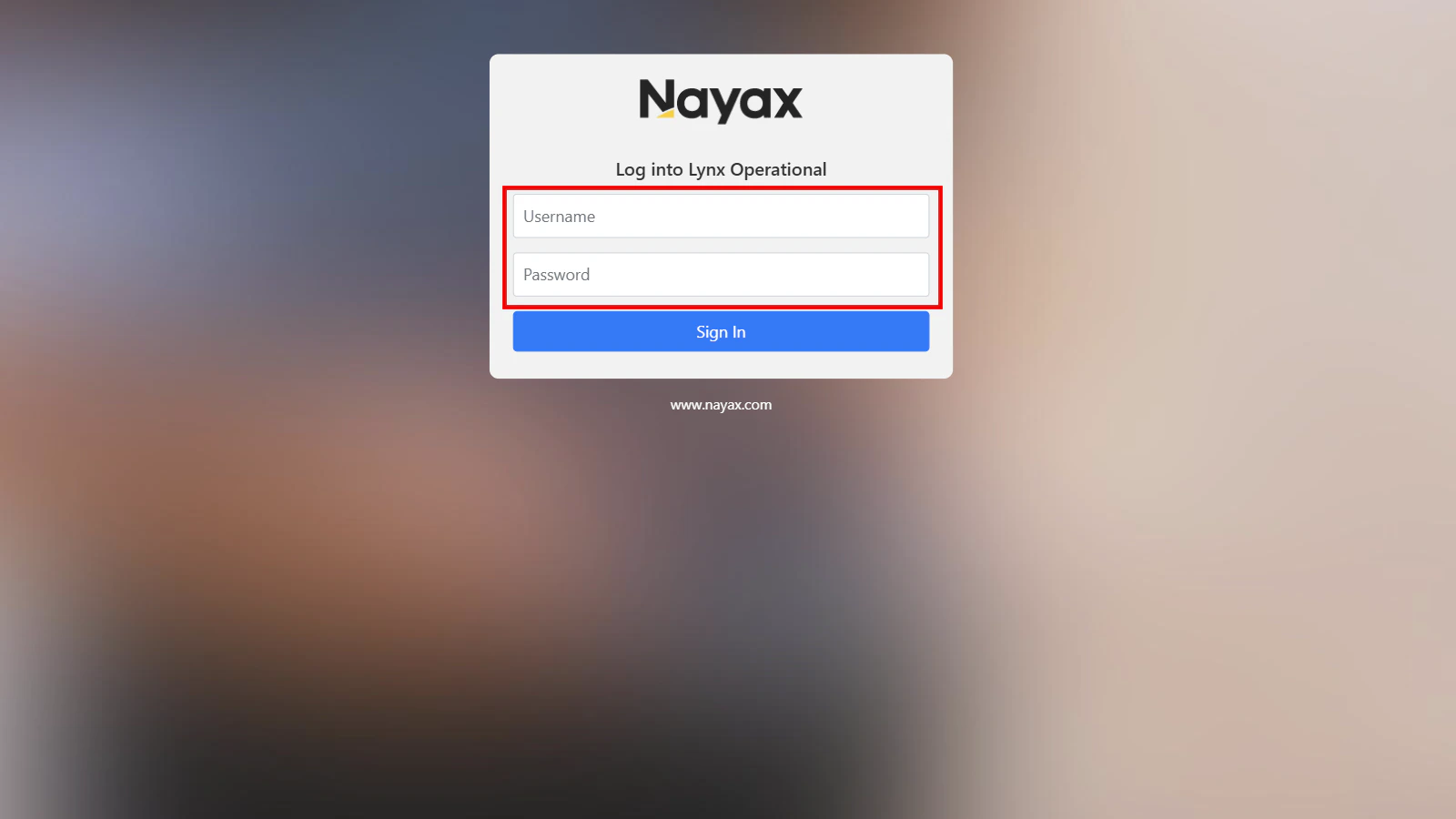
1. [**Log into Lynx Operational**](https://lynx.nayax.com/operational/signin)
2. 输入您的 Nayax Core 凭据。
 ## 生成加密密钥
您需要使用 Actor ID(运营商 ID)来生成加密密钥,该 ID 可在 Nayax Core 的 Administration > Operator > Details 选项卡下找到。
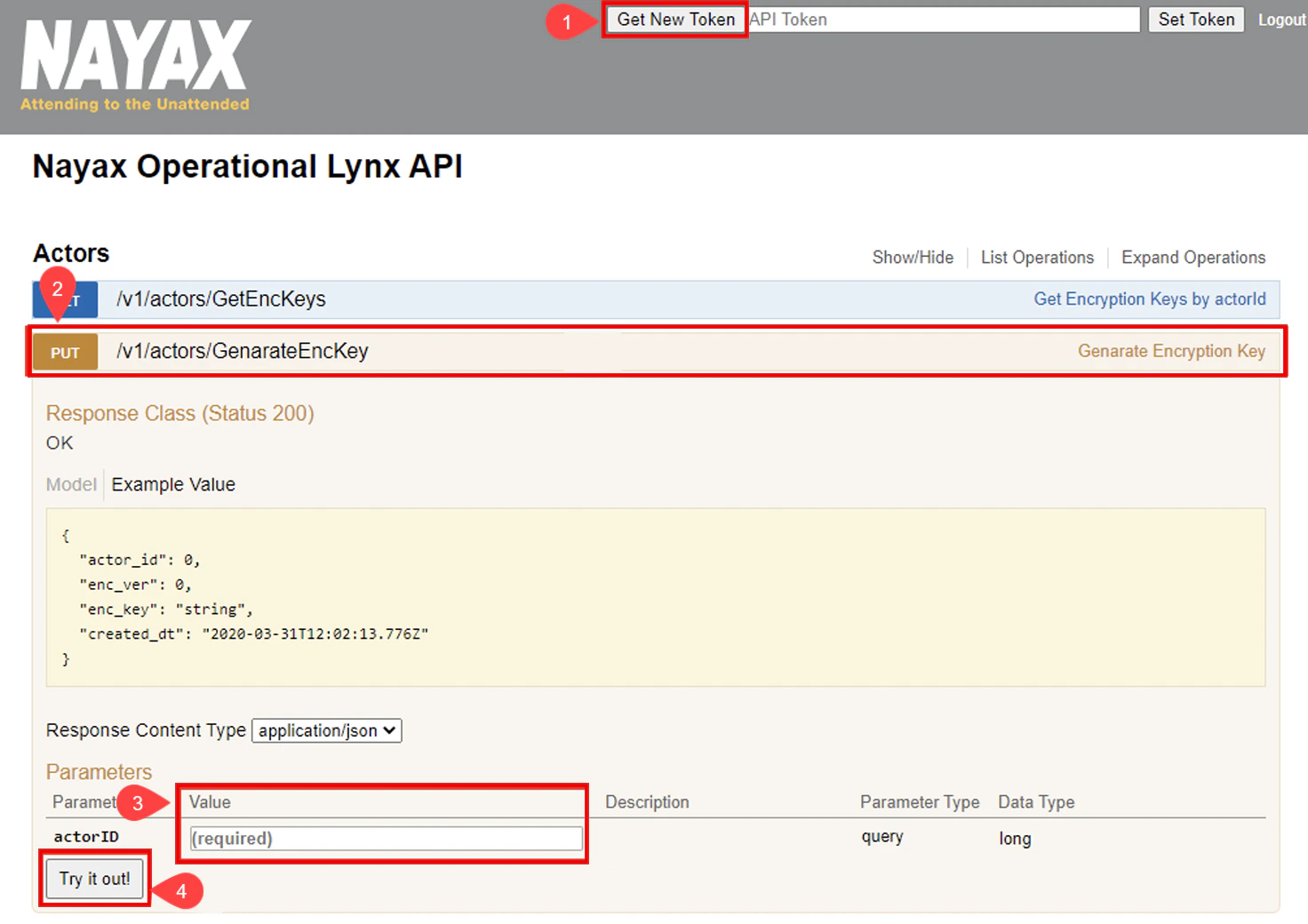
1. 点击 Lynx API 界面右上角的 Generate New Token 按钮。
2. 选择 PUT /v1/actors/GenerateEncKey 行以查看更多详细信息。
3. 输入 `actorID` 参数值。
4. 点击 Try it out! 按钮以生成新的加密密钥。
加密密钥的使用与刷新指南
* 如果在 Nayax Core 中任何 SQS 消息传递配置里勾选了 Enable Encryption 复选框,则发送到队列的所有消息都将使用生成的加密密钥进行加密。
* 可以通过重复上述步骤来刷新加密密钥。每个新密钥的 `enc_ver` 值都会递增,表示密钥的版本号。
## 生成加密密钥
您需要使用 Actor ID(运营商 ID)来生成加密密钥,该 ID 可在 Nayax Core 的 Administration > Operator > Details 选项卡下找到。
1. 点击 Lynx API 界面右上角的 Generate New Token 按钮。
2. 选择 PUT /v1/actors/GenerateEncKey 行以查看更多详细信息。
3. 输入 `actorID` 参数值。
4. 点击 Try it out! 按钮以生成新的加密密钥。
加密密钥的使用与刷新指南
* 如果在 Nayax Core 中任何 SQS 消息传递配置里勾选了 Enable Encryption 复选框,则发送到队列的所有消息都将使用生成的加密密钥进行加密。
* 可以通过重复上述步骤来刷新加密密钥。每个新密钥的 `enc_ver` 值都会递增,表示密钥的版本号。
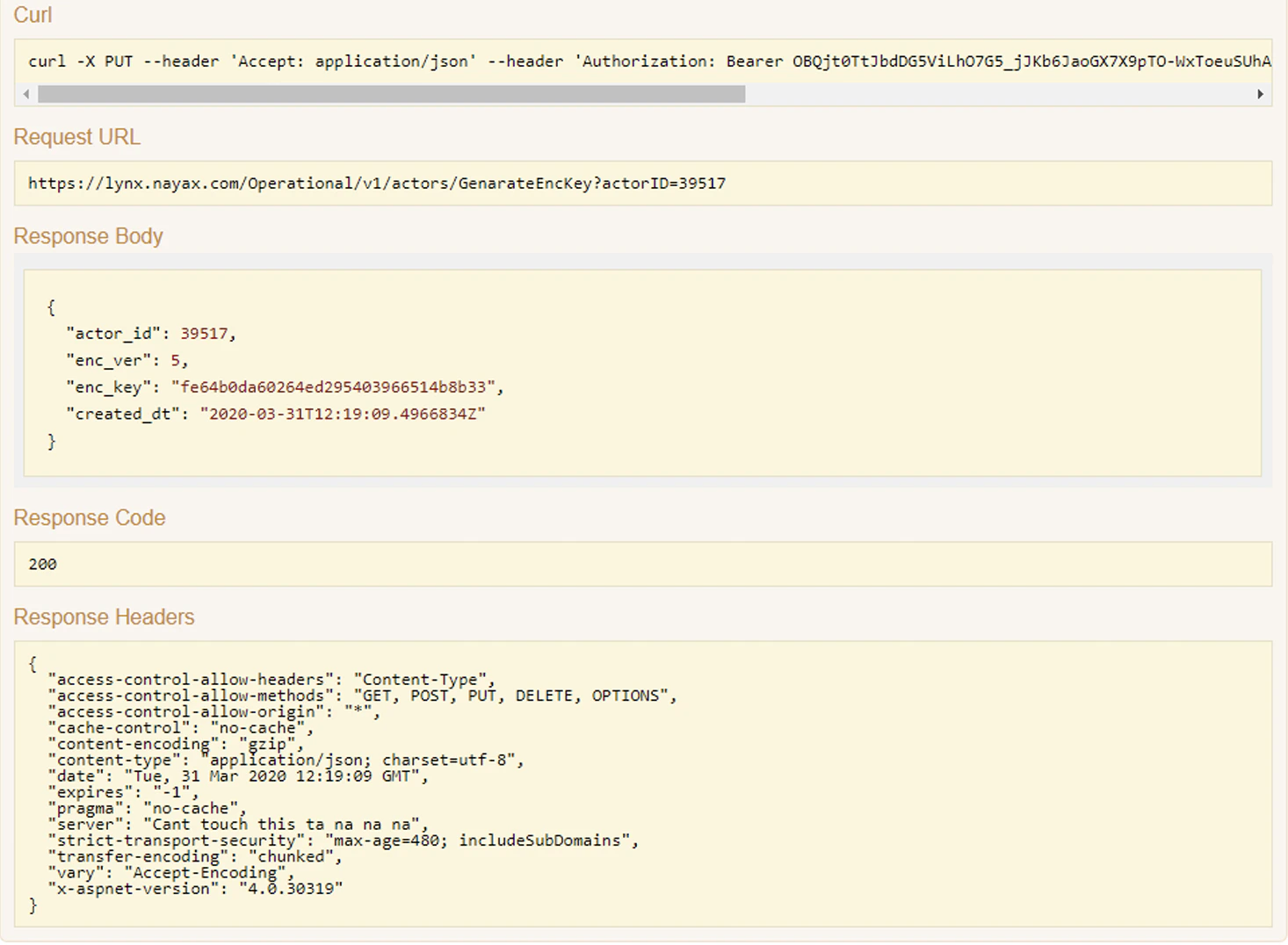
 响应将包含以下值:
| 字段名称 | 描述 |
| - | - |
| actor\_id | 自动生成的唯一 ID,表示层级结构树中的层级实体 |
| enc\_ver | 标识加密密钥版本的编号 |
| enc\_key | 加密密钥,用于加密发送到 Amazon SQS 的消息的字母数字 GUID |
| created\_dt | 加密密钥的创建日期和时间 |
响应示例
响应将包含以下值:
| 字段名称 | 描述 |
| - | - |
| actor\_id | 自动生成的唯一 ID,表示层级结构树中的层级实体 |
| enc\_ver | 标识加密密钥版本的编号 |
| enc\_key | 加密密钥,用于加密发送到 Amazon SQS 的消息的字母数字 GUID |
| created\_dt | 加密密钥的创建日期和时间 |
响应示例
 ## 列出加密密钥
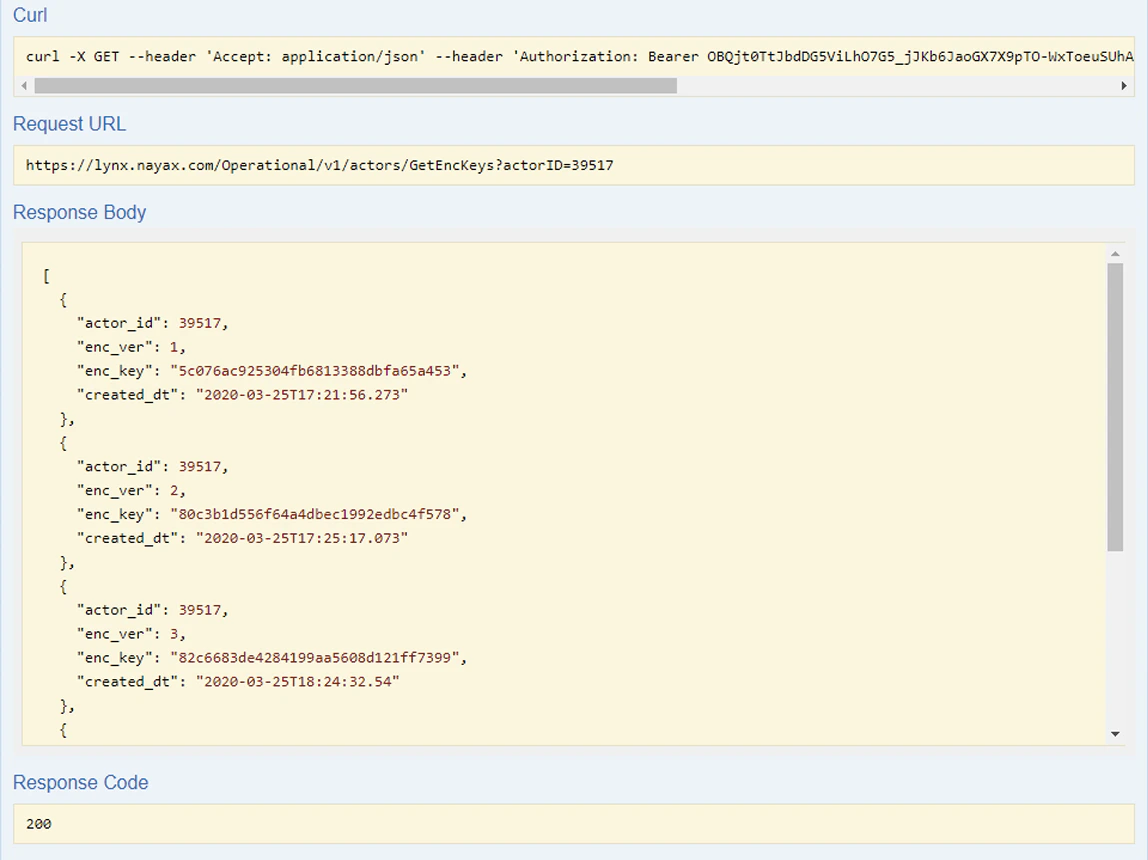
您可以使用 Lynx API 的 GET Encryption Keys 选项检索之前生成的所有密钥:
1. 点击 GET /v1/actors/GetEncKeys 行以查看更多详细信息
2. 输入 `actorID` 参数值。
3. 点击 Try it out! 按钮以查看已生成密钥的列表。
按照这些步骤操作,您可以确保消息安全加密地传递到 Amazon SQS。
## 列出加密密钥
您可以使用 Lynx API 的 GET Encryption Keys 选项检索之前生成的所有密钥:
1. 点击 GET /v1/actors/GetEncKeys 行以查看更多详细信息
2. 输入 `actorID` 参数值。
3. 点击 Try it out! 按钮以查看已生成密钥的列表。
按照这些步骤操作,您可以确保消息安全加密地传递到 Amazon SQS。
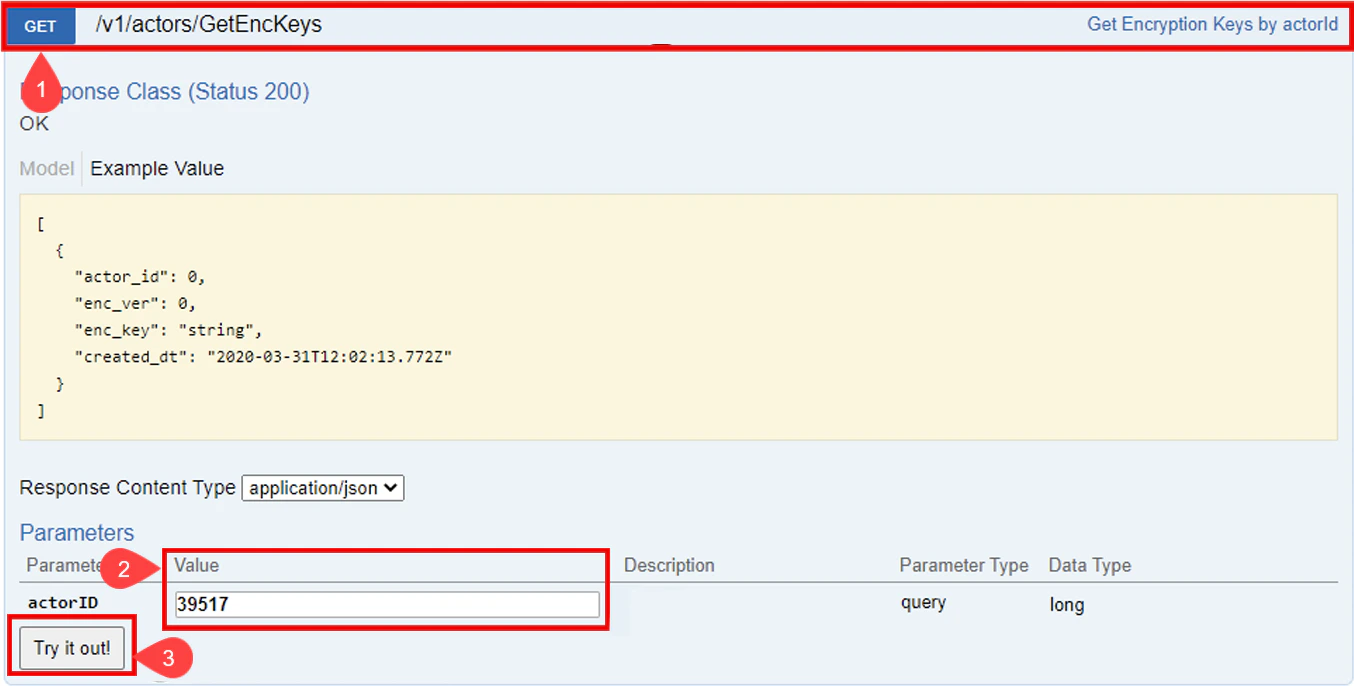 响应示例:
响应示例:
 ## 解密消息
您还可以使用加密密钥对消息执行解密操作。请参见下方代码块:
```cs theme={null}
public string Decrypt(string cipherText)
{
using (Aes aesAlg = Aes.Create())
{
aesAlg.Key = Key;
aesAlg.IV = IV;
ICryptoTransform decryptor = aesAlg.CreateDecryptor(aesAlg.Key, aesAlg.IV);
using (MemoryStream msDecrypt = new MemoryStream(Convert.FromBase64String(cipherText)))
{
using (CryptoStream csDecrypt = new CryptoStream(msDecrypt, decryptor, CryptoStreamMode.Read))
{
using (StreamReader srDecrypt = new StreamReader(csDecrypt))
{
return srDecrypt.ReadToEnd();
}
}
}
}
}
}
// AES Encryption Example
string key = "0123456789abcdef"; // 16 bytes key
string iv = "abcdef9876543210"; // 16 bytes IV
AesEncryption aes = new AesEncryption(key, iv);
string original = "Hello, World!";
string decrypted = aes.Decrypt(encryptedMessage);
```
在哪里:
1. It initializes the AES algorithm with a `key` and an initialization vector (`IV`) and then creates a `decryptor`.
2. The encrypted message, provided as a `Base64` string is converted back into bytes and read using a `MemoryStream` and `CryptoStream` with the `decryptor`.
3. 随后读取解密后的数据,并将其作为原始的明文字符串返回。
该方法本质上是将加密过程反向执行,以还原出原始消息。
## 解密消息
您还可以使用加密密钥对消息执行解密操作。请参见下方代码块:
```cs theme={null}
public string Decrypt(string cipherText)
{
using (Aes aesAlg = Aes.Create())
{
aesAlg.Key = Key;
aesAlg.IV = IV;
ICryptoTransform decryptor = aesAlg.CreateDecryptor(aesAlg.Key, aesAlg.IV);
using (MemoryStream msDecrypt = new MemoryStream(Convert.FromBase64String(cipherText)))
{
using (CryptoStream csDecrypt = new CryptoStream(msDecrypt, decryptor, CryptoStreamMode.Read))
{
using (StreamReader srDecrypt = new StreamReader(csDecrypt))
{
return srDecrypt.ReadToEnd();
}
}
}
}
}
}
// AES Encryption Example
string key = "0123456789abcdef"; // 16 bytes key
string iv = "abcdef9876543210"; // 16 bytes IV
AesEncryption aes = new AesEncryption(key, iv);
string original = "Hello, World!";
string decrypted = aes.Decrypt(encryptedMessage);
```
在哪里:
1. It initializes the AES algorithm with a `key` and an initialization vector (`IV`) and then creates a `decryptor`.
2. The encrypted message, provided as a `Base64` string is converted back into bytes and read using a `MemoryStream` and `CryptoStream` with the `decryptor`.
3. 随后读取解密后的数据,并将其作为原始的明文字符串返回。
该方法本质上是将加密过程反向执行,以还原出原始消息。
This documentation is built and hosted on [Mintlify](https://mintlify.com), a developer documentation platform.