> ## Documentation Index
> Fetch the complete documentation index at: https://devzone.nayax.com/llms.txt
> Use this file to discover all available pages before exploring further.
# 检索卡数据
export const EndpointCard = ({method = "API", title, children, href, arrow = true}) => {
const METHOD_STYLES = {
GET: {
bg: "mint-bg-green-400/20 dark:mint-bg-green-400/20",
text: "mint-text-green-700 dark:mint-text-green-400",
border: "mint-border-green-300 dark:mint-border-green-700"
},
POST: {
bg: "mint-bg-blue-400/20 dark:mint-bg-blue-400/20",
text: "mint-text-blue-700 dark:mint-text-blue-400"
},
PUT: {
bg: "mint-bg-yellow-400/20 dark:mint-bg-yellow-400/20",
text: "mint-text-yellow-700 dark:mint-text-yellow-400"
},
PATCH: {
bg: "mint-bg-orange-400/20 dark:mint-bg-orange-400/20",
text: "mint-text-orange-700 dark:mint-text-orange-400"
},
DELETE: {
bg: "mint-bg-red-400/20 dark:mint-bg-red-400/20",
text: "mint-text-red-700 dark:mint-text-red-400"
},
API: {
bg: "mint-bg-black",
text: "mint-text-white"
}
};
const MethodBadge = ({method}) => {
const style = METHOD_STYLES[method?.toUpperCase()] ?? METHOD_STYLES.GET;
return
{method?.toUpperCase()}
;
};
const content =
{}
{title}
{children &&
{children}
}
{}
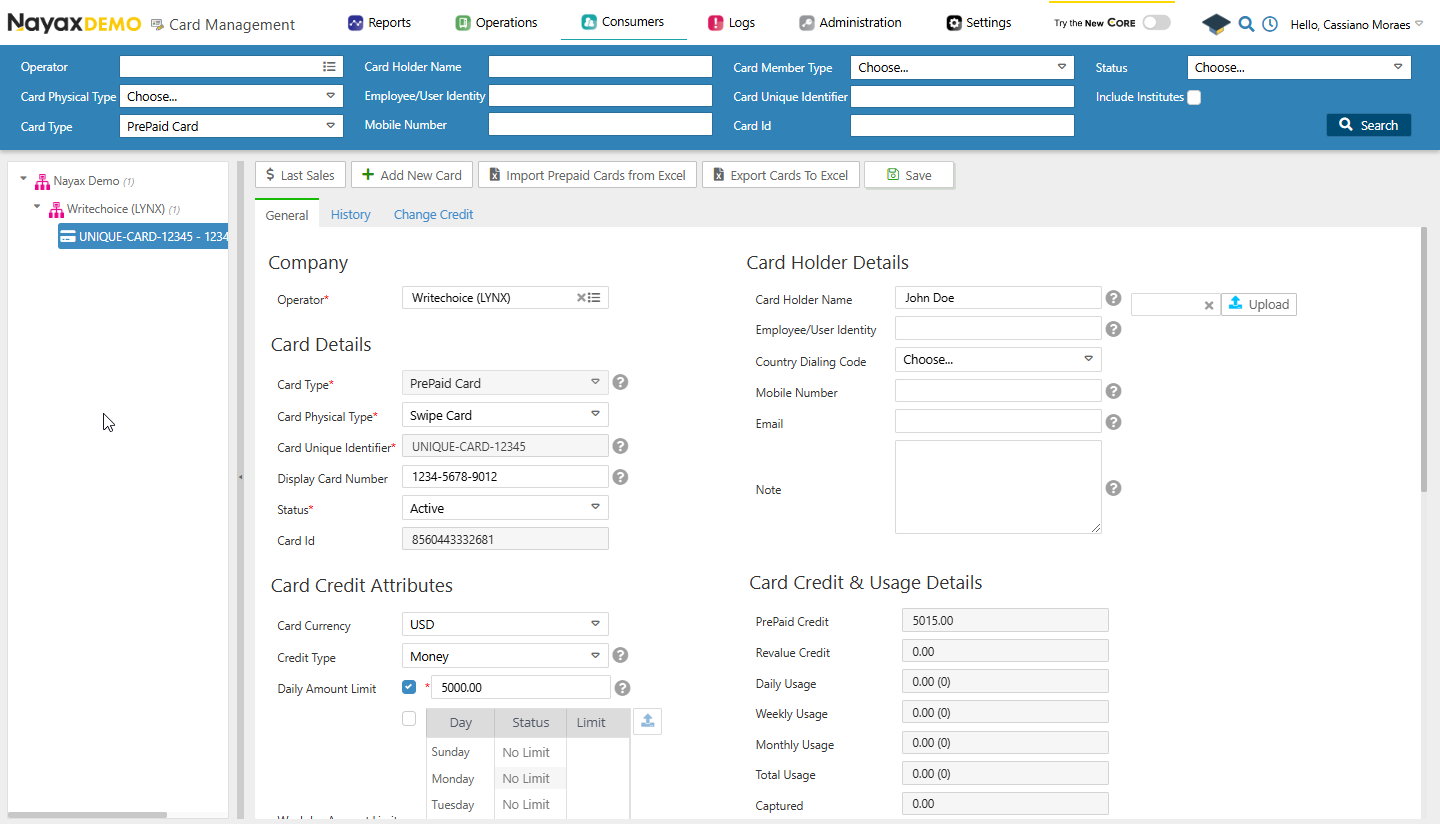 您将看到该卡片的所有详细信息,这与前面提到的 Lynx API 端点检索到的数据相同。
## 获取卡牌
此通用端点将检索所有卡片的概览信息,包括 Card ID、Card Holder Name 和 Card Status 等基本详细信息。请参见示例查询:
```sh Request theme={null}
curl --request GET \
--url https://qa-lynx.nayax.com/operational/v1/cards \
--header 'accept: application/json' \
--header 'Authorization: Bearer '
```
通过在请求中添加查询参数,此端点也可以检索特定卡片的详细信息,而不是所有卡片。例如,要获取 Card Unique Identifier 为 `1409315030` 的卡片的详细信息,您可以使用下方代码块中的查询。
```sh Request theme={null}
curl --request GET \
--url 'https://qa-lynx.nayax.com/operational/v1/cards?CardUniqueIdentifier=1409315030%20' \
--header 'accept: application/json' \
--header 'Authorization: Bearer '
```
卡片的以下任何详细信息都可以用作查询参数:
* `CardID`
* `CardUniqueIdentifier`
* `CardDisplayNumber`
* `CardMobileNumber`
* `ExternalApplicationUserID`
* `CardEmail`
* `CardHolderName`
## 通过卡片显示编号获取卡片
它根据卡片的显示号码(即卡片的物理卡号)获取卡片详细信息。这非常适用于只能获取显示号码作为参考的情况。
请参见下方代码块中的查询示例:
```sh theme={null}
curl --request GET \
--url https://qa-lynx.nayax.com/operational/v1/cards/displayNumber/{CardDisplayNumber} \
--header 'Authorization: Bearer ' \
--header 'accept: application/json'
```
将 `{CardDisplayNumber}` 替换为该卡片的实际号码。
## 获取预付卡
它检索与特定 CardID 关联的预付卡的详细信息。可用于管理预付卡或验证其状态和属性。
请参见下方代码块中的查询示例:
```sh Request theme={null}
curl --request GET \
--url https://qa-lynx.nayax.com/operational/v1/cards/CardID/prepaid \
--header 'accept: application/json' \
--header 'Authorization: Bearer '
```
将 `{CardID}` 替换为该卡片的实际 `CardID`。
响应中将包含所请求卡片的详细信息。
## 从卡中获得信用
此选项通过唯一标识符获取特定卡片的当前信用额度余额。可用于监控卡片余额,例如预付卡或技术员卡的余额。
请参见下方代码块中的查询示例:
```sh Request theme={null}
curl --request GET \
--url https://qa-lynx.nayax.com/operational/v1/cards/{CardUniqueIdentifier}/credit \
--header 'Authorization: Bearer ' \
--header 'accept: application/json'
```
```json Response theme={null}
{
"value": 5320
}
```
将 `{CardUniqueIdentifier}` 替换为该卡的实际标识符。
响应中将包含该卡片的信用额度余额。
## 获取卡的重新估值
通过卡片的唯一标识符检索与特定卡片关联的增值金额。请参见下方的查询示例:
```sh Request theme={null}
curl --request GET \
--url https://qa-lynx.nayax.com/operational/v1/cards/{CardUniqueIdentifier}/revalue \
--header 'Authorization: Bearer ' \
--header 'accept: application/json'
```
将 `{CardUniqueIdentifier}` 替换为该卡的实际标识符。
响应中将包含该卡片的增值金额。
This documentation is built and hosted on [Mintlify](https://mintlify.com), a developer documentation platform.
您将看到该卡片的所有详细信息,这与前面提到的 Lynx API 端点检索到的数据相同。
## 获取卡牌
此通用端点将检索所有卡片的概览信息,包括 Card ID、Card Holder Name 和 Card Status 等基本详细信息。请参见示例查询:
```sh Request theme={null}
curl --request GET \
--url https://qa-lynx.nayax.com/operational/v1/cards \
--header 'accept: application/json' \
--header 'Authorization: Bearer '
```
通过在请求中添加查询参数,此端点也可以检索特定卡片的详细信息,而不是所有卡片。例如,要获取 Card Unique Identifier 为 `1409315030` 的卡片的详细信息,您可以使用下方代码块中的查询。
```sh Request theme={null}
curl --request GET \
--url 'https://qa-lynx.nayax.com/operational/v1/cards?CardUniqueIdentifier=1409315030%20' \
--header 'accept: application/json' \
--header 'Authorization: Bearer '
```
卡片的以下任何详细信息都可以用作查询参数:
* `CardID`
* `CardUniqueIdentifier`
* `CardDisplayNumber`
* `CardMobileNumber`
* `ExternalApplicationUserID`
* `CardEmail`
* `CardHolderName`
## 通过卡片显示编号获取卡片
它根据卡片的显示号码(即卡片的物理卡号)获取卡片详细信息。这非常适用于只能获取显示号码作为参考的情况。
请参见下方代码块中的查询示例:
```sh theme={null}
curl --request GET \
--url https://qa-lynx.nayax.com/operational/v1/cards/displayNumber/{CardDisplayNumber} \
--header 'Authorization: Bearer ' \
--header 'accept: application/json'
```
将 `{CardDisplayNumber}` 替换为该卡片的实际号码。
## 获取预付卡
它检索与特定 CardID 关联的预付卡的详细信息。可用于管理预付卡或验证其状态和属性。
请参见下方代码块中的查询示例:
```sh Request theme={null}
curl --request GET \
--url https://qa-lynx.nayax.com/operational/v1/cards/CardID/prepaid \
--header 'accept: application/json' \
--header 'Authorization: Bearer '
```
将 `{CardID}` 替换为该卡片的实际 `CardID`。
响应中将包含所请求卡片的详细信息。
## 从卡中获得信用
此选项通过唯一标识符获取特定卡片的当前信用额度余额。可用于监控卡片余额,例如预付卡或技术员卡的余额。
请参见下方代码块中的查询示例:
```sh Request theme={null}
curl --request GET \
--url https://qa-lynx.nayax.com/operational/v1/cards/{CardUniqueIdentifier}/credit \
--header 'Authorization: Bearer ' \
--header 'accept: application/json'
```
```json Response theme={null}
{
"value": 5320
}
```
将 `{CardUniqueIdentifier}` 替换为该卡的实际标识符。
响应中将包含该卡片的信用额度余额。
## 获取卡的重新估值
通过卡片的唯一标识符检索与特定卡片关联的增值金额。请参见下方的查询示例:
```sh Request theme={null}
curl --request GET \
--url https://qa-lynx.nayax.com/operational/v1/cards/{CardUniqueIdentifier}/revalue \
--header 'Authorization: Bearer ' \
--header 'accept: application/json'
```
将 `{CardUniqueIdentifier}` 替换为该卡的实际标识符。
响应中将包含该卡片的增值金额。
This documentation is built and hosted on [Mintlify](https://mintlify.com), a developer documentation platform.