> ## Documentation Index
> Fetch the complete documentation index at: https://devzone.nayax.com/llms.txt
> Use this file to discover all available pages before exploring further.
# 操作员操作
export const EndpointCard = ({method = "API", title, children, href, arrow = true}) => {
const METHOD_STYLES = {
GET: {
bg: "mint-bg-green-400/20 dark:mint-bg-green-400/20",
text: "mint-text-green-700 dark:mint-text-green-400",
border: "mint-border-green-300 dark:mint-border-green-700"
},
POST: {
bg: "mint-bg-blue-400/20 dark:mint-bg-blue-400/20",
text: "mint-text-blue-700 dark:mint-text-blue-400"
},
PUT: {
bg: "mint-bg-yellow-400/20 dark:mint-bg-yellow-400/20",
text: "mint-text-yellow-700 dark:mint-text-yellow-400"
},
PATCH: {
bg: "mint-bg-orange-400/20 dark:mint-bg-orange-400/20",
text: "mint-text-orange-700 dark:mint-text-orange-400"
},
DELETE: {
bg: "mint-bg-red-400/20 dark:mint-bg-red-400/20",
text: "mint-text-red-700 dark:mint-text-red-400"
},
API: {
bg: "mint-bg-black",
text: "mint-text-white"
}
};
const MethodBadge = ({method}) => {
const style = METHOD_STYLES[method?.toUpperCase()] ?? METHOD_STYLES.GET;
return
{method?.toUpperCase()}
;
};
const content =
{}
{title}
{children &&
{children}
}
{}
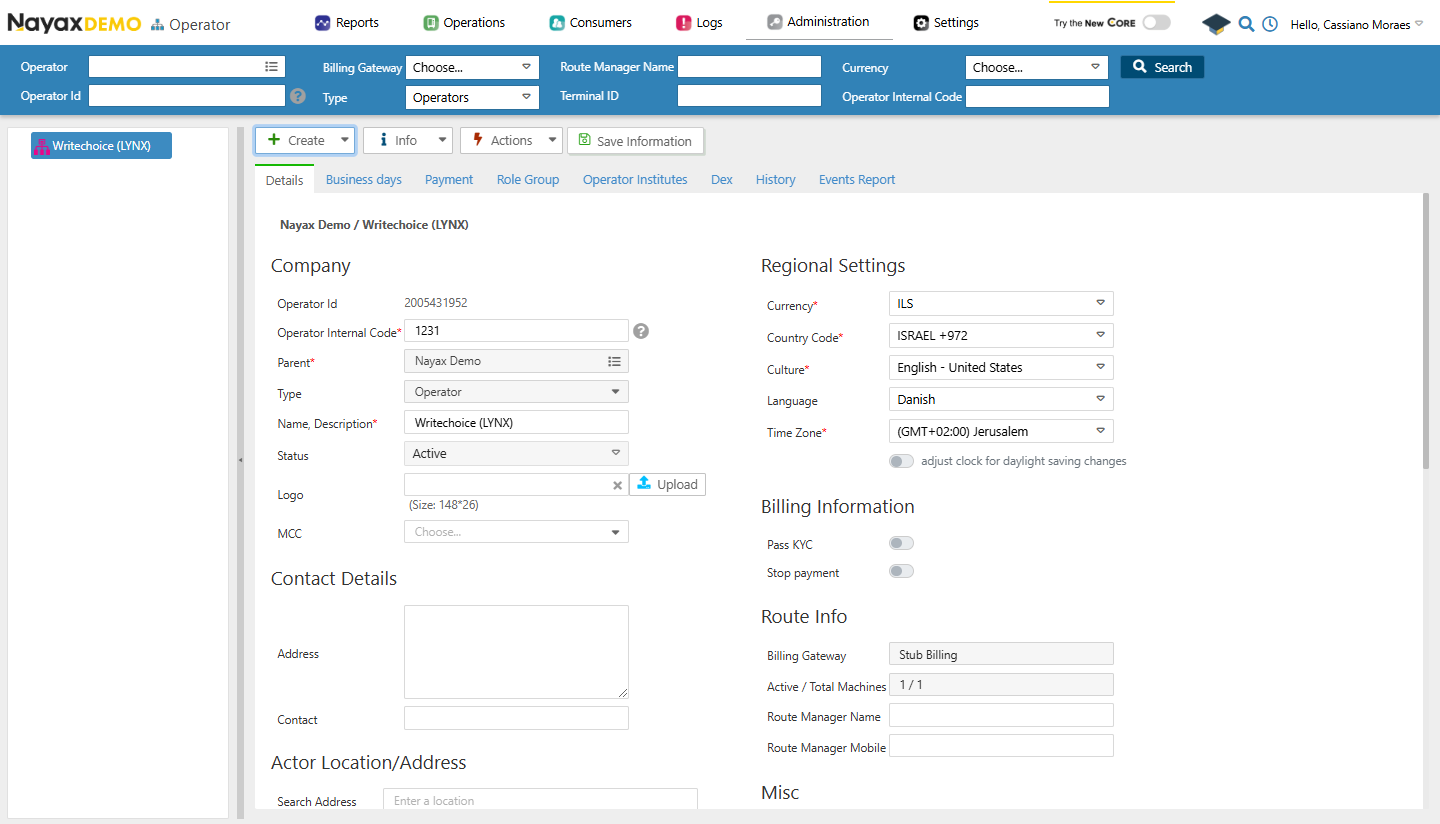 这些操作也可以通过 Lynx API 以编程方式执行,使用以下端点:
验证
请参阅本文档的[“安全和令牌”](/docs/manage-data-operations/lynx-api/security)页面,了解如何访问您的令牌,以及如何正确使用它来验证您的 API 请求。
## 检索操作员详细信息
[通过 ActorID 获取参与者详情](/reference/lynx/actors/get-actor-details-by-actorid)可检索特定参与者的综合信息。此端点提供通过提供的 ActorID 标识的参与者的详细属性,包括个人资料信息和相关配置。
```sh Request theme={null}
curl --request GET \
--url https://qa-lynx.nayax.com/operational/v1/actors/{ActorID} \
--header 'Authorization: Bearer ' \
--header 'accept: application/json'
```
```json Response theme={null}
{
"ParentActorID": 0,
"ActorID": 0,
"ActorDescription": "string",
"ActorCode": 0,
"ActorAddress": "string",
"ActorContact": "string",
"ActorTypeID": 0,
"ActorStatus": 0,
"ActorHierarchyLevel": 0,
"CurrencyID": 0,
"LastUpdated": "2024-11-25T20:58:19.906Z",
"RouteManagerName": "string",
"RouteManagerMobile": "string",
"TimeZoneKey": 0,
"DayLightSavingsBit": true,
"CountryID": 0,
"DailyCCTransLimitPerCard": 0,
"DailyPPTransLimitPerCard": 0,
"DailyExternalPPTransLimitPerCard": 0,
"DailyCCTransLimitPerCardPerOperator": 0,
"OperatorActorID": 0,
"DistributorActorID": 0,
"AreaActorID": 0,
"RouteActorID": 0,
"ActorHierarchy": "string",
"ActorHasChildrenBit": true,
"ActorHasMachinesBit": true,
"ActorImageURL": "string",
"ActorContractInfo": "string",
"ActorSQSID": 0,
"UseProductGroupVATBit": true,
"EreceiptTransactionEndEnableBit": true,
"MaximumRevalueAmountLimit": 0,
"ActorCreatedBy": 0,
"ActorCreationDate": "2024-11-25T20:58:19.906Z",
"UpdateBy": 0,
"CultureID": 0,
"RevaluePayoutByDistributor": true,
"FiscalizationBit": true,
"GeoCountryID": 0,
"GeoState": "string",
"GeoCity": "string",
"GeoAddress": "string",
"GeoStreetNumber": "string",
"GeoLongitude": 0,
"GeoLatitude": 0,
"GeoZipCode": "string",
"GeoZoom": 0,
"ActorLanguageID": 2,
"ActorMerchantBit": "string",
"ActorMerchantNameForDescriptor": "string",
"OverrideGeoInherritcanceBit": true,
"AirportID": 0,
"VerticalCustomJSON": "string",
"FiscalizationActorID": 0,
"SupportIncrementalAuth": true,
"MaximumDefaultCredit": 0,
"Refs": {
"additionalProp": "string"
}
}
```
路径参数
将 `{ActorID}` 替换为要从中检索详情的实际 Operator ID。
响应将包含所请求操作员的详细信息。
## 更新运算符
[Update Operator/Sub-Operator](/reference/lynx/actors/update-operatorsub-operator) 端点允许您编辑指定运营商的信息。
```sh Request theme={null}
curl --request PUT \
--url https://qa-lynx.nayax.com/operational/v1/actors/{ActorID} \
--header 'Authorization: Bearer ' \
--header 'accept: application/json' \
--header 'Content-Type: application/json' \
--data '{
"ActorDescription": "Updated Main Branch",
"ActorCode": 1002,
"ActorAddress": "456 New Street, Metropolis",
"ActorContact": "updated-contact@branch.com",
"ActorTypeID": 16,
"ActorStatus": 1,
"CurrencyID": 840,
"CountryID": 840,
"GeoCity": "Metropolis",
"GeoLongitude": -77.0364,
"GeoLatitude": 38.8951
}'
```
```json Response theme={null}
{
"ParentActorID": 0,
"ActorID": 0,
"ActorDescription": "string",
"ActorCode": 0,
"ActorAddress": "string",
"ActorContact": "string",
"ActorTypeID": 0,
"ActorStatus": 0,
"ActorHierarchyLevel": 0,
"CurrencyID": 0,
"LastUpdated": "2024-11-25T20:58:19.906Z",
"RouteManagerName": "string",
"RouteManagerMobile": "string",
"TimeZoneKey": 0,
"DayLightSavingsBit": true,
"CountryID": 0,
"DailyCCTransLimitPerCard": 0,
"DailyPPTransLimitPerCard": 0,
"DailyExternalPPTransLimitPerCard": 0,
"DailyCCTransLimitPerCardPerOperator": 0,
"OperatorActorID": 0,
"DistributorActorID": 0,
"AreaActorID": 0,
"RouteActorID": 0,
"ActorHierarchy": "string",
"ActorHasChildrenBit": true,
"ActorHasMachinesBit": true,
"ActorImageURL": "string",
"ActorContractInfo": "string",
"ActorSQSID": 0,
"UseProductGroupVATBit": true,
"EreceiptTransactionEndEnableBit": true,
"MaximumRevalueAmountLimit": 0,
"ActorCreatedBy": 0,
"ActorCreationDate": "2024-11-25T20:58:19.906Z",
"UpdateBy": 0,
"CultureID": 0,
"RevaluePayoutByDistributor": true,
"FiscalizationBit": true,
"GeoCountryID": 0,
"GeoState": "string",
"GeoCity": "string",
"GeoAddress": "string",
"GeoStreetNumber": "string",
"GeoLongitude": 0,
"GeoLatitude": 0,
"GeoZipCode": "string",
"GeoZoom": 0,
"ActorLanguageID": 2,
"ActorMerchantBit": "string",
"ActorMerchantNameForDescriptor": "string",
"OverrideGeoInherritcanceBit": true,
"AirportID": 0,
"VerticalCustomJSON": "string",
"FiscalizationActorID": 0,
"SupportIncrementalAuth": true,
"MaximumDefaultCredit": 0,
"Refs": {
"additionalProp": "string"
}
}
```
主体参数与[创建操作员](/docs/manage-data-operations/lynx-api/operator/create-operator)时使用的相同。
路径参数
将 `{ActorID}` 替换为要更新的实际 Operator ID。
响应将包含所请求操作员的更新详细信息。
This documentation is built and hosted on [Mintlify](https://mintlify.com), a developer documentation platform.
这些操作也可以通过 Lynx API 以编程方式执行,使用以下端点:
验证
请参阅本文档的[“安全和令牌”](/docs/manage-data-operations/lynx-api/security)页面,了解如何访问您的令牌,以及如何正确使用它来验证您的 API 请求。
## 检索操作员详细信息
[通过 ActorID 获取参与者详情](/reference/lynx/actors/get-actor-details-by-actorid)可检索特定参与者的综合信息。此端点提供通过提供的 ActorID 标识的参与者的详细属性,包括个人资料信息和相关配置。
```sh Request theme={null}
curl --request GET \
--url https://qa-lynx.nayax.com/operational/v1/actors/{ActorID} \
--header 'Authorization: Bearer ' \
--header 'accept: application/json'
```
```json Response theme={null}
{
"ParentActorID": 0,
"ActorID": 0,
"ActorDescription": "string",
"ActorCode": 0,
"ActorAddress": "string",
"ActorContact": "string",
"ActorTypeID": 0,
"ActorStatus": 0,
"ActorHierarchyLevel": 0,
"CurrencyID": 0,
"LastUpdated": "2024-11-25T20:58:19.906Z",
"RouteManagerName": "string",
"RouteManagerMobile": "string",
"TimeZoneKey": 0,
"DayLightSavingsBit": true,
"CountryID": 0,
"DailyCCTransLimitPerCard": 0,
"DailyPPTransLimitPerCard": 0,
"DailyExternalPPTransLimitPerCard": 0,
"DailyCCTransLimitPerCardPerOperator": 0,
"OperatorActorID": 0,
"DistributorActorID": 0,
"AreaActorID": 0,
"RouteActorID": 0,
"ActorHierarchy": "string",
"ActorHasChildrenBit": true,
"ActorHasMachinesBit": true,
"ActorImageURL": "string",
"ActorContractInfo": "string",
"ActorSQSID": 0,
"UseProductGroupVATBit": true,
"EreceiptTransactionEndEnableBit": true,
"MaximumRevalueAmountLimit": 0,
"ActorCreatedBy": 0,
"ActorCreationDate": "2024-11-25T20:58:19.906Z",
"UpdateBy": 0,
"CultureID": 0,
"RevaluePayoutByDistributor": true,
"FiscalizationBit": true,
"GeoCountryID": 0,
"GeoState": "string",
"GeoCity": "string",
"GeoAddress": "string",
"GeoStreetNumber": "string",
"GeoLongitude": 0,
"GeoLatitude": 0,
"GeoZipCode": "string",
"GeoZoom": 0,
"ActorLanguageID": 2,
"ActorMerchantBit": "string",
"ActorMerchantNameForDescriptor": "string",
"OverrideGeoInherritcanceBit": true,
"AirportID": 0,
"VerticalCustomJSON": "string",
"FiscalizationActorID": 0,
"SupportIncrementalAuth": true,
"MaximumDefaultCredit": 0,
"Refs": {
"additionalProp": "string"
}
}
```
路径参数
将 `{ActorID}` 替换为要从中检索详情的实际 Operator ID。
响应将包含所请求操作员的详细信息。
## 更新运算符
[Update Operator/Sub-Operator](/reference/lynx/actors/update-operatorsub-operator) 端点允许您编辑指定运营商的信息。
```sh Request theme={null}
curl --request PUT \
--url https://qa-lynx.nayax.com/operational/v1/actors/{ActorID} \
--header 'Authorization: Bearer ' \
--header 'accept: application/json' \
--header 'Content-Type: application/json' \
--data '{
"ActorDescription": "Updated Main Branch",
"ActorCode": 1002,
"ActorAddress": "456 New Street, Metropolis",
"ActorContact": "updated-contact@branch.com",
"ActorTypeID": 16,
"ActorStatus": 1,
"CurrencyID": 840,
"CountryID": 840,
"GeoCity": "Metropolis",
"GeoLongitude": -77.0364,
"GeoLatitude": 38.8951
}'
```
```json Response theme={null}
{
"ParentActorID": 0,
"ActorID": 0,
"ActorDescription": "string",
"ActorCode": 0,
"ActorAddress": "string",
"ActorContact": "string",
"ActorTypeID": 0,
"ActorStatus": 0,
"ActorHierarchyLevel": 0,
"CurrencyID": 0,
"LastUpdated": "2024-11-25T20:58:19.906Z",
"RouteManagerName": "string",
"RouteManagerMobile": "string",
"TimeZoneKey": 0,
"DayLightSavingsBit": true,
"CountryID": 0,
"DailyCCTransLimitPerCard": 0,
"DailyPPTransLimitPerCard": 0,
"DailyExternalPPTransLimitPerCard": 0,
"DailyCCTransLimitPerCardPerOperator": 0,
"OperatorActorID": 0,
"DistributorActorID": 0,
"AreaActorID": 0,
"RouteActorID": 0,
"ActorHierarchy": "string",
"ActorHasChildrenBit": true,
"ActorHasMachinesBit": true,
"ActorImageURL": "string",
"ActorContractInfo": "string",
"ActorSQSID": 0,
"UseProductGroupVATBit": true,
"EreceiptTransactionEndEnableBit": true,
"MaximumRevalueAmountLimit": 0,
"ActorCreatedBy": 0,
"ActorCreationDate": "2024-11-25T20:58:19.906Z",
"UpdateBy": 0,
"CultureID": 0,
"RevaluePayoutByDistributor": true,
"FiscalizationBit": true,
"GeoCountryID": 0,
"GeoState": "string",
"GeoCity": "string",
"GeoAddress": "string",
"GeoStreetNumber": "string",
"GeoLongitude": 0,
"GeoLatitude": 0,
"GeoZipCode": "string",
"GeoZoom": 0,
"ActorLanguageID": 2,
"ActorMerchantBit": "string",
"ActorMerchantNameForDescriptor": "string",
"OverrideGeoInherritcanceBit": true,
"AirportID": 0,
"VerticalCustomJSON": "string",
"FiscalizationActorID": 0,
"SupportIncrementalAuth": true,
"MaximumDefaultCredit": 0,
"Refs": {
"additionalProp": "string"
}
}
```
主体参数与[创建操作员](/docs/manage-data-operations/lynx-api/operator/create-operator)时使用的相同。
路径参数
将 `{ActorID}` 替换为要更新的实际 Operator ID。
响应将包含所请求操作员的更新详细信息。
This documentation is built and hosted on [Mintlify](https://mintlify.com), a developer documentation platform.