> ## Documentation Index
> Fetch the complete documentation index at: https://devzone.nayax.com/llms.txt
> Use this file to discover all available pages before exploring further.
# 检索层次结构
export const EndpointCard = ({method = "API", title, children, href, arrow = true}) => {
const METHOD_STYLES = {
GET: {
bg: "mint-bg-green-400/20 dark:mint-bg-green-400/20",
text: "mint-text-green-700 dark:mint-text-green-400",
border: "mint-border-green-300 dark:mint-border-green-700"
},
POST: {
bg: "mint-bg-blue-400/20 dark:mint-bg-blue-400/20",
text: "mint-text-blue-700 dark:mint-text-blue-400"
},
PUT: {
bg: "mint-bg-yellow-400/20 dark:mint-bg-yellow-400/20",
text: "mint-text-yellow-700 dark:mint-text-yellow-400"
},
PATCH: {
bg: "mint-bg-orange-400/20 dark:mint-bg-orange-400/20",
text: "mint-text-orange-700 dark:mint-text-orange-400"
},
DELETE: {
bg: "mint-bg-red-400/20 dark:mint-bg-red-400/20",
text: "mint-text-red-700 dark:mint-text-red-400"
},
API: {
bg: "mint-bg-black",
text: "mint-text-white"
}
};
const MethodBadge = ({method}) => {
const style = METHOD_STYLES[method?.toUpperCase()] ?? METHOD_STYLES.GET;
return
{method?.toUpperCase()}
;
};
const content =
{}
{title}
{children &&
{children}
}
{}
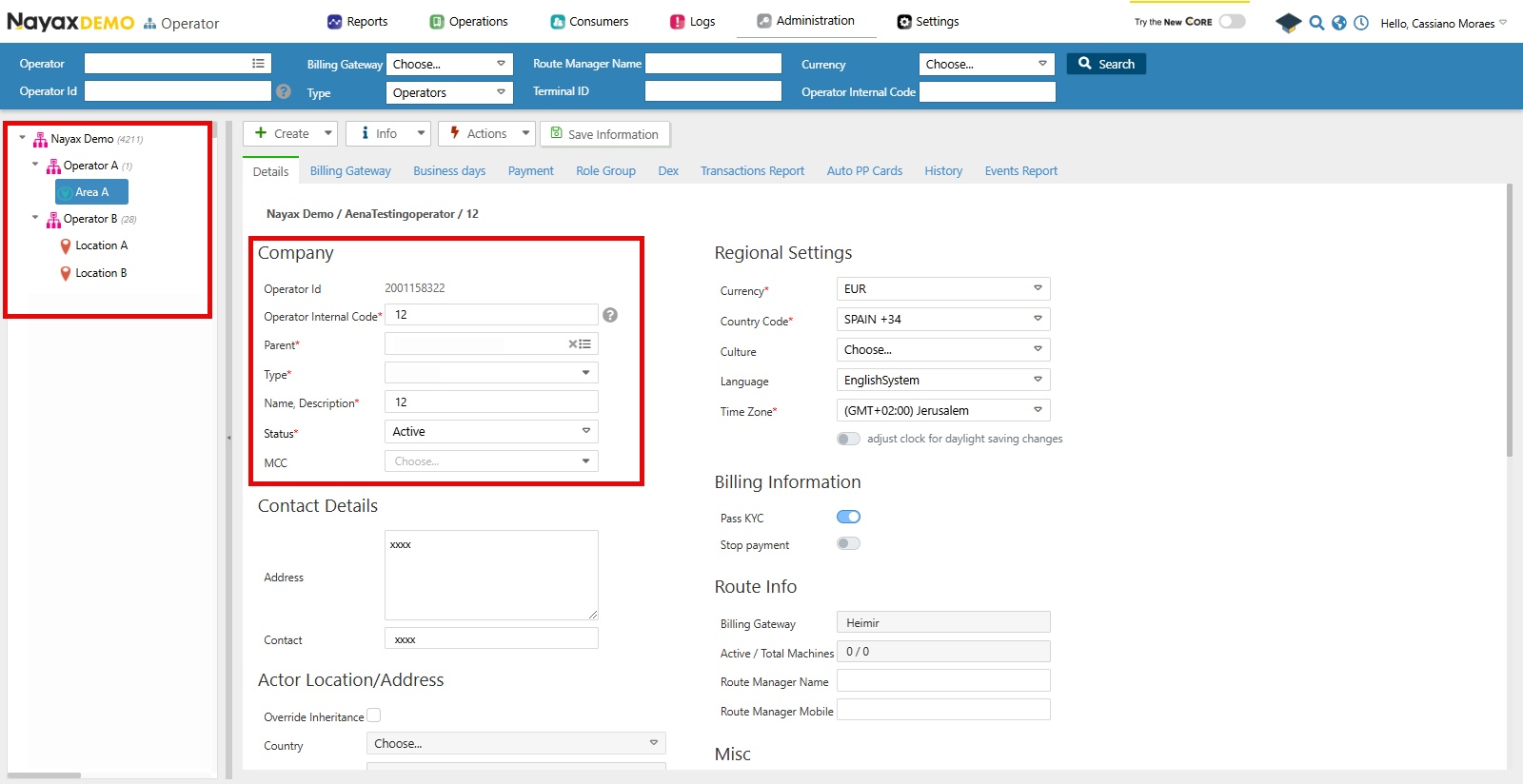 ## Lynx API
您还可以使用 Lynx API 通过使用以下端点以编程方式检索操作员的层次结构及其详细信息:
### 获取运算符层次结构
[Get Actor Hierarchy for Current User](/reference/lynx/actors/get-actor-hierarchy-for-current-user) 端点通过在请求的查询参数中提供 `ActorID`,检索当前用户或指定 Actor/运营商及其子实体(如区域、路线和机器)的层级结构。请参阅下方代码块中的示例请求:
```sh theme={null}
curl --request GET \
--url 'https://qa-lynx.nayax.com/operational/v1/actors/hierarchy?ActorID=' \
--header 'accept: application/json'
```
可用的查询参数有:
| 范围 | 描述 |
| :- | :- |
| `ActorID` | 您想要检索其层次结构的操作员或参与者的唯一 ID。 |
| `StatusID` | 筛选层次结构以仅包含具有特定状态的参与者。使用此选项仅检索活动或非活动实体。 |
| `HierarchyLevelLimit` | 指定要返回的层次结构的最大深度。例如,1 表示直系子代,2 表示孙代。 |
Lynx API 参与者
在 Nayax Core 中,运营商及其类型(例如 "Area" 和 "Routes")只是用于区分它们的命名方式。而在 Lynx API 中,它们统称为 Actor,仅通过 `ActorTypeID` 加以区分。
### 回复
请求成功后,端点将返回一个 Operator 对象数组。请参阅以下代码块中的示例:
```json theme={null}
{
"ParentActorID": 0,
"ActorID": 12345,
"ActorDescription": "Operator A",
"ActorTypeID": 2,
"ActorStatus": 1,
"ActorHierarchyLevel": 0,
"ActorChildren": [
{
"ParentActorID": 12345,
"ActorID": 23456,
"ActorDescription": "Area A",
"ActorTypeID": 3,
"ActorStatus": 1,
"ActorHierarchyLevel": 1,
"ActorChildren": [
{
"ParentActorID": 23456,
"ActorID": 34567,
"ActorDescription": "Route A",
"ActorTypeID": 4,
"ActorStatus": 1,
"ActorHierarchyLevel": 2,
"ActorChildren": [
{
"ParentActorID": 34567,
"ActorID": 45678,
"ActorDescription": "Machine 1",
"ActorTypeID": 5,
"ActorStatus": 1,
"ActorHierarchyLevel": 3,
"ActorChildren": []
}
]
}
]
}
]
}
```
As you can see above, this is the hierarchy for the Operator with the `ActorID: 12345` showing each of its children operators. The table below describes each of the response's body parameters:
| 范围 | 描述 |
| :- | :- |
| `ParentActorID` | 指定演员的父演员的 ID。 |
| `ActorID` | 当前演员的唯一 ID。 |
| `ActorDescription` | 演员的描述或姓名。 |
| `ActorTypeID` | 参与者的类型(例如,操作员、区域、路线)。 |
| `ActorStatus` | 参与者的状态(例如,活跃、不活跃)。 |
| `ActorHierarchyLevel` | 等级制度中演员的级别。 |
| `ActorChildren` | 当前演员的子演员 ID 或详细信息列表。 |
This documentation is built and hosted on [Mintlify](https://mintlify.com), a developer documentation platform.
## Lynx API
您还可以使用 Lynx API 通过使用以下端点以编程方式检索操作员的层次结构及其详细信息:
### 获取运算符层次结构
[Get Actor Hierarchy for Current User](/reference/lynx/actors/get-actor-hierarchy-for-current-user) 端点通过在请求的查询参数中提供 `ActorID`,检索当前用户或指定 Actor/运营商及其子实体(如区域、路线和机器)的层级结构。请参阅下方代码块中的示例请求:
```sh theme={null}
curl --request GET \
--url 'https://qa-lynx.nayax.com/operational/v1/actors/hierarchy?ActorID=' \
--header 'accept: application/json'
```
可用的查询参数有:
| 范围 | 描述 |
| :- | :- |
| `ActorID` | 您想要检索其层次结构的操作员或参与者的唯一 ID。 |
| `StatusID` | 筛选层次结构以仅包含具有特定状态的参与者。使用此选项仅检索活动或非活动实体。 |
| `HierarchyLevelLimit` | 指定要返回的层次结构的最大深度。例如,1 表示直系子代,2 表示孙代。 |
Lynx API 参与者
在 Nayax Core 中,运营商及其类型(例如 "Area" 和 "Routes")只是用于区分它们的命名方式。而在 Lynx API 中,它们统称为 Actor,仅通过 `ActorTypeID` 加以区分。
### 回复
请求成功后,端点将返回一个 Operator 对象数组。请参阅以下代码块中的示例:
```json theme={null}
{
"ParentActorID": 0,
"ActorID": 12345,
"ActorDescription": "Operator A",
"ActorTypeID": 2,
"ActorStatus": 1,
"ActorHierarchyLevel": 0,
"ActorChildren": [
{
"ParentActorID": 12345,
"ActorID": 23456,
"ActorDescription": "Area A",
"ActorTypeID": 3,
"ActorStatus": 1,
"ActorHierarchyLevel": 1,
"ActorChildren": [
{
"ParentActorID": 23456,
"ActorID": 34567,
"ActorDescription": "Route A",
"ActorTypeID": 4,
"ActorStatus": 1,
"ActorHierarchyLevel": 2,
"ActorChildren": [
{
"ParentActorID": 34567,
"ActorID": 45678,
"ActorDescription": "Machine 1",
"ActorTypeID": 5,
"ActorStatus": 1,
"ActorHierarchyLevel": 3,
"ActorChildren": []
}
]
}
]
}
]
}
```
As you can see above, this is the hierarchy for the Operator with the `ActorID: 12345` showing each of its children operators. The table below describes each of the response's body parameters:
| 范围 | 描述 |
| :- | :- |
| `ParentActorID` | 指定演员的父演员的 ID。 |
| `ActorID` | 当前演员的唯一 ID。 |
| `ActorDescription` | 演员的描述或姓名。 |
| `ActorTypeID` | 参与者的类型(例如,操作员、区域、路线)。 |
| `ActorStatus` | 参与者的状态(例如,活跃、不活跃)。 |
| `ActorHierarchyLevel` | 等级制度中演员的级别。 |
| `ActorChildren` | 当前演员的子演员 ID 或详细信息列表。 |
This documentation is built and hosted on [Mintlify](https://mintlify.com), a developer documentation platform.