> ## Documentation Index
> Fetch the complete documentation index at: https://devzone.nayax.com/llms.txt
> Use this file to discover all available pages before exploring further.

# 批准或拒绝退款

export const EndpointCard = ({method = "API", title, children, href, arrow = true}) => {
  const METHOD_STYLES = {
    GET: {
      bg: "mint-bg-green-400/20 dark:mint-bg-green-400/20",
      text: "mint-text-green-700 dark:mint-text-green-400",
      border: "mint-border-green-300 dark:mint-border-green-700"
    },
    POST: {
      bg: "mint-bg-blue-400/20 dark:mint-bg-blue-400/20",
      text: "mint-text-blue-700 dark:mint-text-blue-400"
    },
    PUT: {
      bg: "mint-bg-yellow-400/20 dark:mint-bg-yellow-400/20",
      text: "mint-text-yellow-700 dark:mint-text-yellow-400"
    },
    PATCH: {
      bg: "mint-bg-orange-400/20 dark:mint-bg-orange-400/20",
      text: "mint-text-orange-700 dark:mint-text-orange-400"
    },
    DELETE: {
      bg: "mint-bg-red-400/20 dark:mint-bg-red-400/20",
      text: "mint-text-red-700 dark:mint-text-red-400"
    },
    API: {
      bg: "mint-bg-black",
      text: "mint-text-white"
    }
  };
  const MethodBadge = ({method}) => {
    const style = METHOD_STYLES[method?.toUpperCase()] ?? METHOD_STYLES.GET;
    return <span className={`
          method-pill rounded-lg font-bold px-1.5 py-0.5 text-xs leading-5 ${style.bg} ${style.text}`}>
        {method?.toUpperCase()}
      </span>;
  };
  const content = <div className="group flex items-center gap-4 border border-gray-200 dark:border-gray-700 rounded-xl p-5 bg-white dark:bg-[#1e1e1e] hover:border-gray-400 dark:hover:border-gray-500 hover:shadow-md transition-all cursor-pointer">
      {}
      <div className="flex-1 min-w-0">
        <p className="font-semibold text-gray-900 dark:text-white text-sm leading-snug">{title}</p>
        {children && <p className="mt-1 text-sm text-gray-500 dark:text-gray-400 line-clamp-2">{children}</p>}
      </div>

      {}
      <div className="shrink-0">
        <MethodBadge method={method} />
      </div>
    </div>;
  if (!href) return content;
  return <a href={href} className="block no-underline border-b-0 mb-2">
      {content}
    </a>;
};

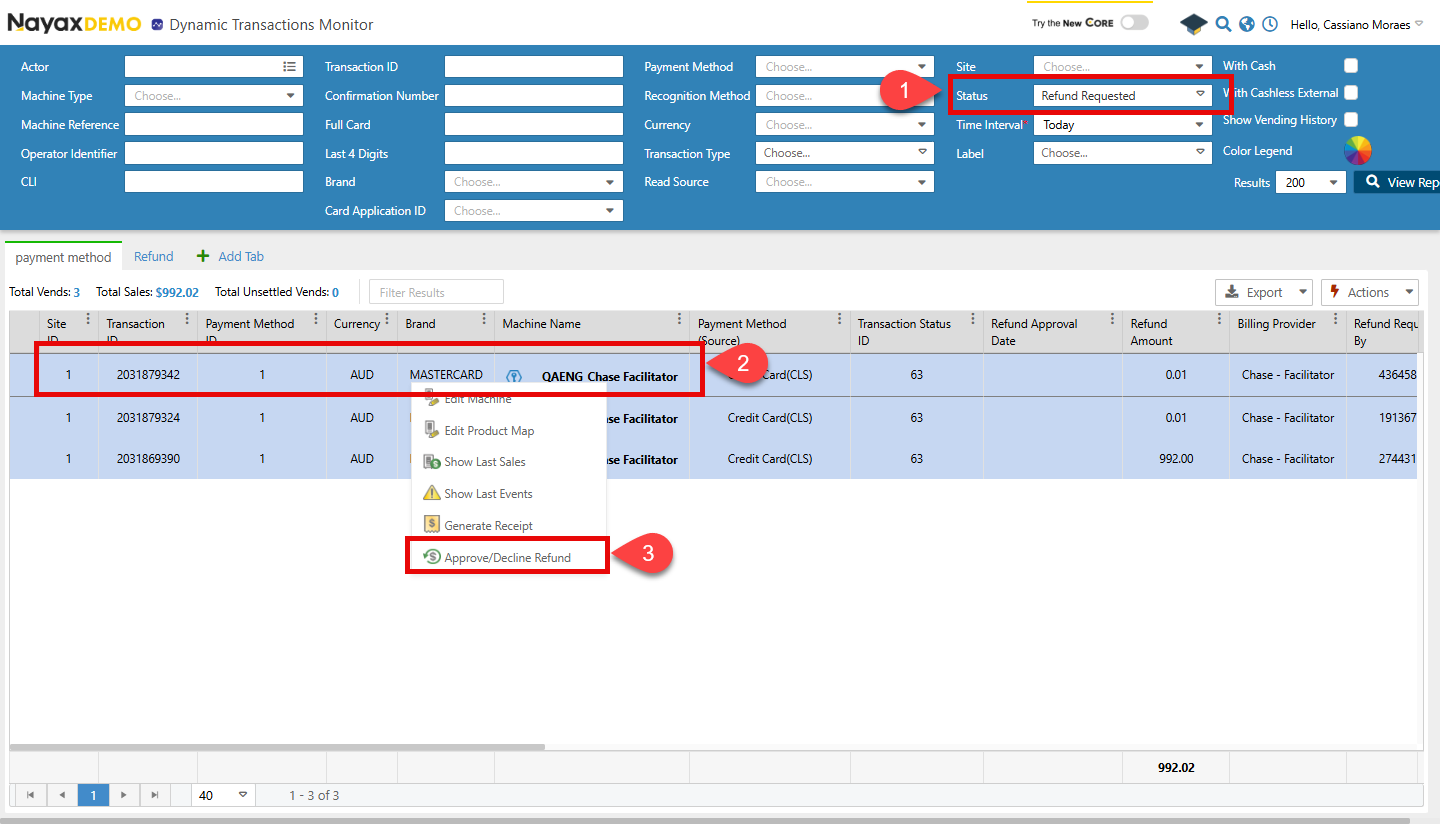
退款申请成功后，交易将保持**待处理**状态，直至获得批准或被拒绝。您可以在 Nayax 核心页面的\*\*“报告”**中查看此状态。 \*\* > 在线报告 > 动态事务监控**。请遵循以下步骤：

1. 使用搜索功能查找交易。然后，选择\*\*“已申请退款”**并按**“状态”\*\*进行筛选。
2. 右键单击列表中的交易。
3. 单击\*\*“批准/拒绝退款”\*\* 。

   <Frame>
     <img src="https://mintcdn.com/nayax-44d6e37b/1pW0jXOF4OhjjY4f/images/docs/approve-or-decline-a-refund/image1.png?fit=max&auto=format&n=1pW0jXOF4OhjjY4f&q=85&s=c77f31546c533b2c7ebdba5be3283aed" width="1440" height="824" data-path="images/docs/approve-or-decline-a-refund/image1.png" />
   </Frame>
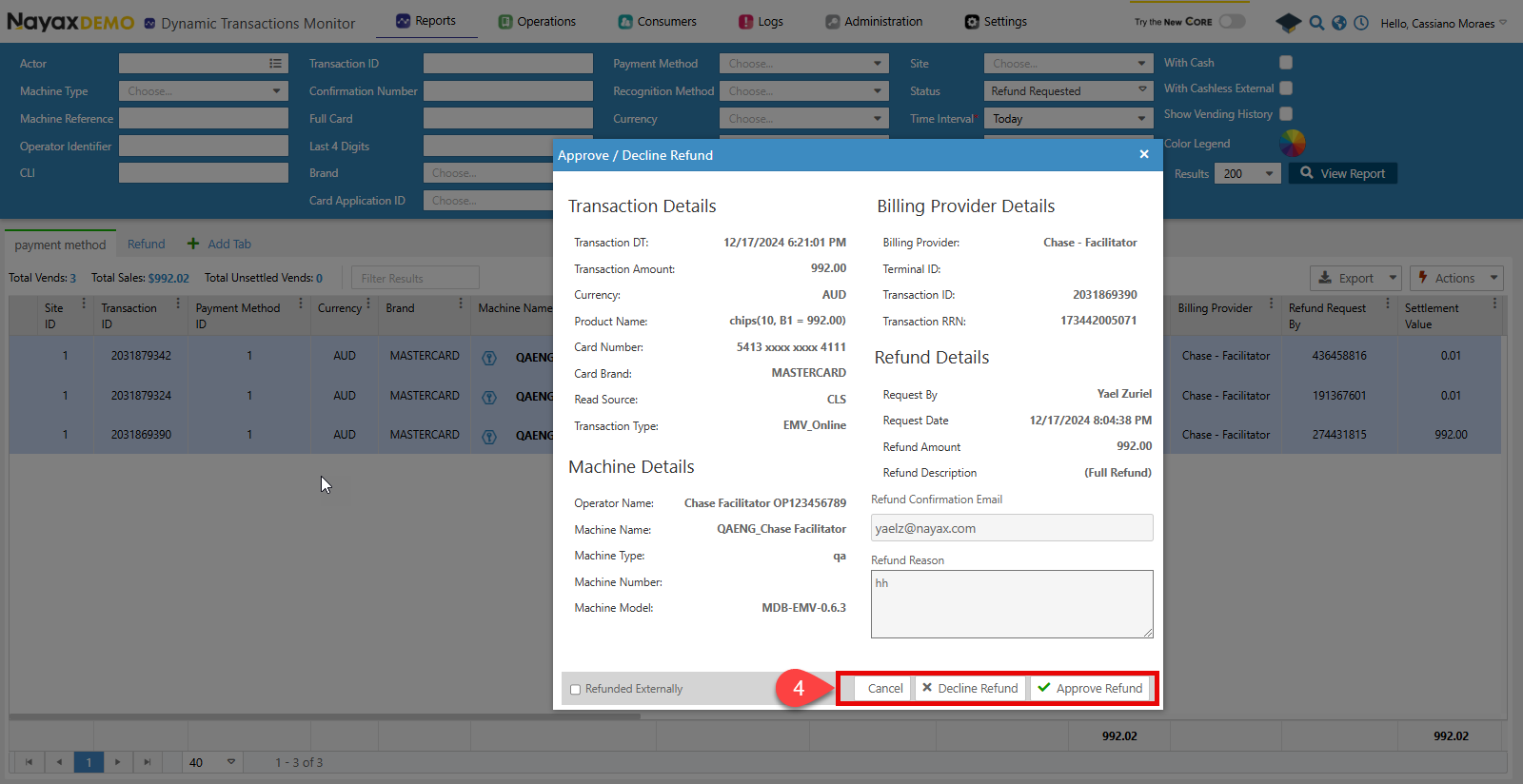
4. 将出现一个弹出窗口。点击\*\*“拒绝退款”**或**“批准退款”\*\* 。
   <Frame>
     <img src="https://mintcdn.com/nayax-44d6e37b/1pW0jXOF4OhjjY4f/images/docs/approve-or-decline-a-refund/image2.png?fit=max&auto=format&n=1pW0jXOF4OhjjY4f&q=85&s=18b9b9b9dcc8ba1deb4923b0525c4030" width="1600" height="824" data-path="images/docs/approve-or-decline-a-refund/image2.png" />
   </Frame>

## Lynx API

此过程可以通过 Lynx API 使用以下端点完成。

<Columns cols={2}>
  <EndpointCard title="批准退款" href="/reference/lynx/payment/approve-payment-refund" method="post" />

  <EndpointCard title="拒绝退款" href="/reference/lynx/payment/decline-a-payment-refund" method="post" />
</Columns>

<br />

<Warning>
  验证

  请参阅本文档的[“安全和令牌”](/docs/manage-data-operations/lynx-api/security)页面，了解如何访问您的令牌以及如何正确使用它们来验证您的 API 请求。
</Warning>

### 批准请求

使用“批准付款退款”端点批准退款。以下代码块显示了请求对象及其正文参数：

```sh Request theme={null}
curl --request POST \
     --url https://qa-lynx.nayax.com/operational/v1/payment/refund-approve \
     --header 'accept: application/json' \
     --header 'content-type: application/json' \
     --data '
{
  "IsRefundedExternally": true,
  "RefundDocumentUrl": "string",
  "TransactionId": 0,
  "SiteId": 0,
  "MachineAuTime": "2024-10-10T16:30:37.179Z"
}
'
```

有关每个参数的更多详细信息，请参阅下表：

<table align={["left","left","left"]}>
  <thead>
    <tr>
      <th>
        姓名
      </th>

      <th>
        类型
      </th>

      <th>
        描述
      </th>
    </tr>
  </thead>

  <tbody>
    <tr>
      <td>
        是否已在外部退款
      </td>

      <td>
        `boolean`
      </td>

      <td>
        当客户直接联系账单提供商申请退款时会使用该标志。在这种情况下，该标志会被设置为 true，且账单提供商收到的文件会被添加到 `RefundedDocumentUrl` 中。
      </td>
    </tr>

    <tr>
      <td>
        退款文件网址
      </td>

      <td>
        `string`
      </td>

      <td>
        如果 `IsRefundedExternally` 被设置为 `true`，则需要在此处添加账单提供商提供的退款文件 URL。
        参阅

        [Upload Refund Documentation](/docs/manage-data-operations/lynx-api/refunds/upload-refund-document)

        有关上传文档和获取 URL 的更多详细信息。
      </td>
    </tr>

    <tr>
      <td>
        交易ID
      </td>

      <td>
        `int64`
      </td>

      <td>
        批准退款的交易的唯一标识符。
      </td>
    </tr>

    <tr>
      <td>
        站点编号
      </td>

      <td>
        `int32`
      </td>

      <td>
        发生交易的站点的唯一标识符。
      </td>
    </tr>

    <tr>
      <td>
        机器AuTime
      </td>

      <td>
        `date-time`
      </td>

      <td>
        机器的授权时间与交易相关。
      </td>
    </tr>
  </tbody>
</table>

<Warning>
  `TransactionId`、`SiteId` 和 `MachineAuTime` 必须与退款请求中发送的值相同。
</Warning>

### 拒绝请求

要拒绝退款，请使用“拒绝付款退款”端点。以下代码块显示了请求对象及其正文参数。

```sh Request theme={null}
curl --request POST \
     --url https://qa-lynx.nayax.com/operational/v1/payment/refund-decline \
     --header 'accept: application/json' \
     --header 'content-type: application/json' \
     --data '
{
  "DeclineReason": "string",
  "TransactionId": 0,
  "SiteId": 0,
  "MachineAuTime": "2024-10-10T16:30:37.179Z"
}
'
```

有关每个参数的更多详细信息，请参阅下表：

| 姓名 | 类型 | 描述 |
| - | - | - |
| 拒绝原因 | `string` | 拒绝退款请求的原因。 |
| 交易ID | `int64` | 拒绝退款的交易的唯一标识符。 |
| 站点编号 | `int32` | 发生交易的站点的唯一标识符。 |
| 机器AuTime | `date-time` | 机器的授权时间与交易相关联。 |

<Warning>
  `TransactionId`、`SiteId` 和 `MachineAuTime` 必须与退款请求中发送的值保持一致。
</Warning>

## 请求状态

退款申请获批或被拒后，消费者将收到一封发送至退款申请中提供的邮箱地址的电子邮件。申请状态也会更新。您可以在 Nayax Core 的\*\*“报告”**页面查看此信息。 \*\* > 在线报告 > 动态交易监控器**。


This documentation is built and hosted on [Mintlify](https://mintlify.com), a developer documentation platform.