> ## Documentation Index
> Fetch the complete documentation index at: https://devzone.nayax.com/llms.txt
> Use this file to discover all available pages before exploring further.
# 申请退款
export const EndpointCard = ({method = "API", title, children, href, arrow = true}) => {
const METHOD_STYLES = {
GET: {
bg: "mint-bg-green-400/20 dark:mint-bg-green-400/20",
text: "mint-text-green-700 dark:mint-text-green-400",
border: "mint-border-green-300 dark:mint-border-green-700"
},
POST: {
bg: "mint-bg-blue-400/20 dark:mint-bg-blue-400/20",
text: "mint-text-blue-700 dark:mint-text-blue-400"
},
PUT: {
bg: "mint-bg-yellow-400/20 dark:mint-bg-yellow-400/20",
text: "mint-text-yellow-700 dark:mint-text-yellow-400"
},
PATCH: {
bg: "mint-bg-orange-400/20 dark:mint-bg-orange-400/20",
text: "mint-text-orange-700 dark:mint-text-orange-400"
},
DELETE: {
bg: "mint-bg-red-400/20 dark:mint-bg-red-400/20",
text: "mint-text-red-700 dark:mint-text-red-400"
},
API: {
bg: "mint-bg-black",
text: "mint-text-white"
}
};
const MethodBadge = ({method}) => {
const style = METHOD_STYLES[method?.toUpperCase()] ?? METHOD_STYLES.GET;
return
{method?.toUpperCase()}
;
};
const content =
{}
{title}
{children &&
{children}
}
{}
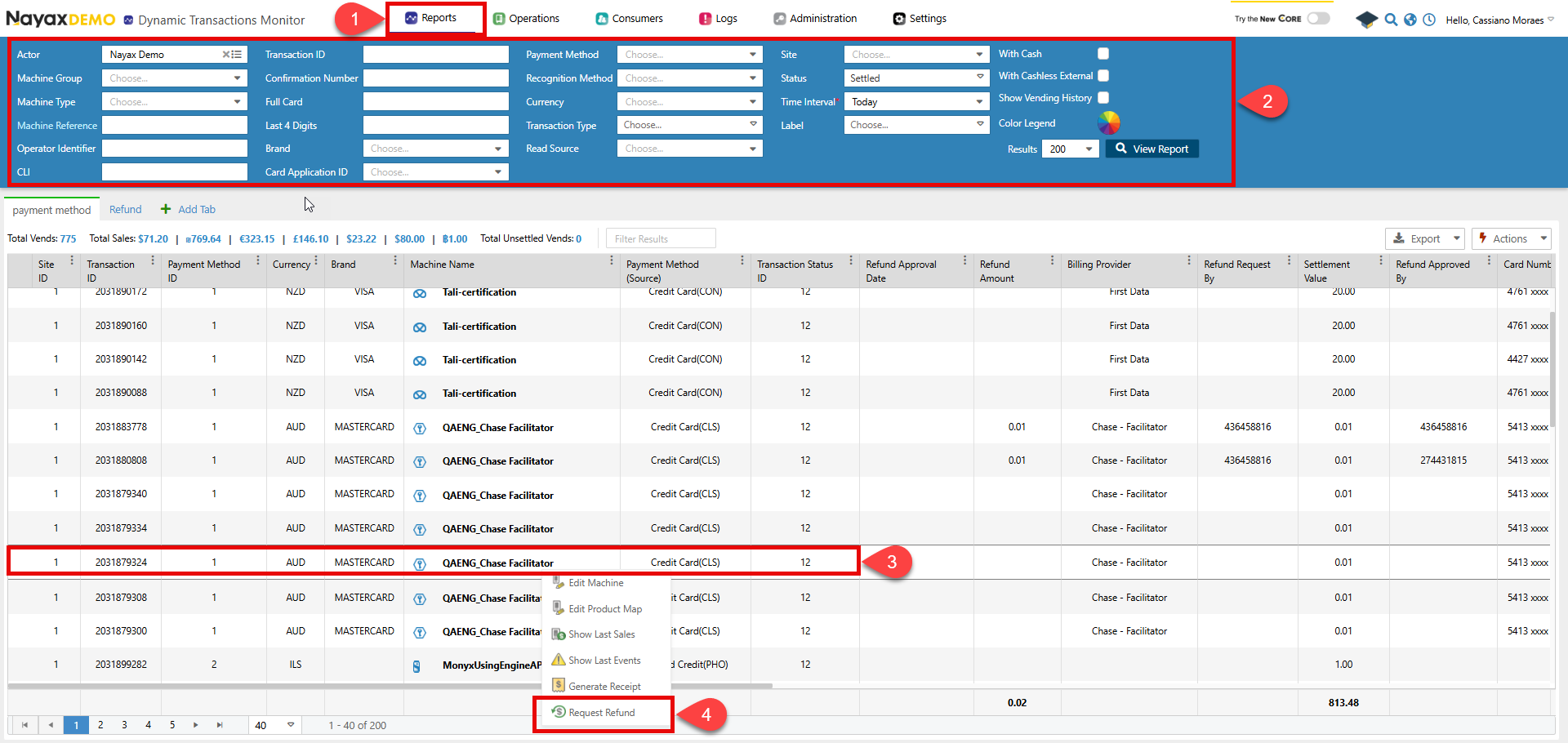 5. 将会弹出一个窗口。在其中,选择全部退款还是部分退款,并填写退款原因。
6. 点击**申请退款**。
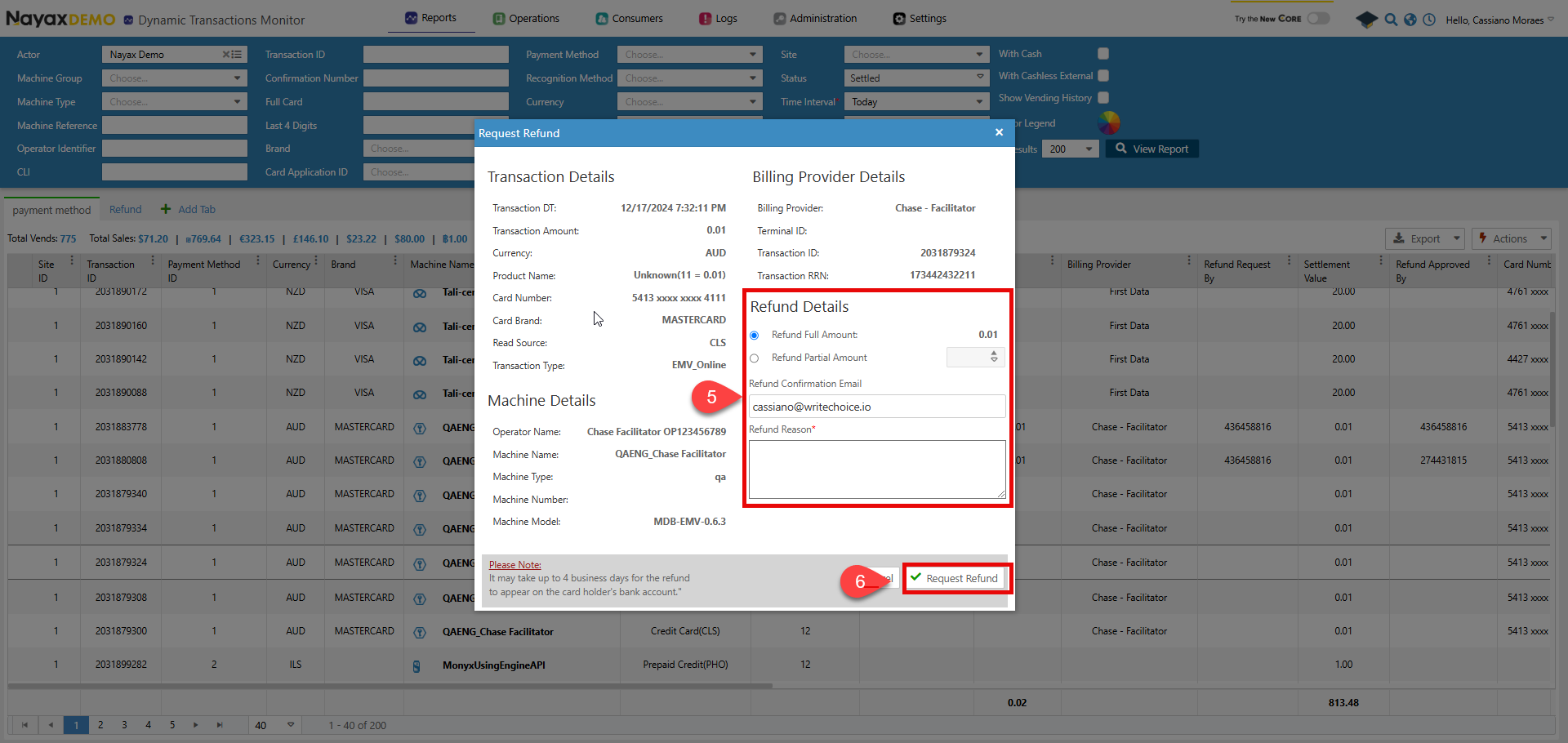
5. 将会弹出一个窗口。在其中,选择全部退款还是部分退款,并填写退款原因。
6. 点击**申请退款**。
 ## Lynx API
此过程可以通过 Lynx API 以编程方式执行。以下端点用于处理退款。
验证
请参阅本文档的[“安全和令牌”](/docs/manage-data-operations/lynx-api/security)页面,了解如何访问您的令牌以及如何正确使用它们来验证您的 API 请求。
### 发起请求
要启动请求,请使用[“请求退款”](/reference/lynx/payment/request-a-payment-refund)端点申请退款。在请求的正文参数中提供与退款相关的属性,如下所示:
```sh Request theme={null}
curl --request POST \
--url https://qa-lynx.nayax.com/operational/v1/payment/refund-request \
--header 'accept: application/json' \
--header 'content-type: application/json' \
--data '
{
"RefundAmount": 0,
"RefundEmailList": "string",
"RefundReason": "string",
"TransactionId": 0,
"SiteId": 0,
"MachineAuTime": "2024-10-10T16:30:37.179Z"
}
'
```
下面,您可以看到每个参数的描述:
| 姓名 | 类型 | 描述 |
| :- | :- | :- |
| 退款金额 | `double / null` | 退还给客户的金额。 |
| RefundEmailList | `string / null` | 用于通知退款的电子邮件地址列表,以逗号分隔。 |
| 退款原因 | `string / null` | 要求退款的原因。 |
| 交易ID | `int64` | 请求退款的交易的唯一标识符。 |
| 站点编号 | `int32` | 发生交易的站点的唯一标识符。 |
| 机器AuTime | `date-time` | 机器的授权时间与交易相关联。 |
### 如何获取TransactionID和SiteID
Retrieve `TransactionId` and `SiteId` from the Lynx API using the [Get Last Sales for Machine](/reference/lynx/machines/get-last-sales-for-machine-by-machineid) endpoint with the `MachineID`. The response object includes both values.
## 请求状态
一旦您发送请求,通知电子邮件将会发送到请求参数中输入的电子邮件地址。
该退款现处于 `pending`(待处理)状态,需要被批准或拒绝。详情请参阅 [Approve or Decline a Refund](/docs/manage-data-operations/lynx-api/refunds/approve-or-decline-a-refund)。
This documentation is built and hosted on [Mintlify](https://mintlify.com), a developer documentation platform.
## Lynx API
此过程可以通过 Lynx API 以编程方式执行。以下端点用于处理退款。
验证
请参阅本文档的[“安全和令牌”](/docs/manage-data-operations/lynx-api/security)页面,了解如何访问您的令牌以及如何正确使用它们来验证您的 API 请求。
### 发起请求
要启动请求,请使用[“请求退款”](/reference/lynx/payment/request-a-payment-refund)端点申请退款。在请求的正文参数中提供与退款相关的属性,如下所示:
```sh Request theme={null}
curl --request POST \
--url https://qa-lynx.nayax.com/operational/v1/payment/refund-request \
--header 'accept: application/json' \
--header 'content-type: application/json' \
--data '
{
"RefundAmount": 0,
"RefundEmailList": "string",
"RefundReason": "string",
"TransactionId": 0,
"SiteId": 0,
"MachineAuTime": "2024-10-10T16:30:37.179Z"
}
'
```
下面,您可以看到每个参数的描述:
| 姓名 | 类型 | 描述 |
| :- | :- | :- |
| 退款金额 | `double / null` | 退还给客户的金额。 |
| RefundEmailList | `string / null` | 用于通知退款的电子邮件地址列表,以逗号分隔。 |
| 退款原因 | `string / null` | 要求退款的原因。 |
| 交易ID | `int64` | 请求退款的交易的唯一标识符。 |
| 站点编号 | `int32` | 发生交易的站点的唯一标识符。 |
| 机器AuTime | `date-time` | 机器的授权时间与交易相关联。 |
### 如何获取TransactionID和SiteID
Retrieve `TransactionId` and `SiteId` from the Lynx API using the [Get Last Sales for Machine](/reference/lynx/machines/get-last-sales-for-machine-by-machineid) endpoint with the `MachineID`. The response object includes both values.
## 请求状态
一旦您发送请求,通知电子邮件将会发送到请求参数中输入的电子邮件地址。
该退款现处于 `pending`(待处理)状态,需要被批准或拒绝。详情请参阅 [Approve or Decline a Refund](/docs/manage-data-operations/lynx-api/refunds/approve-or-decline-a-refund)。
This documentation is built and hosted on [Mintlify](https://mintlify.com), a developer documentation platform.