

Are all of the calls directed to the same TCP port?
Answer
Answer
Yes, that is the most common and standard setup for this type of integration.All communication calls discussed (e.g., StartSession, Sale, Authorization, etc.) are typically directed to the same TCP port on your server, as specified in the base URL provided to Nayax.
How can we direct the calls to a particular port?
Answer
Answer
You direct the calls to a specific port by appending the port number, preceded by a colon (
:), to the customer’s base URL.This format ensures all calls (e.g.,
StartSession, SaleEndNotification, etc.) are directed to that specific port on the customer’s server.How can we track a transaction?
Answer
Answer
Your primary identifier for tracking a transaction on your system is the Transaction ID field.You can send us any Transaction ID you desire, provided it meets the following criteria:
- It must be made up of 36 numeric characters.
- It must be included and encrypted in the
StartSessionresponse body. (For full details, please refer to the Start Session authentication process).
Sale request.Example: In theSalerequest, you will find:
- Your Transaction ID (in your system’s context).
- Nayax’s matching Transaction ID.
How do I identify which of my machines the transaction is coming from?
Answer
Answer
You can identify the machine from which the transaction originated by checking the 1. Recommended Method:
The best method is to use the 2. Alternative Method:
You can also identify the source using the physical device’s serial number, which is sent within the 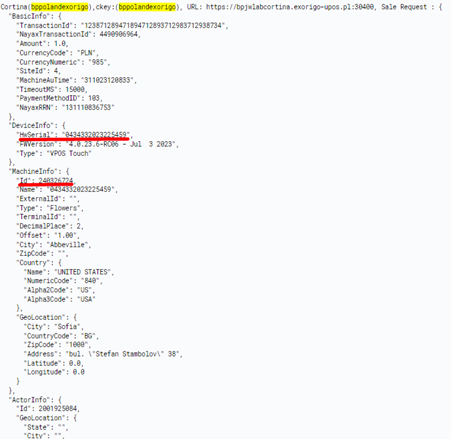
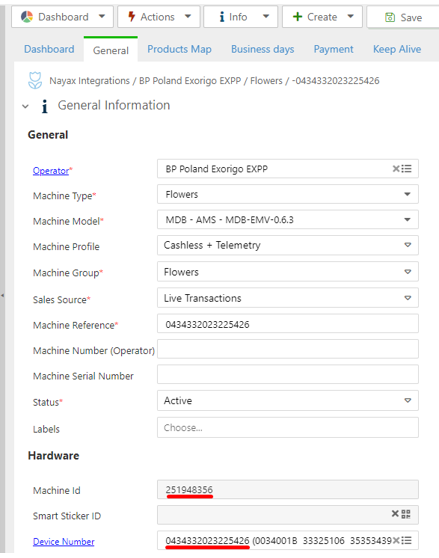
Sale request data.1. Recommended Method: MachineInfo
The best method is to use the Id field found within the MachineInfo object in the request.- This
Idrepresents your virtual machine’s ID. - Recommendation: We suggest matching by the virtual machine ID because it is less likely to change than the physical device (e.g., if you swap a payment terminal).
Action Item: We recommend adding a column to your internal tracking table that correlates the MachineInfo.Id with the physical location of the device.
2. Alternative Method: DeviceInfo
You can also identify the source using the physical device’s serial number, which is sent within the DeviceInfo object. This is a less reliable long-term key if device swaps are common.What are the endpoints for each of the commands?
Answer
Answer
Each method has its own endpoint, as specified in the URL provided to Nayax.
The structure is:
(customer's URL)/Cortina/ followed by the command/integration path.1. Simple Commands (Session & Notification)
These commands use a direct path structure:2. PrePaid Integration Commands
These commands include the integration type (PrePaid) in the path:Where do I get the consumer’s card details?
Answer
Answer
The consumer’s card details are found within the 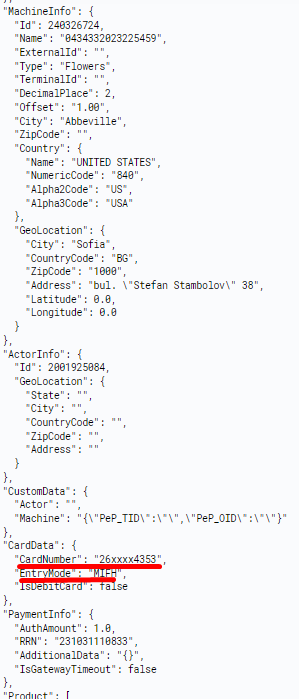
CardData object, which is included in the Sale request.