

How it works
Before selecting a product, the consumer scans the QR code displayed on the machine, as in the image below.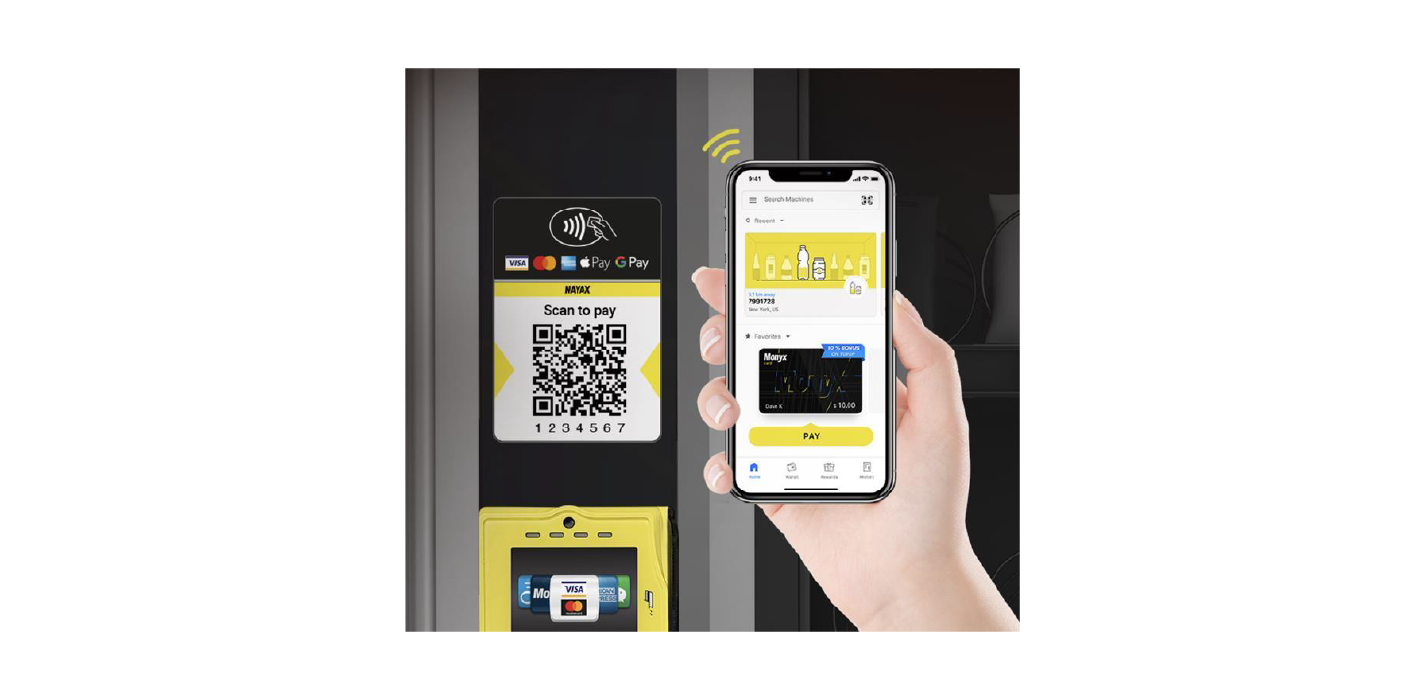
Transaction Flows
Cortina supports two types of StaticQR transaction flows:- Pre-selection
- Pre-authorization
Pre-selection
The Pre-selection flow simplifies the payment process by merging the steps of product/service selection and authorization into a single transaction. This flow is typically used for low-value or quick transactions, where the consumer’s selection and payment authorization are handled in a single step. See the diagram below: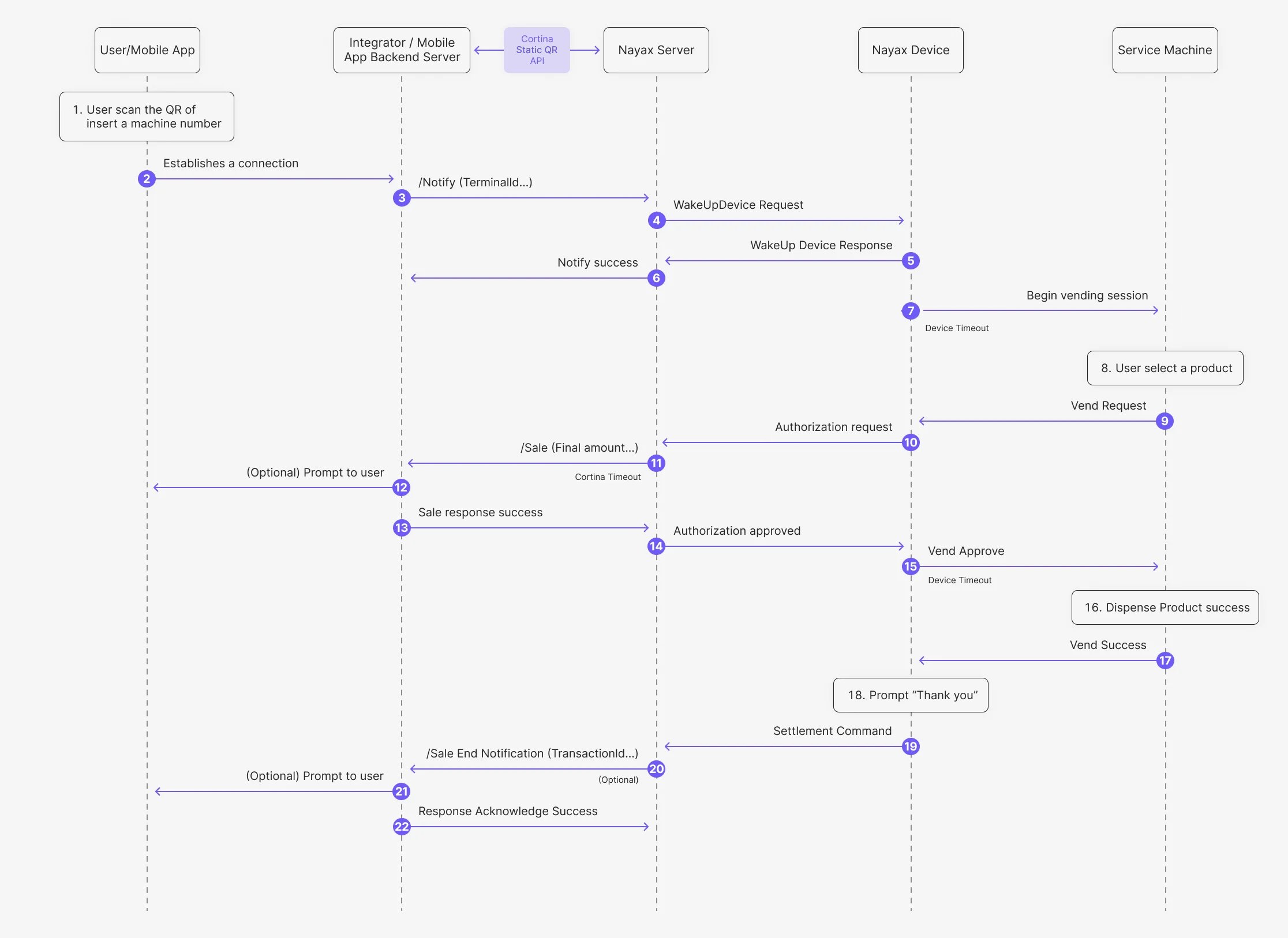
- The consumer scans the QR code or enters the machine number into their mobile app.
- The Mobile App establishes a connection with the Integrator’s backend server.
- The Integrator sends a /Notify (TerminalID) request to the Nayax Server via the StaticQR Start endpoint.
- The Nayax Server sends a WakeUpDevice Request to the Nayax Device.
- The Nayax Device returns a WakeUp Device Response to the Nayax Server.
- The Nayax Server sends a Notify success message back to the Integrator.
- The Nayax Device sends a Begin vending session command to the Service Machine.
- The consumer selects a product on the Service Machine.
- The Service Machine sends a Vend Request to the Nayax Device.
- The Nayax Device sends an Authorization response to the Nayax Server.
- The Nayax Server sends the /Sale (Final amount) request to the Integrator via the StaticQR Sale endpoint.
- (Optional) The Integrator may display a prompt to the consumer on their mobile device.
- The Integrator sends a Sale response success back to the Nayax Server.
- The Nayax Server sends an Authorization approved message to the Nayax Device.
- The Nayax Device sends a Vend Approve response to the Service Machine.
- The Service Machine dispenses the product successfully.
- The Service Machine sends a Vend Success notification to the Nayax Device.
- The Nayax Device displays a “Thank you” message.
- The Nayax Device sends the Settlement Command to the Nayax Server.
- (Optional) The Nayax Server sends the /Sale End Notification (TransactionId) to the Integrator via the Sale End Notification endpoint.
- (Optional) The Integrator may display a final prompt to the consumer on their mobile device.
- The Integrator sends a Response Acknowledge Success to the Nayax Server.
Pre-Authorization
The Pre-authorization Flow for Static QR involves several key steps to authenticate and authorize a payment using a static QR code. This flow ensures the transaction is valid before dispensing the product or service. See the diagram below: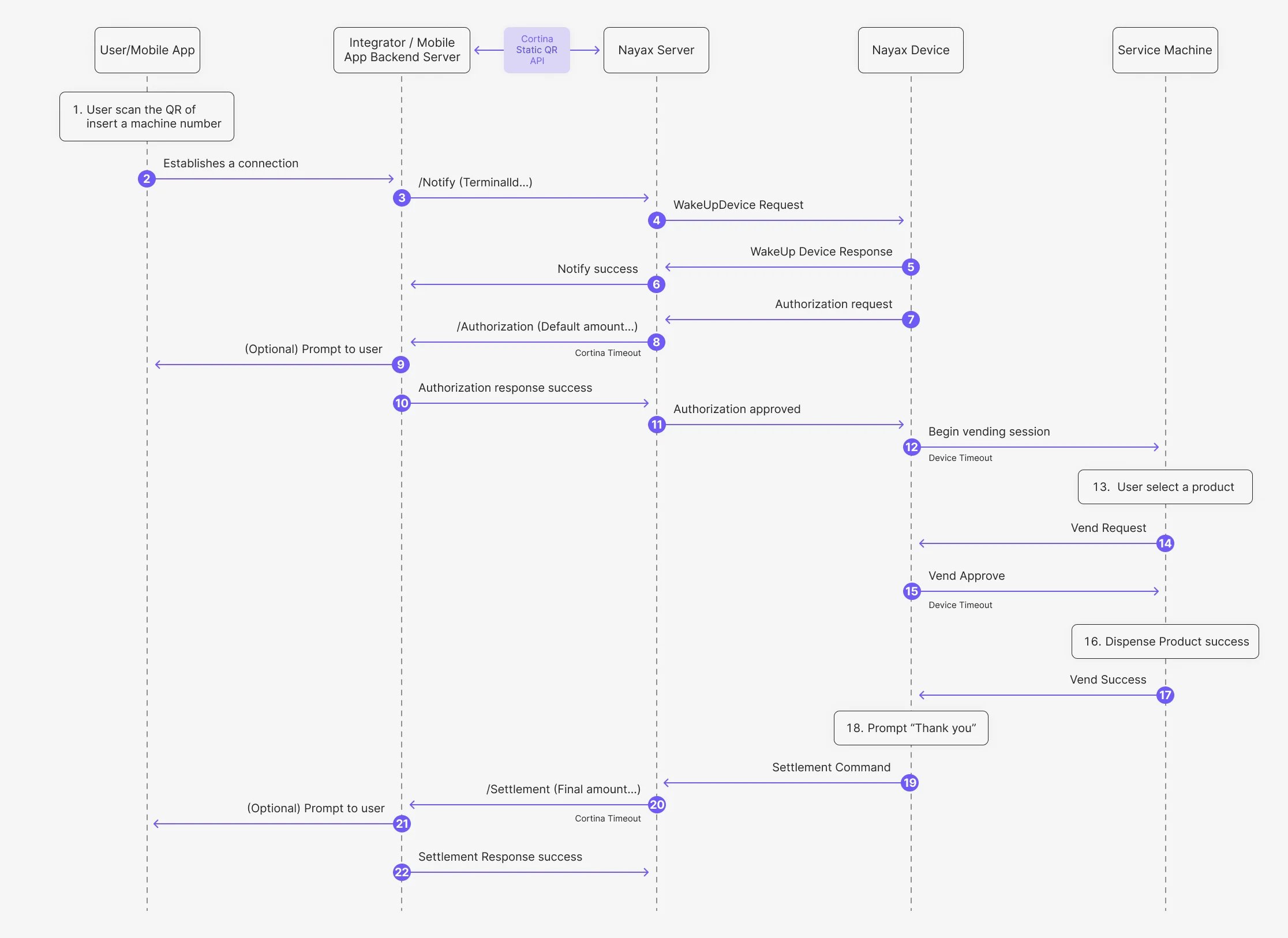
- The consumer scans the QR code or enters the machine number into their mobile app.
- The Mobile App establishes a connection with the Integrator’s backend server.
- The Integrator sends a /Notify (TerminalID) request to the Nayax Server via the StaticQR Start endpoint.
- The Nayax Server sends a WakeUpDevice Request to the Nayax Device.
- The Nayax Device returns a WakeUp Device Response to the Nayax Server.
- The Nayax Server sends a Notify success message back to the Integrator.
- The Nayax Device sends an Authorization request to the Nayax Server.
- The Nayax Server sends an /Authorization (Default amount) request to the Integrator via the StaticQR Authorization endpoint.
- (Optional) The Integrator may display a prompt to the consumer on their mobile device.
- The Integrator sends an Authorization response success back to the Nayax Server.
- The Nayax Server sends an Authorization approved message to the Nayax Device.
- The Nayax Device sends a Begin vending session command to the Service Machine.
- The consumer selects the desired product on the Service Machine.
- The Service Machine sends a Vend Request to the Nayax Device.
- The Nayax Device sends a Vend Approve response to the Service Machine.
- The Service Machine dispenses the product successfully.
- The Service Machine sends a Vend Success notification to the Nayax Device.
- The Nayax Device displays a “Thank you” message.
- The Nayax Device sends the Settlement Command to the Nayax Server.
- The Nayax Server sends the /Settlement (Final amount) request to the Integrator via the StaticQR Settlement endpoint.
- (Optional) The Integrator may display a final prompt to the consumer on their mobile device.
- The Integrator sends a Settlement Response success to the Nayax Server.