

Pinpad mode flow
The diagram below illustrates the steps involved in using the TweezerComm methods to handle card presentation and PIN entry on a Nayax Device, focusing on Contactless and Swipe transactions.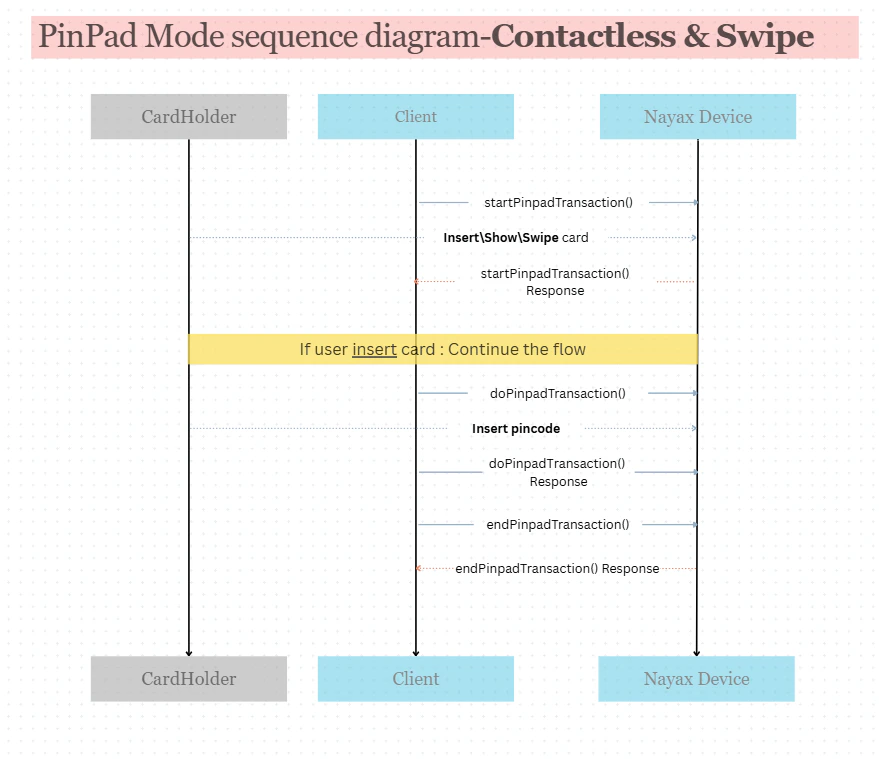
- The client application sends a
startPinpadTransaction()Request to the Nayax Device to prepare it for a card-based transaction. - The Nayax Device responds with a
startPinpadTransaction()Response and then begins to display a prompt for the CardHolder to Insert, Show, or Swipe card. - The CardHolder physically presents their card by inserting, swiping, or tapping it on the Nayax Device.
- If the CardHolder inserts the card (triggering the need for a PIN), the flow continues with the Client sending a
doPinpadTransaction()Request to prompt for the PIN input. - The CardHolder enters their PIN directly on the Nayax Device. The device responds to the client with the
doPinpadTransaction()Response after the PIN is captured. - Once the necessary card and PIN data are securely captured, the Client sends an
endPinpadTransaction()Request to the Nayax Device. - The Nayax Device confirms the PinPad process is complete with the
endPinpadTransaction()Response, returning the device to an idle state.