

Transaction flow
To understand the pre-authorization flow, see the diagram below: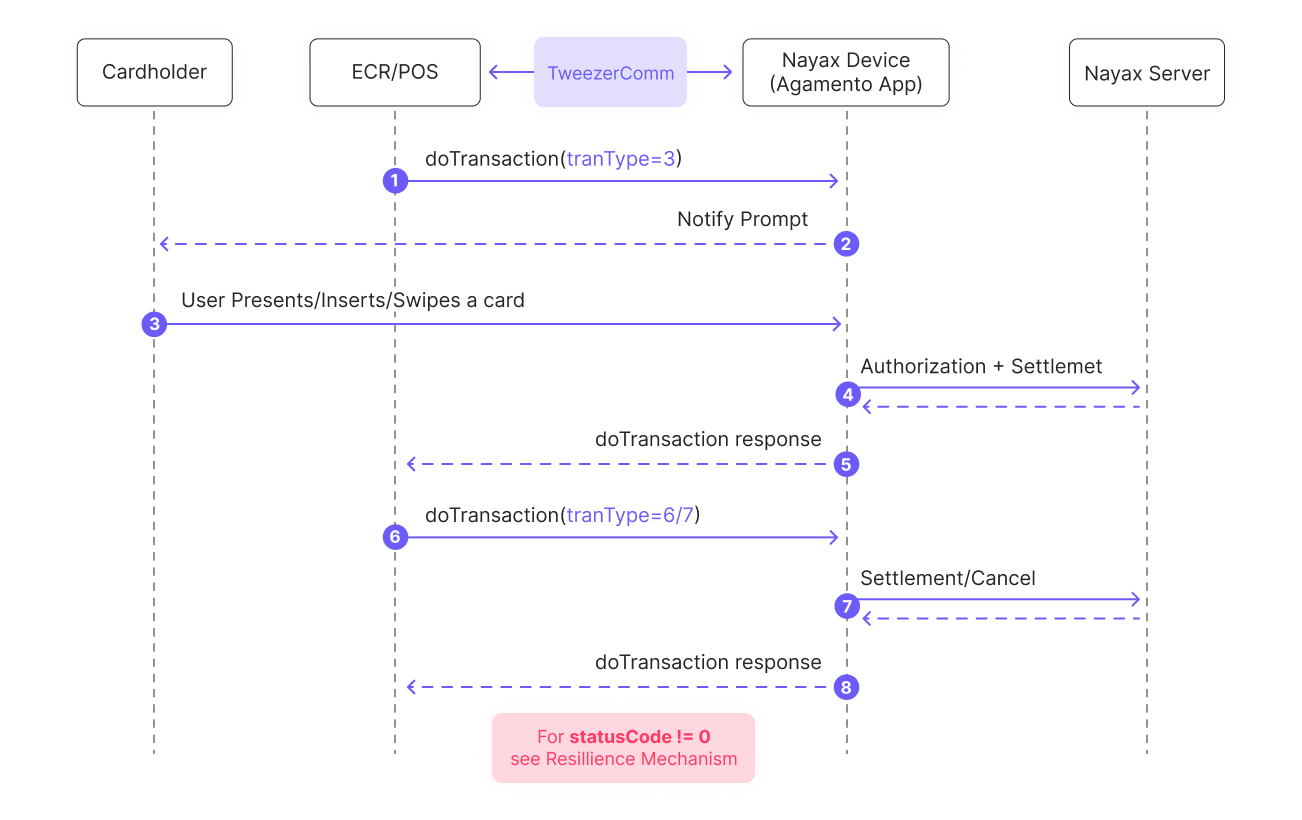
- After the cardholder selects the product or service, the ECR/POS sends a
doTransaction()Request to the Nayax Device (Agamento App) through TweezerComm. - The device then displays a prompt for the cardholder, requesting him to insert or swipe a card.
- The cardholder inserts, swipes, or taps their card on the ECR/POS.
- The Nayax Device communicates with the Nayax Server for payment authorization.
- The Nayax Server responds with the authorization result, which is then returned to the ECR/POS.
- Depending on the outcome of the approval, the ECR/POS sends a
doTransaction(tranType=6/7)Request to the Nayax Device to settle or cancel the transaction. - The settlement or cancellation request is sent to the Nayax Server, which responds with the final transaction status.
- The Nayax Device then relays this status back to the ECR/POS, completing the process.
See also
doTransaction
Start and process a payment transaction over the TweezerComm protocol.
Resilience mechanism
Handle transaction completion or cancellation when errors or failures occur.