

Configuration
To have logs of the SDK, you need to configure the following flags in themain method:
dump_packets_level(vmc_configuration): Determines the level of detail required to log messages generated by the SDK. These are the options available:debug_level_dump_none: Don’t generate a log.debug_level_dump_all: Log all messages.debug_level_dump_moderate: Logs all messages, excluding keep-alives and their ACKs.
debug( boolean): Enables or disables log generation.
Log file location
The SDK logs are written to a specific file location.-
On the C# SDK, the logs are automatically saved inside the same directory you run the SDK from, inside the
bin\Debugfolder. For example: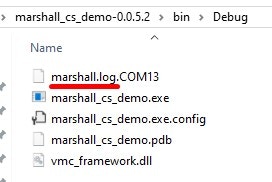
-
On the C SDK, the log location is determined by invoking the function below.
C
It is up to you, the developer, to decide where to write the output SDK logs:
Command line - like the x86/Linux example. UART port - like the STM example. Or any other choice as you desire.
C
-
On the Java SDK, the default log file path is specified in the
FileWriterinitialization. See the following example.Java
out.txt. The true parameter in the FileWriter constructor indicates that data will be appended to the existing log file if it already exists.