vmc_configuration class is used to set up various parameters and flags that control the behavior of the peripheral. Proper configuration is crucial for ensuring smooth operation and compatibility with different peripherals.
Configuration object
The code block below displays thevmc_configuration class for the available SDK languages.
Object parameters
The table below describes the parameters of the class.| Parameter | Type | Description |
|---|---|---|
port_vpos | String | The PC COM port to which the Nayax device is connected. |
port_vpos_baud | int | The baud rate for the Nayax device communication port. |
serial | String | The serial number of the machine. This enables precise tracking, effective inventory management, and streamlined maintenance scheduling. |
model | String | Model name of the machine. It assists in troubleshooting by distinguishing different machine types in logs and reports. |
sw_ver | String | The software version of the peripheral. |
machine_type | int | The type of peripheral. |
explicit_vend_success | bool | Flag to indicate explicit vending status (success/failure). Relevant only for long vending process. |
price_not_final_support | bool | Indicates if the price is not final, meaning the settlement price can be different than the one authorized. Relevant for Multisession flow only. |
mag_card_approved_by_vmc_support | bool | Support for magnetic card approval by the peripheral. |
mifare_approved_by_vmc_support | bool | Support for MIFARE card approval by the peripheral. |
debug | bool | Enables or disables debugging. Enabling it is mandatory in order to generate the SDK’s logs. |
dump_packets_level | int | Sets the level of packet logging for debugging purposes. |
reader_always_on | bool | It keeps the Nayax device’s reader always enabled and ready for transactions. Used in cases in which the peripheral would like a card’s presentation to be a trigger for product selection. |
multi_session_support | bool | Enables support for Multi-Session flow |
multi_vend_support | bool | Enables support for Multi-vend flow. |
always_idle | bool | Configures the device to start transactions by product selection and have the authorized amount appear on Nayax’s device screen (instead of animations). |
Mandatory fields
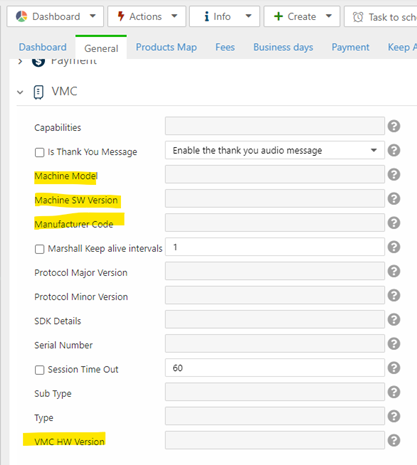
When configuring a VMC (Vending Machine Controller), there are specific mandatory fields essential for the proper identification of the machine. Properly managing these fields leads to improved troubleshooting, enhanced system integration, and more efficient maintenance processes. Refer to the code block below for an example of the configuration for these mandatory fields.Nayax Core
These parameters will be saved in Nayax Core. You can find them in Operations > Machines. Find and select your machine and open the VMC tab, as shown in the following image.