

单个服务站
当 Nayax 设备服务于一个服务点时,使用此配置。读卡器
这些设置用于控制设备硬件以及交易的启动方式:- 小数位:定义 Nayax 设备并影响 Default Credit 值。
通常为
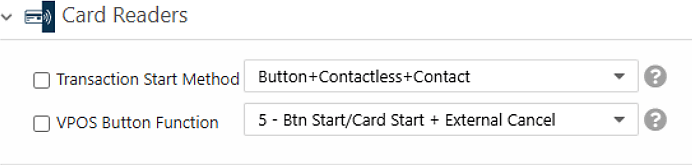
2。 - Transaction Start Method:设置为 Button、Contactless 和 Contact,以便交易既可以通过空闲模式下出示卡片启动,也可以通过按下设备屏幕上的按钮启动。
- VPOS Button Function:设置为 5 - Btn Start/Card Start + External Cancel。
MDB
MDB Flags 设置用于告知服务器该设备支持哪种支付流程。Device Start 使用 Pre-Authorization 流程,该流程适用于交易在消费者选择商品或服务之前、且最终金额尚未确定之前就已开始的情况。 将 MDB Flags 设置为 * Flags Disabled。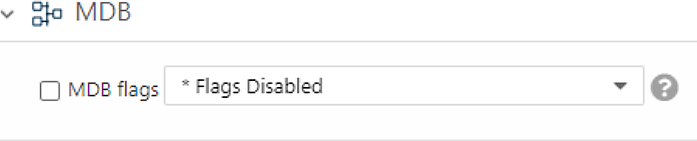
支付
The Default Credit setting sets the authorization amount for the Pre-Authorization flow. The value is in cents and is affected by the Decimal Place value. The settlement value must not be higher than this amount.Pulse/ccTalk
以下设置定义了每个脉冲适用的信用额度以及授权来源:- 每脉冲信用额度
1:设置为 1。 - 每次出货脉冲数
1:设置为 1。 - Pulse Options:设置为 Use Default Credit for Authorization。
VPOS Touch
VAS configurations 设置用于告知服务器该机器支持 Spark Device Start 流程。请将其设置为 Spark Device Start (V2)。如果不进行 此设置,Device Start 将无法正常运行。此设置同时涵盖 Device Start 和 Device Stop。 完成后,点击 Save 以保存配置。多个服务站(2、4 或 6 个)
当 Nayax 设备服务于两到六个服务点时,使用此配置。该设备仅支持偶数个服务站(2、4 或 6)。读卡器
这些设置用于控制设备硬件以及交易的启动方式:- Decimal Place:定义 Nayax 设备并影响 Default Credit 值。当设备服务于多个服务点时,小数位数还会影响每个服务站显示的金额。通常为
2。 - Transaction Start Method:设置为 Product。在有服务站选择的情况下,流程必须先从选择所需的服务站开始。

MDB
MDB Flags 设置用于告知服务器该设备支持哪种支付流程。多站点 Device Start 使用 Pre-Authorization 流程。 将 MDB Flags 设置为 * Flags Disabled。支付
The Default Credit setting sets the authorization amount for the Pre-Authorization flow. The value is in cents and is affected by the Decimal Place value. The settlement value must not be higher than this amount.Pulse/ccTalk
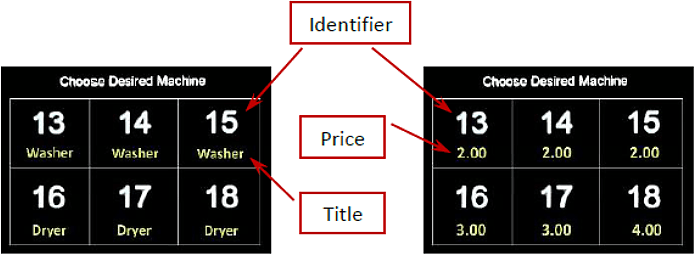
本部分用于设置两到六个服务站的显示内容。每条脉冲线代表设备所服务的一个服务站。每个服务站显示的金额为 Credit per Pulse 乘以 Number of Pulses。 授权金额可以对所有服务站保持一致,也可以单独设置:- 如需所有站点使用相同金额,请在 Default Credit 中设置金额,并将 Pulse Options 设置为 Use Default Credit for Authorization。
- 如需每个站点使用不同金额,请配置 Credit per Pulse 和 Number of Pulses,且不要使用 Pulse Options。
- Credit per Pulse 1-6(Cents):为 1 到 6 号服务站分别显示的金额。该值将乘以 Number of Pulses per Vend 1-6。如需在显示屏上隐藏价格,请将其设置为
0。 - Number of Pulses per Vend
1-6:将每个站点设置为 1(1;1;1;1;1;1)。显示的金额为 Credit per Pulse 乘以该数值,因此值为1时将原样显示 Credit per Pulse 的金额。 - Pulse Identifier
1-6:空闲模式下为每个服务点显示的标识符。默认值为 1 到 6。 - Pulse Title 1-6:显示在每个标识符下方的可选说明文字。设置后,屏幕将每 3 秒在价格和标题之间切换显示。如果不设置标题,则不会显示说明屏幕。示例:Charger、Air and Vac、Washer and Dryer。
- Pulse Options:设置为 Use Default Credit for Authorization,以基于 Default Credit 金额进行授权,忽略各站点显示的金额。若要改用各站点显示的金额,请不要设置此属性。
- Pulse Line Welcome Message:空闲模式下显示在服务站布局上方的可选单行消息。默认值为 “Choose Desired Machine”。可用它告知消费者如何开始一个流程。
2、货币为 USD 的情况下,将 Credit per Pulse 1-6 设置为 200;200;200;300;300;400,并将 Number of Pulses per Vend 1-6 设置为 1;1;1;1;1;1,将显示六个价格:三个为 $2,两个为 $3,一个为 $4。将 Pulse Options 设置为 Use Default Credit for Authorization 后,每笔交易都将按照 Default Credit 进行授权。
VPOS Touch
VAS configurations 设置用于告知服务器该机器支持 Spark Device Start 流程。请将其设置为 Spark Device Start (V2)。如果不进行 此设置,Device Start 将无法正常运行。此设置同时涵盖 Device Start 和 Device Stop。 完成后,点击 Save 以保存配置。配置摘要
使用下表作为 Device Start 设置的快速参考:后续步骤
设备启动
了解 Device Start 交易流程在 API 层面的运作方式。
设备停止配置
添加从设备停止交易的设置。