

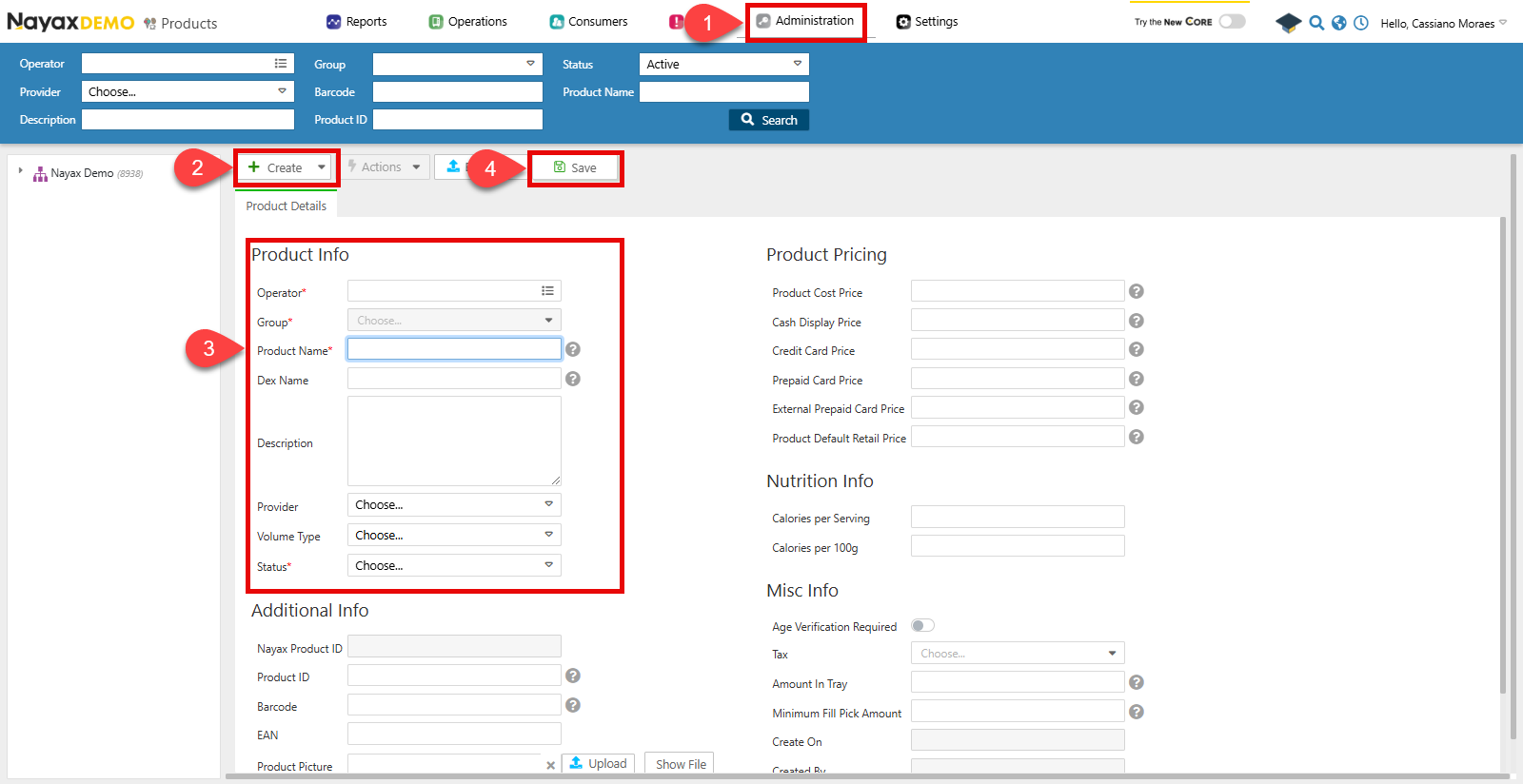
- 转到 Administration > Products。
- 点击 Create > Add Product。
- 填写表格中的必填字段:
- Operator:选择该产品所属的运营商。
- Group:选择该运营商下此产品所属的产品组。
- Product Name:产品的名称。
- Status:产品是否处于激活状态。
- 点击“保存”以完成。
通过 API 创建产品
使用 Create New Operator Product 端点以编程方式创建产品。验证请参阅本文档的“安全和令牌”页面,了解如何访问您的令牌以及如何正确使用它们来验证您的 API 请求。
发送 POST 请求,将
OperatorID 作为路径参数,并在请求正文中提供产品详细信息:
Request
curl --request POST \
     --url https://qa-lynx.nayax.com/operational/v1/operators/{OperatorID}/products \
     --header 'Authorization: Bearer <YOUR_ACCESS_TOKEN>' \
     --header 'accept: application/json' \
     --header 'Content-Type: application/json' \
     --data '{
       "NayaxProductID": 12345,
       "ProductGroupID": 1001,
       "ActorID": 67890,
       "ProductManufacturerID": 55,
       "ProductName": "Energy Drink",
       "ProductCatalogNumber": "ED123",
       "ProductBarcode": "0123456789123",
       "ProductPackageQuantity": 24,
       "ProductDescription": "A refreshing energy drink.",
       "ProductVolumeTypeID": 3,
       "DEXProductName": "Energy_Drink",
       "ProductCostPrice": 1.20,
       "ProductDefaultRetailPrice": 2.50,
       "ProductMinimumPickQTY": 5,
       "ProductStatus": 1,
       "ProductCashPrice": 2.40,
       "ProductCreditCardPrice": 2.60,
       "ProductPrepaidCardPrice": 2.50,
       "ProductExternalPrepaidCardPrice": 2.55,
       "ProductMemberTypePriceBit": true,
       "ProductPictureURL": "https://example.com/energy-drink.jpg",
       "CaloriesPer100g": 45.0,
       "CaloriesPerServing": 110.0,
       "EANCode": "0123456789123",
       "ProductCreatedBy": 7890,
       "ProductCreationDate": "2024-11-25T14:00:00Z",
       "ProductUpdatedBy": 7890,
       "ProductLastUpdated": "2024-11-25T14:30:00Z",
       "VatId": 10
     }'
路径参数请确保将
OperatorID 作为路径参数发送,以指定该产品所属的运营商。在正文参数中,发送有关产品的以下详细信息:
| 范围 | Type | 描述 |
|---|---|---|
| Nayax产品ID | int64/null | Nayax 系统中产品的唯一标识符。 |
| 产品组ID | int32/null | 产品所属产品组的唯一标识符。 |
| 演员ID | int64/null | 与产品相关的参与者的唯一标识符。 |
| 产品制造商ID | int32/null | 产品制造商的唯一标识符。 |
| 产品名称 | string/null | 产品的名称。 |
| 产品目录编号 | string/null | 分配给产品的目录编号。 |
| 产品条形码 | string/null | 与产品相关的条形码。 |
| 产品包装数量 | int32/null | 每包产品单位的数量。 |
| 产品描述 | string/null | 产品描述。 |
| 产品卷类型ID | int32/null | 与产品关联的卷类型标识符。 |
| DEX产品名称 | string/null | DEX(数据交换)格式的产品名称。 |
| 产品成本价 | double/null | 产品的成本价。 |
| 产品默认零售价 | double/null | 产品的默认零售价。 |
| 产品最小提货数量 | int32/null | 可领取产品的最小数量。 |
| 产品状态 | int32/null | 产品的状态,通常代表可用性。 |
| 产品现金价格 | double/null | 以现金支付时的产品价格。 |
| ProductCreditCardPrice | double/null | 使用信用卡支付时的产品价格。 |
| ProductPrepaidCardPrice | double/null | 使用预付卡支付时的产品价格。 |
| ProductExternalPrepaidCardPrice | double/null | 使用外部预付卡支付时的产品价格。 |
| 产品会员类型价格位 | boolean/null | 指示产品是否具有特定于会员类型的定价。 |
| ProductPictureURL | string/null | 产品图片的 URL。 |
| 每100克卡路里 | double/null | 每100克产品的卡路里数。 |
| 每份卡路里 | double/null | 每份产品的卡路里数。 |
| EAN码 | string/null | 与产品相关的欧洲商品编号 (EAN) 代码。 |
| 产品创建者 | int64/null | 创建产品条目的用户的标识符。 |
| 产品创建日期 | date-time/null | 产品创建的日期和时间。 |
| 产品更新者 | int64/null | 最后更新产品条目的用户的标识符。 |
| 产品上次更新时间 | date-time/null | 产品最后更新的日期和时间。 |
| 增值税号 | int32/null | 与产品相关的增值税 (VAT) 标识符。 |
一次创建多个产品
您可以使用“创建机器产品”端点为单台机器创建多个产品。这样,您可以在一个请求中添加多个产品,即使它们属于不同的产品组。Request
curl -X POST "https://qa-lynx.nayax.com/operational/v1/machines/<MACHINE_ID>/machineProducts" \
-H "Authorization: Bearer <YOUR_ACCESS_TOKEN>" \
-H "Content-Type: application/json" \
-d '[
  {
    "MachineID": 5001,
    "ProductName": "Cola Drink",
    "MDBCode": 1,
    "CashPrice": 1.75,
    "CreditCardPrice": 1.80,
    "RetailPrice": 1.85,
    "ProductGroupID": 201,
    "DEXProductName": "Cola Drink",
    "IsActive": true
  },
  {
    "MachineID": 5001,
    "ProductName": "Potato Chips",
    "MDBCode": 2,
    "CashPrice": 2.25,
    "CreditCardPrice": 2.30,
    "RetailPrice": 2.40,
    "ProductGroupID": 202,
    "DEXProductName": "Potato Chips",
    "IsActive": true
  }
]'
路径参数在上面的例子中,替换
<MACHINE_ID>您需要提供实际的机器标识符来添加产品。此 API 调用返回的响应 JSON 将通过返回列表中代表每种产品的对象来确认产品已成功添加。
Response
[
  {
    "DexPrice": 1.75,
    "ProductRef": "PROD001",
    "MachineProductRef": "MACH001-A1",
    "ProductGroupRef": "BEVERAGES",
    "MachineRef": "MACH001",
    "MachineProductID": 101,
    "NayaxProductID": 1001,
    "MachineID": 5001,
    "MDBCode": 1,
    "PAR": 10,
    "CashPrice": 1.75,
    "CreditCardPrice": 1.80,
    "MachinePrice": 1.70,
    "RetailPrice": 1.85,
    "DEXProductName": "Cola Drink",
    "PACode": "PA001",
    "PCCode": "PC001",
    "ProductMinimumPickQTY": 5,
    "VendOutAlertThreshold": 2,
    "LastUpdated": "2024-10-10T17:30:00.000Z",
    "MissingStockByDEX": 0,
    "DEXMissingStockLastUpdated": "2024-10-10T17:30:00.000Z",
    "PrePaidCardPrice": 1.65,
    "OperatorButtonCode": "BTN001",
    "LastUpdatedByMobile": "2024-10-10T17:30:00.000Z",
    "ProductGroupID": 201,
    "MissingStockByMDB": 0,
    "MDBMissingStockLastUpdated": "2024-10-10T17:30:00.000Z",
    "SelectionVendOutBit": false,
    "CommissionValue": 0.05,
    "ExternalPrepaidPrice": 1.60,
    "product_mark_for_alerts": 1,
    "last_sale_dt": "2024-10-09T16:30:00.000Z",
    "last_sale_mdb_dt": "2024-10-09T16:30:00.000Z",
    "slow_mover": false
  },
  {
    "DexPrice": 2.25,
    "ProductRef": "PROD002",
    "MachineProductRef": "MACH001-B2",
    "ProductGroupRef": "SNACKS",
    "MachineRef": "MACH001",
    "MachineProductID": 102,
    "NayaxProductID": 1002,
    "MachineID": 5001,
    "MDBCode": 2,
    "PAR": 15,
    "CashPrice": 2.25,
    "CreditCardPrice": 2.30,
    "MachinePrice": 2.20,
    "RetailPrice": 2.40,
    "DEXProductName": "Potato Chips",
    "PACode": "PA002",
    "PCCode": "PC002",
    "ProductMinimumPickQTY": 3,
    "VendOutAlertThreshold": 1,
    "LastUpdated": "2024-10-10T17:30:00.000Z",
    "MissingStockByDEX": 0,
    "DEXMissingStockLastUpdated": "2024-10-10T17:30:00.000Z",
    "PrePaidCardPrice": 2.10,
    "OperatorButtonCode": "BTN002",
    "LastUpdatedByMobile": "2024-10-10T17:30:00.000Z",
    "ProductGroupID": 202,
    "MissingStockByMDB": 1,
    "MDBMissingStockLastUpdated": "2024-10-10T17:30:00.000Z",
    "SelectionVendOutBit": true,
    "CommissionValue": 0.10,
    "ExternalPrepaidPrice": 2.05,
    "product_mark_for_alerts": 1,
    "last_sale_dt": "2024-10-08T15:00:00.000Z",
    "last_sale_mdb_dt": "2024-10-08T15:00:00.000Z",
    "slow_mover": true
  }
]
| 范围 | 描述 |
|---|---|
DexPrice | 产品的DEX协议价格。 |
ProductRef | 产品的参考标识符。 |
MachineProductID | 机器中产品的唯一标识符。 |
MachineID | 关联机器的标识符。 |
MDBCode | 产品的 MDB 协议代码。 |
CashPrice | 现金支付的产品价格。 |
CreditCardPrice | 信用卡付款的价格。 |
RetailPrice | 产品的零售价。 |
DEXProductName | DEX 记录的产品名称。 |
ProductGroupID | 产品组的标识符。 |
LastUpdated | 上次更新的时间戳。 |
IsActive | 指示产品是否处于活动状态。 |
更新产品
您可以使用 Update Specific Product 端点,通过在路径参数中添加产品的NayaxProductID,并在正文请求中提供要更改的信息,来更改产品的详细信息。如下例请求所示:
Request
curl --request PUT \
     --url https://qa-lynx.nayax.com/operational/v1/products/{NayaxProductID} \
     --header 'Authorization: Bearer <YOUR_ACCESS_TOKEN>' \
     --header 'accept: application/json' \
     --header 'Content-Type: application/json' \
     --data '{
       "ProductName": "Updated Chocolate Bar",
       "ProductGroupID": 1002,
       "ProductDefaultRetailPrice": 3.00,
       "ProductCashPrice": 2.90,
       "ProductCreditCardPrice": 3.10,
       "ProductDescription": "Updated description for the chocolate bar.",
       "IsActive": true
     }'