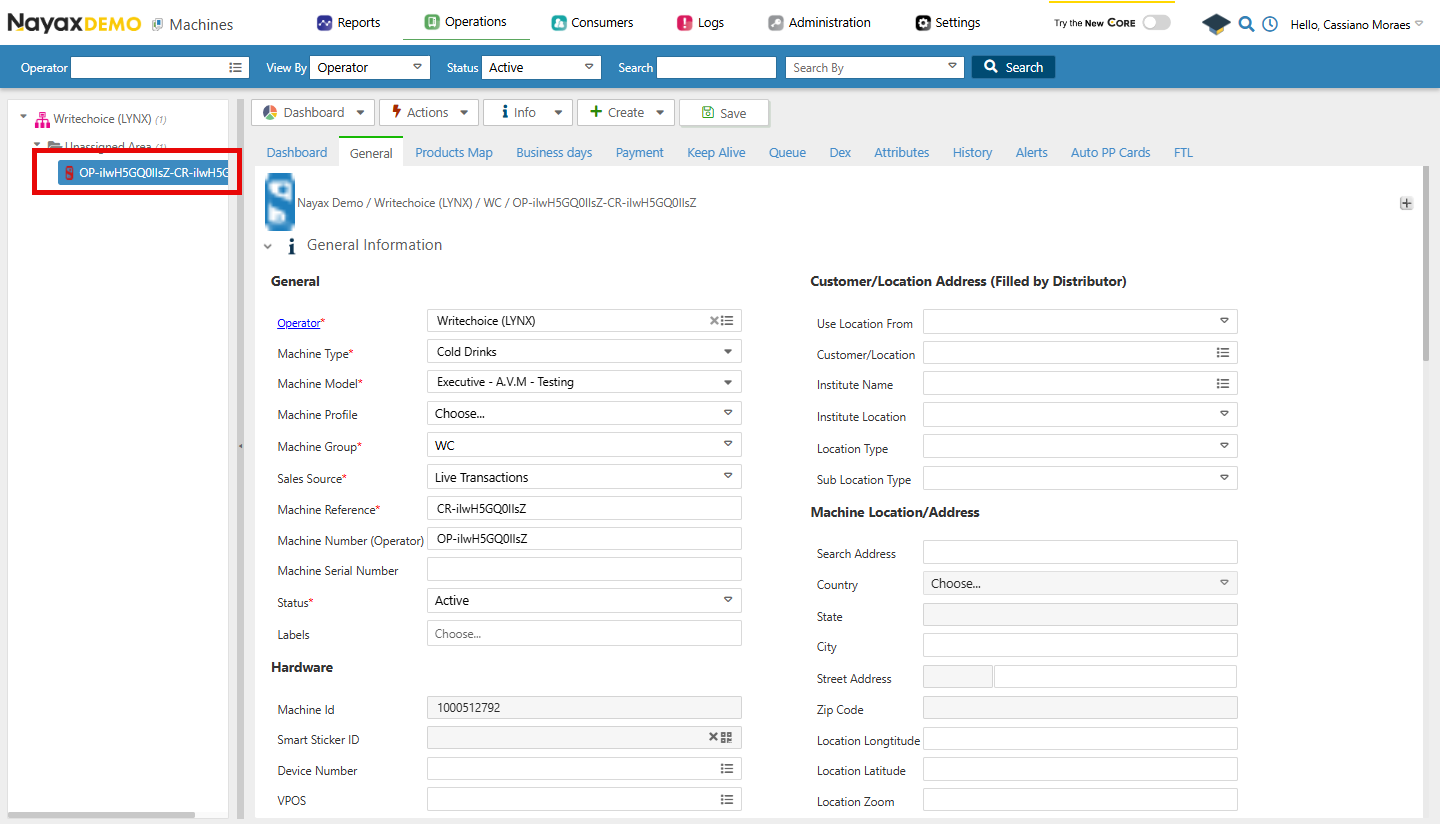
- 在您的 Dashboard 中前往 Operations > Machines。
- 点击 Create > New Machine。
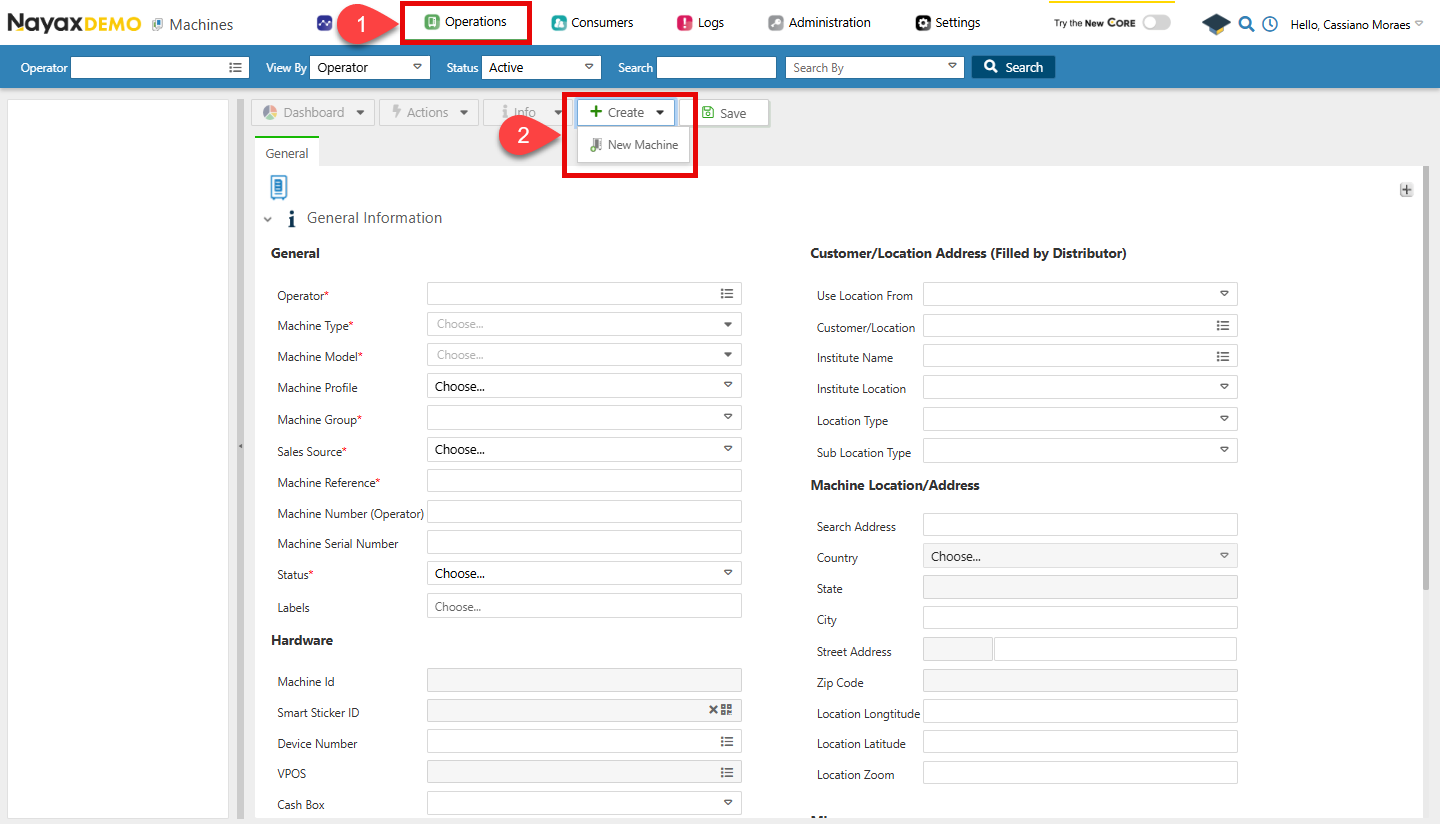
- 现在您可以填写表单中的所有详细信息,完成后点击 Save。
验证请参阅本文档的“安全和令牌”页面,了解如何访问您的令牌,以及如何正确使用它来验证您的 API 请求。
创建新机器的请求
使用 Create New Machine 端点创建新机器。以下代码块示例展示了创建新机器的请求:curl -X POST "https://qa-lynx.nayax.com/operational/v1/machines" \
-H "Authorization: Bearer <YOUR_ACCESS_TOKEN>" \
-H "Content-Type: application/json" \
-d '{
"ActorID": 2001492652,
"CountryID": 105,
"CurrencyID": 2,
"MachineGroupID": 210631347,
"MachineModelID": 305,
"MachineName": "New Vending Machine",
"MachineStatusBit": 1,
"LanguageID": 7,
"SalesSourceID": 30000512,
"MachineTypeID": 555001,
"GeoCountry": 1
}'
 {
    "MachineID": 942488501,
    "ActorID": 2001492652,
    "CountryID": 105,
    "CurrencyID": 2,
    "InstituteID": 3001,
    "LocationID": 4001,
    "MachineGroupID": 210631347,
    "MachineModelID": 305,
    "MachineName": "Marshall Vending",
    "MachineNumber": "MV001",
    "MachineStatusBit": 1,
    "LanguageID": 7,
    "OperatorActorID": 2001492652,
    "DistributorActorID": 3001492652,
    "AreaActorID": 4001492652,
    "SalesSourceID": 30000512,
    "MachineTypeID": 555001,
    "SerialNumber": "SN12345X",
    "VPOSSerialNumber": "VP12345",
    "DeviceSerialNumber": "SN12345X",
    "VPOSID": 98765,
    "DeviceID": 123456,
    "UseLocationFrom": 1,
    "GeoCountry": 1,
    "GeoState": "New York",
    "GeoCity": "New York City",
    "GeoAddress": "123 Main St",
    "GeoStreetNumber": "123",
    "GeoLongitude": -73.935242,
    "GeoLatitude": 40.730610,
    "GeoZoom": 15,
    "GeoZipCode": "10001",
    "SearchAddress": "123 Main St, New York, NY",
    "Remarks": "High-traffic area",
    "DexType": 2,
    "DexMidnightReadsEnableBit": true,
    "DexG85CheckEnableBit": true,
    "DexDivideBillsBy": 100,
    "DexG85CheckParsingFilterEnableBit": true,
    "UseCardPriceCorrectCashPriceBit": false,
    "MachineTimeZoneOffset": -5,
    "DexReadInterval": 30,
    "LocationType": 1,
    "ApplyDisplayPickListSelectionsToReportsBit": true,
    "DisplayPickListSelectionsAs": 1,
    "LastUpdated": "2024-10-09T14:38:53.474Z",
    "MachineProfile": 0,
    "CityID": 101,
    "RegionID": 201,
    "CountryDialingCode": 1,
    "DexIgnoreCRCCheckBit": true,
    "DexParseLABit": false,
    "ProductMapID": 501,
    "Longitude": -73.935242,
    "Latitude": 40.730610,
    "DexTotalSalesMinusCardSalesBit": true,
    "RouteActorID": 5001492652,
    "MachineLogicAlertEnableBit": true,
    "AlertRuleSetId": 601,
    "MachineMemberTypePricingEnableBit": false,
    "DexMultiplyCoinsBy": 10,
    "DexMultiplyTubesBy": 5,
    "CustomerID": 12345,
    "CommissionType": 2,
    "CommissionDefaultValue": 0.05,
    "CreatedBy": 105,
    "CreatedOn": "2023-06-01T12:00:00.000Z",
    "UpdateBy": 107,
    "TubeSource": 2,
    "BillSource": 3,
    "SmartStickerId": 8080,
    "EnableRemoveVendBit": true,
    "EnableEreceiptBit": true,
    "ProductMapAutomaticCreationBit": true,
    "Refs": {
      "Documentation": "https://example.com/machine/942488501"
    }
  }
]
| 字段名称 | 描述 |
|---|---|
ActorID | 创建机器时所使用的操作员 ID。 |
CountryID | 代表机器所在国家/地区的 ID。使用“获取国家/地区”端点获取可用国家/地区代码列表。 |
CurrencyID | 机器货币的 ID。使用“获取货币”端点获取可用货币代码列表。 |
MachineGroupID | 机器所属分组的 ID。您可以使用 List All Machine Groups for Actor 端点查看现有分组。 |
MachineModelID | ID for the machine’s model. To obtain the machine model of an existing machine, you can copy and paste the MachineModelId from the Get Specific Machine Basic Info endpoint for a specific machine. |
MachineName | 虚拟机器的名称。 |
MachineStatusBit | 机器的状态:1 表示活跃,2 表示非活跃。 |
LanguageID | 该 ID 表示机器所使用的语言。 |
SalesSourceID | 表示销售来源的 ID。应为 30000512,即表示实时交易(其他选项无关紧要) |
MachineTypeID | 机器的类型决定了其在 Nayax Core 中显示的图标。 |
GeoCountry | 机器所在国家/地区的代码。 |
MachineID。
验证创建
新机器创建完成后,您可以在 Nayax Core 中进行验证,具体步骤如下:- 前往**“操作” > 机器**。
- 使用 Search 功能筛选机器,并从列表中选择该机器。