

Vend result timeout (timeout for vend success)
This parameter sets how long the device waits for a vend response (Vend Approved or Vend Failure) from the peripheral after sending it Vend Approved. In Nayax Core, the parameter’s maximum value is 65535 seconds (18 hours, 12 minutes, and 15 seconds). If you need a longer window, use Multi-Session, where the timeout is 23 hours for credit cards and 72 hours for proprietary cards.
Status command
Once pairing is complete, the device immediately sends aStatus command when network communication is lost, so the machine knows. It looks something like this in the Java SDK (the C# and C logs look the same):
Java SDK's log
Once communication resumes and the device returns to idle, the device sends a
Status command with a value of 20:
Java SDK's log
- The peripheral sends keep-alive commands, and the device responds to each one.
- The device sends a
Statuscommand with a value of 21 (0x15).
- The peripheral sends keep-alive commands, and the device responds to each one.
- The device sends a
Statuscommand with a value of 20 (0x14).
Status command can also provide information during the consumer’s card presentation, unrelated to the sequences above:
If a consumer has trouble with card reading, the device prompts them to insert the card or use another card. If the card doesn’t have enough credit, the device doesn’t show that reason on screen or in the SDK logs, since it isn’t related to communication between the VPOST and the machine, but rather between the device and the acquirer. You can generally see the reason a transaction was cancelled or a card was rejected in Nayax Core.
Communication loss
The Marshall protocol uses ACK commands in response to each command sent: when your peripheral sends a command to the device, it receives an ACK command in return, and vice versa. The ACK is a response from the receiving side to the sender, confirming the command was received. If no ACK arrives, the command is sent again. If none of the three attempts (the original command plus two retries) receive an ACK, the SDK stops sending keep-alive commands, and the device sends a reset command to re-establish pairing. If no ACKs arrive during a transaction, responsibility depends on timing. If none arrive afterVend Success, Nayax is responsible for making the settlement. If none arrive after authorization but before Vend Success, or before authorization at all, Nayax cancels the transaction.
Approval by a 3rd-party server
This section covers how the machine notifies the SDK whether a card is approved. After theVend Request is sent and a consumer presents their card, the Transfer Data command is sent, and the peripheral gets the card’s details and forwards them (on its own, unrelated to the SDK) to the desired 3rd-party server. Once the server approves or denies the card, the peripheral notifies the SDK, which also informs the device, by calling client_gateway_auth(bool approved):
true for approved:
Cancel command
If you sendVend Request and haven’t yet received Vend Approved or Vend Denied, you can send the Cancel command, which causes Vend Denied to be sent.
If you send Cancel before receiving Vend Approved, but Vend Approved is already on its way to your machine, you won’t see Vend Cancel in the logs, since a cancel command can’t follow Vend Approved. In that case, Vend Failure is sent from the peripheral’s end instead. You can also skip Cancel in this situation and respond with Vend Failure directly, which produces the same result.
You can also cancel a transaction before sending Vend Request, if the consumer starts a transaction but backs out before you send it. This can happen either before the consumer presents a card, or right after you receive Begin Session but before you send Vend Request. In the first case, the SDK’s logs show only Reader Enable.
Begin session sent only after card authorization
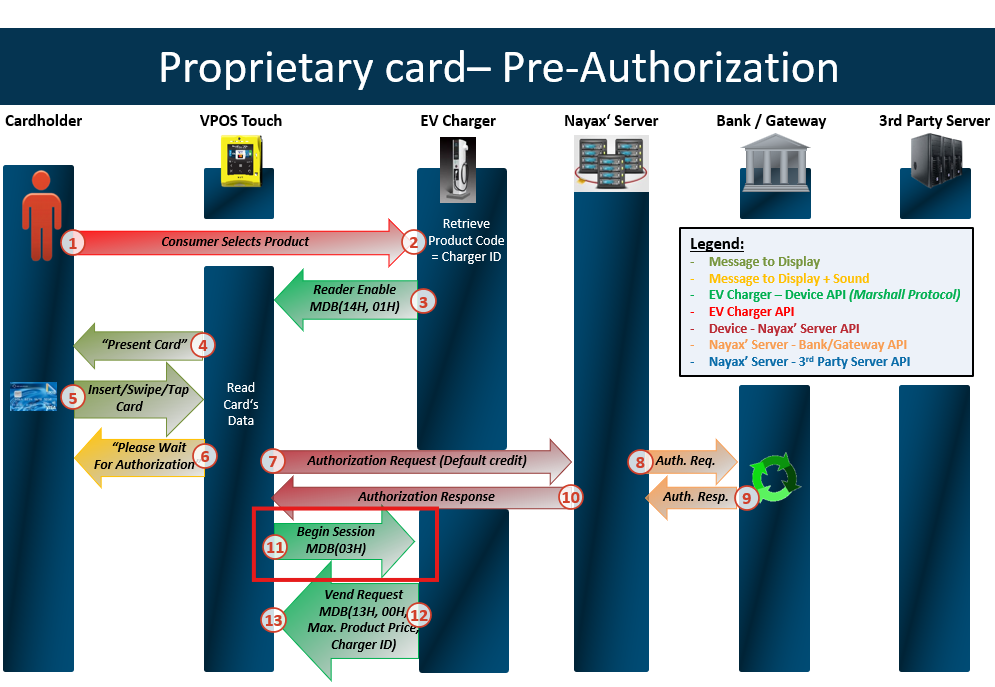
When using prepaid cards, authorization comes first, andBegin Session is sent afterward.
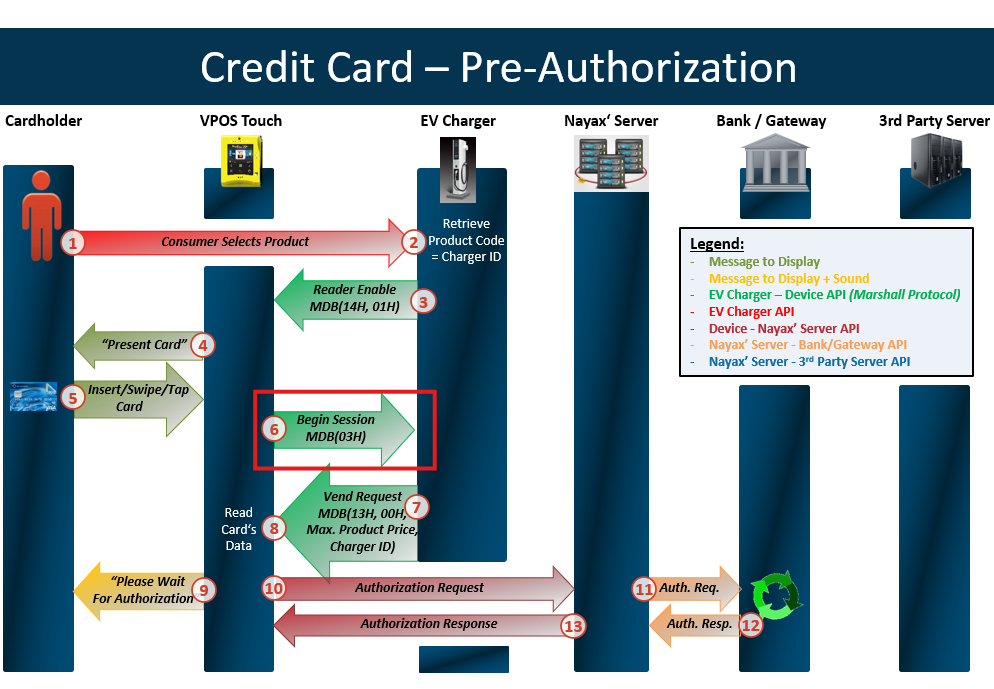
Begin Session comes first, and authorization happens afterward.
Closing a session with a price of 0
To cancel a transaction, send a close session command with a status other thanOK, such as Failed to Dispense. Sending a close session with a price of 0 and a status of OK is treated as an error in your machine’s price calculation, not as a cancellation.
Anyone looking at this device’s Last Sales would otherwise assume there’s an issue on Nayax’s end with settling the transaction, such as a payment or configuration issue. In reality, there’s no issue in the transaction process between your peripheral and the device. You didn’t want to charge the consumer, for your own reasons. That’s why Vend Failure exists, along with the close session statuses Vend Failure and Cancel by User: they indicate the product wasn’t provided, so the consumer isn’t charged, and the matching reason shows on Last Sales and DTM.
Once you change a session’s status to anything but OK, the price you send becomes irrelevant, since the transaction is cancelled regardless.
The possible statuses are:
0: Status OK1: User cancel2: Failed to dispense the product4: Vend denied
Close Session command.
Multivend: partial vending example
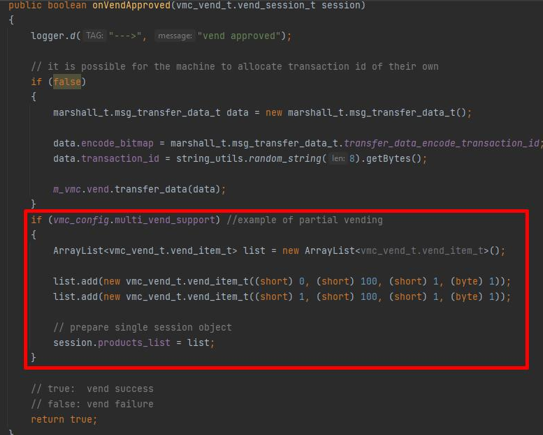
Partial vending applies only to Multivend, and means that only some of the selected products could be vended. For example, if the consumer selects five items: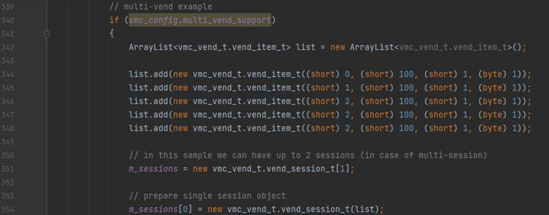
onVendApproved callback:
Session timeout delay
The device checks its open sessions every minute, so it may settle a transaction up to a minute after the timeout set in Nayax Core. For example:- A 1-minute timeout: the session expires between 1 minute and 1 minute 59 seconds after it starts.
- A 5-minute timeout: the session expires between 5 minutes and 5 minutes 59 seconds after it starts.
- A 1-hour timeout: the session expires between 1 hour and 1 hour 59 seconds after it starts.