

External settlement flow
The External Settlement flow allows a third party to complete a transaction that was authorized directly on a terminal.PrerequisiteFor this flow to function, the External Settlement setting must be enabled by Nayax.
NoteThis feature applies only to transactions authorized outside of the Spark start flows (Remote Start or Device Start).In addition, in case of using External Settlement with Marshall Multisession, note that you should not send a “Close Session” command for settlement.
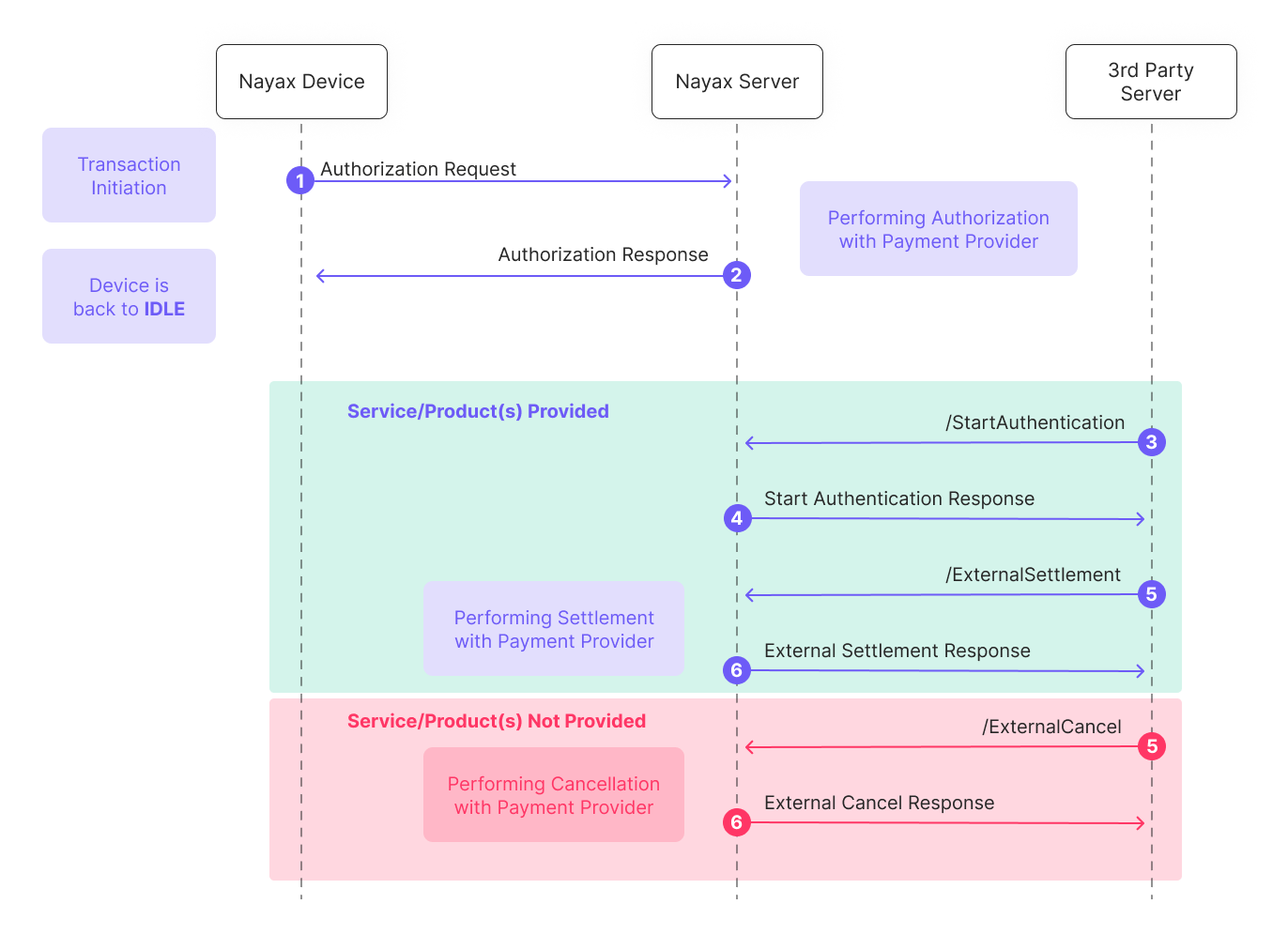
- Authorization Request: The process begins with transaction initiation on the Nayax Device, which sends an authorization request to the Nayax Server.
- Authorization Response: The Nayax Server performs authorization with the payment provider and sends the response back to the device, which then returns to an IDLE state. The transaction remains authorized but unsettled.
- /StartAuthentication: After the service or product is provided (or fails to be provided), the 3rd Party Server initiates communication by calling the StartAuthentication method. This call must include an encrypted cipher to securely authenticate both Nayax and the integrator.
- Start Authentication Response: The Nayax Server decrypts the cipher, validates the credentials and timestamps, and responds with a hashed
SparkTransactionIdto confirm authenticity. - /ExternalSettlement (If Service Provided): The 3rd Party Server sends the settlement request.
- Critical Identification: The request must contain the
NayaxTransactionIdandSiteIdto correctly match the original transaction. - Time Limit: Transactions must be settled within 48 hours of initiation. Settlement attempts after this window will fail.
- Critical Identification: The request must contain the
- External Settlement Response: The Nayax Server settles with the payment provider and sends a success/failure response to the 3rd Party Server.
- /ExternalCancel: The 3rd Party Server sends an ExternalCancel request. This is mandatory to release the consumer’s captured funds if no service was delivered. For Pre-Selection flows, this method is referred to as a Void, while for Pre-Authorization, it is a Cancel.
- External Cancel Response: The Nayax Server initiates the financial cancellation with the payment provider and confirms the outcome to the 3rd Party Server.
Outcomes and error handling
Integrators should monitor theErrorCode and StatusMessage within the Status object to determine the result of a request and the necessary follow-up action.
Troubleshooting tips
- Missing Mandatory Fields: If fields like
SiteIdare missing, the system returns event code 50 or 51 and specifies the missing fields in theStatusMessage. - Transaction Not Found: If you receive a “Transaction was not found” error, ensure that
NayaxTransactionIdandSiteIdexactly match the original transaction data. - Card Scheme Compliance: Transactions that remain unsettled for too long will be automatically canceled by the system. However, integrators must not rely on this and should send an External Cancel immediately if no settlement will occur to avoid poor user experience and potential disputes.
Advanced settlement features
Digital receipts (eReceiptData)
For operators using the Nayax eReceipt platform, the ExternalSettlement request includes an eReceiptData field.
- This field allows you to add custom data (in JSON format) such as company name, station name, or support information directly to the digital receipt.
- Format Example:
{"General":[{"Company":"Your Payments","Station Name":"812"}]}.
Product management (ProductInfo)
If you manage a Products Map in Nayax Core, you can include an array of objects to report exactly what was sold:
- Value: The decimal amount of a single product.
- Code: The integer representing the Product Code in the Products Map.
- Quantity: The number of units provided.
[{"Value": 6.50, "Code": 12, "Quantity": 3}].
See also
StartAuthentication
Authenticates the 3rd-party server before an external settlement or cancel request.
ExternalSettlement
Completes a transaction that was authorized outside a standard Spark flow.
ExternalCancel
Releases captured funds when no service was provided.