

Pre-Authorization OnlyDevice Start currently only supports pre-authorization, for an option with Pre-Selection see Remote Start.
Incremental AuthorizationSpark Device Start Pre-Authorization supports Incremental authorization (where the Amount of the Settlement command can be higher than the Amount of the TransactionNotify [authorization] command).In order for Incremental Authorization feature to be supported, it needs to be activated on both the operator level as well as machine level. In addition, the customer would need to sign an official document regarding him taking the liability of the risk (more on that bellow).
-
Note that not all billing providers support Incremental authorization, only the following do (as of October 2026):
Heartland (US), Chase (US), Adyen (US, Europe), Credorax (Europe), Firstdata (Australia) - Important note!: in case of the incremental authorization failing (for example, in case of the consumer not having sufficient funds for the Amount sent in the Settlement command), the consumer would only be charged for the initial amount he was authorized for: the amount sent in the Amount field of the TransactionNotify, and NOT the Amount sent in the Settlement command. The risk for the loss is on the machine operator.
Pre-authorization flow
To understand the device start pre-authorization flow, see the diagram below: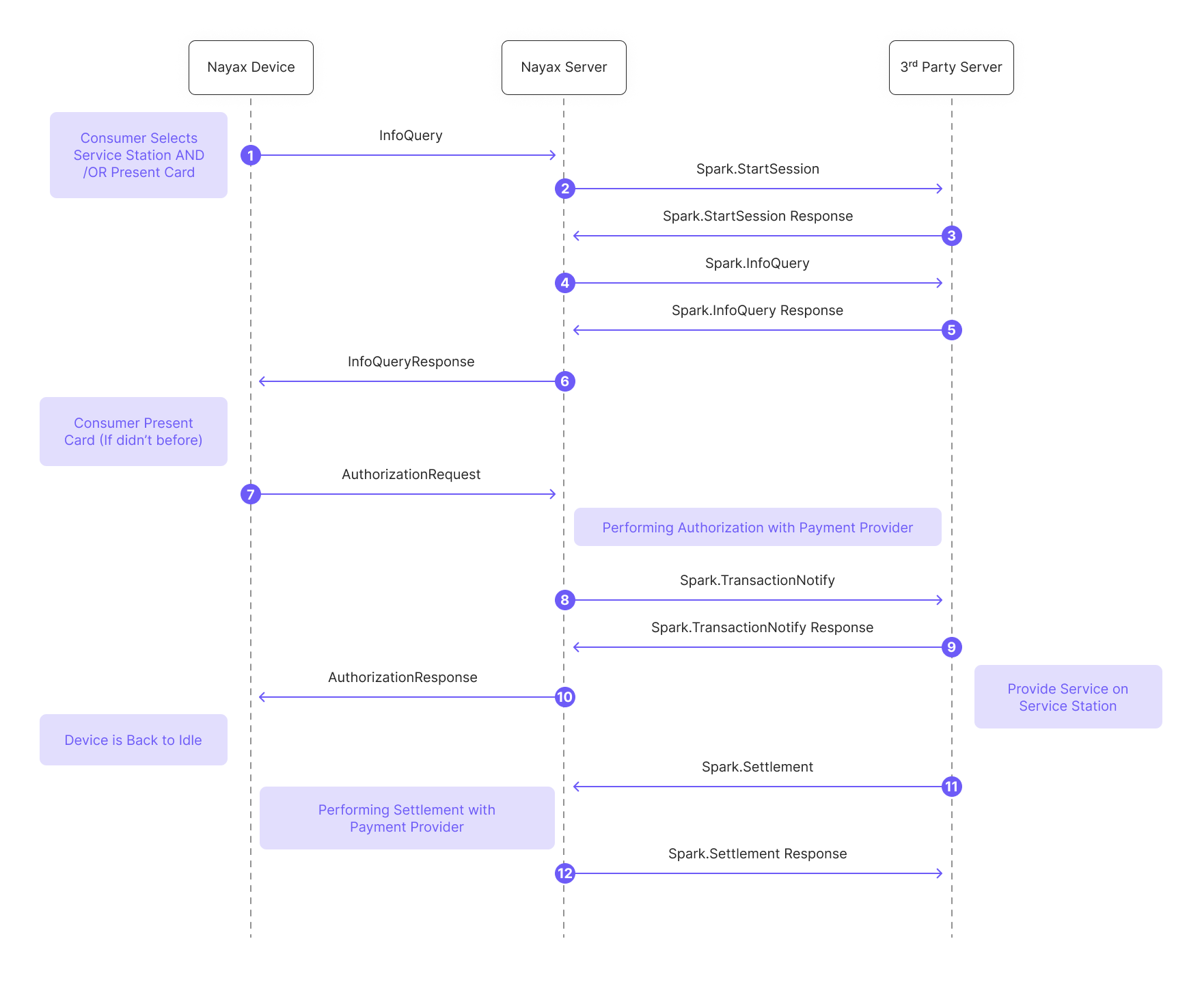
- A consumer selects a service station (and/or presents a card) on the Nayax Device, which sends an
InfoQueryrequest to the Nayax Server. - The Nayax Server sends a
StartSessionto the 3rd Party Server. - The 3rd Party Server responds to the Nayax Server with a
StartSession Response. - The Nayax Server sends an
InfoQueryto the 3rd Party Server. - The 3rd Party Server responds to the Nayax Server with an
InfoQuery. - The Nayax Server sends an
InfoQuerycommand back to the Nayax Device. - The consumer presents their card (if they haven’t already done so). An
AuthorizationRequestis sent from the Nayax Device to the Nayax Server. - The Nayax Server performs authorization with a Payment Provider and then sends a
TransactionNotifyto the 3rd Party Server. - The 3rd Party Server responds to the Nayax Server with a
TransactionNotifyResponse. - The Nayax Server sends an
AuthorizationResponseback to the Nayax Device. At this point, the service can be provided on the Service Station, and the Nayax Device is back to idle. - The 3rd Party Server sends a
Settlementcommand to the Nayax Server. - The Nayax Server performs the settlement with the Payment Provider and then sends a
Settlementback to the 3rd Party Server.