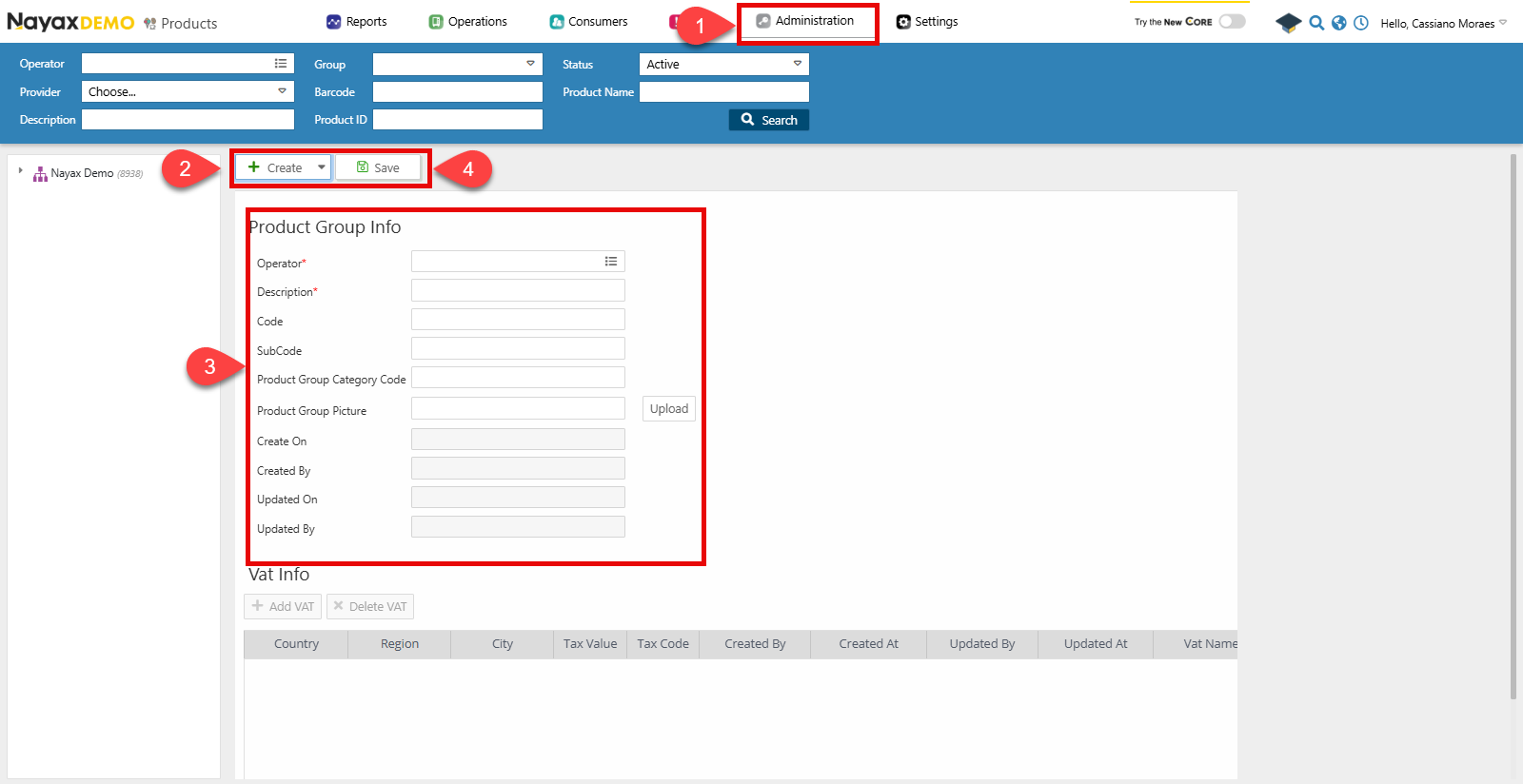
- Go to Administration> Products.
- Click Create > Add Product Group
- Fill in the required Product Group details in the form
- Operator: Select which operator is associated with the group.
- Description: the name of the product group.
- Click Save to finish.
Lynx API
You can also perform this programmatically through Lynx API by performing a POST Request on the following endpoint:Create Product Groups
POST
Create a new Product Group
You can define and organize product groups using the Create New Product Group endpoint. See an example request in the code block below:| Parameter | Type | Description |
|---|---|---|
| ActorID | int64 | The unique identifier of the actor associated with the product group. |
| ProductGroupName | string/null | The name of the product group to be created (e.g., “Beverages”). |
| ProductGroupCode | int64/null | The code associated with the product group. |
| ProductGroupSubCode | int64/null | A sub-code for further categorizing the product group. |
| ProductGroupCategoryCode | string/null | The category code associated with the product group (e.g., “DRINKS”). |