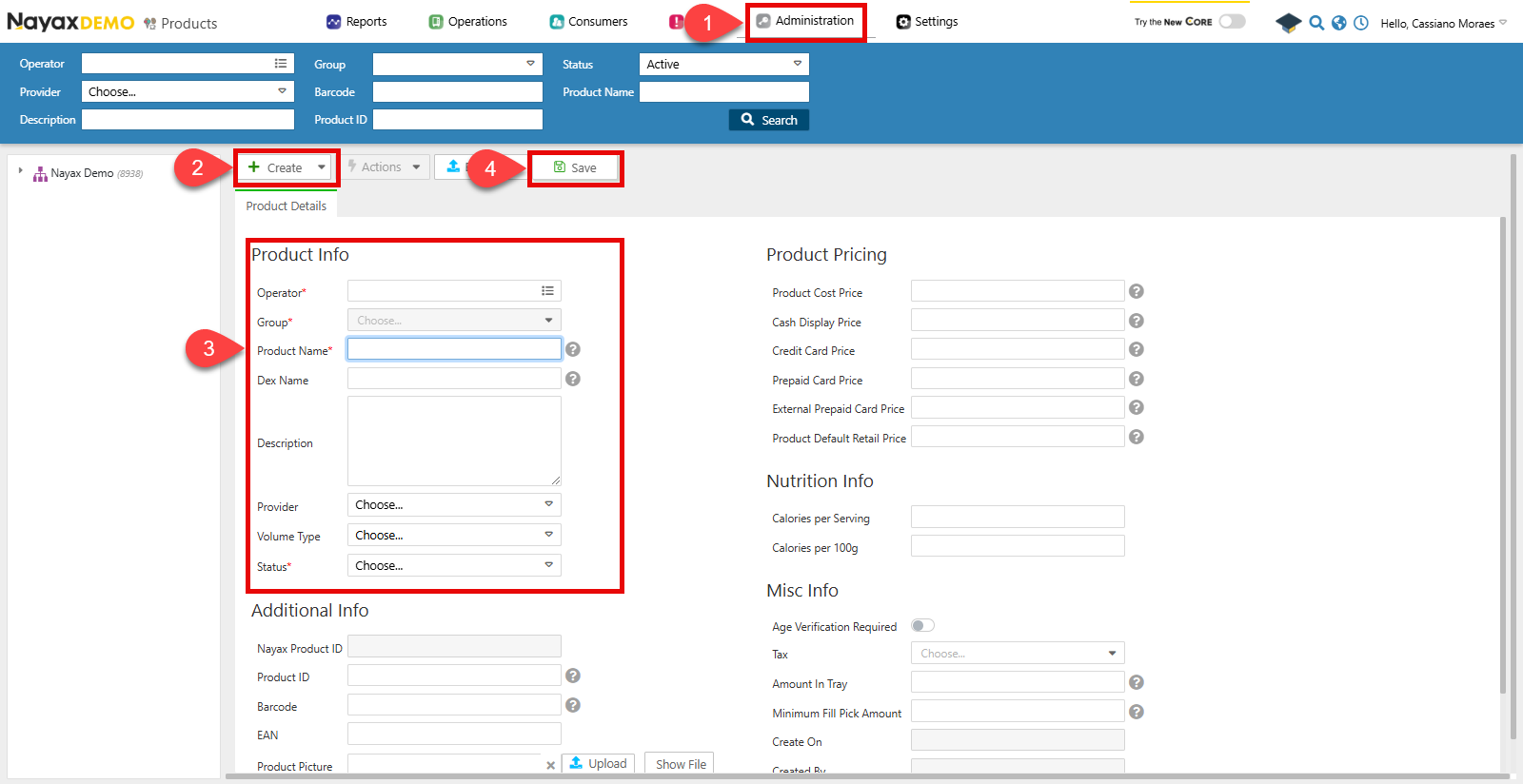
- Go to Administration> Products.
- Click Create > Add Product
- Fill in the required fields in the form:
- Operator: Choose under which operator the product is located.
- Group: Choose the group of products from the operator to which this product belongs.
- Product Name
- Status: whether the product is active or not.
- Click Save to finish.
Lynx API
This process can also be completed through Lynx API. In the step-by-step guide below, you’ll use the following endpoint:Create Machine Products
POST
Create a new Product
You can add a new product to an operator’s catalog using the Create New Operator Product endpoint. See an example request in the code block below:Request
Path ParamEnsure that you send the
OperatorID as a path param to specify what operator the product belongs too.| Parameter | Type | Description |
|---|---|---|
| NayaxProductID | int64/null | The unique identifier for the product in the Nayax system. |
| ProductGroupID | int32/null | The unique identifier of the product group to which the product belongs. |
| ActorID | int64/null | The unique identifier of the actor associated with the product. |
| ProductManufacturerID | int32/null | The unique identifier of the product’s manufacturer. |
| ProductName | string/null | The name of the product. |
| ProductCatalogNumber | string/null | The catalog number assigned to the product. |
| ProductBarcode | string/null | The barcode associated with the product. |
| ProductPackageQuantity | int32/null | The quantity of product units per package. |
| ProductDescription | string/null | A description of the product. |
| ProductVolumeTypeID | int32/null | The volume type identifier associated with the product. |
| DEXProductName | string/null | The name of the product in the DEX (Data Exchange) format. |
| ProductCostPrice | double/null | The cost price of the product. |
| ProductDefaultRetailPrice | double/null | The default retail price of the product. |
| ProductMinimumPickQTY | int32/null | The minimum quantity of the product that can be picked. |
| ProductStatus | int32/null | The status of the product, typically representing availability. |
| ProductCashPrice | double/null | The price of the product when paid with cash. |
| ProductCreditCardPrice | double/null | The price of the product when paid with a credit card. |
| ProductPrepaidCardPrice | double/null | The price of the product when paid with a prepaid card. |
| ProductExternalPrepaidCardPrice | double/null | The price of the product when paid with an external prepaid card. |
| ProductMemberTypePriceBit | boolean/null | Indicates if the product has member-type-specific pricing. |
| ProductPictureURL | string/null | The URL of the product’s picture. |
| CaloriesPer100g | double/null | The number of calories per 100 grams of the product. |
| CaloriesPerServing | double/null | The number of calories per serving of the product. |
| EANCode | string/null | The European Article Number (EAN) code associated with the product. |
| ProductCreatedBy | int64/null | The identifier of the user who created the product entry. |
| ProductCreationDate | date-time/null | The date and time when the product was created. |
| ProductUpdatedBy | int64/null | The identifier of the user who last updated the product entry. |
| ProductLastUpdated | date-time/null | The date and time when the product was last updated. |
| VatId | int32/null | The VAT (Value Added Tax) identifier associated with the product. |
Create Multiple Products at Once
You can create multiple products for a single machine using the Create Machine Products endpoint. This allows you to add several products in one request, even if they belong to different product groups.Request
Path ParamsIn the example above, replace
<MACHINE_ID> with the actual machine identifier you need products added.Response
| Parameter | Description |
|---|---|
DexPrice | The DEX protocol price of the product. |
ProductRef | Reference identifier for the product. |
MachineProductID | Unique identifier for the product in the machine. |
MachineID | Identifier of the associated machine. |
MDBCode | MDB protocol code for the product. |
CashPrice | Price of the product for cash payments. |
CreditCardPrice | Price for credit card payments. |
RetailPrice | The retail price set for the product. |
DEXProductName | Name of the product as recorded by DEX. |
ProductGroupID | Identifier for the product group. |
LastUpdated | Timestamp of the last update. |
IsActive | Indicates if the product is active. |
Update Product
You can use the Update Specific Product endpoint to change a product’s details by adding the product’sNayaxProductID in the path params and the information to change in the body request. As in the example request below:
Request