| Network & System | ETH_INTERFACE | Network interface for reporting; autodetects if empty. | String | empty | Fallback to eth0. |
| KIOSK_USE_TCP_SOCKETS | Set to 1 to use TCP ports 10000 (cmd) and 10001 (events). | Bool (1/0) | 0 | Disables domain sockets if set. |
| DAILY_RESTART_HOUR | Automatic daily reboot hour (0-23); 0 is disabled. | U8 | 0 | Reboot occurs within 30 minutes of the set hour. |
| KIOSK_TCP_LOCALHOST | Limits EMV Core sockets to the localhost interface. | Bool (1/0) | 0 | Introduced in SDK v0.7. |
| DNS_ENTRY_1 … DNS_ENTRY_5 | Static hostname-to-IP mapping entries; injected into /etc/hosts at startup (e.g., 192.168.1.10 myserver.local). | String | none | Introduced in SDK v1.5. |
| SOCKET_OPEN_MAX_TIMEOUT | Maximum socket connection timeout, in seconds. | Int (sec) | none | Introduced in SDK v1.5. |
| TEST_COMMANDS_ENABLED | Unlocks TEST_* JSON-RPC commands for test automation. | Bool (1/0) | 0 | Introduced in SDK v1.5. Do not enable in production. |
| NO_READER_RESTART_TIMEOUT | How long to wait for the reader to respond before rebooting. | Int (sec) | 3600 | Introduced in SDK v1.5. Minimum 60 seconds. |
| TMS & Payment | TMS_SVC_URL | URL for Terminal Management System. | URL String | tms.otiglobal.com | Use tms-c.otiglobal.com for Nayax Core. |
| PAYMENT_SVC_URL | URL for payment processing server. | URL String | payment-nayax-p.otiglobal.com | Max 256 characters. |
| SERVER_POLL_INTERVAL | Seconds between calls to the server for updates. | U16 | 600 | Low values increase data usage. |
| Reader Settings | READER_IS_SERIAL | 0=USB, 1=Serial, 2=Auto-detect. | 0/1/2 | 2 | Removed in SDK v1.4; use READER_SERIAL_PORT. |
| READER_SERIAL_PORT | Sets the actual port device (e.g., /dev/ttyS0). | String | None (USB) | Not supported in Android SDK. |
| AUDIO_PERCENTAGE | Sets the reader’s audio volume (UNO-8/PLUS only). | U8 | unset | Introduced in SDK v1.5. |
| Open Loop Payment | OPEN_LOOP_ENABLED | Enables/Disables open-loop payment. | Bool (1/0) | 0 | Introduced in SDK v0.7. Default changed from 1 to 0 in SDK v1.5. |
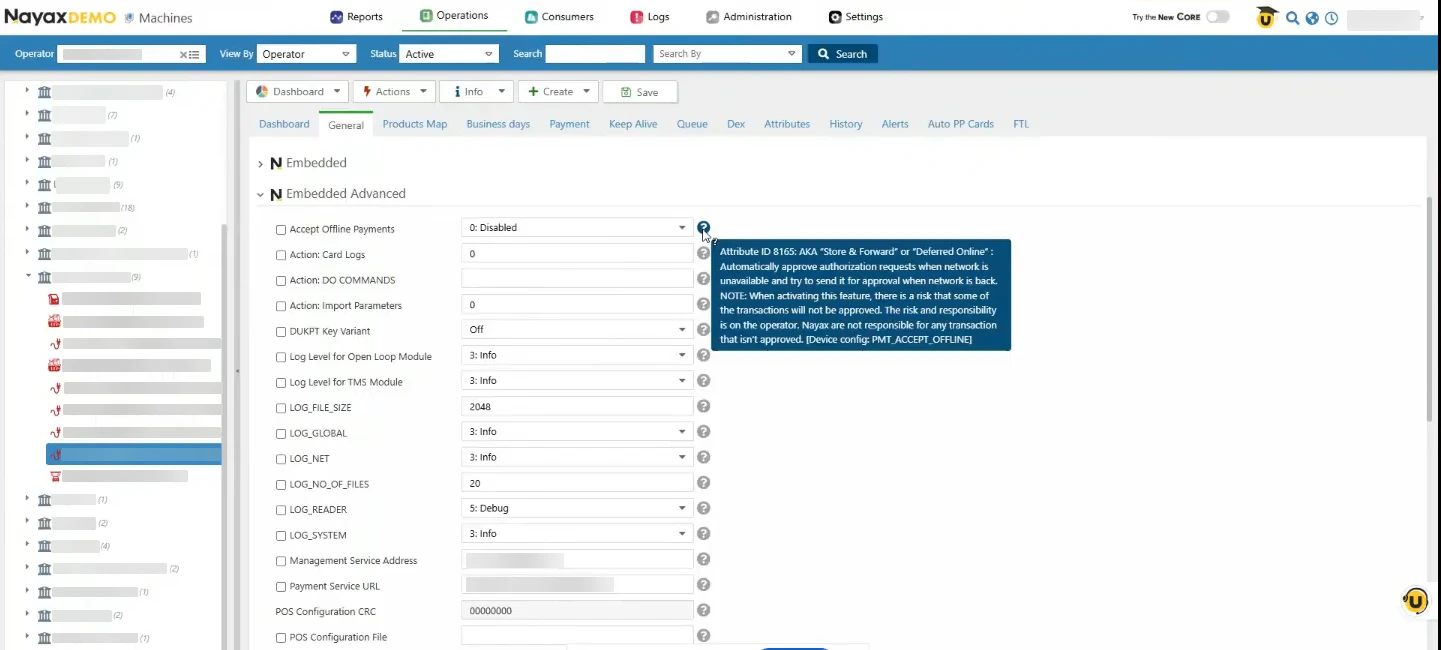
| PMT_ACCEPT_OFFLINE | Automatically approves auth when network is down (Store & Forward). | Bool (1/0) | 0 | 0=Disabled, 1=No comm, 2=Always. Deprecated in SDK v1.5; use the deferred parameter in PreAuthorize instead. |
| PRE_AUTH_AMOUNT | Default pre-authorization amount if not provided by API. | Int | 0 | Provided in cents. |
| PAYMENT_SVC_SYNCHRONOUS | Waits for the current transaction to close on the server before starting a new one. | Bool (1/0) | 0 | PMT_KIOSK_AUTOCONFIRM has no effect on this platform since SDK v1.5. |
| CURRENCY_CODE | ISO 4217 code (e.g., 840 for USD). | String | 840 | v1.4 takes this from Nayax Core automatically. SDK v1.5 adds a further fallback to the reader’s kernel currency tag (9F3C) on the first transaction before defaulting to 840. |
| Closed Loop (CLP) | CLP_MIFARE_ENABLED | Enables Mifare detection as a closed loop. | Int | 2 | 0=Off, 1=Server approval, 2=Local Host API. |
| CLP_MIFARE_READ | Format: K[A|B][key_num]B[block_num]... (for example, KA01B10B14,KB05B20B30 reads blocks 10 and 14 with key A number 1, and blocks 20 and 30 with key B number 5). | String | unset | Read blocks are returned in TransactionComplete’s mifare_read field. |
| Logging | LOG_FILE_SIZE | Max size in KB for each log file. | Int | 1024 | Default was 256 KB before SDK v1.2. |
| LOG_NO_OF_FILES | Number of log files kept before rotation. | Int | 10 | Default was 6 before SDK v1.2. |