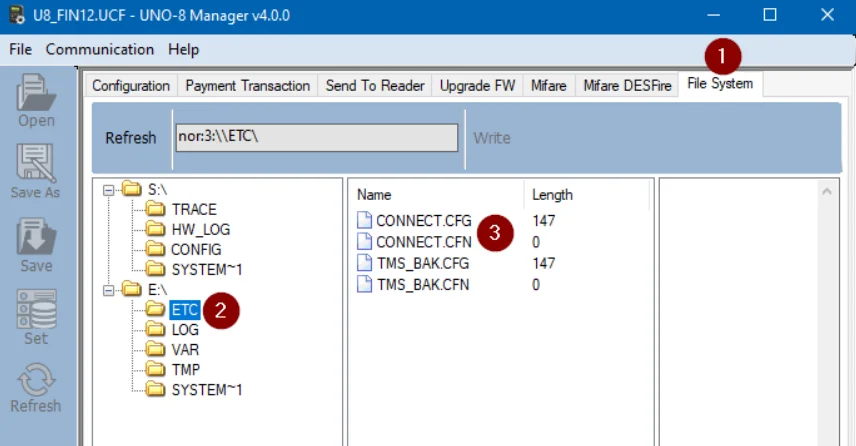
Configuration parameters are managed centrally from Nayax Core and may vary by customer and machine.

Location

Configuration files are saved on the reader file system in the E:\ETC folder.

Format

<Parameter Name>=<Value>
Example: TMS_SVC_URL=tms.otiglobal.com

Managing Settings

Configuration is managed centrally through Nayax Core. To adjust settings:
  1. Navigate to Operations > Machines.
  2. Locate the Embedded and Embedded Advanced sections.
  3. Update the relevant attributes and press Save. The server generates a configuration file and pushes it to the device automatically.

Network & System Settings

These parameters control network interface selection and system-level behavior:
ParameterDescriptionTypeDefaultSince Ver.
ETH_INTERFACENetwork interface; empty = autodetect with fallback to eth0Stringempty
KIOSK_USE_TCP_SOCKETSUse TCP ports 10000 (commands) and 10001 (events) instead of domain socketsBool (1/0)0
DAILY_RESTART_HOURHour for automatic daily reboot (0–23, 0 = disabled). Actual reboot within 30 min of set hour.U80
CONFIG_VERSIONVersion of the config file; sent to TMS, not used by the deviceString
KIOSK_TCP_LOCALHOSTLimit EMV Core sockets to localhost interfaceBool (1/0)00.7

TMS & Payment Service Settings

These parameters configure the URLs and polling behavior for the TMS and payment server:
ParameterDescriptionTypeDefaultSince Ver.
TMS_SVC_URLURL of TMS service. Use tms.otiglobal.com for OTI TMS or tms-c.otiglobal.com for Nayax Core.URL Stringtms.otiglobal.com0.7 / 1.0
PAYMENT_SVC_URLPayment server URL, name only (e.g., payment-nayax-p.otiglobal.com)URL String (max 256)empty
SERVER_POLL_INTERVALSeconds between server calls for updates. Lower value = better responsiveness but more data usage.U16600

Reader Settings

These parameters control initialization commands, button behavior, and reader display messages:
ParameterDescriptionTypeDefaultSince Ver.
INIT_CMDCommands to send to the Saturn Reader on initialization. Hex strings of TLV tags, separated by |. Example: DF0A0100|DF7A0100Hex stringsempty
STOP_BUTTON_IDID of the STOP/CANCEL button: 1 = Right, 2 = LeftU81
STOP_BUTTON_LED_PRESENT0 = disable button blinking (if LED is not on the STOP button)Bool (1/0)1
R_COUNTRY_CODESets the Terminal Country Code value in the reader. v1.0 takes it from Nayax Core machine country.String (4 chars)N/A0.7 / 1.0
R_DOSends DO commands to the reader on device start. Executed only once, unlike INIT_CMD. Multiple R_DO lines are all executed.Hex stringN/A
R_MSG_X_YSets reader message (index X, line Y) when the device startsASCII stringN/A

Security Settings

These parameters control SSL and encryption settings for server connections:
ParameterDescriptionTypeDefaultSince Ver.
TMS_USE_SSLSwitch SSL for TMS service on or offBool (1/0)0
PMT_DUKPT_KEY_VARIANTDUKPT key variant depending on PSP. Use decimal format (e.g., 17 decimal = 0x11). Set to 0 to disable DUKPT (testing only).U817
PAYMENT_SVC_USE_SSLSwitch SSL for payment service on or offBool (1/0)

Open Loop Payment Settings

These parameters control open-loop (credit/debit) payment behavior, timeouts, and authorization flow:
ParameterDescriptionTypeDefaultSince Ver.
PMT_ACCEPT_OFFLINEStore & Forward: automatically approve when network is unavailable. Note: Risk of unapproved transactions; operator responsibility.Bool (1/0)0
PMT_KIOSK_AUTOCONFIRMAutomatically confirms with pre-auth amount if session is interrupted. Supports long sessions with possible resets (e.g., EV chargers).Bool (1/0)1
PMT_CONFIRMATION_INTERVALSeconds between attempts to execute pending Confirm or Void operationsU325
PAYMENT_SVC_SERVER_RETRIESHow many times online authorization will be retried on errorInt3
PAYMENT_SVC_SERVER_TIMEOUTHTTP timeout for payment server requests (seconds)Int20
PAYMENT_SVC_CONFIRM_TIMEOUTServer timeout when sending Confirm or Void requests (seconds)U3260
PAYMENT_SVC_USER_WAITING_MAX_TIMEMax waiting time for online authorization (seconds)U1630
MAESTRO_LIMIT_CENTSTransactions above this limit with Maestro card will be declined without fallbackU322500
PAYMENT_SVC_SYNCHRONOUSWait for the current transaction to close on the server before starting a new one. Note: for asynchronous mode after an unexpected reset, also set PMT_KIOSK_AUTOCONFIRM=0.Bool (1/0)0
OPEN_LOOP_ENABLEDEnable/disable open-loop paymentBool (1/0)10.7
PRE_AUTH_AMOUNTDefault pre-authorization amount in cents if no amount is provided by the APIInt00.7
CURRENCY_CODEISO 4217 code (e.g., 840 = USD). v1.0 takes it from Nayax Core automatically after any machine attribute change or ‘Reload configuration’ action.String8400.7 / 1.0

Closed-Loop Payment Settings

These parameters enable and configure closed-loop (prepaid) card support, including Mifare:
ParameterDescriptionTypeDefaultSince Ver.
CLP_PROPRIATARY_TRACKS_ENABLEDEnable detection of proprietary tracks as Closed Loop during EMV payment. Requires proper reader configuration.Bool (1/0)0
CLP_MIFARE_READSpecify Mifare blocks to read. Format: `K[AB][key_num]B[block_num],…Example:KA01B10B14,KB05B20B30`String
CLP_MIFARE_ENABLEDEnable Mifare cards as Closed Loop during payment. 0 = disabled; 1 = enabled via server; 2 = enabled via local host API (UID returned immediately in TransactionComplete).Int00.7

Logging Settings

These parameters control log file size, retention, and per-module verbosity:
ParameterDescriptionTypeDefaultSince Ver.
LOG_HOURS_TO_UPLOADHours of logs to include in UPLOAD_LOG commandU1610
LOG_NO_OF_FILESNumber of log files kept. Oldest file is overridden when all reach LOG_FILE_SIZE.Int6
LOG_FILE_SIZEMax size in KB of each log fileInt256
LOG_GLOBALDefault log level for all modules (1–5)1–53
LOG_READERLog level for Reader1–53
LOG_ETHLog level for Ethernet (errors only; use LOG_NET for data)1–53
LOG_NETLog level for oT_Net (network)1–53
LOG_SYSTEMLog level for SYSTEM or common functions1–53
LOG_APP_3Log level for Open Loop1–53
LOG_APP_4Log level for TMS1–53
LOG_USBH2Log level for USB Host1–53

Reader Message Customization

These parameters customize the text displayed on the Saturn Reader for various states:
ParameterDescriptionTypeDefault
SAT_MSG_DECLINED1Line 1 of “Declined” messageString (16)
SAT_MSG_DECLINED2Line 2 of “Declined” messageString (16)
SAT_MSG_ERROR1Line 1 of “Error” messageString (16)
SAT_MSG_ERROR2Line 2 of “Error” messageString (16)
SAT_MSG_CARD_NOT_RECOGNIZED1Line 1, used by Closed-Loop PaymentString (16)Card not
SAT_MSG_CARD_NOT_RECOGNIZED2Line 2, used by Closed-Loop PaymentString (16)recognized
SAT_MSG_CLP_AUTHORIZING1Line 1, used by Closed-Loop PaymentString (16)Authorizing…
SAT_MSG_CLP_APPROVED1Line 1, used by Closed-Loop PaymentString (16)Approved
SAT_MSG_CLP_APPROVED2Line 2, used by Closed-Loop PaymentString (16)Balance:
SAT_MSG_SWIPE_ALL1Message for retrying transaction in all channelsString (16)Insert or Swipe
SAT_MSG_SWIPE_ALL2String (16)Or Change Card
SAT_MSG_DEFAULT_MSGSWIPE1Message for retrying transaction via Mag StripeString (16)Please Swipe
SAT_MSG_DEFAULT_MSGSWIPE2String (16)Card