Integrating the UNO-mini requires your enclosure and display to meet specific EMVCo certification requirements for logos, LEDs, and audio feedback. The EMV contactless logo must appear on your machine panel at the same position as the logo printed on the UNO-mini device: the center of the antenna. When reproducing the logo, follow the EMVCo sizing, clear space, and color rules. See the EMVCo Contactless Symbol Reproduction Requirements for the full specification.

Card scheme brand guidelines

Card scheme logos on the machine panel or display are optional. If you choose to display them, they must comply with each scheme’s brand guidelines. The following table lists the brand guidelines documentation for each major card scheme.

LED and audio requirements

The UNO-mini has 4 green LEDs on its front panel. These LEDs are required by EMVCo for POS devices and must be visible to the end user.
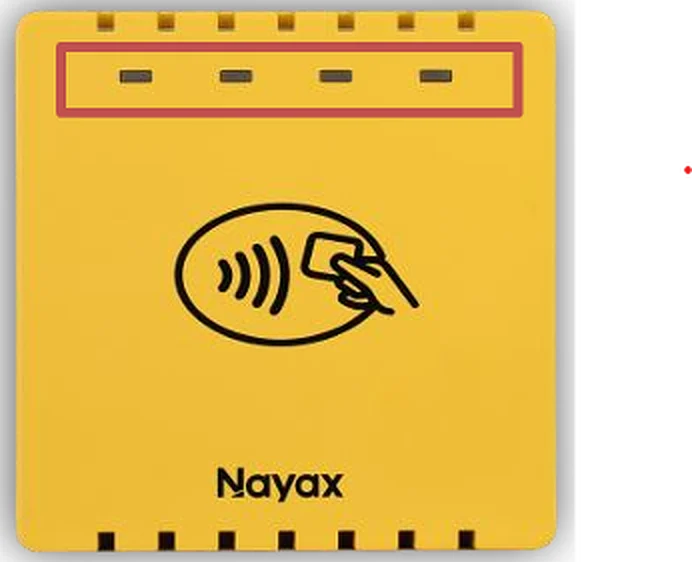
UNO-mini front panel showing 4 LED indicators and EMV contactless logo
There are two compliant ways to present the LEDs to the end user:
  1. Create a transparent area in the machine panel to expose the original device LEDs directly.
  2. Simulate the LED states on the machine display screen, if one is present.

LED and audio states

The following table lists all LED and audio states as defined in EMVCo Book A v2.10, sections 9.x. LED legend: ○ Off, ● On. Blinking states are noted in the LED pattern column. Audio tones:
  • Success tone: approximately 1500 Hz sine wave, 500 ms
  • Alert tone: approximately 750 Hz double beep (200 ms on / 200 ms off / 200 ms on)
StatusMsg indexDescriptionLED patternMessage displayAudio
Not ReadyReader not powered or not communicating○ ○ ○ ○No messageNone
Idle17Powered and connected, not polling for card. First LED blinks approximately 200 ms every 5 s.● ○ ○ ○ (blink)WelcomeNone
Ready to Read1Polling for card. Transaction amount may be shown.● ○ ○ ○€ xx.xx / Present cardNone
Card Read Successfully35All four LEDs light in sequence over approximately 250 ms, then remain lit for approximately 750 ms, then turn off. Total duration: 1000 ms.Sequential flash (all 4)Card read OK / Remove cardSuccess tone
Authorizing36Online authorization in progress○ ○ ○ ○Authorizing / Please wait
Approved6Transaction approved by issuer or by terminal offline decision○ ○ ○ ○ApprovedNone (success tone played at card read)
Not Approved9Transaction declined by issuer○ ○ ○ ○Not ApprovedOptional alert tone
Declined255General decline○ ○ ○ ○DeclinedOptional alert tone
Read Error39Error occurred reading the card○ ○ ○ ○Read error / Please try againOptional alert tone
Conditions Not Satisfied38Contactless conditions not met, for example when risk management requires a contact chip○ ○ ○ ○Please try another cardOptional alert tone
Contactless Collision5Multiple contactless cards detected simultaneously○ ○ ○ ○Present one card onlyOptional alert tone
Timeout / No Card30Transaction timed out with no card presented○ ○ ○ ○Timeout / No CardOptional alert tone
Terminated10Transaction terminated by terminal or application○ ○ ○ ○TerminatedOptional alert tone
PIN Entry Required11Card requires PIN entry, which cannot be performed via contactless○ ○ ○ ○Please try another cardOptional alert tone
See Phone12Mobile device requires customer action, such as unlocking or approving on the phone○ ○ ○ ○See PhoneOptional alert tone

Next steps

Power Supply

Review power requirements and wiring recommendations before connecting the device.

Connection Interfaces

Connect the UNO-mini to your host controller via USB or UART TTL.