

Configuration & device behavior
Once enabled, the Nayax Engine changes how the physical device handles transactions:- The device will not send its own settlement command after a successful authorization.
- The transaction remains unsettled until an external request is received.
- The only way to settle a transaction is via the ExternalSettlement command.
- For Multi-session flows, the “Close Session” command is no longer relevant; use ExternalSettlement instead.
- To allow the settlement price to differ from the authorized amount (settlement price ≤ authorized price), enable the
price not finalflag in the Marshall SDK.
Incremental AuthorizationExternal Settlement supports Incremental Authorization. Ensure your logic adheres to the Maximum Default Credit limits to avoid settlement failure. More on this in the Incremental Authorization documentation.
Managing unsettled transactions
When no product or service is provided, you must proactively manage the transaction to maintain a good user experience.- External Cancel: If you know no settlement will occur, you must send an External Cancel immediately.
- Consumer Impact: If a transaction remains authorized without being canceled or settled, the consumer’s funds will stay captured on their payment method, leading to potential disputes.
External settlement flow
The flow consists of two phases: payment authorization handled by the Marshall peripheral and Nayax device, and settlement or cancellation triggered by your 3rd-party server.Payment authorization
The steps below cover the authorization phase, from card tap through session completion.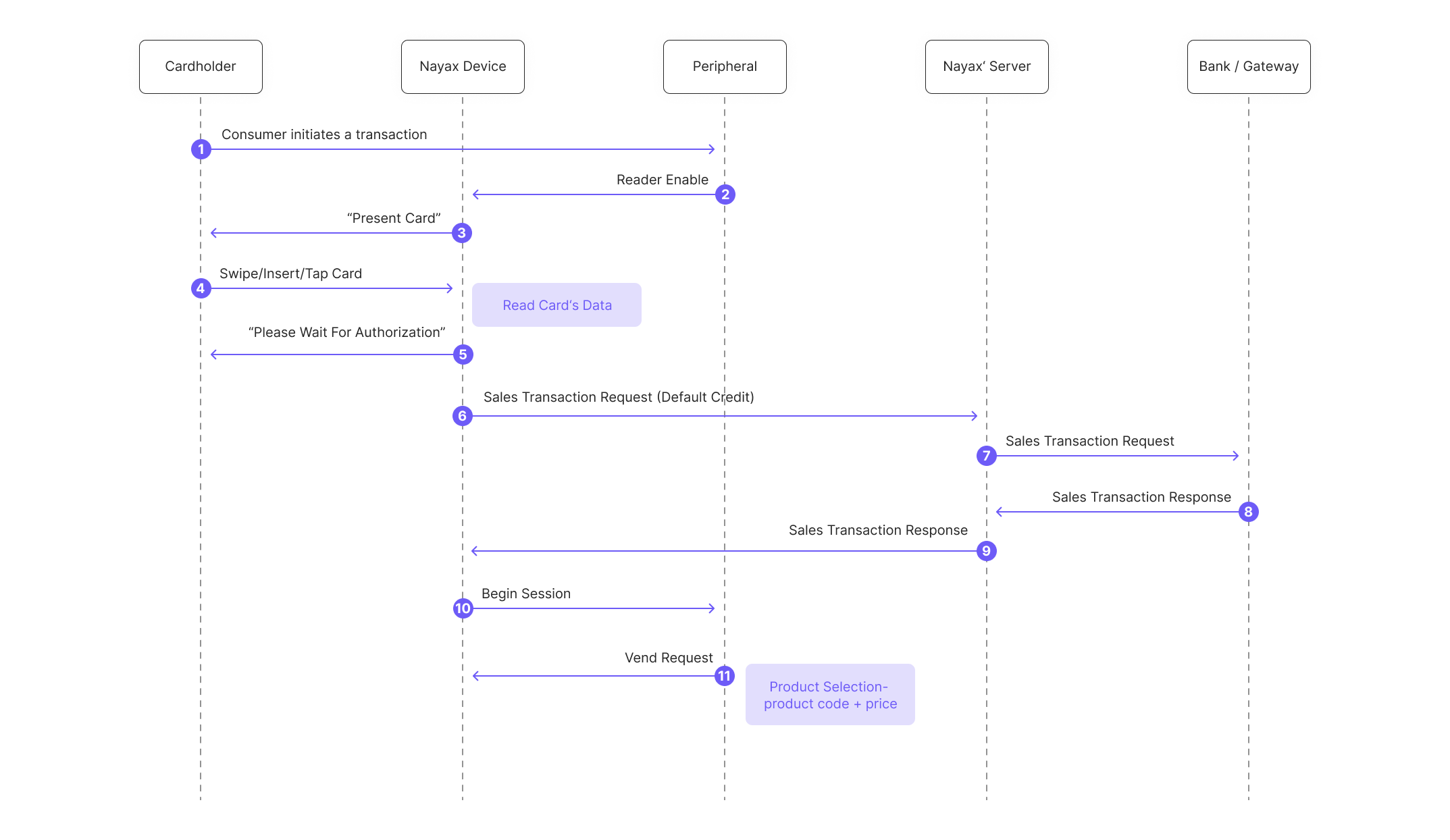
- The consumer initiates a transaction with the peripheral.
- The Peripheral enables the Nayax’s device card reader.
- The consumer is prompted to present their card.
- The customer presents the card to the Nayax Device.
- The consumer is notified about the authorization process taking place.
- The Nayax Device sends an authorization request to the Nayax Server.
- The Nayax Server performs authorization with the Billing Provider.
- The Billing Provider sends an authorization response (approved) to the Nayax Server.
- The Nayax Server sends the authorization response back to the Nayax Device.
- The peripheral’s SDK triggers the “session begin” event:
- The machine display shows: “Please Select a Product.” and the customer selects a product, prompting the peripheral’s SDK to send a “vend request” to the Nayax Device.
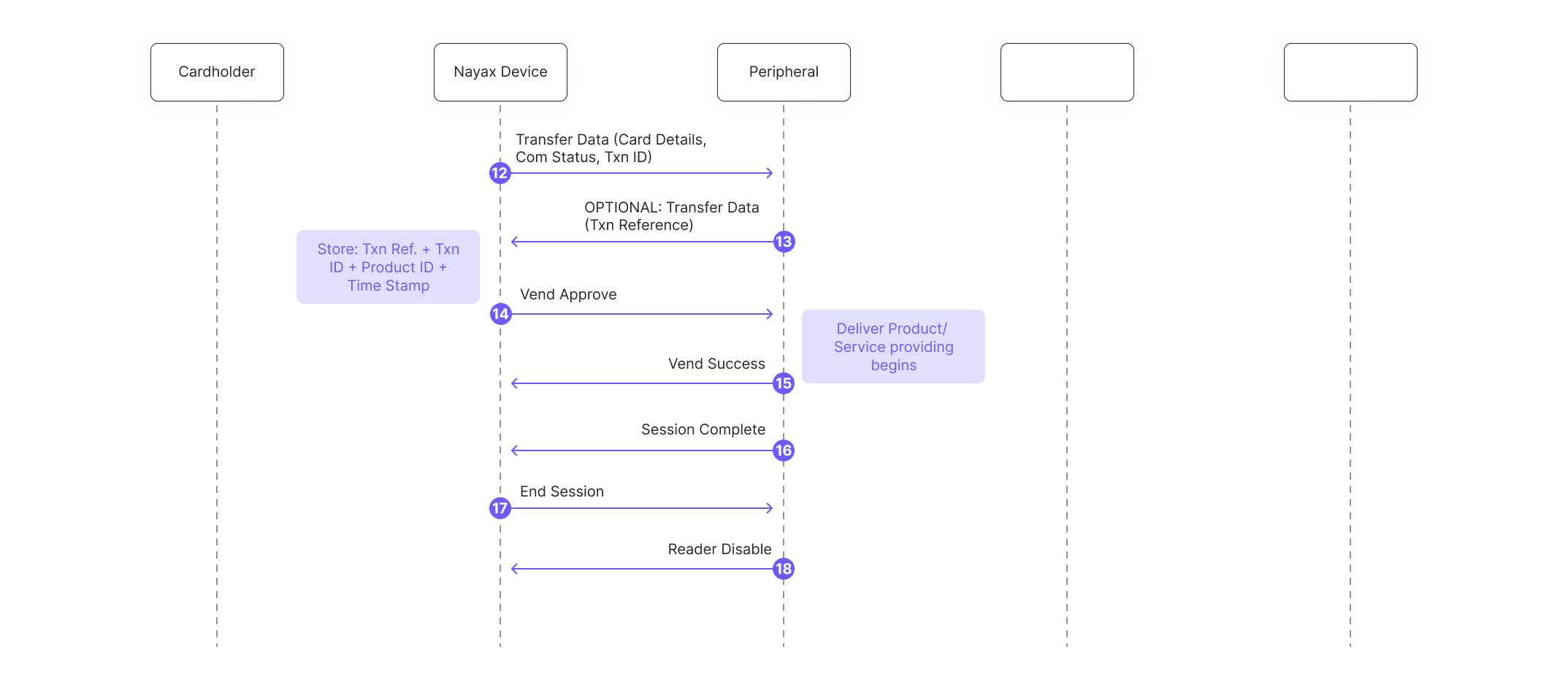
- The peripheral’s SDK handles transaction data received via Transfer Data command (includes Nayax Transaction ID and card details):
- Optional: The peripheral’s SDK can respond to Nayax’s device with its own Transaction number (this information won’t be used anywhere, just in case the peripheral would like to have its own Transaction ID appearing in the SDK’s logs).
- Nayax’s device sends “Vend Approved”, triggering the peripheral’s SDK “vend approved” event:
- The peripheral dispenses the product or provides the service to the consumer, and the SDK reports success and completes the local session:
- The peripheral sends
Session Completeto indicate completion of the ongoing transaction process (not yet settling it). - Nayax’s device sends
End Sessionto the peripheral. - The peripheral sends
Reader Disableto put the reader in standby.
Settling the transaction
After session close, a 3rd-party server handles either settlement or cancellation depending on whether the service was provided. If the service was provided:- The 3rd Party Server initiates communication by calling the
StartAuthenticationmethod with an encrypted cipher to authenticate. - The Nayax Server decrypts the cipher, validates the credentials and timestamps to confirm authenticity.
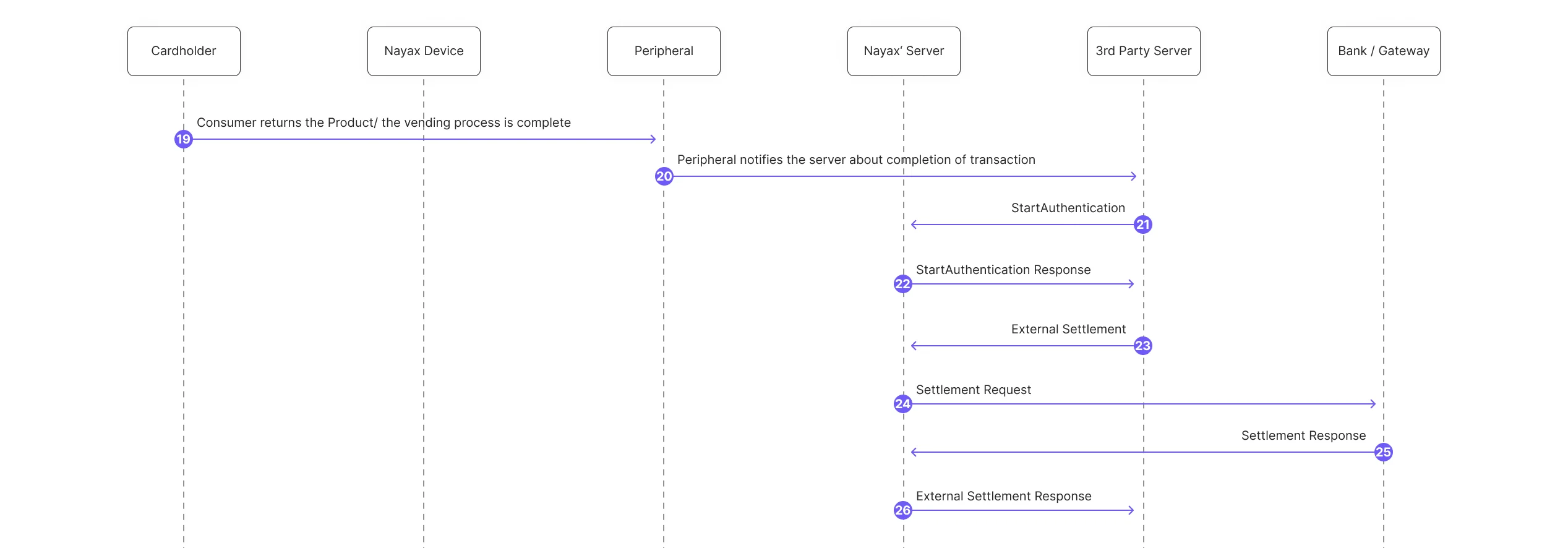
- The 3rd Party Server sends an ExternalSettlement request. It must contain:
NayaxTransactionId,SiteId(information retrieved from the transaction’s Transfer Data’s command) and be sent within 48 hours of the authorization of the consumer’s card.- To allow the settlement price to differ from the authorized amount (settlement price ≤ authorized price), enable the
price not finalflag in the Marshall SDK.
- To allow the settlement price to differ from the authorized amount (settlement price ≤ authorized price), enable the
- The peripheral notifies the server of the transaction’s completion.
- The 3rd party server starts the authentication process.
- Nayax server sends a response.
- Nayax’s servers send an ExternalSettlement response to the 3rd-party server.
- Nayax’s servers notify the device of the settlement.
- Nayax’s device notifies the consumer that the transaction has been settled for the final amount they were charged.
- Nayax Server sends an external settlement response.
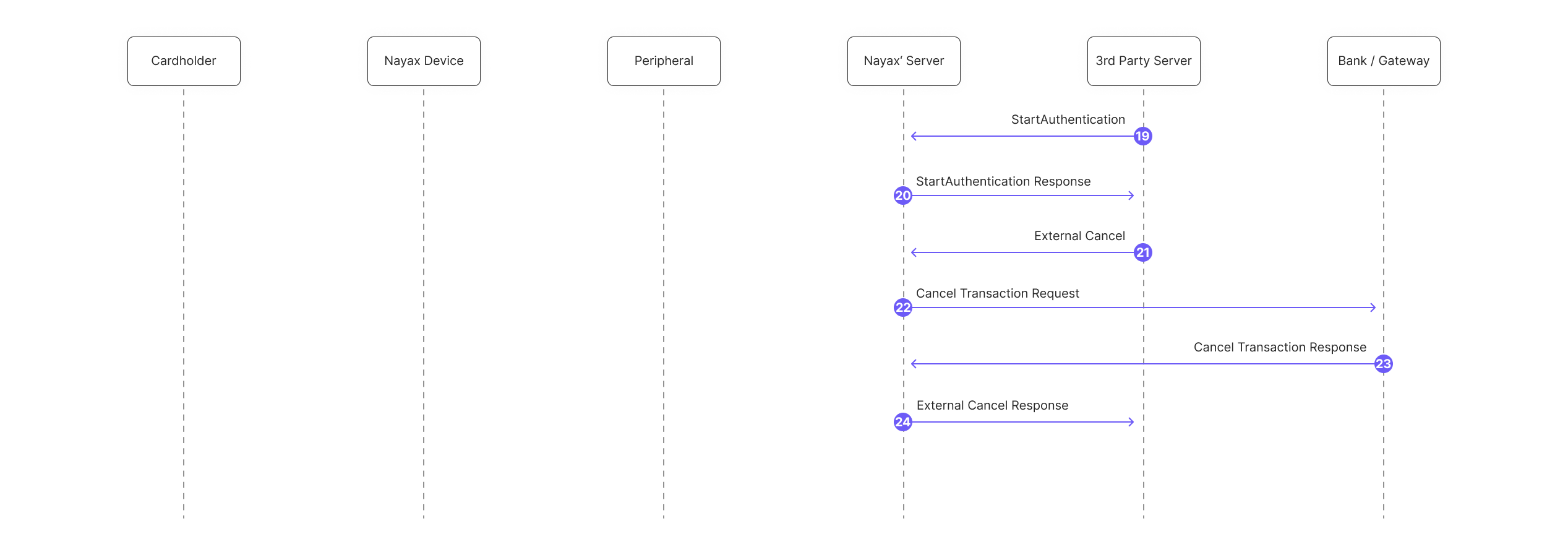
- The 3rd Party Server starts the authentication process.
- Nayax server sends a response.
- The 3rd Party Server sends an ExternalCancel request. It must contain:
NayaxTransactionId,SiteId(information retrieved from the transaction’s Transfer Data’s command) and be sent within 48 hours of the authorization of the consumer’s card. - Nayax Servers initiate the cancellation process with the payment provider.
- Nayax’s servers receive the response from the payment provider.
- Nayax’s servers send an ExternalCancel response to the 3rd Party Server.
Next steps
External settlement API
API reference for the ExternalSettlement endpoint used to settle authorized transactions from a 3rd-party server.
External cancel API
API reference for the ExternalCancel endpoint used to cancel authorized transactions when no service is provided.
Incremental authorization
Details on Incremental Authorization and Maximum Default Credit limits that apply to External Settlement.